# Inmuebles24 Scraper 🏠 Mexico Real Estate + Agent Phone & Email (`memo23/inmuebles24-scraper`) Actor
Inmuebles24 scraper — paste any Mexico sale, rent or commercial search URL. Price, m², rooms, geo, photos, agency. Opt-in agency WhatsApp, direct phone and email. 45 fields per listing. JSON, CSV or Excel. $1 per 1,000. No login needed.
- **URL**: https://apify.com/memo23/inmuebles24-scraper.md
- **Developed by:** [Muhamed Didovic](https://apify.com/memo23) (community)
- **Categories:** Real estate, AI, Agents
- **Features:** Limited permissions
- **Stats:** 92 total users, 37 monthly users, 100.0% runs succeeded, 0 bookmarks
- **User rating**: 5.00 out of 5 stars
## Pricing
from $1.00 / 1,000 listing scrapeds
This Actor is paid per event. You are not charged for the Apify platform usage, but only a fixed price for specific events.
Learn more: https://docs.apify.com/actors/running/actors-in-store.md#pay-per-event
## What's an Apify Actor?
An Actor is a serverless cloud program that runs on the Apify platform. It has two run modes.
In Batch mode, an Actor accepts a well-defined JSON input, performs an action which can take anything from a few seconds to a few hours,
and optionally produces a well-defined JSON output, datasets with results, or files in key-value store.
In Standby mode, an Actor provides a web server which can be used as a website, API, or an MCP server.
Apify vocabulary and the platform model are defined once, in the agent quickstart at https://apify.com/agents.md.
## How to integrate an Actor?
If asked about integration, you help developers integrate Actors into their projects.
You adapt to their stack and deliver integrations that are safe, well-documented, and production-ready.
Do not guess an integration path. Every one of them is in the agent quickstart at https://apify.com/agents.md: the Apify MCP server, Agent Skills with the Apify CLI, the JavaScript and Python clients, the REST API, and the account-free path for an agent with no human to sign in. It also carries the rule on stating cost before the first paid run.
For examples already wired to this Actor's own input schema, see the [API](#api) section below.
Each client library has reference documentation the quickstart does not restate: [JavaScript/TypeScript](https://docs.apify.com/api/client/js/docs.md) (`npm install apify-client`) and [Python](https://docs.apify.com/api/client/python/docs.md) (`pip install apify-client`).
# README
## Inmuebles24 Scraper 🏠 Mexico Real Estate + Agent Phone & Email

Versión en español
Extrae anuncios de Inmuebles24.com a partir de cualquier URL de búsqueda. Sin navegador y sin inicio de sesión: pegas la URL y recibes filas estructuradas.
**Cómo se usa**
Abre Inmuebles24, aplica los filtros que necesites (ciudad, precio, recámaras, superficie), copia la URL de la barra de direcciones y pégala en `startUrls`.
**Qué obtienes**
39 campos por anuncio: precio y moneda, superficie total y cubierta, recámaras, baños, estacionamientos, antigüedad, mantenimiento, amenidades, descripción, fotos, coordenadas, colonia y ciudad, más la agencia. Con enrichContacts suma WhatsApp, teléfono directo y email. Exporta a JSON, CSV o Excel.
**Plan gratuito**
Con una cuenta gratuita de Apify obtienes hasta 100 resultados por ejecución, sin pagar nada. Los planes de pago quitan el límite: [precios de Apify](https://apify.com/pricing).
Dudas o campos que falten: abre una issue en la página del actor.
**Turn any Inmuebles24.com search into structured property data — including the agent's *direct phone and email*.** Paste a sale, rent, or commercial search URL and get every listing: price, surface, rooms, construction year, maintenance fees, amenities, geo-coordinates, photos and the agency. Then optionally add the agency's contact card: the **WhatsApp**, plus the **direct phone number and email address** that the search page leaves blank. JSON, CSV, or Excel out, billed per listing.
### Why use this scraper
Every other Inmuebles24 scraper stops at what the search page shows — and the search page leaves **`phone` and `email` blank**, exposing only WhatsApp. This one keeps going: for each listing it adds the **direct phone, the agency email, and the contact name**.
- 🎯 **Just paste a search URL.** Apply your filters on inmuebles24.com (city, price, property type, sale/rent…), copy the address-bar URL, paste it in. Every result page is paginated automatically. Sale, rent and commercial searches all work.
- 📞 **Direct phone + email (the differentiator).** Opt into `enrichContacts` and each listing gains `whatsApp`, `phone`, `agencyEmail`, and `contactName` — the real lead-gen fields. These fields are not on the search page, so most scrapers leave them out.
- 📍 **45 fields per listing**, including **geo lat/lng**, neighborhood, surface (land + built), rooms, bathrooms, parking, maintenance fees, antiquity, amenities, and every photo.
- ⚡ **Nothing to set up.** No login, cookies or proxies to configure: paste a URL and run.
- 🧾 **The same data Inmuebles24 shows**, field for field, so prices, surfaces and amenities match the listing.
### Overview
One dataset row per Inmuebles24 listing. Sale, rent, and commercial searches all produce the same shape: identifiers, price, surface, rooms, location + coordinates, agency and photos. Enabling `enrichContacts` adds the agency's WhatsApp, direct phone, email and contact name. There is no keyword-search input: you paste a search-results URL, or listing URLs, from inmuebles24.com.
The sample below is a development listing (`postingType: "DEVELOPMENT"`), which is why bedrooms / bathrooms / surface are null. Regular property rows fill those fields.
### Supported Inputs
| Input | What it is | Example |
|---|---|---|
| Search URL (sale) | Filtered results page | `https://www.inmuebles24.com/casas-en-venta-en-jalisco.html` |
| Search URL (rent) | Filtered results page | `https://www.inmuebles24.com/departamentos-en-renta-en-ciudad-de-mexico.html` |
| Search URL (price) | Price cap or floor | `https://www.inmuebles24.com/casas-en-venta-en-jalisco-hasta-6000000-pesos.html` (floor: `-mas-de-6000000-pesos`) |
| Search URL (commercial) | Offices, locales, warehouses | any `-en-venta-` / `-en-renta-` URL with a commercial property type |
| Listing URL | One listing or development page | `https://www.inmuebles24.com/propiedades/clasificado/alclapin-departamento-en-del-valle-sur-150644596.html` |
| `startUrl` | Single URL convenience field | same as one `startUrls` item |
Listing URLs mix freely with searches. A listing that is no longer online is named in the run log and not billed.
**Unsupported:** agency profile pages and keyword-only queries with no inmuebles24.com URL. Filter on the site first, then paste the address-bar URL.
### How we compare
| | Typical "by search URL" scraper | **This actor** |
|---|---|---|
| Price, m², rooms, year, fees, amenities, photos | ✓ | ✓ |
| Geo coordinates | ✓ | ✓ |
| Agency name | ✓ | ✓ |
| Agency WhatsApp | ✓ | ✅ *(with `enrichContacts`)* |
| **Agent direct phone** | ✗ *(blank on the website)* | ✅ |
| **Agency email** | ✗ *(blank on the website)* | ✅ |
| **Contact name** | ✗ | ✅ |
| Output fields | ~25 | **45** |
The listing fields match the market leader one-for-one — then we add the three contact fields nobody scraping the search pages can produce.
### Use cases
| Audience | What they get |
|---|---|
| **Real-estate lead-gen / agencies** | Targeted lists of agents by city + property type, with **direct phone + email** for outreach |
| **PropTech & portals** | Full inventory feeds (price, geo, photos, features) to seed or benchmark a marketplace |
| **Market & price analysts** | Price-per-m², inventory depth, and feature distributions across any Mexican market |
| **Investors & developers** | Track new developments, asking prices, and days-on-market by neighborhood |
| **CRM / data teams** | Clean, deduplicated listing records keyed by `postingId`, refreshed on demand |
### How it works
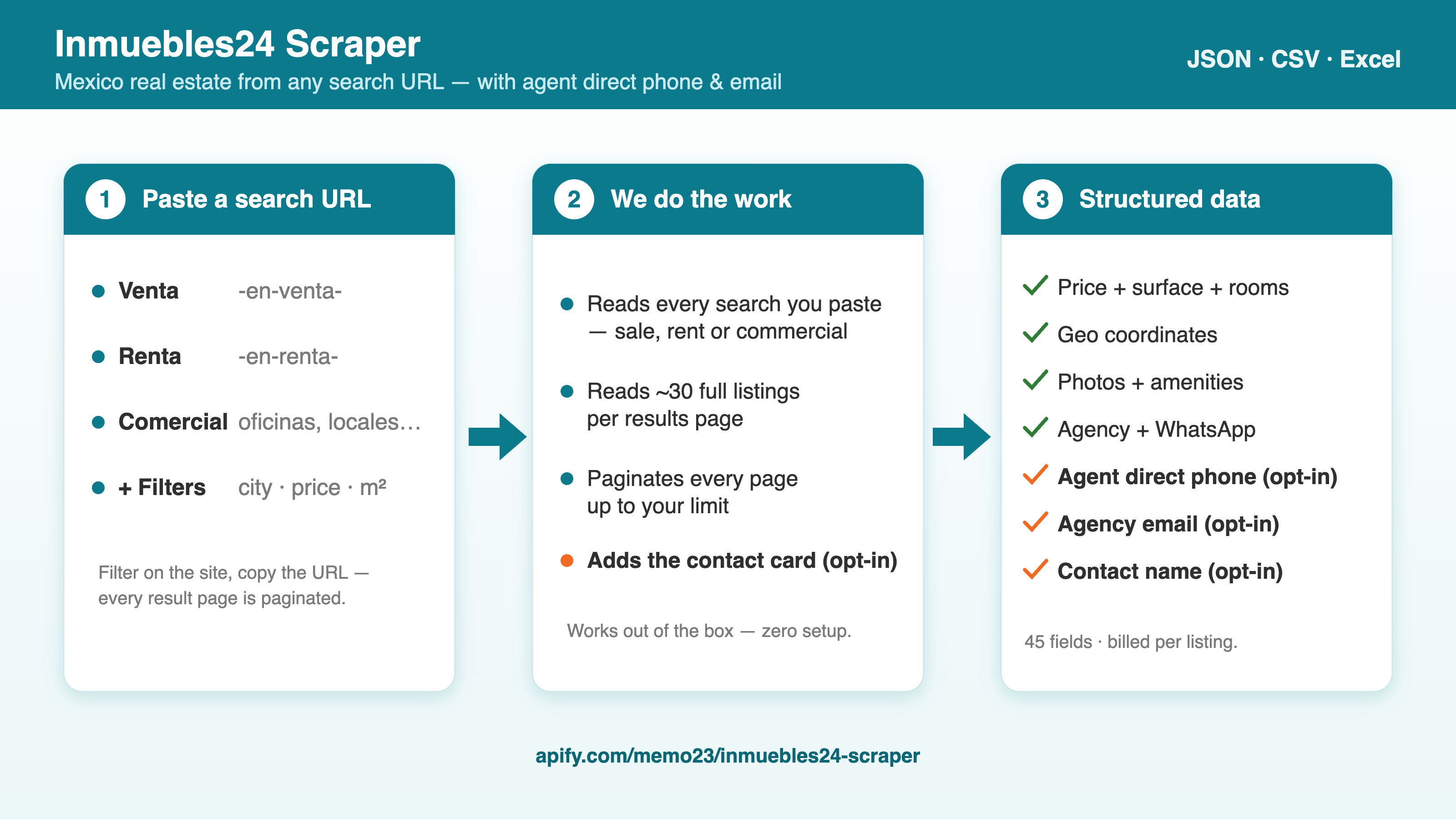
1. **Paste a search URL** — the actor reads every results page of that search.
2. **Parse ~30 fully-detailed listings per page** — price, features, location + geo, agency and photos — and paginate automatically until `maxItems`.
3. **(Opt-in) Enrich contacts** — for each listing the actor adds the **WhatsApp, direct phone, agency email, and contact name**.
4. **Push** every listing to the dataset (JSON / CSV / Excel), deduplicated by `postingId`.
### Input configuration
| Field | Type | Default | Description |
|---|---|---|---|
| `startUrls` | array | `[]` | One or more inmuebles24.com search-results or listing URLs. Sale, rent, commercial, any filter. |
| `startUrl` | string | – | Convenience single-URL field; merged with `startUrls` and de-duplicated. |
| `maxItems` | integer | `1000` | Hard cap on listings collected across all URLs (controls billing). |
| `fullDescription` | boolean | `true` | Complete description per listing (one extra request each, four at a time on paid runs). Off: the first 150 characters, `descriptionTruncated: true`, and faster bulk runs. |
| `enrichContacts` | boolean | `false` | Add **`whatsApp`, `phone`, `agencyEmail`, `contactName`** per listing. Billed only per listing that returns a contact — never for a miss. |
| `proxy` | object | Apify Proxy | The default works out of the box. Set your own proxy only if you want to. |
> **Tip:** filter on inmuebles24.com in your browser, copy the URL, paste it. The actor preserves the filter and walks every page.
### Output overview
Each dataset item is one listing. Identifiers (`postingId`, `url`) are always present on a successful parse. Price, surface, rooms, and geo come from the search card. `whatsApp`, `phone`, `agencyEmail` and `contactName` come from the contact card, so they are filled when `enrichContacts` is on and Inmuebles24 returned one. Rows read from a full search page also carry `whatsApp` without it.
Development rows (`postingType: "DEVELOPMENT"`) often have null bedrooms, bathrooms, and area — those live on the unit mix, not the project card.
Rows with `partialRow: true` were read from the visible result cards of a page the site only serves fully rendered, which is typically page 5 onward of a long search. They carry price, surface, rooms, location, agency, description and the main photo, but no coordinates, WhatsApp number, posting code or dates. With `enrichContacts` on they still get the direct phone, agency email and WhatsApp.
### Output samples
```json
{
"type": "property",
"postingId": "150660207",
"postingCode": "66006R",
"url": "https://www.inmuebles24.com/propiedades/desarrollo/ememhoin-reserva-constanza-150660207.html",
"title": "Reserva Constanza",
"description": "Descubre reserva constanza: Tu nuevo hogar en Santiago, Nuevo León. Imagina vivir en una casa que combine elegancia, ...",
"postingType": "DEVELOPMENT",
"propertyType": "Desarrollos horizontales",
"operation": "Venta",
"price": 5600000,
"currency": "MN",
"priceFormatted": "5,600,000",
"expenses": null,
"bedrooms": null,
"bathrooms": null,
"parking": null,
"totalArea": null,
"coveredArea": null,
"antiquity": null,
"features": {},
"address": "Huertas, Las Huertas",
"neighborhood": "Los Cavazos",
"city": "Santiago",
"province": "Nuevo León",
"country": "Mexico",
"latitude": 25.4574642,
"longitude": -100.1543678,
"publisherId": "103091728",
"publisherName": "Areya Residencial",
"publisherUrl": "https://www.inmuebles24.com/inmobiliarias/areya-residencial_103091728-inmuebles.html",
"publisherLogo": "https://img10.naventcdn.com/empresas/18/01/03/09/17/28/130x70/logo_areya-residencial_1786383546584.jpg",
"whatsApp": "+528135500500",
"images": [
"https://img10.naventcdn.com/avisos/18/01/50/66/02/07/720x532/1624836127.jpg?isFirstImage=true",
"https://img10.naventcdn.com/avisos/18/01/50/66/02/07/720x532/1624839109.jpg"
],
"mainImage": "https://img10.naventcdn.com/avisos/18/01/50/66/02/07/720x532/1624836127.jpg?isFirstImage=true",
"hasVideos": false,
"hasTour": false,
"hasPlans": false,
"modifiedDate": "2026-08-10T13:56:14-0400",
"scrapedAt": "2026-08-11T10:45:19.715Z"
}
```
### Pricing
| Event | When | Rate |
|---|---|---|
| Listing scraped | One property row saved to the dataset | $0.001 ($1 / 1,000) |
| Contact info found | `enrichContacts` returned a phone or email for that listing | $0.01 |
| Actor start | Once per run, per GB of memory | $0.005 |
Contact enrichment (WhatsApp, direct phone, email) is billed per listing that returns a contact, never on a miss. Free Apify accounts are capped at 100 listings per run.
### Key output fields
| Group | Fields |
|---|---|
| **Identifiers** | `type`, `postingId`, `postingCode`, `url`, `postingType`, `scrapedAt`, `modifiedDate` |
| **Listing** | `title`, `description`, `propertyType`, `operation` (Venta / Renta), `antiquity` |
| **Pricing** | `price`, `currency`, `priceFormatted`, `expenses` |
| **Features** | `bedrooms`, `bathrooms`, `parking`, `totalArea`, `coveredArea`, `features{}` |
| **Location** | `address`, `neighborhood`, `city`, `province`, `country`, `latitude`, `longitude` |
| **Agency** | `publisherId`, `publisherName`, `publisherUrl`, `publisherLogo`, `whatsApp` |
| **Contact enrichment** *(opt-in)* | `phone`, `phones[]`, `agencyEmail`, `agencyEmails[]`, `contactName`, `contactEnriched` |
| **Media** | `images[]`, `mainImage`, `hasVideos`, `hasTour`, `hasPlans` |
### Free tier
You can run this scraper on a free Apify account before paying anything:
| | Free account |
|---|---|
| Results per run | up to **100** |
| Cost | nothing — the free plan includes monthly platform credit |
That is enough to check the field list and the data quality against your own URLs. Paid plans lift the cap; see [Apify pricing](https://apify.com/pricing).
### FAQ
**Which Inmuebles24 URLs are supported?**
Any search-results URL from inmuebles24.com — sale (`-en-venta-`), rent (`-en-renta-`), or commercial, with any filters (city, neighborhood, price, property type, etc.). Paste the URL straight from your browser; pagination is automatic.
**How do I get the agent's phone and email?**
Enable `enrichContacts`. Each listing then includes `whatsApp`, `phone` (direct call line), `agencyEmail`, and `contactName`, You're billed only per listing that actually returns a contact — never for a miss.
**Why don't other scrapers return phone/email?**
Because the search pages leave those fields blank: only WhatsApp is published there. The actor fetches each listing's full contact card for you.
**Does it need a proxy?**
No. Runs work out of the box on the default Apify Proxy, and a proxy of your own does not make them faster.
**How many listings can I get?**
As many as match your search — set `maxItems`. The actor paginates through every result page.
### Support
- For issues or feature requests, use the **Issues** tab of this actor on the Apify Console.
- Customization or questions:
- Website:
- Email:
### Additional Services
- Request customization or a whole-dataset export:
- API access (no Apify fee, usage fee only):
### Explore More Scrapers
Building a real-estate or lead-gen dataset? Same author, same export format:
- **Zonaprop, Propiedades, AutoTrader** and other property scrapers
- **Yelp, Trustpilot, G2** business & review scrapers
- Plus jobs, e-commerce, and social scrapers at [memo23's Apify profile](https://apify.com/memo23).
### 🤖 For AI Agents & LLM Apps
Compact reference for AI agents calling this actor via the [Apify MCP server](https://mcp.apify.com) or the Apify API (actor: `memo23/inmuebles24-scraper`).
**Purpose:** Scrape property listings from any Inmuebles24.com (Mexico) sale, rent, or commercial search URL, with an opt-in enrichment that adds each agency's direct phone and email.
**Minimal input:**
```json
{
"startUrls": ["https://www.inmuebles24.com/inmuebles-en-venta-en-ciudad-de-mexico.html"],
"maxItems": 25
}
```
`startUrl` (single string) is accepted as an alternative to `startUrls`.
**Output:** one dataset row per listing — `type`, `postingId`, `postingCode`, `url`, `title`, `description`, `postingType`, `propertyType`, `operation`, `price`, `currency`, `priceFormatted`, `expenses`, `bedrooms`, `bathrooms`, `parking`, `totalArea`, `coveredArea`, `antiquity`, `features`, `address`, `neighborhood`, `city`, `province`, `country`, `latitude`, `longitude`, `publisherId`, `publisherName`, `publisherUrl`, `publisherLogo`, `whatsApp`, `images`, `mainImage`, `hasVideos`, `hasTour`, `hasPlans`, `modifiedDate`, `scrapedAt`. With `enrichContacts` on, adds `phone`, `phones[]`, `agencyEmail`, `agencyEmails[]`, `contactName`, `contactEnriched`.
**Behaviors an agent should know:**
- Always set `maxItems` — an uncapped run walks every result page of the search (defaults to 1000).
- URL mode only; there is no keyword-search field. `startUrls` and `startUrl` take inmuebles24.com search-results URLs and listing URLs (`/propiedades/clasificado/…-.html`).
- `enrichContacts` (default false) adds WhatsApp + direct phone + agency email + contact name. Without it `whatsApp` is usually empty.
- `enrichEmails` (default false, experimental) is a separate best-effort website-based email discovery adding `contactEmail`/`contactWebsite`; a website found by name must name the listing's city, and each agency is looked up and billed once per run.
- Runs work with the default `proxy` settings; nothing to configure.
- `fullDescription` (default true) makes one extra call per listing. If those requests start failing mid-run, paid runs retry them on a slower route, two at a time. Free accounts, or paid runs where that fails too, get the remaining rows with the 150-character description (`descriptionTruncated: true`) and without contacts, and the log says so.
- Billed per listing; `enrichContacts` is billed only per listing that returns a contact, never for a miss. Rows are deduplicated by `postingId`.
- `partialRow: true` marks a row read from a result card (deeper pages of a long search): no `latitude`/`longitude`, `whatsApp`, `postingCode` or dates; `publisherUrl` is then rebuilt from the agency name and id and flagged `publisherUrlInferred`.
### ⚠️ Disclaimer
This Actor is an independent tool and is not affiliated with, endorsed by, or sponsored by Inmuebles24, Navent, or any of their subsidiaries or affiliates. All trademarks mentioned are the property of their respective owners.
The scraper accesses only publicly available property-listing information on inmuebles24.com — no buyer data, private messages, or content behind a login. The agent phone/email returned are the business contact details that agencies publish for buyer enquiries. Users are responsible for ensuring their use complies with inmuebles24.com's Terms of Service, applicable data-protection law (GDPR/LFPDPPP, etc.), and any contractual obligations of their own organisation.
### SEO Keywords
inmuebles24 scraper, scrape inmuebles24, inmuebles24 api, mexico real estate scraper, mexico property scraper, inmuebles24 data extraction, real estate leads mexico, inmuebles24 agent phone, inmuebles24 agency email, propiedades mexico scraper, casas en venta scraper, departamentos en renta scraper, real estate lead generation mexico, navent scraper, zonaprop scraper, property listings api, real estate market data mexico, inmuebles24 listings export, scrape casas mexico, mexico proptech data
# Actor input Schema
## `startUrls` (type: `array`):
One or more inmuebles24.com search-results URLs. Sale (-en-venta-), rent (-en-renta-) and commercial searches all work, including any filters already applied in the URL. Examples: https://www.inmuebles24.com/casas-en-venta-en-jalisco.html, or with a price cap https://www.inmuebles24.com/casas-en-venta-en-jalisco-hasta-6000000-pesos.html (a floor is -mas-de-6000000-pesos). Single listing pages work too and return that listing, e.g. https://www.inmuebles24.com/propiedades/clasificado/alclapin-departamento-en-del-valle-sur-150644596.html; one that is no longer online is named in the log and not billed. Default: empty (use startUrl or this list).
## `startUrl` (type: `string`):
Convenience alternative to startUrls when you have one inmuebles24.com search-results or listing URL. Merged with startUrls and de-duplicated. Example: https://www.inmuebles24.com/departamentos-en-renta-en-ciudad-de-mexico.html. Default: empty.
## `maxItems` (type: `integer`):
Hard cap on the number of listings collected across all URLs. Controls billing. Free Apify accounts are capped at 100 regardless of this value. Example: 25 for a smoke test. Default: 1000.
## `fullDescription` (type: `boolean`):
Fetch each listing's complete description, one extra request per listing. Turn it off for faster bulk runs: rows then carry the first 150 characters and descriptionTruncated: true. If these requests start failing mid-run, the remaining rows carry the short description and the log says so. Default: true.
## `enrichContacts` (type: `boolean`):
Adds each listing's WhatsApp, direct phone number, agency email, and contact name (not guessed from the web page). Adds whatsApp, phone, phones, agencyEmail, agencyEmails, contactName, contactEnriched. Billed only per listing that returns a contact — never charged for misses. Default: false.
## `enrichEmails` (type: `boolean`):
Best-effort: looks up a contact email on the agency's own website (or by name). Adds contactEmail, contactWebsite, and emailEnrichment. A website found by name is kept only when it names the listing's city, and an agency behind several listings is looked up and billed once per run. Independent of enrichContacts. Default: false.
## `proxy` (type: `object`):
The default works out of the box. Set your own proxy only if you want to. Default: Apify Proxy (datacenter).
## Actor input object example
```json
{
"startUrls": [
"https://www.inmuebles24.com/inmuebles-en-venta-en-ciudad-de-mexico.html"
],
"maxItems": 1000,
"fullDescription": true,
"enrichContacts": false,
"enrichEmails": false,
"proxy": {
"useApifyProxy": true
}
}
```
# Actor output Schema
## `results` (type: `string`):
No description
# API
You can run this Actor programmatically using our API. Below are code examples in JavaScript, Python, and CLI, as well as the OpenAPI specification and MCP server setup.
## JavaScript example
```javascript
import { ApifyClient } from 'apify-client';
// Initialize the ApifyClient with your Apify API token
// Replace the '' with your token
const client = new ApifyClient({
token: '',
});
// Prepare Actor input
const input = {
"startUrls": [
"https://www.inmuebles24.com/inmuebles-en-venta-en-ciudad-de-mexico.html"
],
"proxy": {
"useApifyProxy": true
}
};
// Run the Actor and wait for it to finish
const run = await client.actor("memo23/inmuebles24-scraper").call(input);
// Fetch and print Actor results from the run's dataset (if any)
console.log('Results from dataset');
console.log(`💾 Check your data here: https://console.apify.com/storage/datasets/${run.defaultDatasetId}`);
const { items } = await client.dataset(run.defaultDatasetId).listItems();
items.forEach((item) => {
console.dir(item);
});
// 📚 Want to learn more 📖? Go to → https://docs.apify.com/api/client/js/docs
```
## Python example
```python
from apify_client import ApifyClient
# Initialize the ApifyClient with your Apify API token
# Replace '' with your token.
client = ApifyClient("")
# Prepare the Actor input
run_input = {
"startUrls": ["https://www.inmuebles24.com/inmuebles-en-venta-en-ciudad-de-mexico.html"],
"proxy": { "useApifyProxy": True },
}
# Run the Actor and wait for it to finish
run = client.actor("memo23/inmuebles24-scraper").call(run_input=run_input)
# Fetch and print Actor results from the run's dataset (if there are any)
print(f"💾 Check your data here: https://console.apify.com/storage/datasets/{run.default_dataset_id}")
for item in client.dataset(run.default_dataset_id).iterate_items():
print(item)
# 📚 Want to learn more 📖? Go to → https://docs.apify.com/api/client/python/docs/quick-start
```
## CLI example
```bash
echo '{
"startUrls": [
"https://www.inmuebles24.com/inmuebles-en-venta-en-ciudad-de-mexico.html"
],
"proxy": {
"useApifyProxy": true
}
}' |
apify call memo23/inmuebles24-scraper --silent --output-dataset
```
## MCP server setup
```json
{
"mcpServers": {
"apify": {
"type": "http",
"url": "https://mcp.apify.com/?tools=fetch-actor-details,memo23/inmuebles24-scraper"
}
}
}
```
The hosted server signs you in with OAuth on first connect, so no API token belongs in this config. Clients without OAuth support can send an `Authorization: Bearer ` header instead, using a token from API & Integrations in Apify Console (https://console.apify.com/settings/integrations).
## OpenAPI specification
Download the OpenAPI definition: https://api.apify.com/v2/actors/zMfYuj5we34aHghy3/builds/m6dwU5i1ddvWT2l3W/openapi.json