# Upwork Job Scraper | Scrape up to 10k Jobs ✨ (MCP) (`upwork-vibe/upwork-job-scraper`) Actor
Get ALL Upwork jobs instantly. Pre-indexed database delivers 10,000+ jobs at once. No cookies, no timeouts, filters that actually work. Perfect for freelancers, agencies, and Clay/Zapier automations. Pay only $0.003 per job - no subscriptions required.
upwork@vistorio.online
- **URL**: https://apify.com/upwork-vibe/upwork-job-scraper.md
- **Developed by:** [Upwork Vibe](https://apify.com/upwork-vibe) (community)
- **Categories:** Jobs, Lead generation, Automation
- **Features:** Limited permissions
- **Stats:** 2,051 total users, 113 monthly users, 91.9% runs succeeded, 57 bookmarks
- **User rating**: 4.50 out of 5 stars
## Pricing
from $4.50 / 1,000 job results
This Actor is paid per event. You are not charged for the Apify platform usage, but only a fixed price for specific events.
Since this Actor supports Apify Store discounts, the price gets lower the higher subscription plan you have.
Learn more: https://docs.apify.com/actors/running/actors-in-store.md#pay-per-event
## What's an Apify Actor?
An Actor is a serverless cloud program that runs on the Apify platform. It has two run modes.
In Batch mode, an Actor accepts a well-defined JSON input, performs an action which can take anything from a few seconds to a few hours,
and optionally produces a well-defined JSON output, datasets with results, or files in key-value store.
In Standby mode, an Actor provides a web server which can be used as a website, API, or an MCP server.
Apify vocabulary and the platform model are defined once, in the agent quickstart at https://apify.com/agents.md.
## How to integrate an Actor?
If asked about integration, you help developers integrate Actors into their projects.
You adapt to their stack and deliver integrations that are safe, well-documented, and production-ready.
Do not guess an integration path. Every one of them is in the agent quickstart at https://apify.com/agents.md: the Apify MCP server, Agent Skills with the Apify CLI, the JavaScript and Python clients, the REST API, and the account-free path for an agent with no human to sign in. It also carries the rule on stating cost before the first paid run.
For examples already wired to this Actor's own input schema, see the [API](#api) section below.
Each client library has reference documentation the quickstart does not restate: [JavaScript/TypeScript](https://docs.apify.com/api/client/js/docs.md) (`npm install apify-client`) and [Python](https://docs.apify.com/api/client/python/docs.md) (`pip install apify-client`).
# README
## Upwork Scraper - Extract up to 10,000 Jobs per request
Experience seamless Upwork job extraction with fast access to comprehensive job data. Pull up to 10,000 jobs from a single search without any authentication hassles.
### ✨ Key Features
- **🔑 No Credentials Required:** Simply configure your search parameters and start extracting. No cookies, login details, or complex authentication needed.
- **📈 High Volume Capacity:** Extract up to 10,000 jobs per search - perfect for comprehensive market analysis and bulk data collection.
- **⚡ Fast Data Access:** Get results quickly from our pre-indexed database. Optimized for speed and reliability.
- **🎯 Precision Filtering:** 40+ filter parameters that work exactly as configured - budget, location, skills, client history, and more.
- **📊 Complete Job Data:** Access all public job fields including budget details, client stats, vendor requirements, and application costs.
### 🛠️ How It Works
1. **Configure Your Search:** Set your desired filters - keywords, budget ranges, client requirements, experience levels
2. **Set Volume Limit:** Choose how many jobs to extract (1 to 10,000)
3. **Run Extraction:** Get results in clean, structured JSON format
4. **Export or Integrate:** Use with Clay, Zapier, Make, or export to your preferred format
#### Input Sample
```javascript
{
"limit": 200,
"fromDate": "2026-01-13",
"toDate": "2026-01-14",
"jobCategories": ["Web Development", "Mobile Development"],
"includeKeywords.keywords": ["React", "Node.js", "TypeScript"],
"includeKeywords.matchTitle": true,
"includeKeywords.matchSkills": true,
"includeKeywords.matchDescription": true,
"budget.hourlyRate.min": "40",
"client.includeLocations": [
{"type": "COUNTRY", "value": "US"},
{"type": "COUNTRY", "value": "CA"},
{"type": "COUNTRY", "value": "GB"},
{"type": "REGION", "value": "europe"}
],
"client.paymentMethodVerified": true
}
```
### 💰 Pricing
| Event | Price | Description |
|-------|-------|-------------|
| `result-item` | $0.0035 | Per job from search results |
| `result-item-from-ids` | $0.01 | Per job fetched by ID |
| `client-details` | $0.003 | Addon: client work history & feedback |
| `client-activity` | $0.003 | Addon: proposals, interviews, last activity |
- Pay only for what you use — no subscriptions
- Addon charges only apply when data is actually returned (no charge on empty results)
- Platform costs included
📊 **See the Pricing tab for volume discounts (Bronze/Silver/Gold tiers).**
### 🔎 Fetch Jobs by ID
Skip the search — fetch specific jobs directly by their Upwork job UID. When `jobIds` is provided, **all search filters are ignored**.
```javascript
{
"limit": 10,
"jobIds": ["2036847678762808589", "2036802414567081499"]
}
```
Each job is charged as `result-item-from-ids` ($0.01). You can combine this with addons:
```javascript
{
"limit": 10,
"jobIds": ["2036847678762808589"],
"addons.enableClientDetails": true,
"addons.enableClientActivity": true
}
```
### 💎 Premium Addons
Addons enrich each job result with additional data via per-job API calls.
#### Client Details Addon (`addons.enableClientDetails`)
- Client **work history** and **contractor feedback** from previous freelancers
- $0.003 per job (only charged when history data is returned)
#### Client Activity Addon (`addons.enableClientActivity`)
- **Number of proposals** received
- **Last client activity** timestamp
- Candidates currently **interviewing**
- **Invites sent** and **unanswered invites**
- $0.003 per job (only charged when activity data is returned)
#### Job Attachments Addon *(coming soon)*
- Job file attachments (PDFs, images, mockups) — not yet available
Addons require additional API calls per job and will slow down processing — consider extending your timeout window. We recommend testing your filters without addons first to verify result count.
### 📖 How to Use Upwork Job Scraper (Best practice)
#### Getting Started: Minimal Example
**Start with this minimal configuration before adding filters:**
```javascript
{
"limit": 100
}
```
This returns the 100 most recent jobs across all categories. Once you see what data you're getting, you can add filters to narrow down the results to exactly what you need.
#### Daily Freelancer Monitor
```javascript
{
"limit": 200,
"fromDate": "2025-01-13", // Yesterday
"toDate": "2025-01-14", // Today
"jobCategories": ["Web Development", "Mobile Development"],
"includeKeywords.keywords": ["React", "Node.js", "TypeScript"],
"includeKeywords.matchTitle": true,
"includeKeywords.matchSkills": false,
"includeKeywords.matchDescription": true,
"budget.hourlyRate.min": "40",
"client.includeLocations": [
{"type": "COUNTRY", "value": "US"},
{"type": "COUNTRY", "value": "CA"},
{"type": "COUNTRY", "value": "GB"}
],
"client.paymentMethodVerified": true
}
```
#### Agency Market Analysis
```javascript
{
"limit": 5000,
"fromDate": "2025-01-01",
"toDate": "2025-01-14",
"jobCategories": ["Web Development", "Web & Mobile Design"],
"budget.fixedPrice.min": "5000",
"client.totalSpent.min": "10000",
"client.minFeedbackScore": "4.0",
"client.includeLocations": [
{"type": "REGION", "value": "north_america"},
{"type": "REGION", "value": "europe"}
],
"vendor.experienceLevel": ["INTERMEDIATE", "EXPERT"]
}
```
#### Clay Automation Daily Pull
```javascript
{
"limit": 300,
"fromDate": "2025-01-13T00:00:00Z",
"toDate": "2025-01-13T23:59:59Z",
"includeKeywords.keywords": ["SaaS", "B2B", "startup"],
"includeKeywords.matchSkills": false,
"includeKeywords.matchTitle": false,
"includeKeywords.matchDescription": true,
"budget.minClientHireRate": 50,
"client.includeLocations": [
{"type": "REGION", "value": "europe"}
],
"client.paymentMethodVerified": true,
"client.totalSpent.min": "5000"
}
```
#### Advanced Filtering Example
```javascript
{
"limit": 2000,
"fromDate": "2025-01-01T12:30:00Z",
"jobCategories": [
"Web Development",
"Web & Mobile Design"
],
"includeKeywords.keywords": ["React", "TypeScript", "Next.js"],
"includeKeywords.matchTitle": true,
"includeKeywords.matchDescription": true,
"includeKeywords.matchSkills": true,
"excludeKeywords.keywords": ["WordPress", "PHP", "Shopify"],
"excludeKeywords.matchTitle": true,
"excludeKeywords.matchDescription": true,
"excludeKeywords.matchSkills": true,
"budget.hourlyRate.min": "40",
"budget.hourlyRate.max": "150",
"budget.jobDurations": [
"UP_TO_THREE_MONTHS",
"UP_TO_SIX_MONTHS",
"MORE_THAN_SIX_MONTHS"
],
"budget.minClientHireRate": 50,
"client.paymentMethodVerified": true,
"client.minFeedbackScore": "4.0",
"client.includeLocations": [
{"type": "COUNTRY", "value": "US"},
{"type": "REGION", "value": "europe"},
{"type": "COUNTRY", "value": "GB"}
],
"client.totalSpent.min": "5000",
"vendor.experienceLevel": ["INTERMEDIATE", "EXPERT"],
"vendor.englishProficiency": "FLUENT"
}
```
### 📊 Output format
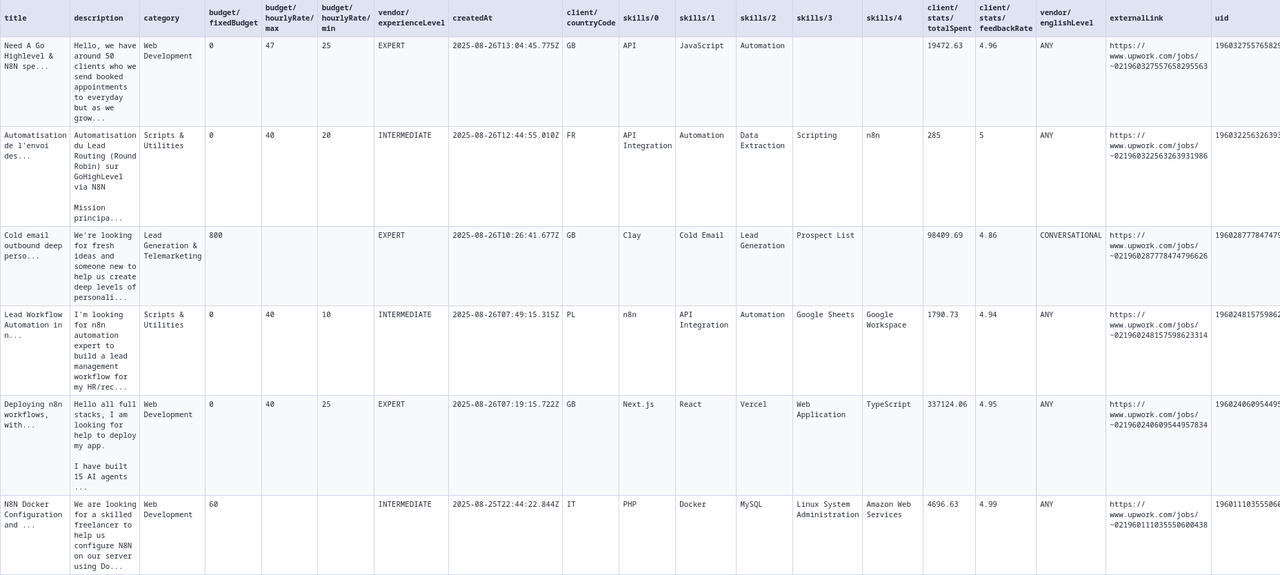
Clean, structured JSON with all job details:
```json
{
"uid": "1955020056847176693",
"title": "React Developer for SaaS Platform",
"description": "We are looking for an experienced React Developer to help us build and scale our SaaS platform for small-to-medium businesses. You’ll be working closely with our product and backend teams to deliver high-quality, performant, and maintainable features that enhance user experience and support rapid growth.",
"createdAt": "2025-01-15T10:30:00.000Z",
"skills": [
"React",
"TypeScript",
"Node.js",
"Redux",
"REST APIs"
],
"externalLink": "https://www.upwork.com/jobs/~021955020056847176693",
"applicationCost": 6,
"featured": false,
"category": "Web Development",
"ciphertext": "~021955020056847176693",
"questions": null,
"budget": {
"fixedBudget": 5000,
"hourlyRate": {
"min": 40,
"max": 80
}
},
"client": {
"timezone": "America/New_York",
"industry": "Technology",
"companySize": 10,
"countryCode": "US",
"phoneNumberVerified": true,
"paymentMethodVerified": true,
"enterprise": false,
"connectedAt": "2024-05-01T00:00:00.000Z",
"stats": {
"totalSpent": 125000,
"totalHires": 42,
"hireRate": 85,
"avgRate": 65,
"feedbackRate": 4.95,
"feedbackCount": 38
},
"history": [
{
"startDate": "2024-06-01",
"endDate": "2024-12-01",
"totalCharge": 15000,
"totalHours": 320,
"feedback": { "score": 5.0, "comment": "Excellent developer" }
}
]
},
"vendor": {
"hireType": "FREELANCER",
"countryCodes": ["US", "CA", "UK"],
"experienceLevel": "EXPERT",
"englishLevel": "FLUENT",
"languages": ["English", "French"]
},
"activity": {
"totalApplicants": 12,
"totalHired": 0,
"totalInvitedToInterview": 3,
"unansweredInvites": 1,
"lastBuyerActivity": "2025-01-15T14:22:00.000Z"
},
"customJobScore": 4.8
}
```
#### 📸 Output Sample
 #### Field Descriptions
**Core Fields:**
- `uid`: Unique identifier for the job
- `title`: Job title/headline
- `description`: Job description
- `createdAt`: When the job was posted (ISO 8601)
- `externalLink`: Direct link to job on Upwork
- `applicationCost`: Connects required to apply
- `featured`: Whether it's a featured/promoted job
- `category`: Job category on Upwork
- `ciphertext`: Encoded job reference
- `questions`: Screening questions (array or null)
- `customJobScore`: Client quality score (0-5) based on verification status, ratings, hire history, and spending patterns
**Budget Object:**
- `fixedBudget`: Fixed price amount (0 if hourly)
- `hourlyRate.min/max`: Hourly rate range (null if fixed)
**Client Object:**
- `timezone`: Client's timezone (IANA format)
- `industry`: Client's industry sector
- `companySize`: Number of employees
- `countryCode`: 2-letter country code
- `phoneNumberVerified`: Phone verification status
- `paymentMethodVerified`: Payment method verified
- `enterprise`: Enterprise client flag
- `connectedAt`: When joined Upwork
- `stats.totalSpent`: Total spent on platform
- `stats.totalHires`: Number of hires made
- `stats.hireRate`: Percentage of jobs that result in hire
- `stats.avgRate`: Average hourly rate paid
- `stats.feedbackRate`: Average rating given (0-5)
- `stats.feedbackCount`: Number of feedback entries
- `companyName`: Buyer's company name (string or null) *(Client Details addon only — null when the buyer was classified as a person rather than a company)*
- `history`: Client work history array *(Client Details addon only)*
**Activity Object** *(Client Activity addon only):*
- `totalApplicants`: Number of proposals received
- `totalHired`: Number of candidates hired
- `totalInvitedToInterview`: Number invited to interview
- `unansweredInvites`: Number of unanswered client invites
- `lastBuyerActivity`: Timestamp of last client activity
**Vendor Object:**
- `hireType`: "FREELANCER", "AGENCY", or "ANY"
- `countryCodes`: Preferred freelancer locations
- `experienceLevel`: "BEGINNER", "INTERMEDIATE", or "EXPERT"
- `englishLevel`: "ANY", "BASIC", "CONVERSATIONAL", "FLUENT", or "NATIVE"
- `languages`: Required languages listed in the job's preferred qualifications as human-readable English names (e.g. `["English", "French"]`); `null` when the posting has no language requirement
### 📋 Complete Input Parameters
#### ⚙️ Basic Settings
| Parameter | Type | Description | Example |
|-----------|------|-------------|---------|
| `limit` | integer | Max jobs to return (1-10000) | `1000` |
| `fromDate` | string | Jobs posted after (YYYY-MM-DD or YYYY-MM-DDTHH:MM:SSZ) | `"2025-01-01"` or `"2025-01-01T00:00:00Z"` |
| `toDate` | string | Jobs posted before (YYYY-MM-DD or YYYY-MM-DDTHH:MM:SSZ) | `"2025-12-31"` or `"2025-12-31T23:59:59Z"` |
| `jobCategories` | array | Upwork category names | `["Web Development", "UI/UX Design"]` |
| `jobIds` | array | Fetch specific jobs by UID (ignores all filters) | `["2036847678762808589"]` |
#### 💎 Addons
| Parameter | Type | Description | Price |
|-----------|------|-------------|-------|
| `addons.enableClientDetails` | boolean | Client work history & feedback | $0.003/job |
| `addons.enableClientActivity` | boolean | Proposals, interviews, last activity | $0.003/job |
#### 🔎 Keyword Filters
| Parameter | Type | Description | Example |
|-----------|------|-------------|---------|
| `includeKeywords.keywords` | array | Must contain these terms (auto-activates when set) | `["React", "Node.js"]` |
| `includeKeywords.matchTitle` | boolean | Search in titles | `true` |
| `includeKeywords.matchDescription` | boolean | Search in descriptions | `true` |
| `includeKeywords.matchSkills` | boolean | Search in required skills | `true` |
| `excludeKeywords.keywords` | array | Exclude jobs with these terms (auto-activates when set) | `["WordPress", "PHP"]` |
| `excludeKeywords.matchTitle` | boolean | Search in titles | `true` |
| `excludeKeywords.matchDescription` | boolean | Search in descriptions | `true` |
| `excludeKeywords.matchSkills` | boolean | Search in required skills | `true` |
#### 💰 Budget & Payment
| Parameter | Type | Description | Example |
|-----------|------|-------------|---------|
| `budget.hourlyRate.min` | string | Minimum hourly rate (USD) | `"50"` |
| `budget.hourlyRate.max` | string | Maximum hourly rate (USD) | `"150"` |
| `budget.fixedPrice.min` | string | Minimum fixed price (USD) | `"1000"` |
| `budget.fixedPrice.max` | string | Maximum fixed price (USD) | `"10000"` |
| `budget.connectsPrice.min` | integer | Minimum connects required | `1` |
| `budget.connectsPrice.max` | integer | Maximum connects required | `10` |
| `budget.jobDurations` | array | Contract lengths | `["UP_TO_THREE_MONTHS"]` |
| `budget.hourlyWorkloads` | array | Weekly commitment | `["LESS_THAN_30_HOURS"]` |
| `budget.minClientHireRate` | integer | Min hire rate (%) | `50` |
#### 🏢 Client Requirements
| Parameter | Type | Description | Example |
|-----------|------|-------------|---------|
| `client.paymentMethodVerified` | boolean | Verified payment only | `true` |
| `client.minFeedbackScore` | string | Min rating (0-5) | `"4.5"` |
| `client.totalSpent.min` | string | Minimum total spent (USD) | `"10000"` |
| `client.totalSpent.max` | string | Maximum total spent (USD) | `"50000"` |
| `client.includeLocations` | array | Client locations | `[{"type": "COUNTRY", "value": "US"}]` |
| `client.excludeLocations` | array | Exclude locations | `[{"type": "COUNTRY", "value": "PK"}]` |
| `client.companySizeRange` | array | Company sizes | `["UP_TO_100_EMPLOYEES"]` |
#### 👤 Vendor Preferences
| Parameter | Type | Description | Example |
|-----------|------|-------------|---------|
| `vendor.experienceLevel` | array | Required experience | `["INTERMEDIATE", "EXPERT"]` |
| `vendor.englishProficiency` | string | English level | `"FLUENT"` |
| `vendor.type` | array | Freelancer/Agency | `["FREELANCER"]` |
| `vendor.includeLocations` | array | Vendor locations | `[{"type": "COUNTRY", "value": "US"}]` |
| `vendor.includeFeatured` | boolean | Featured jobs only | `true` |
#### Job Categories
**Most Popular Categories:**
- `"Web Development"` - Frontend, backend, full-stack
- `"Mobile Development (Web/Mobile)"` - Cross-platform mobile apps
- `"Mobile Development (IT)"` - Native iOS/Android development
- `"UI/UX Design"` - User interface and experience design
- `"AI/ML Engineering"` - Machine learning and AI projects
- `"Data Science & Analytics"` - Data analysis and visualization
- `"Digital Marketing"` - SEO, PPC, social media
- `"Content Writing"` - Articles, blogs, copywriting
- `"Ecommerce Development"` - Online stores, Shopify
- `"DevOps Engineering"` - CI/CD, cloud infrastructure
**Development & Tech:**
- `"Web Development"`
- `"Mobile Development (Web/Mobile)"`
- `"Mobile Development (IT)"`
- `"Desktop Software Development"`
- `"Ecommerce Development"`
- `"Game Development"`
- `"Game Design & Development"`
- `"Blockchain & Cryptocurrency"`
- `"AI/ML Engineering"`
- `"Data Engineering"`
- `"Cloud Computing"`
- `"DevOps Engineering"`
- `"DevOps & Solution Architecture"`
- `"QA & Testing (Software)"`
- `"QA & Testing (Web/Mobile)"`
**Design & Creative:**
- `"UI/UX Design"`
- `"Product Design"`
- `"Visual Design"`
- `"Illustration & Design"`
- `"Web & Mobile Design"`
- `"3D Modeling & CAD"`
- `"Architecture & Interior Design"`
**Business & Admin:**
- `"Product Management (Business)"`
- `"Product Management (Tech)"`
- `"Project Management"`
- `"Business Analysis & Strategy"`
- `"Virtual Assistance"`
- `"Data Entry & Transcription"`
- `"Market Research"`
**Marketing & Sales:**
- `"Digital Marketing"`
- `"Social Media Marketing"`
- `"Content Writing"`
- `"Brand Strategy & Marketing"`
- `"Marketing Automation"`
- `"Sales & Business Development"`
**Note:** Use exact category names as shown (case-sensitive). Full list of 70+ categories available.
### 🔔 Set Notifications
Notifications are ideal for real-time job monitoring when combined with scheduled runs. Get instant alerts for new opportunities directly to your preferred communication channel.
#### When to Use Notifications
- **Real-time monitoring:** Get alerts as soon as matching jobs appear
- **Scheduled scraping:** Receive job updates at regular intervals (every hour, daily, etc.)
- **Team collaboration:** Share opportunities with your team via Discord/Slack
- **Personal alerts:** Get notifications to your Telegram for urgent opportunities
#### Configuration Overview
##### Basic Settings
- **Notification Limit:** 1-20 jobs per platform (default: 3)
- **Run Metadata:** Optional summary message with run details and dataset URLs
- **Platform Support:** Telegram, Discord, and Slack
#### Setting Up Telegram Notifications
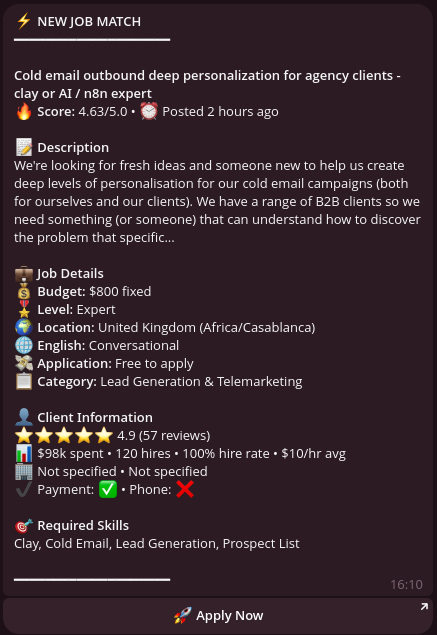 1. **Create a Bot:**
- Message @BotFather on Telegram
- Send `/newbot` and follow instructions
- Save your bot token (e.g., `1234567890:ABCdefGHIjklMNOpqrsTUVwxyz`)
2. **Get Your Chat ID:**
- Message @userinfobot to get your personal chat ID
- For channels: Add bot as admin, channel ID starts with `-100`
3. **Configure in Actor:**
```javascript
{
"notifications.telegram.token": "YOUR_BOT_TOKEN",
"notifications.telegram.channelId": "YOUR_CHAT_ID",
"notifications.limit": 5,
"notifications.shouldSendRunMetadata": true
}
```
#### Setting Up Discord Notifications
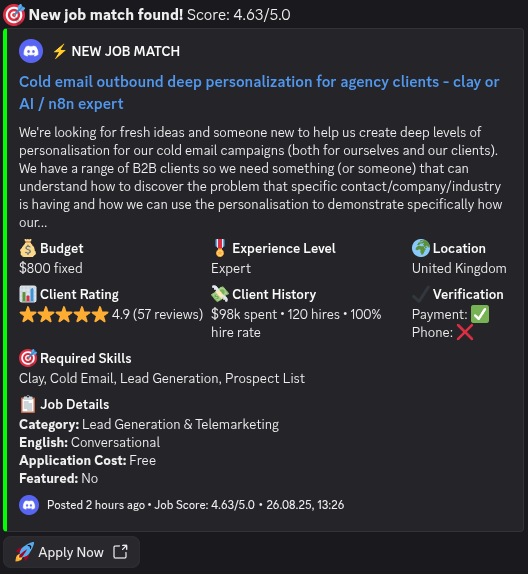 1. **Create a Bot:**
- Go to [Discord Developer Portal](https://discord.com/developers/applications)
- Create new application → Bot → Copy token
- Add bot to server with "Send Messages" permission
2. **Get Channel ID:**
- Enable Developer Mode in Discord settings
- Right-click channel → Copy ID
3. **Configure in Actor:**
```javascript
{
"notifications.discord.token": "YOUR_BOT_TOKEN",
"notifications.discord.channelId": "CHANNEL_ID",
"notifications.limit": 10
}
```
#### Setting Up Slack Notifications
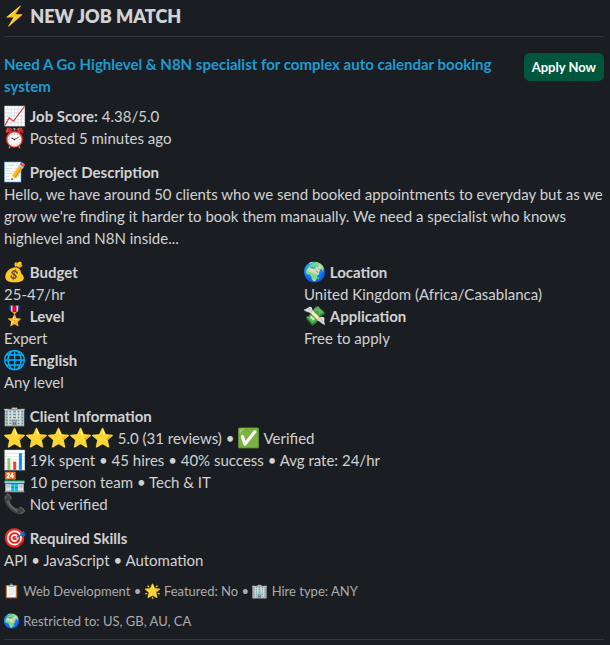 1. **Create Slack App:**
- Go to [api.slack.com/apps](https://api.slack.com/apps)
- Create new app → OAuth & Permissions
- Add scopes: `chat:write` and `channels:read`
- Install to workspace → Copy bot token (starts with `xoxb-`)
2. **Add Bot to Channel:**
- Invite bot to your channel: `/invite @your-bot-name`
3. **Configure in Actor:**
```javascript
{
"notifications.slack.token": "xoxb-YOUR-TOKEN",
"notifications.slack.channelId": "CHANNEL_ID",
"notifications.limit": 5
}
```
#### Example: Real-Time Job Monitoring with Notifications
```javascript
{
// Search parameters
"limit": 50,
"fromDate": "2025-01-14T12:00:00Z",
"toDate": "2025-01-14T14:00:00Z",
"jobCategories": ["Web Development"],
"includeKeywords.keywords": ["React", "urgent", "ASAP"],
"budget.hourlyRate.min": "75",
"client.paymentMethodVerified": true,
// Notification settings
"notifications.limit": 10, // Send up to 10 newest jobs
"notifications.shouldSendRunMetadata": true, // Include run summary
// Telegram configuration
"notifications.telegram.token": "YOUR_TOKEN",
"notifications.telegram.channelId": "YOUR_CHAT_ID",
// Discord configuration (optional - can use multiple platforms)
"notifications.discord.token": "YOUR_DISCORD_TOKEN",
"notifications.discord.channelId": "YOUR_DISCORD_CHANNEL"
}
```
#### Notification Features
- **Smart Filtering:** Only the newest jobs matching your criteria are sent
- **Run Metadata:** Optional summary with total results, dataset URLs, and run details
- **Multi-Platform:** Send to multiple channels simultaneously
- **Limit Control:** Prevent notification spam with configurable limits (1-20)
- **Schedule Compatible:** Perfect for hourly/daily scheduled runs
#### Tips for Effective Notifications
1. **Use with Schedules:** Set up hourly runs with 10-30 minute overlap for real-time monitoring
2. **Adjust Limits:** Start with 3-5 notifications, increase if needed
3. **Multiple Channels:** Use Telegram for personal alerts, Discord/Slack for team
4. **Filter Quality:** Use strict filters to ensure only high-quality jobs trigger notifications
5. **Metadata Option:** Enable for first few runs to verify configuration
### 💡 Smart Usage Tips - Don't Pay Twice!
#### Live Job Monitoring (Near Real-Time)
**⚠️ Use 10-30 minute overlap ONLY when scraping up to the present moment**
Jobs can take up to 30 minutes to sync to our database. If you're monitoring live jobs (toDate = now), use overlap to catch delayed jobs:
```javascript
// First run at 9:00 AM (scraping up to NOW)
{
"limit": 50,
"fromDate": "2025-01-14T07:00:00Z",
"toDate": "2025-01-14T09:00:00Z" // NOW
}
// Next run at 11:00 AM (scraping up to NOW)
{
"limit": 50,
"fromDate": "2025-01-14T08:30:00Z", // 30-min overlap
"toDate": "2025-01-14T11:00:00Z" // NOW
}
// Next run at 1:00 PM (scraping up to NOW)
{
"limit": 50,
"fromDate": "2025-01-14T10:30:00Z", // 30-min overlap
"toDate": "2025-01-14T13:00:00Z" // NOW
}
```
**When to use overlap:** Only when your `toDate` is the current time (live monitoring)
**Overlap duration:** 10-30 minutes maximum (30 min for maximum safety)
#### Historical Data Collection (Past Jobs)
**✅ NO overlap needed when scraping historical data**
When collecting past jobs (not up to the present moment), use exact date boundaries:
```javascript
// Day 1: Get January jobs
{
"limit": 1000,
"fromDate": "2025-01-01T00:00:00Z",
"toDate": "2025-01-31T23:59:59Z" // Past date - NO overlap needed
}
// Day 2: Get February jobs
{
"limit": 1000,
"fromDate": "2025-02-01T00:00:00Z", // Exact boundary - no overlap
"toDate": "2025-02-28T23:59:59Z" // Past date - NO overlap needed
}
```
#### Daily Batch Collection (Previous Day's Jobs)
**✅ NO overlap needed for daily historical pulls**
```javascript
// Monday: Get Sunday's jobs
{
"fromDate": "2025-01-13T00:00:00Z", // Sunday start
"toDate": "2025-01-13T23:59:59Z" // Sunday end - NO overlap
}
// Tuesday: Get Monday's jobs
{
"fromDate": "2025-01-14T00:00:00Z", // Monday start - exact boundary
"toDate": "2025-01-14T23:59:59Z" // Monday end - NO overlap
}
```
**Key Rule:** Overlap is ONLY for live monitoring when `toDate` = current time
#### Cost-Effective Filtering
Start with strict filters to minimize costs:
- Use `"client.paymentMethodVerified": true` to filter serious clients
- Set `"budget.minClientHireRate": 50` to avoid job collectors
- Add `"client.totalSpent.min": "1000"` for proven clients
### 🔧 Integration Options
#### Automation Platforms
- **Clay.com** - Direct table import with enrichment
- **Make/Zapier** - 5000+ app connections
- **n8n** - Self-hosted workflows
- **API** - REST API for custom integrations
#### Export Formats
- JSON (default)
- CSV
- Direct to Google Sheets
- Webhook delivery
### 🔄 n8n Integration Example
n8n is a powerful workflow automation tool that works perfectly with our Upwork Job Scraper. Here's a complete example workflow that scrapes jobs hourly and sends notifications to Slack.
Before pasting this into your workflow follow these instructions (you may need to ask your instance admin to do that):
1. Open any workflow.
2. Press Tab (or plus sign at top left on the screen).
3. Type Apify
4. Press install Apify community node.
#### n8n Workflow: easily expandable minimal example
Import this workflow JSON directly into n8n:
```json
{
"nodes": [
{
"parameters": {
"rule": {
"interval": [
{
"field": "minutes"
}
]
}
},
"name": "Schedule Trigger",
"type": "n8n-nodes-base.scheduleTrigger",
"typeVersion": 1,
"position": [
-176,
-32
],
"id": "237b1913-b1db-48fe-84ac-71a066ee7685"
},
{
"parameters": {
"operation": "Run actor and get dataset",
"actorId": {
"__rl": true,
"value": "YdYsB7rsRY0EUb1lP",
"mode": "list",
"cachedResultName": "Upwork Job Scraper | Scrape up to 10k Jobs ✨ (upwork-vibe/upwork-job-scraper)",
"cachedResultUrl": "https://console.apify.com/actors/YdYsB7rsRY0EUb1lP/input"
},
"customBody": "={\n \"limit\": 100,\n \"fromDate\": \"{{ $now.minus(5, 'minutes').toUTC().toString() }}\",\n \"toDate\": \"{{ $now.toUTC().toString() }}\",\n \"jobCategories\": [\"Web Development\"]\n}"
},
"name": "Run Upwork Scraper",
"type": "@apify/n8n-nodes-apify.apify",
"typeVersion": 1,
"position": [
48,
-32
],
"id": "03ef964f-d758-436d-a47a-62b49168d9c3",
"credentials": {
"apifyApi": {
"id": "x5aAtsWTvkSeaXn9",
"name": "Apify account"
}
}
}
],
"connections": {
"Schedule Trigger": {
"main": [
[
{
"node": "Run Upwork Scraper",
"type": "main",
"index": 0
}
]
]
}
},
"pinData": {},
"meta": {
"templateCredsSetupCompleted": true,
"instanceId": "b1f96afe5804f8bb3692e38aeb44df7e1ef44f291dd2e3122a0e54fe737453c0"
}
}
```
### 🔄 Clay Integration Example
#### 1. Set up an Apify task
1. Create a task for this actor with your desired inputs.
2. Run the task:
- Verify that it returns the expected data.
- Clay requires at least one successful run to use the task as a data source (it imports the latest run by default).
3. (Optional) Create a schedule for the task to automate future runs.
#### 2. Connect Apify to Clay
1. Open **[Clay](https://app.clay.com/)**.
2. Create a table:
- Either start with an empty table, or
- Use [our Clay template](https://app.clay.com/shared-table/share_0t1wzexuWgGPNFwPCWA).
3. Go to **Actions → Sources → View all sources** (scroll to the bottom).
4. Search for **Apify** and choose **Import data from Apify actor**.
5. Select (or add) your Apify account.
6. Choose the actor and the task you created in step 1.
7. Configure data import:
- You can pull results from a specific run, but
- It’s recommended to let Clay fetch the **latest runs**, especially if you also created a schedule in step 1.3.
8. Click **Submit** to finalize the integration.
You are now able to act on the received data as you please. Don't forget to also setup running the source on a schedule (separate from the Apify schedule but you should set up both for best results) to always have the latest data.
### 📚 API Documentation
#### Node.js
```javascript
import { ApifyClient } from 'apify-client';
const client = new ApifyClient({ token: 'YOUR_API_TOKEN' });
const run = await client.actor('upwork-vibe/upwork-job-scraper').call(input);
```
#### Python
```python
from apify_client import ApifyClient
client = ApifyClient('YOUR_API_TOKEN')
run = client.actor('upwork-vibe/upwork-job-scraper').call(input)
```
#### REST API
```bash
curl -X POST "https://api.apify.com/v2/acts/upwork-vibe~upwork-job-scraper/runs?token=YOUR_API_TOKEN" \
-H "Content-Type: application/json" \
-d '{
"limit": 100,
"includeKeywords.keywords": ["react", "javascript"],
"includeKeywords.matchSkills": false,
"includeKeywords.matchTitle": true,
"includeKeywords.matchDescription": true
}'
```
***
### 📍 Location Reference Guide
#### How to Use Locations
Locations in `client.includeLocations`, `client.excludeLocations`, and `vendor.includeLocations` use this format:
```javascript
{"type": "COUNTRY", "value": "US"} // For countries
{"type": "REGION", "value": "europe"} // For regions
```
#### Common Country Codes (ISO 3166-1 alpha-2)
| Country | Code | Country | Code |
|---------|------|---------|------|
| United States | `US` | United Kingdom | `GB` |
| Canada | `CA` | Australia | `AU` |
| Germany | `DE` | France | `FR` |
| Netherlands | `NL` | Switzerland | `CH` |
| Sweden | `SE` | Denmark | `DK` |
| Norway | `NO` | Finland | `FI` |
| Spain | `ES` | Italy | `IT` |
| Poland | `PL` | Ukraine | `UA` |
| India | `IN` | Pakistan | `PK` |
| Bangladesh | `BD` | Philippines | `PH` |
| Singapore | `SG` | Japan | `JP` |
| Brazil | `BR` | Mexico | `MX` |
| Argentina | `AR` | Israel | `IL` |
| United Arab Emirates | `AE` | South Africa | `ZA` |
#### Available Regions
| Region | Value | Includes |
|--------|-------|----------|
| North America | `north_america` | US, CA, MX |
| Europe | `europe` | All EU countries + UK, CH, NO |
| Asia | `asia` | All Asian countries |
| South America | `south_america` | All South American countries |
| Africa | `africa` | All African countries |
| Oceania | `oceania` | AU, NZ, Pacific Islands |
#### Example Usage
```javascript
// Include only US and European clients
"client.includeLocations": [
{"type": "COUNTRY", "value": "US"},
{"type": "REGION", "value": "europe"}
]
// Exclude specific countries
"client.excludeLocations": [
{"type": "COUNTRY", "value": "PK"},
{"type": "COUNTRY", "value": "BD"},
{"type": "COUNTRY", "value": "IN"}
]
// Vendor location preferences
"vendor.includeLocations": [
{"type": "REGION", "value": "north_america"},
{"type": "COUNTRY", "value": "PH"}
]
```
**Note:** For the complete list of ISO country codes, see [ISO 3166-1 alpha-2](https://en.wikipedia.org/wiki/ISO_3166-1_alpha-2)
### 🔍 Troubleshooting
#### Getting 0 Results?
1. **Check your date range** - Ensure dates aren't in the future
2. **Verify category names** - Must match exactly from the enum list (e.g., "Web Development" not "Web Dev")
3. **Remove filters progressively** - Start broad, then add filters one by one
4. **Check parameter structure** - Use dot notation format (e.g., `"budget.hourlyRate.min": "50"`)
#### Validation Errors?
1. **Use dot notation** - Not nested objects: `"includeKeywords.matchTitle": true` ✅ vs `{"includeKeywords": {"matchTitle": true}}` ❌
2. **Exact category names** - "Mobile Development (Web/Mobile)" not "Mobile Development"
3. **Location format** - Must have both fields: `{"type": "COUNTRY", "value": "US"}`
4. **Quote string values** - Budget amounts must be strings: `"50"` not `50`
#### Performance Issues?
1. **Start small** - Test with `limit: 100` before scaling up
2. **Simplify filters** - Complex keyword combinations slow processing
3. **Segment large requests** - Use date ranges to break up big searches
4. **Avoid overlapping filters** - Don't use contradictory include/exclude rules
#### Unexpected Costs?
1. **Always set limit** - Without it, you might pull thousands of jobs
2. **Test first** - Start with `limit: 10` to verify your filters work
3. **Check itemCount** - Monitor response counts before scaling up
4. **Remember billing** - You pay $0.003 per job returned, not per API call
### ✏️ Support
⚡ Feel free to [reach out](mailto:upwork@vistorio.online) to the developer for any [issues](https://apify.com/upwork-vibe/upwork-job-scraper/issues/open) or suggestions for improvement.
💬 📧 🐛 💡 🚀
# Actor input Schema
## `limit` (type: `integer`):
Set the maximum number of job postings to retrieve in your search results. Higher limits provide more opportunities but may take longer to process. Example: Set to 100 for quick daily scans, 1000 for comprehensive weekly searches, or 5000+ for complete market analysis.
## `searchPeriod` (type: `string`):
When set, overrides From Date and To Date. Sets To Date to the current moment and From Date to now minus the given period. Use a human-friendly format: ' '. Supported units: seconds, minutes, hours, days, weeks, months, years (singular or plural). Examples: '3 days', '2 weeks', '1 month', '1 year'. Leave empty to use From Date and To Date instead.
## `fromDate` (type: `string`):
Filter jobs posted on or after this date. Ignored if Search Period is set. Use ISO format (YYYY-MM-DD) or with time (YYYY-MM-DDTHH:MM:SSZ). Leave empty to include all historical jobs.
## `toDate` (type: `string`):
Filter jobs posted up to this date. Ignored if Search Period is set. Use ISO format (YYYY-MM-DD) or with time (YYYY-MM-DDTHH:MM:SSZ). Leave empty to include all future jobs.
## `jobCategories` (type: `array`):
Select specific Upwork job categories to focus your search. Each code represents a different field. Choose multiple categories to broaden your opportunities. Examples: 'Web Development', 'Art & Illustration', 'Digital Marketing', 'Content Writing'.
## `includeKeywords.keywords` (type: `array`):
List keywords that jobs MUST contain to appear in results. Jobs need to match at least one keyword. Use specific terms for better targeting. Examples: \['React', 'Next.js', 'TypeScript'] for frontend development, \['logo design', 'branding', 'corporate identity'] for design work, \['SEO', 'content marketing', 'Google Ads'] for marketing roles.
## `includeKeywords.matchTitle` (type: `boolean`):
Search for your include keywords in job titles. Recommended for finding jobs where your skills are the primary focus. Example: Enable to find 'React Developer Needed' or 'Logo Designer Required' jobs.
## `includeKeywords.matchDescription` (type: `boolean`):
Search for your include keywords in job descriptions. Useful for finding detailed requirements that match your expertise. Example: Find jobs mentioning 'experience with React hooks' or 'proficient in Photoshop' in the description.
## `includeKeywords.matchSkills` (type: `boolean`):
Search for your include keywords in the required skills list. Ideal for targeting jobs that specifically list your technical competencies. Example: Match jobs listing 'JavaScript', 'Adobe Illustrator', or 'Google Analytics' as required skills.
## `excludeKeywords.keywords` (type: `array`):
List keywords that will automatically exclude jobs from results. If ANY of these terms are found, the job will be filtered out. Examples: \['adult content', 'gambling', 'casino'] for ethical reasons, \['PHP 5', 'Internet Explorer', 'Flash'] for outdated tech, \['crypto', 'blockchain'] if you avoid that space.
## `excludeKeywords.matchTitle` (type: `boolean`):
Exclude jobs if forbidden keywords are found in job titles. Effective for quickly filtering out unwanted job types. Example: Exclude jobs titled 'Adult Website Designer' or 'Casino Game Developer'.
## `excludeKeywords.matchDescription` (type: `boolean`):
Exclude jobs if forbidden keywords are found in job descriptions. Thorough filtering but may be more restrictive. Example: Exclude jobs mentioning 'adult entertainment industry' or 'gambling platform' in the description.
## `excludeKeywords.matchSkills` (type: `boolean`):
Exclude jobs if forbidden keywords are found in required skills. Useful for avoiding jobs requiring specific technologies you don't work with. Example: Exclude jobs requiring 'COBOL', 'Assembly', or other technologies you don't know.
## `budget.allowUnspecifiedBudget` (type: `boolean`):
Include jobs where the client hasn't specified a budget range. These jobs may offer negotiable rates but require more discussion during the proposal process. Example: Jobs posting 'Budget negotiable' or 'Discuss rate in interview' instead of specific amounts.
## `budget.hourlyRate.min` (type: `string`):
Set the lowest hourly rate you're willing to accept. Only jobs offering at least this amount per hour will be included. Consider your minimum viable rate for profitability. Examples: '$15' for entry-level work, '$50' for experienced developers, '$100+' for specialized expertise.
## `budget.hourlyRate.max` (type: `string`):
Set the highest hourly rate to filter for. Useful if you want to avoid jobs that seem unrealistically high or target a specific rate range. Leave high for maximum opportunities. Examples: '$75' to avoid potentially fake high-paying posts, '$200' for realistic maximum rates.
## `budget.avgHourlyRate.min` (type: `string`):
Filter by the minimum average hourly rate this client has historically paid freelancers. Indicates the client's typical spending level and payment patterns. Examples: '$20' ensures clients who typically pay decent rates, '$50+' for premium client targeting.
## `budget.avgHourlyRate.max` (type: `string`):
Filter by the maximum average hourly rate this client has historically paid. Useful for targeting clients within your preferred payment range. Examples: '$100' to target mid-market clients, '$50' for budget-conscious projects.
## `budget.fixedPrice.min` (type: `string`):
Set the minimum project budget for fixed-price jobs. Only projects offering at least this total amount will be included. Consider your minimum project value requirements. Examples: '$100' for small tasks, '$1000' for substantial projects, '$5000+' for major developments.
## `budget.fixedPrice.max` (type: `string`):
Set the maximum project budget for fixed-price jobs. Useful for targeting projects within your capacity or avoiding overly complex projects. Examples: '$5000' to avoid massive enterprise projects, '$1000' for manageable smaller projects.
## `budget.connectsPrice.min` (type: `integer`):
Filter by minimum connects required to submit a proposal. Higher connect costs often indicate more competitive or higher-value jobs. Examples: 6+ connects usually mean premium jobs, 12+ connects often indicate very competitive positions.
## `budget.connectsPrice.max` (type: `integer`):
Set maximum connects you're willing to spend on a proposal. Useful for managing your connect budget and avoiding overly expensive applications. Examples: Limit to 6 connects for regular applications, 16 connects for special opportunities only.
## `budget.jobDurations` (type: `array`):
Select acceptable project lengths based on your availability and preferences. Different durations suit different work styles and commitment levels. Examples: 'UP_TO_ONE_MONTH' for quick projects, 'MORE_THAN_SIX_MONTHS' for stable long-term income.
## `budget.hourlyWorkloads` (type: `array`):
Choose acceptable weekly time commitments based on your availability. Part-time allows flexibility, full-time offers steady income. Examples: 'LESS_THAN_30_HOURS' for side projects while employed, 'MORE_THAN_30_HOURS' for full-time freelancing.
## `budget.noAvgHourlyRatePaid` (type: `boolean`):
Include clients who have no recorded average hourly rate history. These may be new clients or those who primarily use fixed-price contracts. Example: New startups, first-time Upwork users, or clients who only hire for one-time projects.
## `budget.noHireRate` (type: `boolean`):
Include clients who haven't successfully hired anyone yet. These are typically new clients who may offer opportunities but also carry higher risk. Example: Brand new companies on Upwork, clients still learning the platform, or those with very specific requirements.
## `budget.onlyContractToHire` (type: `boolean`):
Show only jobs that offer potential for permanent employment after the contract period. Ideal if you're seeking long-term career opportunities. Example: 'Start as contractor, potential for full-time position after 3 months' type postings.
## `budget.minClientHireRate` (type: `integer`):
Require clients to have hired freelancers for at least this percentage of their job posts. Higher rates indicate clients who actually follow through with hiring. Examples: 50% ensures clients hire at least half the time, 80%+ for very reliable clients only.
## `client.companySizeRange` (type: `array`):
Filter by client company size to match your preferred working environment. Larger companies often have bigger budgets but more processes, while smaller companies offer more direct interaction. Examples: Solo entrepreneurs for personal projects, 100+ employees for corporate work, startups (2-10) for innovative projects.
## `client.descriptionLanguage.exclude` (type: `array`):
Exclude job posts written in specific languages using ISO-639-2 codes. Useful if you only work with certain languages. Examples: \['fra', 'deu', 'rus'] to exclude French, German, and Russian job posts, \['spa'] to exclude Spanish-language jobs.
## `client.descriptionLanguage.include` (type: `array`):
Only show job posts written in these languages using ISO-639-2 codes. Ensures you can understand job requirements. Examples: \['eng'] for English-only jobs, \['eng', 'spa'] for English and Spanish jobs, \['fra'] for French-language projects.
## `client.hireHistory` (type: `array`):
Filter by the client's hiring experience on Upwork. More experienced clients often have clearer expectations and smoother processes. Examples: 'NONE' for first-time clients with potential, 'MORE_THAN' for experienced clients with proven track records.
## `client.includeLocations` (type: `array`):
Only show jobs from clients in these specific locations. Each entry is {"type": ..., "value": ...} where type is REGION, SUBREGION, or COUNTRY.
- REGION: africa, americas, antarctica, asia, europe, oceania.
- SUBREGION: australia-and-new-zealand, caribbean, central-america, central-asia, eastern-africa, eastern-asia, eastern-europe, melanesia, micronesia, middle-africa, northern-africa, northern-america, northern-europe, polynesia, south-america, south-eastern-asia, southern-africa, southern-asia, southern-europe, western-africa, western-asia, western-europe.
- COUNTRY: ISO-2 codes (US, GB, DE, ...).
Pick values from the lists above exactly as shown — e.g. 'northern-america' is a SUBREGION, and the closest REGION is 'americas'.
Examples: \[{"type": "COUNTRY", "value": "US"}, {"type": "COUNTRY", "value": "CA"}] for North American clients, \[{"type": "REGION", "value": "europe"}] for European markets, \[{"type": "SUBREGION", "value": "northern-america"}] for US+CA+territories.
## `client.excludeLocations` (type: `array`):
Exclude jobs from clients in these specific locations. Same schema as Include Client Locations — see that field for the full list of valid types and values.
Examples: \[{"type": "COUNTRY", "value": "PK"}, {"type": "COUNTRY", "value": "BD"}] to avoid certain regions, \[{"type": "COUNTRY", "value": "BR"}, {"type": "COUNTRY", "value": "MX"}] for timezone preferences.
## `client.includeIndustry` (type: `array`):
Only show jobs from clients in these specific industries. Useful for building expertise in particular sectors or leveraging existing industry knowledge. Examples: \['Healthcare', 'Fintech'] for regulated industries, \['E-commerce', 'SaaS'] for tech startups, \['Education', 'Non-profit'] for mission-driven work.
## `client.excludeIndustry` (type: `array`):
Exclude jobs from clients in these industries. Helpful for avoiding sectors you don't want to work with due to ethical, legal, or preference reasons. Examples: \['Gambling', 'Adult Entertainment'] for ethical reasons, \['Cryptocurrency', 'MLM'] to avoid risky sectors.
## `client.includeWithNoFeedback` (type: `boolean`):
Include clients who haven't received any feedback ratings yet. These are typically new clients who may offer good opportunities but with unknown reliability. Example: Brand new companies just starting on Upwork, first-time project posters.
## `client.totalSpent.min` (type: `string`):
Require clients to have spent at least this amount total on Upwork. Higher spending indicates serious clients with proven payment history and ongoing project needs. Examples: '$1000+' for established clients, '$10000+' for enterprise-level clients, '$100+' for basic verification.
## `client.totalSpent.max` (type: `string`):
Set an upper limit on client total spending. Useful if you prefer working with smaller clients or want to avoid overly enterprise-level projects. Examples: '$5000' for mid-market clients, '$50000' to avoid massive corporations.
## `client.minFeedbackScore` (type: `string`):
Require clients to have at least this average feedback score (0-5 scale). Higher ratings indicate clients who are easier to work with and provide clear requirements. Examples: '4.0' for good clients, '4.5+' for excellent clients only, '3.5' for reasonable minimum.
## `client.paymentMethodVerified` (type: `boolean`):
Only include clients with verified payment methods. This significantly reduces the risk of payment issues and indicates serious, professional clients. Example: Clients with verified credit cards, PayPal accounts, or bank transfers on file.
## `client.phoneNumberVerified` (type: `boolean`):
Only include clients with verified phone numbers. Adds an extra layer of client verification and accountability. Example: Clients who have confirmed their phone via SMS verification code.
## `client.timezones` (type: `array`):
Filter for clients in specific timezones using IANA timezone identifiers. Important for real-time collaboration requirements. Examples: \['America/New_York', 'America/Los_Angeles'] for US clients, \['Europe/London', 'Europe/Berlin'] for European clients, \['Asia/Tokyo'] for Japanese market.
## `vendor.type` (type: `array`):
Choose whether to show jobs accepting individual freelancers, agencies, or both. Agency jobs often have larger budgets but may require team capabilities. Examples: 'FREELANCER' for solo work, 'AGENCY' for team projects requiring multiple specialists.
## `vendor.languages` (type: `array`):
Show only jobs requiring specific languages using ISO-639-1 codes. Ensures jobs match your language capabilities. Examples: \['en'] for English-required jobs, \['es', 'en'] for bilingual Spanish-English positions, \['de'] for German-language projects.
## `vendor.englishProficiency` (type: `string`):
Filter jobs by minimum English proficiency requirement. Higher levels often correlate with better communication and more complex projects. Examples: 'BASIC' for simple tasks, 'FLUENT' for client-facing work, 'NATIVE' for content writing or complex communication.
## `vendor.experienceLevel` (type: `array`):
Select which experience levels you want to target. Entry-level has less competition but lower rates, Expert level has higher rates but more competition. Examples: 'BEGINNER' for learning opportunities, 'EXPERT' for premium rates, 'INTERMEDIATE' for balanced competition.
## `vendor.minCustomJobScore` (type: `string`):
Minimum custom job quality score (0-5 scale). Higher values mean stricter quality filtering. Examples: '4.5' for top-tier jobs only, '3.5' for good quality, '2.5' for reasonable minimum.
## `vendor.includeLocations` (type: `array`):
Show only jobs seeking freelancers from specific locations. Same schema as Include Client Locations — see that field for the full list of valid types and values.
Examples: \[{"type": "COUNTRY", "value": "US"}, {"type": "COUNTRY", "value": "CA"}] for North American preference, \[{"type": "COUNTRY", "value": "PH"}, {"type": "COUNTRY", "value": "IN"}] for cost-effective regions, \[{"type": "REGION", "value": "europe"}] for GDPR compliance.
Tip: combine with 'Include Location-Agnostic Jobs' to also match jobs that don't specify a freelancer location.
## `vendor.excludeLocations` (type: `array`):
Exclude jobs seeking freelancers from these specific locations. Same schema as Include Client Locations — see that field for the full list of valid types and values.
Examples: \[{"type": "COUNTRY", "value": "US"}] to skip US-only postings, \[{"type": "SUBREGION", "value": "northern-america"}] to skip North America entirely.
## `vendor.includeFeatured` (type: `boolean`):
Show only featured job posts that clients have paid extra to promote. These jobs often have higher visibility and may indicate more serious clients with larger budgets. Example: Jobs with the 'Featured' badge that appear at the top of search results.
## `vendor.includeWithoutCountryPreference` (type: `boolean`):
Include jobs where clients have no specific location preferences for freelancers. These jobs are open to talent worldwide and often increase your opportunities. Example: Jobs that say 'Location: Anywhere' or have no geographic restrictions.
## `vendor.excludeWithQuestions` (type: `boolean`):
Skip jobs that require answering screening questions as part of the proposal. Saves time if you prefer simpler application processes. Example: Jobs asking 'What is your experience with React?' or 'Describe your design process' before proposal submission.
## `jobIds` (type: `array`):
Provide a list of Upwork job UIDs to fetch directly (max 1000). Each job requires a separate API call, so this is significantly slower than filter search.
When this field is populated, all search filters (keywords, budget, client, vendor) are ignored — only the listed jobs are returned.
This feature has separate per-job pricing ($0.01/job). Please review the pricing page.
You can use UIDs from previous search results or from Upwork job URLs.
Example: \['2036837541226083470', '2036123456789012345']
## `addons.enableClientDetails` (type: `boolean`):
Enriches each job result with client work history and feedback from previous freelancers. Also surfaces `client.companyName` (the buyer's company name, when available) at no extra cost — null when the buyer was classified as a person rather than a company.
Requires an additional API call per job. Enabling this will slow down processing — consider extending your timeout window.
Recommendation: test your filters without addons first to verify result count.
## `addons.enableClientActivity` (type: `boolean`):
Provides real-time job activity metrics per listing:
• Number of proposals received
• Last viewed by client timestamp
• Number of candidates currently interviewing
• Number of invites sent by client
• Number of unanswered invites
Requires an additional API call per job. Enabling this will slow down processing — consider extending your timeout window.
Recommendation: test your filters without addons first to verify result count.
## `addons.enableJobAttachments` (type: `boolean`):
Not yet available. Coming soon: fetches file attachments posted by the client with the job listing (PDFs, images, mockups).
Enabling this checkbox will not affect your results or charges.
## `notifications.shouldSendRunMetadata` (type: `boolean`):
Send run metadata as a separate message preceeding the job notifications. Includes run URL, several dataset URLs and total number of results.
## `notifications.limit` (type: `integer`):
Limit amount of notifications sent per platform. If not all jobs fit the limit, you will receive notifications only about the newest.
## `notifications.telegram.token` (type: `string`):
Bot token for sending Telegram notifications. Create a bot via @BotFather on Telegram to get this token. Used to send job alerts, status updates, and error notifications directly to your Telegram. Example: '1234567890:ABCdefGHIjklMNOpqrsTUVwxyz'
## `notifications.telegram.channelId` (type: `string`):
Telegram chat or channel ID where notifications will be sent. Can be a personal chat ID (starts with numbers) or channel ID (starts with -). Get your chat ID by messaging @userinfobot. Examples: '123456789' for personal chat, '-1001234567890' for channel
## `notifications.discord.token` (type: `string`):
Discord bot token for sending notifications. Create a bot application in Discord Developer Portal and copy the bot token. Requires bot to be added to your server with 'Send Messages' permission. Example: 'MTIzNDU2Nzg5MDEyMzQ1Njc4OQ.Gh1234.abcdefghijklmnopqrstuvwxyz1234567890'
## `notifications.discord.channelId` (type: `string`):
Discord channel ID where notifications will be posted. Enable Developer Mode in Discord settings, right-click the channel, and select 'Copy ID'. Bot must have access to this channel. Example: '987654321098765432'
## `notifications.slack.token` (type: `string`):
Slack bot token (starts with 'xoxb-') for posting notifications. Create a Slack app, add bot token scopes 'chat:write' and 'channels:read', then install to workspace. Example: 'xoxb-1234567890123-1234567890123-abcdefghijklmnopqrstuvwx'
## `notifications.slack.channelId` (type: `string`):
Slack channel ID where notifications will be sent. Bot must be added to the channel first. Example: 'C1234567890' for channel ID
## Actor input object example
```json
{
"limit": 10,
"fromDate": "2026-01-01",
"toDate": "2026-12-31",
"jobCategories": [
"All - Design & Creative",
"Web Development"
],
"includeKeywords.keywords": [],
"includeKeywords.matchTitle": true,
"includeKeywords.matchDescription": true,
"includeKeywords.matchSkills": true,
"excludeKeywords.keywords": [],
"excludeKeywords.matchTitle": true,
"excludeKeywords.matchDescription": true,
"excludeKeywords.matchSkills": true,
"budget.allowUnspecifiedBudget": false,
"budget.hourlyRate.min": "5",
"budget.hourlyRate.max": "150",
"budget.avgHourlyRate.min": "5",
"budget.avgHourlyRate.max": "150",
"budget.fixedPrice.min": "50",
"budget.fixedPrice.max": "10000",
"budget.connectsPrice.min": 1,
"budget.connectsPrice.max": 10,
"budget.jobDurations": [
"UNSPECIFIED",
"UP_TO_ONE_MONTH",
"UP_TO_THREE_MONTHS",
"UP_TO_SIX_MONTHS",
"MORE_THAN_SIX_MONTHS"
],
"budget.hourlyWorkloads": [
"UNSPECIFIED",
"LESS_THAN_30_HOURS",
"MORE_THAN_30_HOURS"
],
"budget.noAvgHourlyRatePaid": false,
"budget.noHireRate": false,
"budget.onlyContractToHire": false,
"budget.minClientHireRate": 0,
"client.companySizeRange": [
"UNSPECIFIED",
"SOLO_ENTERPRENEUR",
"UP_TO_10_EMPLOYEES",
"UP_TO_100_EMPOLOYEES",
"UP_TO_500_EMPLOYEES",
"UP_TO_1K_EMPLOYEES",
"MORE_THAN_1K_EMPLOYEES"
],
"client.descriptionLanguage.exclude": [],
"client.descriptionLanguage.include": [],
"client.hireHistory": [
"NONE",
"UP_TO",
"MORE_THAN"
],
"jobIds": [],
"addons.enableClientDetails": false,
"addons.enableClientActivity": false,
"addons.enableJobAttachments": false,
"notifications.shouldSendRunMetadata": true,
"notifications.limit": 3
}
```
# API
You can run this Actor programmatically using our API. Below are code examples in JavaScript, Python, and CLI, as well as the OpenAPI specification and MCP server setup.
## JavaScript example
```javascript
import { ApifyClient } from 'apify-client';
// Initialize the ApifyClient with your Apify API token
// Replace the '' with your token
const client = new ApifyClient({
token: '',
});
// Prepare Actor input
const input = {
"limit": 10,
"fromDate": "2026-01-01",
"toDate": "2026-12-31",
"jobCategories": [
"All - Design & Creative",
"Web Development"
],
"includeKeywords.keywords": [],
"includeKeywords.matchTitle": true,
"includeKeywords.matchDescription": true,
"includeKeywords.matchSkills": true,
"excludeKeywords.keywords": [],
"excludeKeywords.matchTitle": true,
"excludeKeywords.matchDescription": true,
"excludeKeywords.matchSkills": true,
"budget.allowUnspecifiedBudget": false,
"budget.hourlyRate.min": "5",
"budget.hourlyRate.max": "150",
"budget.avgHourlyRate.min": "5",
"budget.avgHourlyRate.max": "150",
"budget.fixedPrice.min": "50",
"budget.fixedPrice.max": "10000",
"budget.connectsPrice.min": 1,
"budget.connectsPrice.max": 10,
"budget.jobDurations": [
"UNSPECIFIED",
"UP_TO_ONE_MONTH",
"UP_TO_THREE_MONTHS",
"UP_TO_SIX_MONTHS",
"MORE_THAN_SIX_MONTHS"
],
"budget.hourlyWorkloads": [
"UNSPECIFIED",
"LESS_THAN_30_HOURS",
"MORE_THAN_30_HOURS"
],
"budget.noAvgHourlyRatePaid": false,
"budget.noHireRate": false,
"budget.onlyContractToHire": false,
"budget.minClientHireRate": 0,
"client.companySizeRange": [
"UNSPECIFIED",
"SOLO_ENTERPRENEUR",
"UP_TO_10_EMPLOYEES",
"UP_TO_100_EMPOLOYEES",
"UP_TO_500_EMPLOYEES",
"UP_TO_1K_EMPLOYEES",
"MORE_THAN_1K_EMPLOYEES"
],
"client.descriptionLanguage.exclude": [],
"client.descriptionLanguage.include": [],
"client.hireHistory": [
"NONE",
"UP_TO",
"MORE_THAN"
],
"jobIds": [],
"addons.enableClientDetails": false,
"addons.enableClientActivity": false,
"addons.enableJobAttachments": false,
"notifications.shouldSendRunMetadata": true,
"notifications.limit": 3
};
// Run the Actor and wait for it to finish
const run = await client.actor("upwork-vibe/upwork-job-scraper").call(input);
// Fetch and print Actor results from the run's dataset (if any)
console.log('Results from dataset');
console.log(`💾 Check your data here: https://console.apify.com/storage/datasets/${run.defaultDatasetId}`);
const { items } = await client.dataset(run.defaultDatasetId).listItems();
items.forEach((item) => {
console.dir(item);
});
// 📚 Want to learn more 📖? Go to → https://docs.apify.com/api/client/js/docs
```
## Python example
```python
from apify_client import ApifyClient
# Initialize the ApifyClient with your Apify API token
# Replace '' with your token.
client = ApifyClient("")
# Prepare the Actor input
run_input = {
"limit": 10,
"fromDate": "2026-01-01",
"toDate": "2026-12-31",
"jobCategories": [
"All - Design & Creative",
"Web Development",
],
"includeKeywords.keywords": [],
"includeKeywords.matchTitle": True,
"includeKeywords.matchDescription": True,
"includeKeywords.matchSkills": True,
"excludeKeywords.keywords": [],
"excludeKeywords.matchTitle": True,
"excludeKeywords.matchDescription": True,
"excludeKeywords.matchSkills": True,
"budget.allowUnspecifiedBudget": False,
"budget.hourlyRate.min": "5",
"budget.hourlyRate.max": "150",
"budget.avgHourlyRate.min": "5",
"budget.avgHourlyRate.max": "150",
"budget.fixedPrice.min": "50",
"budget.fixedPrice.max": "10000",
"budget.connectsPrice.min": 1,
"budget.connectsPrice.max": 10,
"budget.jobDurations": [
"UNSPECIFIED",
"UP_TO_ONE_MONTH",
"UP_TO_THREE_MONTHS",
"UP_TO_SIX_MONTHS",
"MORE_THAN_SIX_MONTHS",
],
"budget.hourlyWorkloads": [
"UNSPECIFIED",
"LESS_THAN_30_HOURS",
"MORE_THAN_30_HOURS",
],
"budget.noAvgHourlyRatePaid": False,
"budget.noHireRate": False,
"budget.onlyContractToHire": False,
"budget.minClientHireRate": 0,
"client.companySizeRange": [
"UNSPECIFIED",
"SOLO_ENTERPRENEUR",
"UP_TO_10_EMPLOYEES",
"UP_TO_100_EMPOLOYEES",
"UP_TO_500_EMPLOYEES",
"UP_TO_1K_EMPLOYEES",
"MORE_THAN_1K_EMPLOYEES",
],
"client.descriptionLanguage.exclude": [],
"client.descriptionLanguage.include": [],
"client.hireHistory": [
"NONE",
"UP_TO",
"MORE_THAN",
],
"jobIds": [],
"addons.enableClientDetails": False,
"addons.enableClientActivity": False,
"addons.enableJobAttachments": False,
"notifications.shouldSendRunMetadata": True,
"notifications.limit": 3,
}
# Run the Actor and wait for it to finish
run = client.actor("upwork-vibe/upwork-job-scraper").call(run_input=run_input)
# Fetch and print Actor results from the run's dataset (if there are any)
print(f"💾 Check your data here: https://console.apify.com/storage/datasets/{run.default_dataset_id}")
for item in client.dataset(run.default_dataset_id).iterate_items():
print(item)
# 📚 Want to learn more 📖? Go to → https://docs.apify.com/api/client/python/docs/quick-start
```
## CLI example
```bash
echo '{
"limit": 10,
"fromDate": "2026-01-01",
"toDate": "2026-12-31",
"jobCategories": [
"All - Design & Creative",
"Web Development"
],
"includeKeywords.keywords": [],
"includeKeywords.matchTitle": true,
"includeKeywords.matchDescription": true,
"includeKeywords.matchSkills": true,
"excludeKeywords.keywords": [],
"excludeKeywords.matchTitle": true,
"excludeKeywords.matchDescription": true,
"excludeKeywords.matchSkills": true,
"budget.allowUnspecifiedBudget": false,
"budget.hourlyRate.min": "5",
"budget.hourlyRate.max": "150",
"budget.avgHourlyRate.min": "5",
"budget.avgHourlyRate.max": "150",
"budget.fixedPrice.min": "50",
"budget.fixedPrice.max": "10000",
"budget.connectsPrice.min": 1,
"budget.connectsPrice.max": 10,
"budget.jobDurations": [
"UNSPECIFIED",
"UP_TO_ONE_MONTH",
"UP_TO_THREE_MONTHS",
"UP_TO_SIX_MONTHS",
"MORE_THAN_SIX_MONTHS"
],
"budget.hourlyWorkloads": [
"UNSPECIFIED",
"LESS_THAN_30_HOURS",
"MORE_THAN_30_HOURS"
],
"budget.noAvgHourlyRatePaid": false,
"budget.noHireRate": false,
"budget.onlyContractToHire": false,
"budget.minClientHireRate": 0,
"client.companySizeRange": [
"UNSPECIFIED",
"SOLO_ENTERPRENEUR",
"UP_TO_10_EMPLOYEES",
"UP_TO_100_EMPOLOYEES",
"UP_TO_500_EMPLOYEES",
"UP_TO_1K_EMPLOYEES",
"MORE_THAN_1K_EMPLOYEES"
],
"client.descriptionLanguage.exclude": [],
"client.descriptionLanguage.include": [],
"client.hireHistory": [
"NONE",
"UP_TO",
"MORE_THAN"
],
"jobIds": [],
"addons.enableClientDetails": false,
"addons.enableClientActivity": false,
"addons.enableJobAttachments": false,
"notifications.shouldSendRunMetadata": true,
"notifications.limit": 3
}' |
apify call upwork-vibe/upwork-job-scraper --silent --output-dataset
```
## MCP server setup
```json
{
"mcpServers": {
"apify": {
"type": "http",
"url": "https://mcp.apify.com/?tools=fetch-actor-details,upwork-vibe/upwork-job-scraper"
}
}
}
```
The hosted server signs you in with OAuth on first connect, so no API token belongs in this config. Clients without OAuth support can send an `Authorization: Bearer ` header instead, using a token from API & Integrations in Apify Console (https://console.apify.com/settings/integrations).
## OpenAPI specification
Download the OpenAPI definition: https://api.apify.com/v2/actors/YdYsB7rsRY0EUb1lP/builds/gIQwfQ2emHSHaIgze/openapi.json