> ## Documentation Index
> Fetch the complete documentation index at: https://code.claude.com/docs/llms.txt
> Use this file to discover all available pages before exploring further.
# How Claude Code uses prompt caching
> Claude Code manages prompt caching automatically. See why a model switch triggers a slow uncached turn, what `/compact` costs, why CLAUDE.md edits don't apply mid-session, and how to check your cache hit rate.
Prompt caching makes Claude Code faster and more cost-efficient. Without caching, the API would reprocess your full history on every turn. With caching, it reuses what it already processed, bills the re-read at the [cached token rate](https://platform.claude.com/docs/en/about-claude/pricing), and fully processes only what changed.
Claude Code handles prompt caching for you, unless you [disable it](#disable-prompt-caching). It is still useful to know how prompt caching works, because some actions invalidate the cache and make the next response slower and more expensive while it rebuilds. This page covers which actions those are, why some settings wait for a restart to apply, and how to check cache performance when usage looks high.
## How the cache is organized
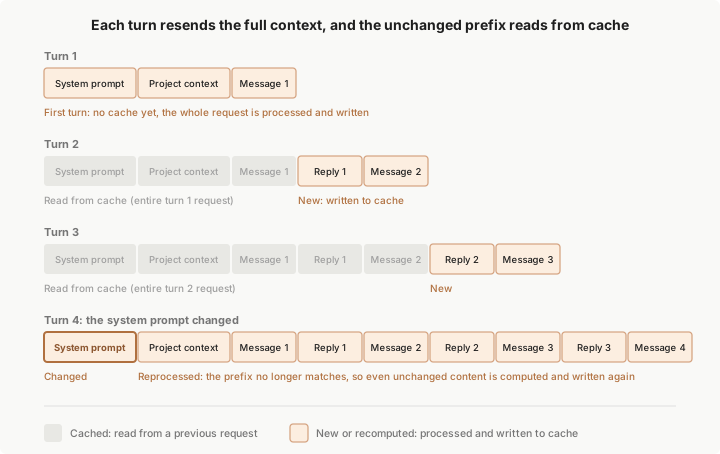
Each time you send a message in Claude Code, it makes a new API request. The model doesn't remember anything between requests, so Claude Code re-sends the full context: the system prompt, your project context, every prior message and tool result, and your new message. New content is appended at the end, which means most of each request is identical to the one before it. Prompt caching is how the API avoids reprocessing the part that didn't change.
The API caches by matching the start of each request, called the prefix, against content it recently processed. On a normal turn, the prefix is the entire previous request and only the latest exchange is new. The match is exact, so a change anywhere in the prefix recomputes everything after it. There is no per-file or per-segment caching. See [how prompt caching works](https://platform.claude.com/docs/en/build-with-claude/prompt-caching#how-prompt-caching-works) in the API reference for the underlying mechanism.
 To get the most out of prefix matching, Claude Code orders each request so content that rarely changes between turns comes first:
| Layer | Content | Changes when |
| --------------- | ----------------------------------------------- | --------------------------------------------------------------------- |
| System prompt | Core instructions, tool definitions | The set of loaded tool definitions changes or Claude Code is upgraded |
| Project context | CLAUDE.md, auto memory, unscoped rules | Session starts, or after `/clear` or `/compact` |
| Conversation | Your messages, Claude's responses, tool results | Every turn |
A change to the conversation layer leaves the system prompt and project context cached. A change to the system prompt invalidates everything, because all later content now sits behind a different prefix. The third column gives common triggers rather than an exhaustive list, and the sections below cover the full set.
The prefix-match rule explains most of the behaviors on this page. [Plan mode](/docs/en/permission-modes#analyze-before-you-edit-with-plan-mode) and [skill loading](/docs/en/skills), for example, append their instructions as conversation messages, so the cached prefix stays intact.
Two settings don't appear in the layer table but still affect what stays cached:
* **Model**: each model has its own cache. Switching models recomputes the entire request even when the content is identical. See [Switching models](#switching-models) below.
* **Effort level**: on most models, each effort level has its own cache, so changing effort mid-session recomputes the entire request. On Fable 5.1 with an API key or a Claude subscription, the cache stays intact by default. See [Changing effort level](#changing-effort-level) below.
Pick your model and effort level at the top of a session, then save `/compact` for natural breaks between tasks. The fewer changes you make mid-task, the higher your cache hit rate.
### Where the cache lives
Caching happens server-side, in whichever infrastructure serves your model. Where that is depends on how you authenticate:
* **API key, Claude subscription, or [Claude Platform on AWS](/docs/en/claude-platform-on-aws)**: the cache lives in Anthropic's infrastructure, accessed through the [Claude API](https://platform.claude.com/docs)
* **Amazon Bedrock or Google Cloud's Agent Platform**: the cache lives in your cloud provider's serving infrastructure
* **Microsoft Foundry**: depends on the deployment's [hosting option](https://platform.claude.com/docs/en/build-with-claude/claude-in-microsoft-foundry#hosting-options). Hosted on Azure deployments are served on Azure infrastructure; Hosted on Anthropic deployments are served on Anthropic's infrastructure
* **Custom `ANTHROPIC_BASE_URL` or [LLM gateway](/docs/en/llm-gateway)**: the cache lives wherever your requests are forwarded, and whether caching works depends on the gateway
Claude Code also appends system context mid-conversation, such as file-change notices, and marks that block for caching on every provider and connection.
At the provider's own endpoint, Amazon Bedrock and its [Mantle endpoint](/docs/en/amazon-bedrock#use-the-mantle-endpoint), Google Cloud's Agent Platform, and Microsoft Foundry cache the block the same way the Claude API does.
When your requests pass through an [LLM gateway](/docs/en/llm-gateway), a custom `ANTHROPIC_BASE_URL`, or a cloud provider base-URL override such as [`ANTHROPIC_BEDROCK_BASE_URL`](/docs/en/env-vars), what stays cached depends on how the gateway handles the [`cache_control` markers](https://platform.claude.com/docs/en/build-with-claude/prompt-caching#explicit-cache-breakpoints) Claude Code sends:
* **Forwards them unchanged**: the block and your conversation cache the same as at the provider's own endpoint.
* **Rejects the marked request with a `400` error naming `cache_control`**: Claude Code re-sends the request with the marker moved off the block and onto your last conversation message, and keeps it there for the rest of the conversation. The block bills as uncached input; your conversation stays cached.
* **Removes the markers while returning success**: your entire conversation history bills as uncached input on every turn. A gateway that converts block-form system content to a plain string drops the marker the same way.
For what each provider stores and processes, see [data usage](/docs/en/data-usage). Wherever the cache lives, entries expire after a period of inactivity, and [Cache lifetime](#cache-lifetime) below covers the TTL and how to extend it.
## Actions that invalidate the cache
These actions cause the next request to miss part or all of the cache. You see a one-time slower, more expensive turn, after which the new prefix is cached. Most of them are avoidable mid-task once you know they have a cost. A model switch can feel free until you notice the slower turn that follows.
* [Switching models](#switching-models)
* [Changing effort level](#changing-effort-level)
* [Turning on fast mode](#turning-on-fast-mode)
* [Connecting or disconnecting an MCP server](#connecting-or-disconnecting-an-mcp-server)
* [Enabling or disabling a plugin](#enabling-or-disabling-a-plugin)
* [Denying an entire tool](#denying-an-entire-tool)
* [Changing output style](#changing-output-style)
* [Compacting the conversation](#compacting-the-conversation)
* [Accumulating many images](#accumulating-many-images)
* [Upgrading Claude Code](#upgrading-claude-code)
### Switching models
Each model has its own cache. Switching with [`/model`](/docs/en/model-config#setting-your-model) means the next request reads the entire conversation history with no cache hits, even though the content is identical.
When you run `/model` at the terminal, Claude Code asks you to confirm the switch only while the cache is still warm. The cache stays warm for one [cache TTL](#cache-lifetime) after Claude Code last sent a request in this conversation or Claude last responded. Once that time passes, the cache has expired, so Claude Code switches without asking.
Before v2.1.238, Claude Code didn't check the cache TTL and asked even after the cache had expired.
You can also require this confirmation or skip it with a [PreModelSwitch hook](/docs/en/hooks#premodelswitch-decision-control).
The [`opusplan` model setting](/docs/en/model-config#opusplan-model-setting) resolves to Opus during plan mode and Sonnet during execution, so each plan-mode toggle is a model switch and starts a fresh cache.
[Automatic model fallback](/docs/en/model-config#automatic-model-fallback) on Fable models and Opus 5 is also a model switch. When a safety classifier flags a request in a category that has a fallback model, Claude Code re-runs the request on that model and the session continues there.
When a skill or command's frontmatter names a [`model`](/docs/en/skills#frontmatter-reference) other than the session's current model, that turn is also a model switch: the next request reads the entire conversation history with no cache hits. The session model resumes on your next prompt. A `context: fork` skill sets the [forked subagent's model](/docs/en/skills#run-skills-in-a-subagent) instead.
### Changing effort level
On most models, changing the [effort level](/docs/en/model-config#adjust-effort-level) mid-session means the next request reads the entire conversation history with no cache hits. While the cache is still warm, Claude Code asks you to confirm the change first.
On Fable 5.1 with an API key or a Claude subscription, changing effort keeps the cache, and Claude Code applies the new level without asking. This doesn't apply on Amazon Bedrock, Google Cloud's Agent Platform, or a [Claude apps gateway](/docs/en/claude-apps-gateway), or when you set [`CLAUDE_CODE_DISABLE_EXPERIMENTAL_BETAS`](/docs/en/llm-gateway-protocol#disable-pre-release-capabilities) or your organization has a HIPAA configuration.
Before v2.1.260, changing effort on Fable 5.1 with an API key or a Claude subscription also invalidated the cache.
### Turning on fast mode
Enabling [fast mode](/docs/en/fast-mode) adds a request header that is part of the cache key, so the first request Claude Code sends with fast mode on reads the entire conversation history with no cache hits. Claude Code sets that header once when a turn starts and keeps it for the whole turn, so when you turn fast mode on while Claude is working, the cache miss from the header happens on the first request of your next turn. Those uncached input tokens are billed at [fast mode rates](/docs/en/fast-mode#understand-the-cost-tradeoff), which is why turning it on at the start of a session costs less than turning it on deep into a long one. If your current model doesn't support fast mode, enabling fast mode also [switches your model](#switching-models), and that switch starts a fresh cache on its own from the next request in the running turn.
The cost applies once per conversation. After the first fast mode turn, Claude Code keeps sending the header and varies only the request's speed setting, which is not part of the cache key. Turning fast mode off, the [automatic fallback to standard speed](/docs/en/fast-mode#handle-rate-limits) after a rate limit, and turning it back on later all keep the cache. If you [run out of usage credits](/docs/en/fast-mode#handle-rate-limits) mid-session, Claude Code retries each rejected fast mode request at standard speed the same way, so this fallback also keeps the cache. `/clear` and `/compact` reset this, since they rebuild the cache at those points anyway.
### Connecting or disconnecting an MCP server
Tool definitions sit in the system prompt layer, so the cache invalidates when the set of tool definitions in the request changes between turns. Toggling the [advisor tool](/docs/en/advisor) is an exception: its definition sits after the cache breakpoint, so enabling or disabling `/advisor` keeps the cached prefix intact. Whether an [MCP server](/docs/en/mcp) change does this depends on whether its tools are deferred by [tool search](/docs/en/mcp#scale-with-mcp-tool-search) or loaded into the prefix:
* **Deferred tools**, the default on supported models: a server connecting, disconnecting, or changing its tool list only appends new content and doesn't disturb anything already cached.
* **Tools loaded into the prefix**: any change to them invalidates the cache. This happens when [tool search is unavailable or disabled](/docs/en/mcp#configure-tool-search), such as on Google Cloud's Agent Platform models earlier than the Claude 4.5 generation, with a custom `ANTHROPIC_BASE_URL` gateway, or on a Microsoft Foundry [deployment hosted on Azure](https://platform.claude.com/docs/en/build-with-claude/claude-in-microsoft-foundry#hosting-options) once Claude Code detects that the deployment rejects tool search. It also happens for a server or tool marked [`alwaysLoad`](/docs/en/mcp#exempt-a-server-from-deferral), and for definitions kept upfront by [threshold-based loading](/docs/en/mcp#configure-tool-search).
When tools load into the prefix, the most common cause of an invalidation is a server connecting or disconnecting mid-session, which can happen without any action on your part: a stdio server's process exits, an HTTP session expires, or a server [reconnects automatically after a transient failure](/docs/en/mcp#automatic-reconnection). A connected server can also push a [dynamic tool update](/docs/en/mcp#dynamic-tool-updates) that changes its tool list.
Editing your MCP config does not by itself change the cache. The new config takes effect only after a restart, which is when the server connects or disconnects.
### Enabling or disabling a plugin
When you enable or disable a [plugin](/docs/en/plugins), what the change costs depends on which component types the plugin provides. The cases below cover each component type, when Claude Code applies the change, and what happens when you disable a plugin again in the same session.
#### Plugin components that keep the cache
Claude Code never invalidates the cache for a plugin's skills, commands, agents, hooks, monitors, or themes. It appends their content after the existing conversation, so the next request pays for that content and still reads everything before it from the cache.
#### Plugins that provide MCP servers
When you enable or disable a plugin that provides [MCP servers](/docs/en/plugins-reference#mcp-servers), Claude Code follows the same rules as when you [connect or disconnect an MCP server](#connecting-or-disconnecting-an-mcp-server):
* If Claude Code defers the server's tools, it keeps the cache.
* If Claude Code loads them into the prefix, the next request re-reads the entire conversation.
#### Code intelligence plugins
When you enable a [code intelligence plugin](/docs/en/discover-plugins#code-intelligence), Claude gets the [LSP tool](/docs/en/tools-reference#lsp-tool-behavior).
#### When plugin changes apply
A plugin change applies when you run [`/reload-plugins`](/docs/en/discover-plugins#apply-plugin-changes-without-restarting) or start a new session, not when you run `/plugin enable` or `/plugin disable`. You pay the cost, whether appended announcements or a full re-read, on the first turn after the change applies. Claude Code can also apply a change on its own:
* For a plugin with a `command` source, Claude Code [can reload the plugin itself](/docs/en/plugin-marketplaces#when-claude-code-re-runs-the-command).
* When you [install a plugin from the `/plugin` interface](/docs/en/discover-plugins#install-plugins), Claude Code can activate it during the install. Claude Code tells you in the install summary whether it did or whether to run `/reload-plugins`.
* When you [move the session with `/cd`](/docs/en/permissions#move-the-session-to-another-directory) on v2.1.246 or later, Claude Code applies the plugins the new directory's settings enable as part of the move, without the full re-read warning that holds a `/reload-plugins`.
* In interactive sessions, when you add or remove a plugin in a [folder of plugins](/docs/en/plugins#test-your-plugins-locally) you passed with `--plugin-dir`, the change applies right away. If applying it would trigger a full re-read, Claude Code holds the change instead and shows a notice to run `/reload-plugins`. Requires Claude Code v2.1.265 or later.
When you run `/reload-plugins` and the reload would trigger a full re-read, Claude Code shows a warning and doesn't apply the reload. Rerun it with `--force` to apply the reload anyway.
`/reload-plugins` also runs in sessions without an interactive terminal, such as the desktop app, the Agent SDK, and [non-interactive mode](/docs/en/headless) with `-p`, when you type it into the session directly. Requires Claude Code v2.1.260 or later.
In those sessions the reload applies everything except plugin MCP server changes, which [take effect in your next session](/docs/en/discover-plugins#apply-plugin-changes-without-restarting) and so never cost a full re-read mid-session.
#### Plugins you enable and then disable in one session
When you disable a plugin you enabled earlier in the session, Claude Code restores the previous request shape. If that prefix is still within its [cache lifetime](#cache-lifetime), the next request reads the older cache entry instead of rebuilding.
### Denying an entire tool
Adding a bare tool name like `Bash` or `WebFetch` as a [deny rule](/docs/en/permissions#manage-permissions) removes that tool from Claude's context entirely. Claude Code loads built-in tool definitions into the system prompt layer, so adding or removing one of these rules mid-session invalidates the cache. Claude Code applies the change on the next request, whether you add the rule through `/permissions` or by [editing a settings file directly](/docs/en/settings#when-edits-take-effect). That includes a rule you add through `/permissions` in the middle of a turn.
Only a deny rule that matches in the tool-name position has this effect: a bare tool name, the equivalent `Bash(*)` form, or a [tool-name glob](/docs/en/permissions#tool-name-wildcards) like `"*"`. A glob that matches only MCP tools, such as `"mcp__*"`, removes those tools the same way but leaves the cache intact when the matched tools are [deferred](#connecting-or-disconnecting-an-mcp-server), the default, since deferred definitions were never in the cached prefix. Scoped deny rules like `Bash(rm *)`, and all allow and ask rules, don't change which tools Claude sees. Claude Code checks them when Claude attempts a call, leaving the prefix intact.
### Changing output style
When you switch [output styles](/docs/en/output-styles) mid-session with `/config` or the `outputStyle` setting, Claude uses the new style starting with your next message. In a conversation that [keeps a recorded system prompt](/docs/en/cli-reference#system-prompt-flags-in-resumed-conversations), as sessions signed in with a claude.ai or Console account do by default, Claude Code delivers the new style's instructions as a message in the conversation. That request still reads the system prompt and the earlier conversation from the cache.
In sessions that don't [fetch feature flags](/docs/en/env-vars#features-that-need-feature-flag-fetching), such as on Amazon Bedrock, Google Cloud's Agent Platform, or Microsoft Foundry, the style's instructions are part of the system prompt, so the request after a switch reads the entire conversation history with no cache hits. There, switch styles before your first message in a session or right after `/clear` or `/compact`, when there is little or no conversation history to re-read.
Before v2.1.251, a mid-session style switch kept the cache but didn't apply until you ran `/clear` or started a new session.
### Compacting the conversation
[Compaction](/docs/en/context-window#what-survives-compaction) replaces your message history with a summary. By design, this invalidates the conversation layer, since the next request has a new, shorter history that doesn't share a prefix with the old one. Claude Code reuses the system prompt layer and reloads project context from disk, which cache-hits only if CLAUDE.md and memory are unchanged since the session started.
To produce the summary, Claude Code sends a separate request with the same system prompt, tools, and history as your conversation, plus a summarization instruction appended as a final user message. While the cache is warm, that request reads your prefix from the cache, so a mid-session `/compact` costs a fraction of what the context size suggests and spends most of its time generating the summary.
After a break longer than the [cache lifetime](#cache-lifetime), there is no cache left to read, so the summarization request reprocesses the full history as uncached input. This is why `/compact` costs the most when you [resume an old session](/docs/en/sessions#resume-from-a-summary). In both the warm and cold cases, the turn after compaction rebuilds the conversation cache for only the much shorter summary, so that turn is not the slow part.
Compaction works in your favor when the context you discard is content you no longer need. To choose when its overhead happens, run `/compact` at a natural break in your work, such as between tasks, instead of waiting for auto-compaction to trigger mid-task. If you've gone down a path you want to abandon entirely, [`/rewind`](#rewinding-the-conversation) to an earlier turn instead. Rewinding truncates back to a prefix that is already cached, rather than building a new one as compaction does.
### Accumulating many images
The API limits how many images and PDFs each request can carry. For the current numbers, see [Request limits](https://platform.claude.com/docs/en/build-with-claude/vision#request-limits) in the API docs. Claude Code also caps the total size of the images and PDFs in a request, so large screenshots reach the limit with fewer images than small ones.
When the next request would pass either limit, Claude Code removes a batch of the oldest images and PDFs from what it sends, which leaves room for more before it needs to remove any again. Claude can no longer see the removed images. If Claude needs one of them again, share it again.
Removing images changes the messages that held them, so the next request reprocesses the conversation from the earliest of those messages onward. Because Claude Code removes a batch at a time, you see one slower turn per batch rather than one with each new screenshot.
### Upgrading Claude Code
A new Claude Code version typically updates the system prompt or tool definitions, so the first request after an upgrade rebuilds the cache from the top. [Auto-update](/docs/en/setup#auto-updates) downloads new versions in the background but applies them on the next launch, never mid-session, so you see this as an uncached first turn after restarting rather than a surprise during a session. Set `DISABLE_AUTOUPDATER=1` to control when upgrades apply.
[Resuming a session](/docs/en/sessions#resume-a-session) after an upgrade reprocesses the entire conversation history with no cache hits, since the history now sits behind a different system prompt. The cost scales with how long the resumed conversation is, so the first turn back into a long session can be the most expensive request you send.
## Actions that keep the cache
These actions either append to the end of the conversation or don't touch the request at all. Some of them, such as editing CLAUDE.md, keep the cache for the same reason the change doesn't reach the running session until `/clear`, `/compact`, or a restart.
* [Editing files in your repository](#editing-files-in-your-repository)
* [Editing CLAUDE.md mid-session](#editing-claude-md-mid-session)
* [Changing permission mode](#changing-permission-mode)
* [Invoking skills and commands](#invoking-skills-and-commands)
* [Running `/recap`](#running-%2Frecap)
* [Rewinding the conversation](#rewinding-the-conversation)
* [Spawning a subagent](#subagents-and-the-cache)
### Editing files in your repository
File contents enter context only when Claude reads them, and reads append to the conversation. Editing a file Claude previously read does not retroactively change the earlier read in history. Instead, Claude Code appends a `` noting the file changed, and Claude re-reads it if needed.
### Editing CLAUDE.md mid-session
Your project-root and user-level CLAUDE.md files are read once at session start and held in memory. Editing them mid-session does not invalidate the cache, but the edit also doesn't apply. Claude keeps working with the version that was loaded at session start. The new content loads on the next `/clear`, `/compact`, or restart.
[Nested CLAUDE.md files in subdirectories](/docs/en/memory) and [rules with `paths:` frontmatter](/docs/en/memory#path-specific-rules) load later, when Claude first reads a matching file. Editing one before it loads does take effect. After it loads, the content is part of the conversation history, so a mid-session edit doesn't retroactively change it.
### Changing permission mode
Switching between [permission modes](/docs/en/permission-modes), such as from Manual to accept edits, does not change the system prompt or tool definitions, so mode changes are cache-safe. The exception is plan mode with the [`opusplan`](/docs/en/model-config#opusplan-model-setting) model setting, which switches the model between Opus and Sonnet as you enter or leave plan mode. That makes the mode toggle a [model switch](#switching-models).
### Invoking skills and commands
[Skills](/docs/en/skills) and [commands](/docs/en/commands) inject their instructions as user messages at the point of invocation. Nothing earlier in the conversation changes. A skill or command whose frontmatter names a `model` can be a [model switch](#switching-models) for that turn.
### Running `/recap`
[`/recap`](/docs/en/interactive-mode#session-recap) generates a summary for display in your terminal. Unlike `/compact`, it appends the summary as command output rather than replacing your message history, so the cached prefix stays intact.
### Rewinding the conversation
[`/rewind`](/docs/en/checkpointing) truncates your conversation back to an earlier turn. The remaining history is the same content the cache was built from at that point, and the system prompt and project context layers are unchanged, so the next request hits the earlier cache entry. Every turn since then has read through that prefix, which kept the entry warm even if the original turn was longer ago than the TTL.
Restoring file checkpoints alongside the conversation has no separate effect on the cache. File contents enter context only when Claude reads them, the same as [editing files in your repository](#editing-files-in-your-repository).
## Cache lifetime
Cached prefixes expire after a period of inactivity. Each request that hits the cache resets the timer, so the cache stays warm as long as you keep working. After a long enough gap, the next request recomputes the full input and re-establishes the cache, which is why the first turn back after stepping away can be noticeably slower.
On a Pro or Max plan, when you resume a large session after a long break, Claude Code [offers to resume from a summary](/docs/en/sessions#resume-from-a-summary) so later requests don't carry the full history.
The time to live (TTL) controls how long a gap the cache survives. The API offers two: a five-minute TTL, and a [one-hour TTL](https://platform.claude.com/docs/en/build-with-claude/prompt-caching#1-hour-cache-duration) that keeps the cache warm through longer breaks but [bills cache writes at a higher rate](https://platform.claude.com/docs/en/build-with-claude/prompt-caching#pricing). The longer TTL helps when you leave a session idle and come back to it, because you skip the reprocessing an expired prefix costs. It costs more on short bursts of work that never idle past five minutes, where the higher write rate applies and the longer cache lifetime goes unused.
### Which TTL each request gets
Claude Code decides the TTL per request, and every request falls in one of two fixed buckets:
* **Main conversation**: your interactive turns, non-interactive `-p` runs, and Agent SDK turns, plus the helpers Claude Code runs inline with them
* **Everything else**: the requests Claude Code makes outside that conversation, such as [subagents](/docs/en/sub-agents), [workflows](/docs/en/workflows), in-process [teammates](/docs/en/agent-teams), forks, compaction, and session titles
Unless you choose a TTL yourself, Claude Code requests the one-hour TTL only on a Claude subscription within your plan's included usage. There it requests the hour for the main conversation, plus a small set of helper requests that Anthropic controls server-side. This table gives each bucket's default TTL under both kinds of billing.
| Request bucket | Claude subscription, within plan usage | Usage credits, API key, or cloud provider |
| ----------------- | ------------------------------------------------------------------------------ | ----------------------------------------- |
| Main conversation | One hour | Five minutes |
| Everything else | Five minutes, except the server-controlled helper requests, which get one hour | Five minutes |
Once you go over your plan's usage limit and Claude Code draws on [usage credits](https://support.claude.com/en/articles/12429409-extra-usage-for-paid-claude-plans), you are billed for that usage, so Claude Code drops the main conversation to the cheaper five-minute TTL. To keep the one-hour TTL there, [choose the TTL yourself](#choose-the-ttl-yourself).
### Choose the TTL yourself
You can set a TTL for either bucket. Each control takes `5m` or `1h`, and Claude Code ignores any other value.
* **Main conversation**: the [`promptCacheTtl`](/docs/en/settings-reference#promptcachettl) setting, or the `CLAUDE_CODE_PROMPT_CACHE_TTL` [environment variable](/docs/en/env-vars)
* **Everything else**: the [`subagentPromptCacheTtl`](/docs/en/settings-reference#subagentpromptcachettl) setting, or the `CLAUDE_CODE_SUBAGENT_PROMPT_CACHE_TTL` environment variable
Both settings and both environment variables require Claude Code v2.1.242 or later. If you sign in with an API key or use a cloud provider, set `promptCacheTtl` to `1h` to give the main conversation a one-hour cache. Requests outside it keep the five-minute default until you choose a TTL for that bucket too.
When more than one control applies, Claude Code takes the first match in this order:
1. `FORCE_PROMPT_CACHING_5M=1`, which forces five minutes for both buckets
2. The bucket's environment variable
3. The bucket's setting
4. For a subagent's requests, the `cacheTtl` value in the subagent's [`experimental` frontmatter field](/docs/en/sub-agents#supported-frontmatter-fields), which requires Claude Code v2.1.248 or later. Claude Code ignores a `1h` there while your Claude subscription is using usage credits
5. `ENABLE_PROMPT_CACHING_1H=1`, which requests one hour for both buckets
6. The [default for the request's bucket](#which-ttl-each-request-gets)
Set `FORCE_PROMPT_CACHING_5M=1` when you're debugging cache behavior, comparing the two TTLs, or overriding a longer TTL set in [managed settings](/docs/en/managed-settings).
To confirm which TTL your main conversation's cache writes used, run `claude -p "hello" --output-format json` and read `usage.cache_creation` in the result. Claude Code reports one-hour cache writes under `ephemeral_1h_input_tokens` and five-minute cache writes under `ephemeral_5m_input_tokens`.
Through an LLM gateway you set with `ANTHROPIC_BASE_URL`, part of the one-hour request travels in the `anthropic-beta` header, so configure the gateway to [forward that header unchanged](/docs/en/llm-gateway-protocol#request-headers). The one-hour TTL isn't available through the [Claude apps gateway](/docs/en/claude-apps-gateway#availability-and-limitations). On Amazon Bedrock, prompt caching support, minimum cacheable prefix length, and one-hour TTL availability all vary by model. If cache token counts stay at zero, check [supported models, regions, and limits](https://docs.aws.amazon.com/bedrock/latest/userguide/prompt-caching.html#prompt-caching-models) in the Amazon Bedrock documentation.
## Cache scope
In Claude Code, the cache is effectively scoped to one machine and directory. The system prompt embeds the working directory, platform, shell, OS version, and auto memory paths, so two sessions in different directories build different prefixes and miss each other's cache. That includes worktrees of the same repository, since each worktree has its own working directory.
Sessions you run in parallel in the same directory build matching prefixes and read each other's cache. Sequential sessions share the prefix only when the git status snapshot at startup matches, since the system prompt also captures branch and recent commits.
The underlying API cache is broader. Caches are isolated between organizations, and on some providers, [between workspaces within an organization](https://platform.claude.com/docs/en/build-with-claude/prompt-caching#cache-storage-and-sharing). Within those boundaries, any two requests with the same model and prefix read the same cache. For Agent SDK callers running fleets of automated processes, see [improve prompt caching across users and machines](/docs/en/agent-sdk/modifying-system-prompts#improve-prompt-caching-across-users-and-machines) to suppress the per-machine sections of the system prompt and share the cache across machines.
## Check cache performance
Cache performance shows up as two token counts the API reports on every response. The most direct way to watch them live is a [statusline script](/docs/en/statusline) that reads the `current_usage` object:
| Field | Meaning |
| ----------------------------- | --------------------------------------------------------------------------------------- |
| `cache_creation_input_tokens` | Tokens written to the cache on this turn, billed at the cache write rate |
| `cache_read_input_tokens` | Tokens served from cache on this turn, billed at roughly 10% of the standard input rate |
A high read-to-creation ratio means caching is working well. If creation stays high turn after turn, something is changing in your prefix. The [actions that invalidate the cache](#actions-that-invalidate-the-cache) section lists the usual causes.
For a per-session summary, run `/usage`. After the main conversation's first response, Claude Code adds a [`Prompt cache (main)` line](/docs/en/costs#prompt-cache-statistics) to the Session block, showing the session's hit ratio, miss count, and whether the cache is warm right now. A status line script can read the same numbers from the [`prompt_cache` object](/docs/en/statusline#prompt-cache-fields). Both require Claude Code v2.1.251 or later.
The `Prompt cache (main)` line also names the likely cause of the last miss when Claude Code can identify one, for example `likely cause: tool definitions changed`. The likely-cause text requires Claude Code v2.1.260 or later.
For visibility across an organization, the OpenTelemetry exporter reports cache read and creation tokens per user and session. See [Monitor usage](/docs/en/monitoring-usage) for the metric and event attribute reference.
## Subagents and the cache
A [subagent](/docs/en/sub-agents) starts its own conversation with its own system prompt and tool set, separate from the parent's. Its first request doesn't read the parent's cache, because the two prefixes differ, and it warms a cache of its own across its turns. Subagents fall outside the main-conversation [TTL bucket](#which-ttl-each-request-gets), so they get five minutes even on a subscription until you [choose a longer one](#choose-the-ttl-yourself).
The parent's cache is unaffected. From the parent's side, the subagent's call and result append to the conversation, leaving the parent's prefix intact.
A [fork](/docs/en/sub-agents#fork-the-current-conversation), by contrast, inherits the parent's system prompt, tools, and conversation history exactly, so its first request reads the parent's cache.
Other requests can also read a prefix that an earlier request cached:
* **Session copies**: a session you [copy with `/fork`](/docs/en/agent-view#copy-the-session-with-%2Ffork) receives its isolation instruction as a message at the end of the copied conversation, so the cache that the original conversation built stays intact.
* **Compaction**: the summarization call described in [Compacting the conversation](#compacting-the-conversation) uses the same prefix-sharing approach.
* **Resumed subagents**: when Claude [resumes a subagent](/docs/en/sub-agents#resume-subagents), the resumed run's first request can read the cache the original run warmed.
* **Workflow fan-outs**: in a [workflow fan-out](/docs/en/workflows#prompt-caching-in-a-fan-out) of same-prefix agents, Claude Code holds all but the first for up to 5 seconds by default, so their first requests can read the prefix that the first agent cached.
## Disable prompt caching
Disabling caching is occasionally useful when debugging caching behavior with a specific model or provider. To turn it off, set one of these environment variables to `1`:
| Variable | Effect |
| ------------------------------- | ----------------------- |
| `DISABLE_PROMPT_CACHING` | Disable for all models |
| `DISABLE_PROMPT_CACHING_HAIKU` | Disable for Haiku only |
| `DISABLE_PROMPT_CACHING_SONNET` | Disable for Sonnet only |
| `DISABLE_PROMPT_CACHING_OPUS` | Disable for Opus only |
| `DISABLE_PROMPT_CACHING_FABLE` | Disable for Fable only |
To set caching policy across an organization, put any of these or the [TTL variables](#cache-lifetime) in the `env` block of [managed settings](/docs/en/managed-settings). For normal use, leave caching enabled.
## Related resources
* [Lessons from building Claude Code: Prompt caching is everything](https://claude.com/blog/lessons-from-building-claude-code-prompt-caching-is-everything): the design rationale for plan mode, deferred tool loading, and compaction
* [Explore the context window](/docs/en/context-window): what loads into context and when
* [Reduce token usage](/docs/en/costs#reduce-token-usage): strategies beyond caching for managing context size
* [Track and reduce costs](/docs/en/agent-sdk/cost-tracking): cache token tracking and TTL configuration for Agent SDK callers
* [Prompt caching](https://platform.claude.com/docs/en/build-with-claude/prompt-caching): the underlying API mechanism, breakpoints, and pricing
To get the most out of prefix matching, Claude Code orders each request so content that rarely changes between turns comes first:
| Layer | Content | Changes when |
| --------------- | ----------------------------------------------- | --------------------------------------------------------------------- |
| System prompt | Core instructions, tool definitions | The set of loaded tool definitions changes or Claude Code is upgraded |
| Project context | CLAUDE.md, auto memory, unscoped rules | Session starts, or after `/clear` or `/compact` |
| Conversation | Your messages, Claude's responses, tool results | Every turn |
A change to the conversation layer leaves the system prompt and project context cached. A change to the system prompt invalidates everything, because all later content now sits behind a different prefix. The third column gives common triggers rather than an exhaustive list, and the sections below cover the full set.
The prefix-match rule explains most of the behaviors on this page. [Plan mode](/docs/en/permission-modes#analyze-before-you-edit-with-plan-mode) and [skill loading](/docs/en/skills), for example, append their instructions as conversation messages, so the cached prefix stays intact.
Two settings don't appear in the layer table but still affect what stays cached:
* **Model**: each model has its own cache. Switching models recomputes the entire request even when the content is identical. See [Switching models](#switching-models) below.
* **Effort level**: on most models, each effort level has its own cache, so changing effort mid-session recomputes the entire request. On Fable 5.1 with an API key or a Claude subscription, the cache stays intact by default. See [Changing effort level](#changing-effort-level) below.
Pick your model and effort level at the top of a session, then save `/compact` for natural breaks between tasks. The fewer changes you make mid-task, the higher your cache hit rate.
### Where the cache lives
Caching happens server-side, in whichever infrastructure serves your model. Where that is depends on how you authenticate:
* **API key, Claude subscription, or [Claude Platform on AWS](/docs/en/claude-platform-on-aws)**: the cache lives in Anthropic's infrastructure, accessed through the [Claude API](https://platform.claude.com/docs)
* **Amazon Bedrock or Google Cloud's Agent Platform**: the cache lives in your cloud provider's serving infrastructure
* **Microsoft Foundry**: depends on the deployment's [hosting option](https://platform.claude.com/docs/en/build-with-claude/claude-in-microsoft-foundry#hosting-options). Hosted on Azure deployments are served on Azure infrastructure; Hosted on Anthropic deployments are served on Anthropic's infrastructure
* **Custom `ANTHROPIC_BASE_URL` or [LLM gateway](/docs/en/llm-gateway)**: the cache lives wherever your requests are forwarded, and whether caching works depends on the gateway
Claude Code also appends system context mid-conversation, such as file-change notices, and marks that block for caching on every provider and connection.
At the provider's own endpoint, Amazon Bedrock and its [Mantle endpoint](/docs/en/amazon-bedrock#use-the-mantle-endpoint), Google Cloud's Agent Platform, and Microsoft Foundry cache the block the same way the Claude API does.
When your requests pass through an [LLM gateway](/docs/en/llm-gateway), a custom `ANTHROPIC_BASE_URL`, or a cloud provider base-URL override such as [`ANTHROPIC_BEDROCK_BASE_URL`](/docs/en/env-vars), what stays cached depends on how the gateway handles the [`cache_control` markers](https://platform.claude.com/docs/en/build-with-claude/prompt-caching#explicit-cache-breakpoints) Claude Code sends:
* **Forwards them unchanged**: the block and your conversation cache the same as at the provider's own endpoint.
* **Rejects the marked request with a `400` error naming `cache_control`**: Claude Code re-sends the request with the marker moved off the block and onto your last conversation message, and keeps it there for the rest of the conversation. The block bills as uncached input; your conversation stays cached.
* **Removes the markers while returning success**: your entire conversation history bills as uncached input on every turn. A gateway that converts block-form system content to a plain string drops the marker the same way.
For what each provider stores and processes, see [data usage](/docs/en/data-usage). Wherever the cache lives, entries expire after a period of inactivity, and [Cache lifetime](#cache-lifetime) below covers the TTL and how to extend it.
## Actions that invalidate the cache
These actions cause the next request to miss part or all of the cache. You see a one-time slower, more expensive turn, after which the new prefix is cached. Most of them are avoidable mid-task once you know they have a cost. A model switch can feel free until you notice the slower turn that follows.
* [Switching models](#switching-models)
* [Changing effort level](#changing-effort-level)
* [Turning on fast mode](#turning-on-fast-mode)
* [Connecting or disconnecting an MCP server](#connecting-or-disconnecting-an-mcp-server)
* [Enabling or disabling a plugin](#enabling-or-disabling-a-plugin)
* [Denying an entire tool](#denying-an-entire-tool)
* [Changing output style](#changing-output-style)
* [Compacting the conversation](#compacting-the-conversation)
* [Accumulating many images](#accumulating-many-images)
* [Upgrading Claude Code](#upgrading-claude-code)
### Switching models
Each model has its own cache. Switching with [`/model`](/docs/en/model-config#setting-your-model) means the next request reads the entire conversation history with no cache hits, even though the content is identical.
When you run `/model` at the terminal, Claude Code asks you to confirm the switch only while the cache is still warm. The cache stays warm for one [cache TTL](#cache-lifetime) after Claude Code last sent a request in this conversation or Claude last responded. Once that time passes, the cache has expired, so Claude Code switches without asking.
Before v2.1.238, Claude Code didn't check the cache TTL and asked even after the cache had expired.
You can also require this confirmation or skip it with a [PreModelSwitch hook](/docs/en/hooks#premodelswitch-decision-control).
The [`opusplan` model setting](/docs/en/model-config#opusplan-model-setting) resolves to Opus during plan mode and Sonnet during execution, so each plan-mode toggle is a model switch and starts a fresh cache.
[Automatic model fallback](/docs/en/model-config#automatic-model-fallback) on Fable models and Opus 5 is also a model switch. When a safety classifier flags a request in a category that has a fallback model, Claude Code re-runs the request on that model and the session continues there.
When a skill or command's frontmatter names a [`model`](/docs/en/skills#frontmatter-reference) other than the session's current model, that turn is also a model switch: the next request reads the entire conversation history with no cache hits. The session model resumes on your next prompt. A `context: fork` skill sets the [forked subagent's model](/docs/en/skills#run-skills-in-a-subagent) instead.
### Changing effort level
On most models, changing the [effort level](/docs/en/model-config#adjust-effort-level) mid-session means the next request reads the entire conversation history with no cache hits. While the cache is still warm, Claude Code asks you to confirm the change first.
On Fable 5.1 with an API key or a Claude subscription, changing effort keeps the cache, and Claude Code applies the new level without asking. This doesn't apply on Amazon Bedrock, Google Cloud's Agent Platform, or a [Claude apps gateway](/docs/en/claude-apps-gateway), or when you set [`CLAUDE_CODE_DISABLE_EXPERIMENTAL_BETAS`](/docs/en/llm-gateway-protocol#disable-pre-release-capabilities) or your organization has a HIPAA configuration.
Before v2.1.260, changing effort on Fable 5.1 with an API key or a Claude subscription also invalidated the cache.
### Turning on fast mode
Enabling [fast mode](/docs/en/fast-mode) adds a request header that is part of the cache key, so the first request Claude Code sends with fast mode on reads the entire conversation history with no cache hits. Claude Code sets that header once when a turn starts and keeps it for the whole turn, so when you turn fast mode on while Claude is working, the cache miss from the header happens on the first request of your next turn. Those uncached input tokens are billed at [fast mode rates](/docs/en/fast-mode#understand-the-cost-tradeoff), which is why turning it on at the start of a session costs less than turning it on deep into a long one. If your current model doesn't support fast mode, enabling fast mode also [switches your model](#switching-models), and that switch starts a fresh cache on its own from the next request in the running turn.
The cost applies once per conversation. After the first fast mode turn, Claude Code keeps sending the header and varies only the request's speed setting, which is not part of the cache key. Turning fast mode off, the [automatic fallback to standard speed](/docs/en/fast-mode#handle-rate-limits) after a rate limit, and turning it back on later all keep the cache. If you [run out of usage credits](/docs/en/fast-mode#handle-rate-limits) mid-session, Claude Code retries each rejected fast mode request at standard speed the same way, so this fallback also keeps the cache. `/clear` and `/compact` reset this, since they rebuild the cache at those points anyway.
### Connecting or disconnecting an MCP server
Tool definitions sit in the system prompt layer, so the cache invalidates when the set of tool definitions in the request changes between turns. Toggling the [advisor tool](/docs/en/advisor) is an exception: its definition sits after the cache breakpoint, so enabling or disabling `/advisor` keeps the cached prefix intact. Whether an [MCP server](/docs/en/mcp) change does this depends on whether its tools are deferred by [tool search](/docs/en/mcp#scale-with-mcp-tool-search) or loaded into the prefix:
* **Deferred tools**, the default on supported models: a server connecting, disconnecting, or changing its tool list only appends new content and doesn't disturb anything already cached.
* **Tools loaded into the prefix**: any change to them invalidates the cache. This happens when [tool search is unavailable or disabled](/docs/en/mcp#configure-tool-search), such as on Google Cloud's Agent Platform models earlier than the Claude 4.5 generation, with a custom `ANTHROPIC_BASE_URL` gateway, or on a Microsoft Foundry [deployment hosted on Azure](https://platform.claude.com/docs/en/build-with-claude/claude-in-microsoft-foundry#hosting-options) once Claude Code detects that the deployment rejects tool search. It also happens for a server or tool marked [`alwaysLoad`](/docs/en/mcp#exempt-a-server-from-deferral), and for definitions kept upfront by [threshold-based loading](/docs/en/mcp#configure-tool-search).
When tools load into the prefix, the most common cause of an invalidation is a server connecting or disconnecting mid-session, which can happen without any action on your part: a stdio server's process exits, an HTTP session expires, or a server [reconnects automatically after a transient failure](/docs/en/mcp#automatic-reconnection). A connected server can also push a [dynamic tool update](/docs/en/mcp#dynamic-tool-updates) that changes its tool list.
Editing your MCP config does not by itself change the cache. The new config takes effect only after a restart, which is when the server connects or disconnects.
### Enabling or disabling a plugin
When you enable or disable a [plugin](/docs/en/plugins), what the change costs depends on which component types the plugin provides. The cases below cover each component type, when Claude Code applies the change, and what happens when you disable a plugin again in the same session.
#### Plugin components that keep the cache
Claude Code never invalidates the cache for a plugin's skills, commands, agents, hooks, monitors, or themes. It appends their content after the existing conversation, so the next request pays for that content and still reads everything before it from the cache.
#### Plugins that provide MCP servers
When you enable or disable a plugin that provides [MCP servers](/docs/en/plugins-reference#mcp-servers), Claude Code follows the same rules as when you [connect or disconnect an MCP server](#connecting-or-disconnecting-an-mcp-server):
* If Claude Code defers the server's tools, it keeps the cache.
* If Claude Code loads them into the prefix, the next request re-reads the entire conversation.
#### Code intelligence plugins
When you enable a [code intelligence plugin](/docs/en/discover-plugins#code-intelligence), Claude gets the [LSP tool](/docs/en/tools-reference#lsp-tool-behavior).
#### When plugin changes apply
A plugin change applies when you run [`/reload-plugins`](/docs/en/discover-plugins#apply-plugin-changes-without-restarting) or start a new session, not when you run `/plugin enable` or `/plugin disable`. You pay the cost, whether appended announcements or a full re-read, on the first turn after the change applies. Claude Code can also apply a change on its own:
* For a plugin with a `command` source, Claude Code [can reload the plugin itself](/docs/en/plugin-marketplaces#when-claude-code-re-runs-the-command).
* When you [install a plugin from the `/plugin` interface](/docs/en/discover-plugins#install-plugins), Claude Code can activate it during the install. Claude Code tells you in the install summary whether it did or whether to run `/reload-plugins`.
* When you [move the session with `/cd`](/docs/en/permissions#move-the-session-to-another-directory) on v2.1.246 or later, Claude Code applies the plugins the new directory's settings enable as part of the move, without the full re-read warning that holds a `/reload-plugins`.
* In interactive sessions, when you add or remove a plugin in a [folder of plugins](/docs/en/plugins#test-your-plugins-locally) you passed with `--plugin-dir`, the change applies right away. If applying it would trigger a full re-read, Claude Code holds the change instead and shows a notice to run `/reload-plugins`. Requires Claude Code v2.1.265 or later.
When you run `/reload-plugins` and the reload would trigger a full re-read, Claude Code shows a warning and doesn't apply the reload. Rerun it with `--force` to apply the reload anyway.
`/reload-plugins` also runs in sessions without an interactive terminal, such as the desktop app, the Agent SDK, and [non-interactive mode](/docs/en/headless) with `-p`, when you type it into the session directly. Requires Claude Code v2.1.260 or later.
In those sessions the reload applies everything except plugin MCP server changes, which [take effect in your next session](/docs/en/discover-plugins#apply-plugin-changes-without-restarting) and so never cost a full re-read mid-session.
#### Plugins you enable and then disable in one session
When you disable a plugin you enabled earlier in the session, Claude Code restores the previous request shape. If that prefix is still within its [cache lifetime](#cache-lifetime), the next request reads the older cache entry instead of rebuilding.
### Denying an entire tool
Adding a bare tool name like `Bash` or `WebFetch` as a [deny rule](/docs/en/permissions#manage-permissions) removes that tool from Claude's context entirely. Claude Code loads built-in tool definitions into the system prompt layer, so adding or removing one of these rules mid-session invalidates the cache. Claude Code applies the change on the next request, whether you add the rule through `/permissions` or by [editing a settings file directly](/docs/en/settings#when-edits-take-effect). That includes a rule you add through `/permissions` in the middle of a turn.
Only a deny rule that matches in the tool-name position has this effect: a bare tool name, the equivalent `Bash(*)` form, or a [tool-name glob](/docs/en/permissions#tool-name-wildcards) like `"*"`. A glob that matches only MCP tools, such as `"mcp__*"`, removes those tools the same way but leaves the cache intact when the matched tools are [deferred](#connecting-or-disconnecting-an-mcp-server), the default, since deferred definitions were never in the cached prefix. Scoped deny rules like `Bash(rm *)`, and all allow and ask rules, don't change which tools Claude sees. Claude Code checks them when Claude attempts a call, leaving the prefix intact.
### Changing output style
When you switch [output styles](/docs/en/output-styles) mid-session with `/config` or the `outputStyle` setting, Claude uses the new style starting with your next message. In a conversation that [keeps a recorded system prompt](/docs/en/cli-reference#system-prompt-flags-in-resumed-conversations), as sessions signed in with a claude.ai or Console account do by default, Claude Code delivers the new style's instructions as a message in the conversation. That request still reads the system prompt and the earlier conversation from the cache.
In sessions that don't [fetch feature flags](/docs/en/env-vars#features-that-need-feature-flag-fetching), such as on Amazon Bedrock, Google Cloud's Agent Platform, or Microsoft Foundry, the style's instructions are part of the system prompt, so the request after a switch reads the entire conversation history with no cache hits. There, switch styles before your first message in a session or right after `/clear` or `/compact`, when there is little or no conversation history to re-read.
Before v2.1.251, a mid-session style switch kept the cache but didn't apply until you ran `/clear` or started a new session.
### Compacting the conversation
[Compaction](/docs/en/context-window#what-survives-compaction) replaces your message history with a summary. By design, this invalidates the conversation layer, since the next request has a new, shorter history that doesn't share a prefix with the old one. Claude Code reuses the system prompt layer and reloads project context from disk, which cache-hits only if CLAUDE.md and memory are unchanged since the session started.
To produce the summary, Claude Code sends a separate request with the same system prompt, tools, and history as your conversation, plus a summarization instruction appended as a final user message. While the cache is warm, that request reads your prefix from the cache, so a mid-session `/compact` costs a fraction of what the context size suggests and spends most of its time generating the summary.
After a break longer than the [cache lifetime](#cache-lifetime), there is no cache left to read, so the summarization request reprocesses the full history as uncached input. This is why `/compact` costs the most when you [resume an old session](/docs/en/sessions#resume-from-a-summary). In both the warm and cold cases, the turn after compaction rebuilds the conversation cache for only the much shorter summary, so that turn is not the slow part.
Compaction works in your favor when the context you discard is content you no longer need. To choose when its overhead happens, run `/compact` at a natural break in your work, such as between tasks, instead of waiting for auto-compaction to trigger mid-task. If you've gone down a path you want to abandon entirely, [`/rewind`](#rewinding-the-conversation) to an earlier turn instead. Rewinding truncates back to a prefix that is already cached, rather than building a new one as compaction does.
### Accumulating many images
The API limits how many images and PDFs each request can carry. For the current numbers, see [Request limits](https://platform.claude.com/docs/en/build-with-claude/vision#request-limits) in the API docs. Claude Code also caps the total size of the images and PDFs in a request, so large screenshots reach the limit with fewer images than small ones.
When the next request would pass either limit, Claude Code removes a batch of the oldest images and PDFs from what it sends, which leaves room for more before it needs to remove any again. Claude can no longer see the removed images. If Claude needs one of them again, share it again.
Removing images changes the messages that held them, so the next request reprocesses the conversation from the earliest of those messages onward. Because Claude Code removes a batch at a time, you see one slower turn per batch rather than one with each new screenshot.
### Upgrading Claude Code
A new Claude Code version typically updates the system prompt or tool definitions, so the first request after an upgrade rebuilds the cache from the top. [Auto-update](/docs/en/setup#auto-updates) downloads new versions in the background but applies them on the next launch, never mid-session, so you see this as an uncached first turn after restarting rather than a surprise during a session. Set `DISABLE_AUTOUPDATER=1` to control when upgrades apply.
[Resuming a session](/docs/en/sessions#resume-a-session) after an upgrade reprocesses the entire conversation history with no cache hits, since the history now sits behind a different system prompt. The cost scales with how long the resumed conversation is, so the first turn back into a long session can be the most expensive request you send.
## Actions that keep the cache
These actions either append to the end of the conversation or don't touch the request at all. Some of them, such as editing CLAUDE.md, keep the cache for the same reason the change doesn't reach the running session until `/clear`, `/compact`, or a restart.
* [Editing files in your repository](#editing-files-in-your-repository)
* [Editing CLAUDE.md mid-session](#editing-claude-md-mid-session)
* [Changing permission mode](#changing-permission-mode)
* [Invoking skills and commands](#invoking-skills-and-commands)
* [Running `/recap`](#running-%2Frecap)
* [Rewinding the conversation](#rewinding-the-conversation)
* [Spawning a subagent](#subagents-and-the-cache)
### Editing files in your repository
File contents enter context only when Claude reads them, and reads append to the conversation. Editing a file Claude previously read does not retroactively change the earlier read in history. Instead, Claude Code appends a `` noting the file changed, and Claude re-reads it if needed.
### Editing CLAUDE.md mid-session
Your project-root and user-level CLAUDE.md files are read once at session start and held in memory. Editing them mid-session does not invalidate the cache, but the edit also doesn't apply. Claude keeps working with the version that was loaded at session start. The new content loads on the next `/clear`, `/compact`, or restart.
[Nested CLAUDE.md files in subdirectories](/docs/en/memory) and [rules with `paths:` frontmatter](/docs/en/memory#path-specific-rules) load later, when Claude first reads a matching file. Editing one before it loads does take effect. After it loads, the content is part of the conversation history, so a mid-session edit doesn't retroactively change it.
### Changing permission mode
Switching between [permission modes](/docs/en/permission-modes), such as from Manual to accept edits, does not change the system prompt or tool definitions, so mode changes are cache-safe. The exception is plan mode with the [`opusplan`](/docs/en/model-config#opusplan-model-setting) model setting, which switches the model between Opus and Sonnet as you enter or leave plan mode. That makes the mode toggle a [model switch](#switching-models).
### Invoking skills and commands
[Skills](/docs/en/skills) and [commands](/docs/en/commands) inject their instructions as user messages at the point of invocation. Nothing earlier in the conversation changes. A skill or command whose frontmatter names a `model` can be a [model switch](#switching-models) for that turn.
### Running `/recap`
[`/recap`](/docs/en/interactive-mode#session-recap) generates a summary for display in your terminal. Unlike `/compact`, it appends the summary as command output rather than replacing your message history, so the cached prefix stays intact.
### Rewinding the conversation
[`/rewind`](/docs/en/checkpointing) truncates your conversation back to an earlier turn. The remaining history is the same content the cache was built from at that point, and the system prompt and project context layers are unchanged, so the next request hits the earlier cache entry. Every turn since then has read through that prefix, which kept the entry warm even if the original turn was longer ago than the TTL.
Restoring file checkpoints alongside the conversation has no separate effect on the cache. File contents enter context only when Claude reads them, the same as [editing files in your repository](#editing-files-in-your-repository).
## Cache lifetime
Cached prefixes expire after a period of inactivity. Each request that hits the cache resets the timer, so the cache stays warm as long as you keep working. After a long enough gap, the next request recomputes the full input and re-establishes the cache, which is why the first turn back after stepping away can be noticeably slower.
On a Pro or Max plan, when you resume a large session after a long break, Claude Code [offers to resume from a summary](/docs/en/sessions#resume-from-a-summary) so later requests don't carry the full history.
The time to live (TTL) controls how long a gap the cache survives. The API offers two: a five-minute TTL, and a [one-hour TTL](https://platform.claude.com/docs/en/build-with-claude/prompt-caching#1-hour-cache-duration) that keeps the cache warm through longer breaks but [bills cache writes at a higher rate](https://platform.claude.com/docs/en/build-with-claude/prompt-caching#pricing). The longer TTL helps when you leave a session idle and come back to it, because you skip the reprocessing an expired prefix costs. It costs more on short bursts of work that never idle past five minutes, where the higher write rate applies and the longer cache lifetime goes unused.
### Which TTL each request gets
Claude Code decides the TTL per request, and every request falls in one of two fixed buckets:
* **Main conversation**: your interactive turns, non-interactive `-p` runs, and Agent SDK turns, plus the helpers Claude Code runs inline with them
* **Everything else**: the requests Claude Code makes outside that conversation, such as [subagents](/docs/en/sub-agents), [workflows](/docs/en/workflows), in-process [teammates](/docs/en/agent-teams), forks, compaction, and session titles
Unless you choose a TTL yourself, Claude Code requests the one-hour TTL only on a Claude subscription within your plan's included usage. There it requests the hour for the main conversation, plus a small set of helper requests that Anthropic controls server-side. This table gives each bucket's default TTL under both kinds of billing.
| Request bucket | Claude subscription, within plan usage | Usage credits, API key, or cloud provider |
| ----------------- | ------------------------------------------------------------------------------ | ----------------------------------------- |
| Main conversation | One hour | Five minutes |
| Everything else | Five minutes, except the server-controlled helper requests, which get one hour | Five minutes |
Once you go over your plan's usage limit and Claude Code draws on [usage credits](https://support.claude.com/en/articles/12429409-extra-usage-for-paid-claude-plans), you are billed for that usage, so Claude Code drops the main conversation to the cheaper five-minute TTL. To keep the one-hour TTL there, [choose the TTL yourself](#choose-the-ttl-yourself).
### Choose the TTL yourself
You can set a TTL for either bucket. Each control takes `5m` or `1h`, and Claude Code ignores any other value.
* **Main conversation**: the [`promptCacheTtl`](/docs/en/settings-reference#promptcachettl) setting, or the `CLAUDE_CODE_PROMPT_CACHE_TTL` [environment variable](/docs/en/env-vars)
* **Everything else**: the [`subagentPromptCacheTtl`](/docs/en/settings-reference#subagentpromptcachettl) setting, or the `CLAUDE_CODE_SUBAGENT_PROMPT_CACHE_TTL` environment variable
Both settings and both environment variables require Claude Code v2.1.242 or later. If you sign in with an API key or use a cloud provider, set `promptCacheTtl` to `1h` to give the main conversation a one-hour cache. Requests outside it keep the five-minute default until you choose a TTL for that bucket too.
When more than one control applies, Claude Code takes the first match in this order:
1. `FORCE_PROMPT_CACHING_5M=1`, which forces five minutes for both buckets
2. The bucket's environment variable
3. The bucket's setting
4. For a subagent's requests, the `cacheTtl` value in the subagent's [`experimental` frontmatter field](/docs/en/sub-agents#supported-frontmatter-fields), which requires Claude Code v2.1.248 or later. Claude Code ignores a `1h` there while your Claude subscription is using usage credits
5. `ENABLE_PROMPT_CACHING_1H=1`, which requests one hour for both buckets
6. The [default for the request's bucket](#which-ttl-each-request-gets)
Set `FORCE_PROMPT_CACHING_5M=1` when you're debugging cache behavior, comparing the two TTLs, or overriding a longer TTL set in [managed settings](/docs/en/managed-settings).
To confirm which TTL your main conversation's cache writes used, run `claude -p "hello" --output-format json` and read `usage.cache_creation` in the result. Claude Code reports one-hour cache writes under `ephemeral_1h_input_tokens` and five-minute cache writes under `ephemeral_5m_input_tokens`.
Through an LLM gateway you set with `ANTHROPIC_BASE_URL`, part of the one-hour request travels in the `anthropic-beta` header, so configure the gateway to [forward that header unchanged](/docs/en/llm-gateway-protocol#request-headers). The one-hour TTL isn't available through the [Claude apps gateway](/docs/en/claude-apps-gateway#availability-and-limitations). On Amazon Bedrock, prompt caching support, minimum cacheable prefix length, and one-hour TTL availability all vary by model. If cache token counts stay at zero, check [supported models, regions, and limits](https://docs.aws.amazon.com/bedrock/latest/userguide/prompt-caching.html#prompt-caching-models) in the Amazon Bedrock documentation.
## Cache scope
In Claude Code, the cache is effectively scoped to one machine and directory. The system prompt embeds the working directory, platform, shell, OS version, and auto memory paths, so two sessions in different directories build different prefixes and miss each other's cache. That includes worktrees of the same repository, since each worktree has its own working directory.
Sessions you run in parallel in the same directory build matching prefixes and read each other's cache. Sequential sessions share the prefix only when the git status snapshot at startup matches, since the system prompt also captures branch and recent commits.
The underlying API cache is broader. Caches are isolated between organizations, and on some providers, [between workspaces within an organization](https://platform.claude.com/docs/en/build-with-claude/prompt-caching#cache-storage-and-sharing). Within those boundaries, any two requests with the same model and prefix read the same cache. For Agent SDK callers running fleets of automated processes, see [improve prompt caching across users and machines](/docs/en/agent-sdk/modifying-system-prompts#improve-prompt-caching-across-users-and-machines) to suppress the per-machine sections of the system prompt and share the cache across machines.
## Check cache performance
Cache performance shows up as two token counts the API reports on every response. The most direct way to watch them live is a [statusline script](/docs/en/statusline) that reads the `current_usage` object:
| Field | Meaning |
| ----------------------------- | --------------------------------------------------------------------------------------- |
| `cache_creation_input_tokens` | Tokens written to the cache on this turn, billed at the cache write rate |
| `cache_read_input_tokens` | Tokens served from cache on this turn, billed at roughly 10% of the standard input rate |
A high read-to-creation ratio means caching is working well. If creation stays high turn after turn, something is changing in your prefix. The [actions that invalidate the cache](#actions-that-invalidate-the-cache) section lists the usual causes.
For a per-session summary, run `/usage`. After the main conversation's first response, Claude Code adds a [`Prompt cache (main)` line](/docs/en/costs#prompt-cache-statistics) to the Session block, showing the session's hit ratio, miss count, and whether the cache is warm right now. A status line script can read the same numbers from the [`prompt_cache` object](/docs/en/statusline#prompt-cache-fields). Both require Claude Code v2.1.251 or later.
The `Prompt cache (main)` line also names the likely cause of the last miss when Claude Code can identify one, for example `likely cause: tool definitions changed`. The likely-cause text requires Claude Code v2.1.260 or later.
For visibility across an organization, the OpenTelemetry exporter reports cache read and creation tokens per user and session. See [Monitor usage](/docs/en/monitoring-usage) for the metric and event attribute reference.
## Subagents and the cache
A [subagent](/docs/en/sub-agents) starts its own conversation with its own system prompt and tool set, separate from the parent's. Its first request doesn't read the parent's cache, because the two prefixes differ, and it warms a cache of its own across its turns. Subagents fall outside the main-conversation [TTL bucket](#which-ttl-each-request-gets), so they get five minutes even on a subscription until you [choose a longer one](#choose-the-ttl-yourself).
The parent's cache is unaffected. From the parent's side, the subagent's call and result append to the conversation, leaving the parent's prefix intact.
A [fork](/docs/en/sub-agents#fork-the-current-conversation), by contrast, inherits the parent's system prompt, tools, and conversation history exactly, so its first request reads the parent's cache.
Other requests can also read a prefix that an earlier request cached:
* **Session copies**: a session you [copy with `/fork`](/docs/en/agent-view#copy-the-session-with-%2Ffork) receives its isolation instruction as a message at the end of the copied conversation, so the cache that the original conversation built stays intact.
* **Compaction**: the summarization call described in [Compacting the conversation](#compacting-the-conversation) uses the same prefix-sharing approach.
* **Resumed subagents**: when Claude [resumes a subagent](/docs/en/sub-agents#resume-subagents), the resumed run's first request can read the cache the original run warmed.
* **Workflow fan-outs**: in a [workflow fan-out](/docs/en/workflows#prompt-caching-in-a-fan-out) of same-prefix agents, Claude Code holds all but the first for up to 5 seconds by default, so their first requests can read the prefix that the first agent cached.
## Disable prompt caching
Disabling caching is occasionally useful when debugging caching behavior with a specific model or provider. To turn it off, set one of these environment variables to `1`:
| Variable | Effect |
| ------------------------------- | ----------------------- |
| `DISABLE_PROMPT_CACHING` | Disable for all models |
| `DISABLE_PROMPT_CACHING_HAIKU` | Disable for Haiku only |
| `DISABLE_PROMPT_CACHING_SONNET` | Disable for Sonnet only |
| `DISABLE_PROMPT_CACHING_OPUS` | Disable for Opus only |
| `DISABLE_PROMPT_CACHING_FABLE` | Disable for Fable only |
To set caching policy across an organization, put any of these or the [TTL variables](#cache-lifetime) in the `env` block of [managed settings](/docs/en/managed-settings). For normal use, leave caching enabled.
## Related resources
* [Lessons from building Claude Code: Prompt caching is everything](https://claude.com/blog/lessons-from-building-claude-code-prompt-caching-is-everything): the design rationale for plan mode, deferred tool loading, and compaction
* [Explore the context window](/docs/en/context-window): what loads into context and when
* [Reduce token usage](/docs/en/costs#reduce-token-usage): strategies beyond caching for managing context size
* [Track and reduce costs](/docs/en/agent-sdk/cost-tracking): cache token tracking and TTL configuration for Agent SDK callers
* [Prompt caching](https://platform.claude.com/docs/en/build-with-claude/prompt-caching): the underlying API mechanism, breakpoints, and pricing