FlashList vs FlatList in React Native: A 2026 Deep Dive into Performance, Architecture, and Migration


React Native developers have relied on FlatList for years to render large datasets. It's a solid improvement over ScrollView, but modern apps — social feeds, chat, product catalogs, video — still push it past comfortable limits.
Shopify’s answer, FlashList, has changed a lot since it first shipped in 2022. The version most tutorials still describe — the one with estimatedItemSize and native layout-correction modules — is FlashList v1. In late 2025, Shopify shipped FlashList v2, a ground-up rewrite that changes several of the APIs and assumptions this kind of article usually leans on. This update walks through what's actually true in mid-2026.
The Ground Has Shifted: New Architecture Is No Longer Optional
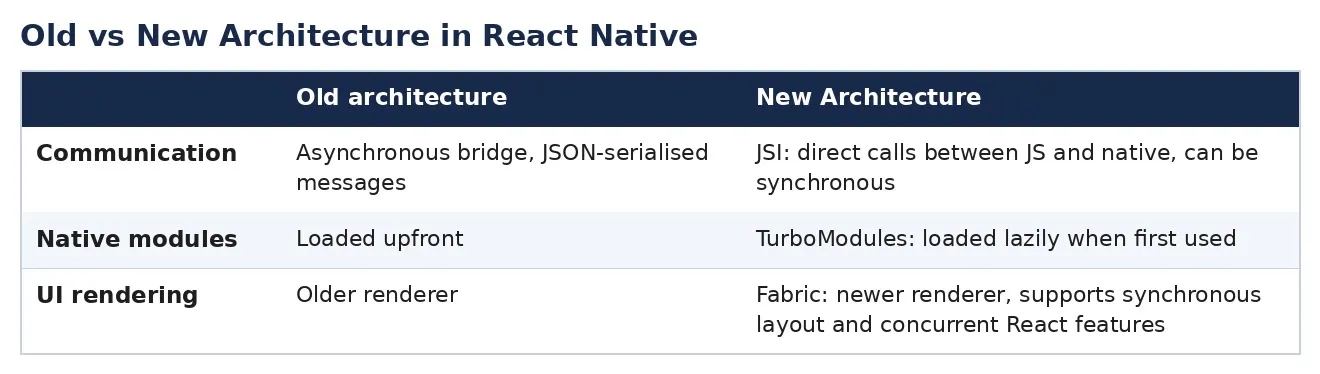
The single biggest change isn’t in FlashList itself — it’s underneath it. React Native’s New Architecture (Fabric renderer, TurboModules, and the JSI replacing the old asynchronous bridge) went from opt-in, to default, to the only option:
- RN 0.76 (late 2024) made the New Architecture the default for new projects.
- RN 0.82 (October 2025) removed the legacy bridge entirely —
newArchEnabled=falseis now simply ignored. - Expo SDK 55 dropped the option to disable it as well.
This matters directly for this comparison: FlashList v2 only runs on the New Architecture. If your app is still on the legacy bridge, you’re locked to FlashList v1 until you upgrade React Native — though at this point, upgrading is no longer really a choice, just a matter of when.
Why List Performance Still Matters
The underlying causes of janky lists haven’t changed:
- Excessive component mounting/unmounting
- Large memory footprints
- Frequent re-renders
- Heavy image loading
- Inefficient virtualization
These still show up as dropped frames, delayed input, memory pressure, and crashes — especially on lower-end Android hardware.
FlatList in 2026
FlatList still virtualizes — rendering only visible items plus a small buffer — and it now runs on Fabric like everything else. That gives it some real benefits over the old bridge-based version (synchronous layout, no JSON serialization tax). But its core strategy hasn't changed: rows are still mounted and destroyed as they scroll in and out of view.
<FlatList
  data={data}
  renderItem={renderItem}
  keyExtractor={(item) => item.id}
/>
On a low-end device, mounting a moderately complex row can still cost more than one frame’s budget (16ms), which is what produces the blank-cell flash during fast scrolling that FlatList is known for.
FlashList v2: What Actually Changed
import { FlashList } from "@shopify/flash-list";<FlashList
data={data}
renderItem={renderItem}
keyExtractor={(item) => item.id}
/>Notice what’s missing compared to the old v1 examples: no estimatedItemSize. That's the headline change in v2 — FlashList now measures and handles sizing automatically instead of asking developers to estimate it up front. A few other structural changes:
Change v1 v2 size estimates Required (estimatedItemSize, etc.) Removed entirely — auto-sized Implementation Native modules (Android/iOS) doing layout correction JS-only Architecture support Old and New Architecture New Architecture only Masonry layout Separate MasonryFlashList component masonry prop on FlashList Ref type FlashList<T> FlashListRef<T> inverted prop.
The move to a JS-only implementation also removes the old friction where native layout-correction modules could conflict with layout animations.
The current release is @shopify/flash-list@2.3.2, and it requires the New Architecture (which, again, is now the only architecture RN offers).
The Core Idea Hasn’t Changed: Recycling vs Recreating
This is still the fundamental reason FlashList outperforms FlatList on large lists.
Get Kaushal Vasava’s stories in your inbox
Join Medium for free to get updates from this writer.
FlatList:
Scroll
 ├─ Create Item
 ├─ Destroy Item
 ├─ Create Item
 ├─ Destroy Item
 └─ Repeat
FlashList:
Scroll
 ├─ Reuse Existing Item
 ├─ Reuse Existing Item
 ├─ Reuse Existing Item
 └─ Continue Recycling
FlashList behaves more like Android’s RecyclerView: components are reused rather than torn down and rebuilt, which is what keeps memory allocation and garbage-collection pressure low during fast scrolling.
A More Honest Look at the Numbers
In the interest of accuracy, it’s worth being upfront: there isn’t a single authoritative, independently reproduced FlashList-v2-vs-FlatList benchmark with clean numbers as of this writing. What is documented:
- Shopify states v2 achieves up to 50% less blank area during fast scrolling compared to v1 — a v1-to-v2 comparison, not a FlatList comparison.
- A widely cited production migration case study (Whitespectre) reported JS-thread CPU usage dropping from consistently above 90% to consistently below 10% after migrating a complex nested list from FlatList to FlashList, along with the elimination of out-of-memory crashes on that particular screen.
- Community write-ups in 2026 commonly describe FlashList as roughly 5–10x smoother than FlatList once lists reach the thousands-of-items range, though these are qualitative industry reports rather than controlled benchmarks.
The realistic takeaway: the architectural advantage (recycling vs. recreating) is real and still holds under the New Architecture, but the specific multiplier you’ll see depends heavily on your device, item complexity, and image loading — so benchmark your own screen rather than trusting any generic table, including this one.
Real-World Example: Social Feed
import { FlashList } from "@shopify/flash-list";

<FlashList
  data={posts}
  renderItem={renderPost}
/>
No size estimate needed anymore. Benefits remain the same in spirit: smoother scrolling, better handling of image-heavy feeds, reduced memory pressure, faster pagination.
Handling Multiple Item Types
Still supported the same way:
type FeedItem = "post" | "video" | "story" | "advertisement";

<FlashList
  data={feed}
  renderItem={renderItem}
  getItemType={(item) => item.type}
/>
getItemType lets FlashList maintain separate recycling pools per item shape, so it reuses the correct type of view instead of rebuilding it.
Masonry Layouts
Pinterest-style layouts no longer need a separate component:
import { FlashList } from "@shopify/flash-list";
<FlashList data={data} renderItem={renderItem} numColumns={3} masonry />
New Hooks Worth Knowing
Flashlist introduces a handful of hooks aimed at recycling-related state bugs — most notably useRecyclingState, for component-local state that should reset whenever the underlying item changes (a common source of "stale row" bugs when views get reused). There are also newer helpers (useLayoutState, useMappingHelper, useFlashListContext) for more advanced layout coordination. If you're migrating a v1 app that manually resets state via useEffect on item ID changes, this is the place to look first.
Migrating
From FlatList to FlashList v2
import { FlashList } from "@shopify/flash-list";Swap <FlatList /> for <FlashList /> and add getItemType if your list has mixed row shapes. You no longer need to supply a size estimate.
From FlashList v1 to v2
npm install @shopify/flash-list@^2.0.0Then remove now-defunct props: estimatedItemSize, estimatedListSize, estimatedFirstItemOffset, onBlankArea, disableHorizontalListHeightMeasurement, disableAutoLayout. Replace inverted per the chat section above, swap MasonryFlashList for the masonry prop, and update ref types from FlashList<T> to FlashListRef<T>.
And critically: confirm your app is actually running on the New Architecture first — v2 won’t run otherwise.
Best Practices
Memoize items:
const FeedItem = React.memo(({ item }) => <Post item={item} />);Stable render functions:
const renderItem = useCallback(({ item }) => <FeedItem item={item} />, []);Avoid inline style objects:
// Avoid
<View style={{ padding: 12 }} />
// Prefer
<View style={styles.container} />
Always benchmark release builds, never dev mode — FlashList’s render buffer is intentionally smaller in dev mode and will look artificially slow.
npx react-native run-android --variant=releaseWhen FlatList Is Still Enough
- Dataset is small (well under ~50 items)
- Simple, static screens (e.g., a settings list)
- No observed scrolling issues
- You’d rather not add a dependency for a screen that doesn’t need it
When to Reach for FlashList
- Social feeds, chat apps, product catalogs, video feeds
- Infinite scroll / search results / large notification lists
- Anything in the hundreds-to-thousands of items range
Dataset Size Recommendation < 50 items FlatList 50–500 items Either 500–5,000 items FlashList 5,000+ items FlashList strongly recommended
A New Name in the Space: LegendList
Worth knowing about if you’re evaluating options in 2026: LegendList has emerged as a newer alternative, built directly on Fabric and Reanimated, positioning itself around eliminating blank-cell flashes even more aggressively than FlashList. It’s newer and less battle-tested in production than FlashList (which still benefits from years of use inside Shopify’s own apps), but it’s a name you’ll increasingly see in “which list library” discussions this year, and worth a look if FlashList’s chat/inverted situation above is a blocker for your use case.
Final Thoughts
The core argument for FlashList hasn’t changed: recycling views instead of recreating them is a structurally better approach for large lists, and that advantage persists even now that FlatList also runs on the New Architecture. What has changed is the shape of the library itself — v2 is simpler to adopt (no more size estimates), fully JS-based, and tied firmly to the New Architecture that RN now requires anyway. The main thing to watch for is the inverted → maintainVisibleContentPosition migration if you're building chat UI — that's the one place where "just swap the component name" no longer holds true.
If you’re starting a new list today, on a New-Architecture app (which, at this point, is any current React Native app), FlashList v2 is the reasonable default. If you’re maintaining a v1 integration, plan the v2 migration alongside your New Architecture migration rather than as a separate project — they’re now the same prerequisite.
Thank you for reading! I hope this article gave you a practical insight that you can apply in your React native projects today.
If you found it valuable, consider giving it 50 claps 👏 and following me for more content on Android Development, Kotlin, Jetpack Compose, KMP, React Native, architecture, testing, and performance optimization.
Have questions or want to discuss App development? Feel free to connect — I enjoy learning and sharing with the community.