Thread Pools in Android
When we start learning Android concurrency, one of the first things we
learn is how to run work on a background thread.
For example:
Thread {
 // Background work
}.start()
It works perfectly fine for a small task.
But what happens when your application has 10, 50, or 100 background tasks?
Should we create a new thread for every task?
Not really.
This is where Thread Pools become useful.
A thread pool allows us to create a group of reusable threads and execute multiple tasks using those threads.
In this article, let’s understand Thread Pools in Android in very simple language.
First, What Is a Thread?
An Android application runs inside a process.
Inside that process, we can have multiple threads.
A simplified view looks like this:
Android App
    |
    v
  Process
    |
    +---- Main Thread
    |
    +---- Thread 1
    |
    +---- Thread 2
    |
    +---- Thread 3
The main thread is responsible for UI-related work.
If we perform a long-running operation on the main thread, the UI can become unresponsive.
That’s why we move expensive work to background threads.
For example:
Thread {
    downloadFile()
}.start()
Now the download runs on a background thread.
But there is a problem.
What If We Have Many Tasks?
Imagine that our application needs to perform multiple operations:
Task 1 → Download file
Task 2 → Upload file
Task 3 → Read database
Task 4 → Process image
Task 5 → Download data
Task 6 → Write file
Task 7 → Process data
...
One simple approach would be:
Thread {
    task1()
}.start()

Thread {
    task2()
}.start()

Thread {
    task3()
}.start()
And so on.
But if we have 100 tasks, we could end up creating a large number of threads.
That’s not a good idea.
Why?
Because creating threads has a cost.
Threads consume memory and system resources, and the operating system also has to manage and schedule them.
So instead of creating a new thread for every task, we can reuse threads.
And that’s the basic idea behind a Thread Pool.
What Is a Thread Pool?

Think about a restaurant.
Imagine there are:
4 Chefsbut:
100 OrdersThe restaurant doesn’t hire a new chef for every order.
Instead, it has four chefs who continuously take orders.
When one chef finishes an order, they take another order.
A Thread Pool works in a similar way.
                  Tasks
                    |
                    v
              +-----------+
              |   Queue   |
              +-----------+
               |  |  |  |
               v  v  v  v
              T1 T2 T3 T4
               \  |  |  /
                Thread Pool
We have:
- A group of worker threads
- A queue of tasks
- A mechanism that assigns tasks to available threads
When a thread finishes its current task, it can execute another task.
So instead of:
Task → Create Thread → Execute → Destroywe can have:
Task → Queue → Reusable Thread
                 ↓
              Task 2
                 ↓
              Task 3
That’s the main advantage of a Thread Pool.
Why Reuse Threads?
Let’s compare the two approaches.
Without Thread Pool
Task 1 → Create Thread → Execute → Destroy

Task 2 → Create Thread → Execute → Destroy

Task 3 → Create Thread → Execute → Destroy

Task 4 → Create Thread → Execute → Destroy
We repeatedly create and destroy threads.
With Thread Pool
Create Threads
      ↓
Thread 1
Thread 2
Thread 3
Thread 4
      ↓
Execute Task 1
      ↓
Execute Task 2
      ↓
Execute Task 3
      ↓
Execute Task 4
The same threads can be reused.
This reduces the overhead associated with repeatedly creating threads.
The Two Main Parts of a Thread Pool
A simple way to understand a Thread Pool is to remember two things.
1. Worker Threads
These are the threads that actually execute our tasks.
For example:
Thread 1
Thread 2
Thread 3
Thread 4
2. Task Queue
The queue stores tasks that are waiting to be executed.
Task 1
Task 2
Task 3
Task 4
Task 5
Task 6
So the complete picture becomes:
                 Task Queue
              +-------------+
              | Task 1      |
              | Task 2      |
              | Task 3      |
              | Task 4      |
              | Task 5      |
              +-------------+
                    |
          +---------+---------+
          |         |         |
          v         v         v
       Thread 1  Thread 2  Thread 3
                    |
                 Thread 4
The threads take tasks from the queue and execute them.
ThreadPoolExecutor
In Java and Android, one important class for creating a custom thread pool is:
ThreadPoolExecutorA simplified example looks like this:
val threadPoolExecutor = ThreadPoolExecutor(
    corePoolSize,
    maximumPoolSize,
    keepAliveTime,
    timeUnit,
    workQueue
)
There are several parameters here.
Let’s understand them one by one.
1. corePoolSize
Suppose we write:
corePoolSize = 4We can think of this as the normal number of worker threads we want the pool to maintain.
Conceptually:
Thread 1
Thread 2
Thread 3
Thread 4
When tasks arrive, the executor creates threads up to the core pool size before relying on the queue for additional tasks.
2. maximumPoolSize
Now suppose we have:
maximumPoolSize = 8This is the maximum number of threads that the pool can create when its queueing strategy allows it.
So conceptually:
Normal:

Thread 1
Thread 2
Thread 3
Thread 4
When the pool becomes busy and the configured queue reaches the relevant limit, it can grow:
Thread 1
Thread 2
Thread 3
Thread 4
Thread 5
Thread 6
Thread 7
Thread 8
But there is one important point.
Setting:
maximumPoolSize = 8does not mean that eight threads are created immediately.
Thread creation depends on how tasks arrive and how the queue is configured.
3. The Task Queue
The queue is one of the most important parts of a Thread Pool.
Suppose our pool has:
corePoolSize = 4
maximumPoolSize = 8
Now tasks start arriving.
A simplified flow is:
Task arrives
     |
     v
Are core threads available?
     |
    Yes
     |
     v
Create/use a worker thread
Once the core threads are busy:
Task arrives
     |
     v
Put task into queue
If the queue is full and the pool is allowed to grow:
Queue full
     |
     v
Create another thread
Eventually, if:
Maximum threads reached
+
Queue is full
the executor needs to reject the task according to its rejection policy.
So when working with ThreadPoolExecutor, don't look only at:
corePoolSize
maximumPoolSize
The queue is equally important.
A Small but Important Detail About the Queue
Consider this:
ThreadPoolExecutor(
    4,
    8,
    30,
    TimeUnit.SECONDS,
    LinkedBlockingQueue()
)
If the queue can keep accepting tasks without a practical limit, tasks can continue waiting in the queue after the core threads are busy.
That means the maximumPoolSize may not behave the way a beginner expects.
Compare that with a bounded queue:
ThreadPoolExecutor(
    4,
    8,
    30,
    TimeUnit.SECONDS,
    ArrayBlockingQueue(10)
)
Now the queue has a limit.
When the queue becomes full, the executor can create additional threads up to the maximum.
So remember:
Thread pool behavior depends not only on the number of threads, but also on the queue.
4. keepAliveTime
Now imagine our pool temporarily grows to eight threads:
Thread 1
Thread 2
Thread 3
Thread 4
Thread 5
Thread 6
Thread 7
Thread 8
The work finishes.
Do we really need all eight threads to stay alive forever?
No.
That’s where keepAliveTime comes in.
For example:
keepAliveTime = 30
TimeUnit.SECONDS
This allows extra idle threads to be removed after the specified idle period.
Conceptually:
Heavy workload
      ↓
8 threads
      ↓
Work finishes
      ↓
Some threads become idle
      ↓
30 seconds
      ↓
Extra threads can be removed
The pool can return closer to its core size when the extra capacity is no longer needed.
Putting It Together
Now let’s create a simple ThreadPoolExecutor:
val executor = ThreadPoolExecutor(
    4,
    8,
    30,
    TimeUnit.SECONDS,
    ArrayBlockingQueue(10)
)
We can submit tasks:
repeat(20) { index ->

    executor.execute {

        println(
            "Task $index running on ${Thread.currentThread().name}"
        )

        Thread.sleep(1000)
    }
}
Notice something important.
We are submitting tasks.
We aren’t manually creating a new thread for every task.
The executor manages the worker threads.
What Happens When a Thread Finishes?
Suppose we have:
Thread 1 → Task 1
Thread 2 → Task 2
Thread 3 → Task 3
Thread 4 → Task 4
Now Thread 2 finishes.
Get rohit adhav’s stories in your inbox
Join Medium for free to get updates from this writer.
There are still tasks waiting:
Task 5
Task 6
Task 7
Task 8
Thread 2 can take the next task:
Thread 2 → Task 5Then:
Thread 2 → Task 6And so on.
This is thread reuse.
The thread doesn’t need to be recreated for every task.
Thread Pool Does Not Mean Unlimited Threads
This is a very important point.
Sometimes developers think:
More threads = more performance.
That’s not always true.
For example:
100 tasks
100 threads
doesn’t automatically mean:
10 tasks
10 threads
will be ten times slower.
Threads have memory and scheduling costs.
If we create too many threads, they can compete for CPU time and other resources.
The goal of a Thread Pool isn’t:
Create as many threads as possible.
The goal is:
Run an appropriate amount of work concurrently while controlling resources
IO Work vs Computation Work
Another important concept is that not all background tasks are the same.
Some tasks are mainly IO-bound.
Others are mainly CPU-bound.
Let’s look at them separately.
IO-Bound Work
IO means Input/Output.
Examples include:
Network requests
File operations
Database operations
For example:
downloadData()The application may spend a significant amount of time waiting for the network.
Conceptually:
Thread
  |
  v
Network Request
  |
  v
Waiting...
  |
  v
Response
While waiting, the thread isn’t continuously doing CPU-heavy calculations.
CPU-Bound Work
CPU-bound tasks spend more time doing actual computation.
Examples include:
Large calculations
Large list sorting
Large list filtering
Bitmap processing
For example:
val result = hugeList
    .filter { ... }
    .sortedBy { ... }
This requires CPU processing.
Why Separate IO and Computation?
Imagine we have one pool:
             One Thread Pool
                    |
          +---------+---------+
          |                   |
       Network             CPU Work
          |                   |
       Waiting            Calculating
Now imagine that a lot of CPU-heavy work starts running.
Those tasks can consume the available worker capacity.
At the same time, we have network and database operations waiting to execute.
Depending on the workload, separating these responsibilities can make concurrency easier to control.
Conceptually:
IO Thread Pool
      |
      +---- Network
      +---- File
      +---- Database
and:
Computation Thread Pool
      |
      +---- Calculations
      +---- Sorting
      +---- Filtering
      +---- Bitmap Processing
The important lesson is not that one fixed number of threads is always correct.
There is no universal:
IO = 8
CPU = 4
rule.
The correct configuration depends on the workload.
A Real-World Android Example
Let’s take a simple example.
Imagine a Play Store-like application.
The screen contains many applications:
App A
App B
App C
App D
App E
App F
...
The user clicks:
Update AllNow we have many tasks:
Task 1 → Update App A
Task 2 → Update App B
Task 3 → Update App C
Task 4 → Update App D
Task 5 → Update App E
...
We don’t necessarily want to create one thread for every application.
Instead, we can have a pool:
                Update Tasks
                     |
                     v
                Task Queue
                     |
          +----------+----------+
          |          |          |
          v          v          v
       Thread 1   Thread 2   Thread 3
                     |
                  Thread 4
When one update finishes, that thread can take another update task.
That’s exactly where thread reuse becomes useful.
Another Example: File Processing
Suppose we need to process 20 files.
Without a pool:
File 1 → Thread
File 2 → Thread
File 3 → Thread
File 4 → Thread
...
File 20 → Thread
With a pool of four workers:
                  File Queue
                      |
          +-----------+-----------+
          |           |           |
          v           v           v
       Thread 1    Thread 2    Thread 3
                         |
                      Thread 4
Initially:
Thread 1 → File 1
Thread 2 → File 2
Thread 3 → File 3
Thread 4 → File 4
Then Thread 2 finishes:
Thread 2 → File 5Thread 4 finishes:
Thread 4 → File 6The same worker threads continue processing the queue.
What Happens When Everything Is Busy?
Suppose we have:
Thread 1 → Busy
Thread 2 → Busy
Thread 3 → Busy
Thread 4 → Busy
And the queue contains:
Task 5
Task 6
Task 7
A new task arrives:
Task 8Depending on the pool configuration, the executor may queue it or create another worker.
Eventually we can reach:
Maximum threads reached
+
Queue full
At that point, the executor must decide what to do with the new task.
This is handled by a rejection policy.
So a ThreadPoolExecutor is not simply:
“Create four threads.”
It is a system for controlling how work is executed.
What About Kotlin Coroutines?
Now you might be thinking:
“I use Kotlin Coroutines. Why should I care about Thread Pools?”
This is where understanding the underlying concept becomes useful.
In modern Android development, we usually prefer Kotlin Coroutines rather than manually creating threads for everyday asynchronous work.
For example:
viewModelScope.launch {

    val data = withContext(Dispatchers.IO) {
        repository.getData()
    }

    // Update UI
}
Instead of manually managing threads, we use a coroutine dispatcher.
For CPU-intensive work:
viewModelScope.launch {

    val result = withContext(Dispatchers.Default) {
        processLargeList(data)
    }

    // Update UI
}
This gives us a much higher-level way to express where work should run.
Coroutine Is Not the Same as Thread
This is one of the most important things to understand.
A coroutine is not a thread.
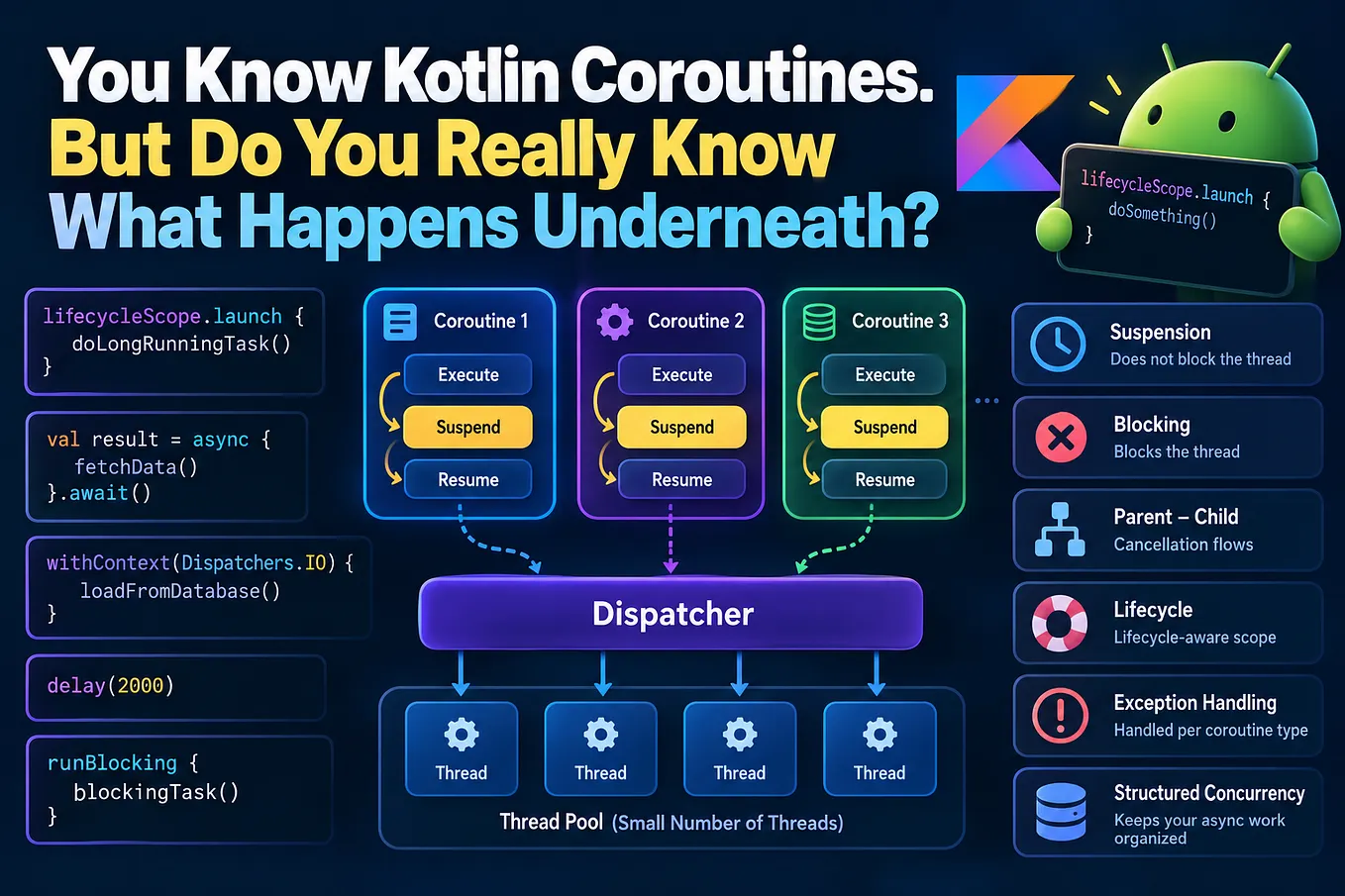
You can have:
1000 Coroutines
       |
       v
   Dispatcher
       |
       v
A smaller number of Threads
You don’t need 1000 threads for 1000 coroutines.
A coroutine can suspend while waiting and allow a thread to perform other work.
That’s one of the reasons coroutines are so useful.
Dispatchers and Thread Pools
You will commonly see:
Dispatchers.IOand:
Dispatchers.DefaultA simple mental model is:
Dispatchers.IO
      |
      +---- Network
      +---- File
      +---- Database
and:
Dispatchers.Default
      |
      +---- Calculations
      +---- Sorting
      +---- Filtering
      +---- CPU-heavy processing
The underlying implementation is more sophisticated than this simple diagram, but this mental model is enough to understand why different dispatchers exist.
The key point is:
Coroutines still need threads to execute.
Coroutines make managing asynchronous work easier; they don’t make threads disappear.
Final Takeaway
Thread Pools are fundamentally about controlling concurrency.
They help us avoid creating a new thread for every task.
The important concepts to understand are:
Thread
   ↓
Worker

Thread Pool
   ↓
Group of reusable workers

Task Queue
   ↓
Waiting tasks

corePoolSize
   ↓
Normal/core worker count

maximumPoolSize
   ↓
Maximum worker count

keepAliveTime
   ↓
How long extra idle workers can remain

Executor
   ↓
Manages task execution
And in modern Kotlin Android development:
ThreadPoolExecutor
       ↓
Understand the underlying concept

Coroutines
       ↓
Modern way to write asynchronous code

Dispatchers.IO
       ↓
IO-oriented work

Dispatchers.Default
       ↓
CPU-oriented work
You don’t need to manually create threads everywhere.
You don’t need hundreds of threads because you have hundreds of tasks.
And you definitely shouldn’t assume that more threads automatically means more performance.
The better question is:
How much work should run concurrently for this particular workload?
Once you start thinking about concurrency this way, concepts like ThreadPoolExecutor, Executors, Dispatchers.IO, Dispatchers.Default, WorkManager, and Kotlin Coroutines become much easier to understand.