Web Application Security: Hands-On Practice (Chapter 14 from The Web Application Hacker’s Handbook)

Note: This write-up reflects my learning and hands-on practice based on the book The Web Application Hacker’s Handbook: Discovering and Exploiting Security Flaws by Dafydd Stuttard and Marcus Pinto.

Exploiting Information Disclosure:
After basic application mapping, attackers use malicious or unexpected interactions to extract more information. Exploiting errors and anomalies can reveal sensitive data, technologies used, and the application’s internal structure.
Exploiting Error Messages:
Web applications sometimes return detailed error messages when unexpected events occur, which can reveal internal application details. During attacks causing unusual errors, applications may expose debugging information that helps attackers understand the system.
Script Error Messages:
Script error messages occur when errors happen in interpreted web scripting languages like VBScript. These messages usually show the type of error and the line number where it occurred. Although they normally do not reveal sensitive information, they can help attackers understand how the application processes inputs, such as whether a parameter expects numeric or string data.
The line number and error details can also help identify where the error occurred in the code, allowing attackers to analyze the application’s logic and determine the sequence in which parameters are processed. By sending malformed inputs to different parameters, attackers may map the server-side code paths. Additionally, error messages that reflect user input may sometimes contain vulnerabilities like cross-site scripting (XSS).
Stack Traces:
A stack trace appears when an unhandled error occurs in applications written in managed languages such as Java, C#, or VB.NET. It is a structured error message that begins with a description of the error and then lists the sequence of function calls that were active when the error occurred. The top of the stack shows the function that caused the error, followed by the functions that called it, revealing the entire execution path.
Stack traces can disclose valuable information to attackers, such as the exact reason for the error, names of libraries or third-party components used in the application, and details about proprietary code modules. They may also include line numbers that help attackers understand the internal logic and processing flow of the application. Additionally, stack traces often reveal environment details like framework versions (e.g., ASP.NET), which can help attackers research known vulnerabilities or configuration weaknesses in the platform.
Informative Debug Messages:
Some web applications generate custom debug error messages that contain extensive runtime information, mainly intended for developers during testing and debugging. These messages may reveal sensitive internal details such as session variable values, database hostnames and credentials, server file paths, and information embedded within session tokens.
They can also expose encryption keys used to protect client-server data and low-level debugging details like CPU register values, stack contents, and loaded DLLs. When such verbose debug messages appear in a live production environment, they represent a serious security weakness because attackers can analyze the disclosed information to understand the system’s internal structure, manipulate application state, and further refine their attacks.
Server and Database Messages:
Get Aditya Kumar’s stories in your inbox
Join Medium for free to get updates from this writer.
Sometimes informative error messages are generated not by the web application itself but by back-end components such as databases, mail servers, or SOAP services. When a serious error occurs, the server may return an HTTP 500 status code, and the response body can include detailed information about the failure.
Database error messages are particularly useful for attackers because they may reveal the exact SQL query that caused the error, helping refine attacks such as SQL injection. Even when applications try to handle errors gracefully, they may still include backend error details in the response. During security testing, attackers often analyse server responses for keywords like error, exception, invalid, SQL, SELECT, or file not found to identify hidden error information. Tools such as Burp Intruder can help quickly locate these messages, allowing attackers to review responses and extract useful details that may help advance an attack.
Using Public Information:
Because many different web technologies and components are used in applications, testers often encounter unusual error messages whose meaning is not immediately clear. In such cases, additional information can often be found by searching the error message text on public sources like search engines, developer documentation, or forums. These messages may originate from specific APIs, third-party components, or publicly available source code used within the application.
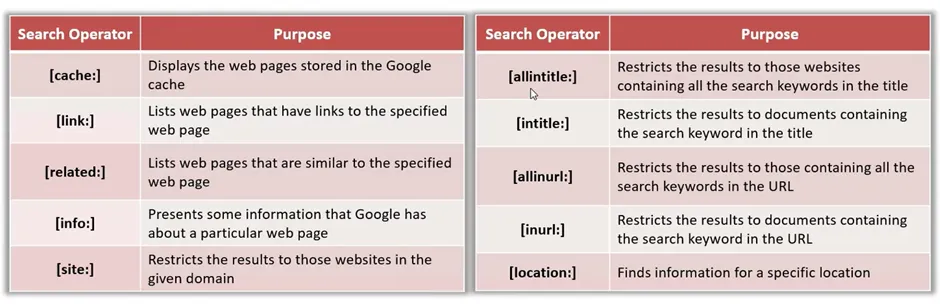
By researching the message, attackers may discover documentation, discussions, or even the actual source code responsible for generating the error, which helps them understand how the application processes input and identify possible vulnerabilities. Security testers commonly search the exact error text, review similar occurrences on other websites, check cached pages for detailed versions of the message, and look for related code snippets in public repositories to gain deeper insight into the issue.
Engineering Informative Error Message:
In some cases, attackers can deliberately create specific error conditions to make the application reveal sensitive information within the error message itself. This happens when the application performs an invalid operation on certain data and then includes that data in the resulting error message. By carefully manipulating inputs, attackers may force the system to process valuable information in a way that triggers an error, allowing them to extract it.
For example, in SQL injection attacks, verbose database errors (such as ODBC errors) may reveal database values when type conversion fails. In more advanced scenarios, attackers may exploit vulnerabilities to create custom functions in the database that execute system commands and intentionally throw exceptions containing the command output. When the application returns the resulting stack trace to the browser, the sensitive data embedded in the exception message becomes visible to the attacker. This technique allows attackers to retrieve arbitrary information from the system by engineering informative error messages.
Gathering Published Information:
Web applications sometimes disclose sensitive information by publishing it directly to users, either intentionally or unintentionally. This may happen as part of the application’s normal functionality, as a side effect of other features, through leftover debugging functionality, or due to vulnerabilities such as broken access controls. Examples of exposed information include lists of valid usernames, account numbers, document IDs, user profile details (roles, privileges, last login, account status), and even user passwords that are masked on the screen but visible in the page source.
Applications may also expose log files containing usernames, session tokens, URLs, actions performed, or database queries. Additionally, useful information can appear in client-side HTML code, such as commented links, hidden form fields, or developer comments about bugs. Security testers should review both server responses and client-side code during application mapping to identify such information leaks and may automate extraction if sensitive data can be accessed.
Using Inference:
Sometimes a web application may not directly reveal sensitive information, but attackers can infer it from the application’s behavior. This happens when small differences in responses, error messages, or processing time reveal useful clues. For example, registration forms may allow attackers to enumerate valid usernames based on error responses, search engines may reveal information about restricted documents, and blind SQL injection can allow attackers to extract database data one bit at a time by observing how the application responds to certain conditions. Another method involves analyzing timing differences in application responses.
If certain inputs require more processing — such as validating a real username, retrieving cached data, or accessing active accounts — the response time may be longer than for invalid or nonexistent inputs. Attackers can measure these timing variations to identify valid usernames, recently accessed accounts, or even scan internal servers. Security testers may automate such timing analysis using tools like Burp Intruder, which records response times and helps detect patterns that reveal hidden information.
Preventing Information Leakage:
1. Use Generic Error Messages: Avoid displaying verbose errors or debug details to users; log detailed errors server-side and optionally return a reference ID for support. Configure custom error pages in ASP.NET, Java, IIS, or Apache to mask technical information.
2. Protect Sensitive Information: Do not publish usernames, passwords, credit card numbers, or log data unnecessarily; enforce strict access controls and show only minimal, necessary information (e.g., truncated credit card numbers, no prefilled passwords).
3. Minimize Client-Side Leakage: Remove service banners, HTML/JavaScript comments, and sensitive data from client-side code. Ensure thick-client components like Java applets or ActiveX controls do not contain hidden sensitive information, as attackers can reverse engineer them.
Contact Me
📧 Email: adii.utsav@gmail.com
🔗 LinkedIn: https://www.linkedin.com/in/aditya-kumar-3241b6286/
💻 GitHub: https://github.com/Rememberful