Why my React timer drifts (and how to fix it)

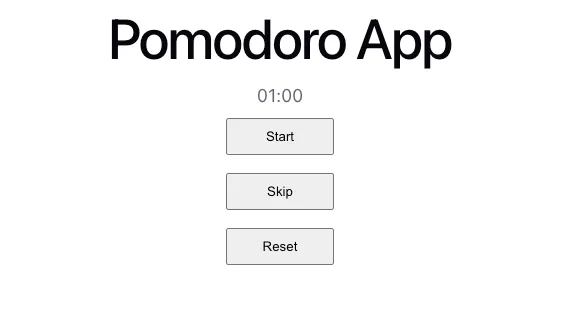
This was my first time building a countdown timer with a mm:ss format, and here is my original code:
import { useEffect, useState } from "react";
import "./App.css";

const formatter = (n: number) => String(n).padStart(2, "0");
const transformedTimer = (second: number) => {
  return `${formatter(Math.floor(second / 60))}:${formatter(second % 60)}`;
};

function App() {
  const [second, setSecond] = useState(5);

  useEffect(() => {
    if (second <= 0) return;

    const secondTimer = setInterval(() => {
      setSecond(second - 1);
    }, 1000);

    return () => clearInterval(secondTimer);
  }, [second]);


  return (
    <>
      <h1>Pomodoro App</h1>
      <p>{transformedTimer(second)}</p>
    </>
  );
}

export default App;
The Problem
This worked, but relying on setInterval to count seconds is problematic. I learned that the interval in setInterval() is minimum time before the callback fires, not the exact time. Same as setTimeout.
So it doesn't fire at exactly 1000ms, only at least 1000ms.
For a timer, that drift matters: the longer it runs, the further it gets from real time, which causes drift.
The drift could be due to the call stack being occupied so the queued callbacks have to wait.
For example:
- An expensive operation running on the call stack blocks the event loop from picking up the next callback, i.e. the
setIntervalcallback, from the task queue and that might take more than 1000ms to execute. - So the
setIntervalin the task queue will have to wait for this operation to finish first then only be executed.
If this continues to happen, eventually the difference could catch up and might cause the time to drift away.
This is one of the examples that setInterval(() => {}, 1000) could take more than 1000ms to operate.
Other reasons that could cause drift, please refer here.
TLDR: Don’t rely on setInterval to count your time.
Solution
How to solve this accuracy problem?
Get Adora Wyne’s stories in your inbox
Join Medium for free to get updates from this writer.
I use timestamp and 2 pointers in the timestamp to calculate the seconds instead.
Timestamp is how many milliseconds has passed since the epoch (January 1, 1970 UTC).
What exactly do I mean?
- I have these 2 pointers in timestamp:
- an ongoing time counter, i.e.
now-> Time now - a fixed time counter, i.e.
end-> Time now + 5 seconds (assume we need a 5-second countdown timer)
2. In useEffect, I use setInterval(() => {}, 100) to get the updated now time.
3. To get how many seconds are left, I would use the end to minus now.
With this approach, we’re measuring real elapsed time rather than trusting the interval to count it. Any delay in setInterval firing doesn't affect accuracy but it only affects how quickly the display catches up.
Here’s the updated code:
import { useEffect, useState } from "react";
import "./App.css";

const formatter = (n: number) => String(n).padStart(2, "0");
const transformedTimer = (second: number) => {
  return `${formatter(Math.floor(second / 60))}:${formatter(second % 60)}`;
};

function App() {
  const [now, setNow] = useState(() => Date.now()); // constantly moving
  const [end, setEnd] = useState(() => Date.now() + 5000); // fixed

  const remainingSeconds = (end - now) / 1000;
  const isRunning = remainingSeconds > 0;
  const second = Math.ceil(Math.max(0, remainingSeconds));

  useEffect(() => {
    if (!isRunning) return;

    const secondTimer = setInterval(() => {
      setNow(Date.now());
    }, 100);

    return () => clearInterval(secondTimer);
  }, [isRunning]);

  return (
    <>
      <h1>Pomodoro App</h1>
      <p>{transformedTimer(second)}</p>
    </>
  );
}

export default App;
Important note
Realise I use setInterval(() => {...}, 100)?
I set the interval to 100ms instead of 1000ms. Here’s why.
With the timestamp approach, the time calculation is always accurate but the display only updates when setInterval fires. That means the screen could briefly show the wrong value between updates.

With a 1000ms interval, that window could be nearly a full second, which is visible to users.
With 100ms, that window shrinks to a tenth of a second, which is imperceptible.
The smaller interval time, the more frequent the setNow will be triggered, the more frequent the time now will be updated, then the smaller gap the wrong time will be shown.
However, I didn’t go lower (like 10ms) because it would refresh the display far more often than necessary with no real benefit.
(This is one of the problems I needed to solve while building my own pomodoro app 🍅)