Common HL7 Integration Problems and Troubleshooting: A Practical Guide

By: Biswanath Sahoo | HL7 Certified

HL7 integration plays a critical role in modern healthcare.
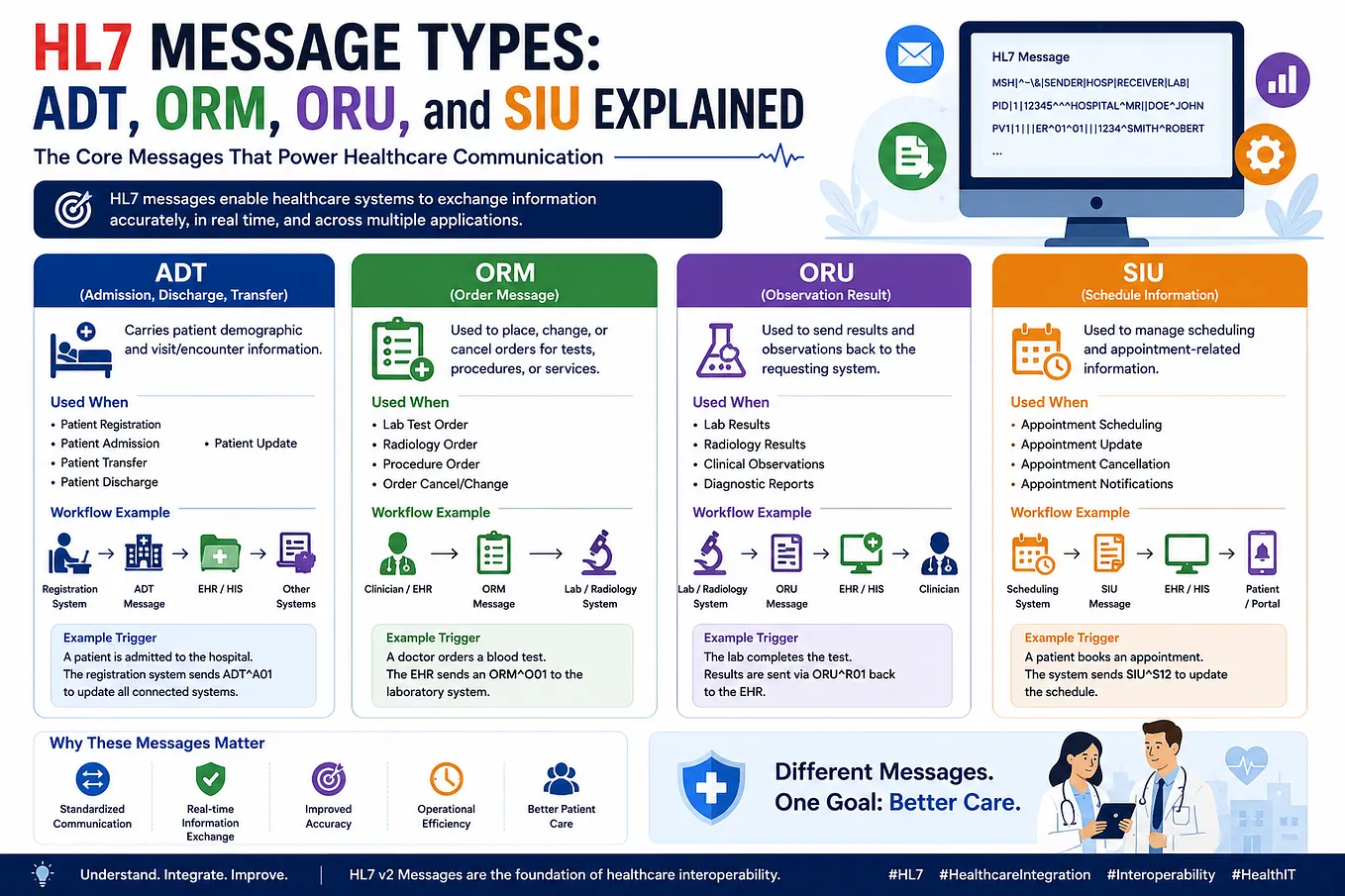
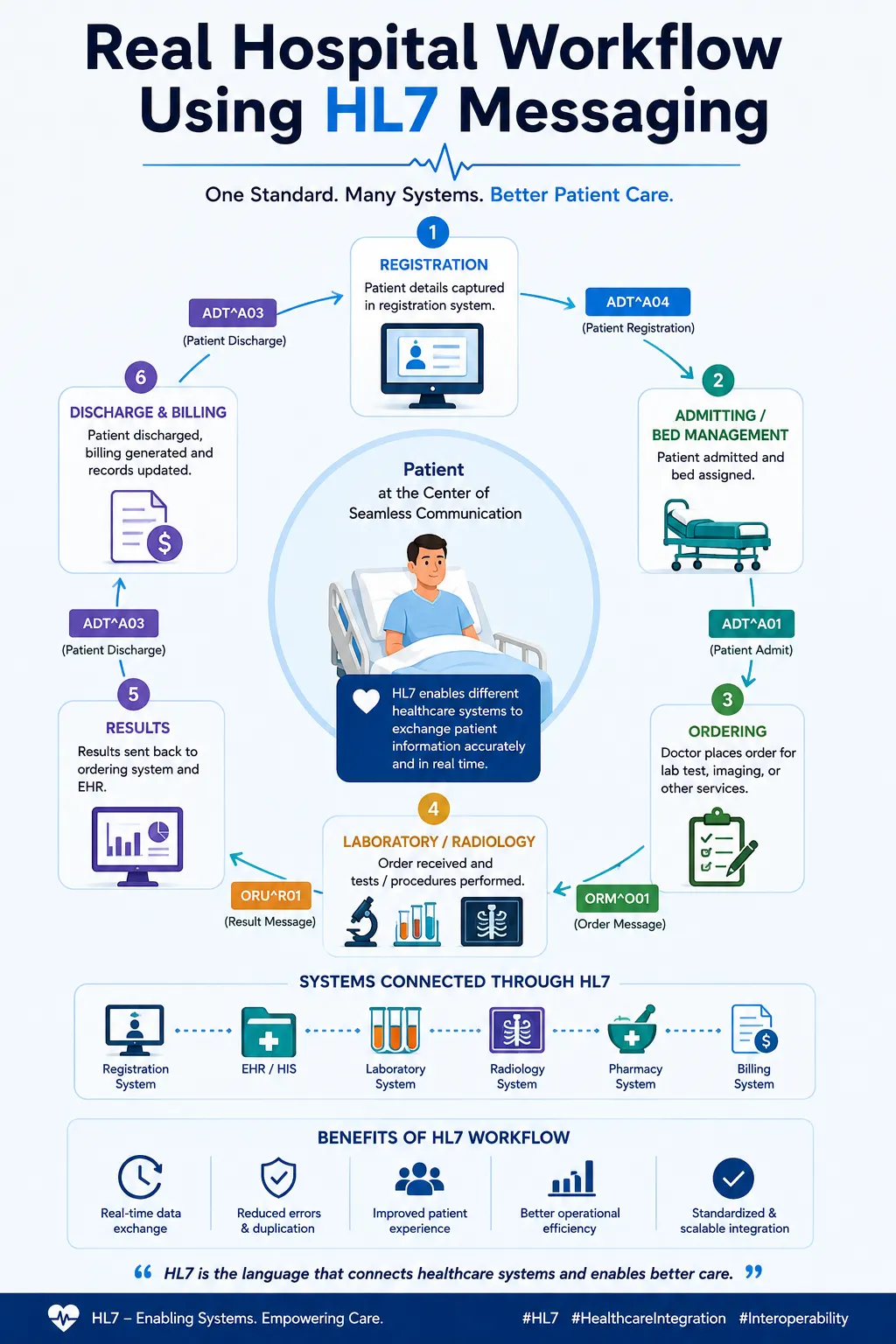
Patient registrations, admissions, laboratory orders, radiology requests, results, and discharge information often travel between multiple healthcare applications every day.
But what happens when an HL7 message doesn’t reach its destination?
A laboratory may stop receiving orders.
Results may not return to the EHR.
Messages may get stuck in a queue.
A receiving system may reject a message.
For healthcare integration professionals, troubleshooting these issues is a regular part of the job.
In this article, we’ll explore some of the most common HL7 integration problems and a practical approach to troubleshooting them.
🔍 Understanding the HL7 Message Journey
Before troubleshooting an issue, it helps to understand the path an HL7 message takes.
A typical workflow looks like this:
Source System
      ↓
Interface Engine
      ↓
Filter / Transformation
      ↓
Destination Connector
      ↓
Network
      ↓
Receiving Application
      ↓
ACK / Response
An issue can occur at any point in this journey.
The key to effective troubleshooting is identifying exactly where the message stopped or failed.
1️⃣ Message Parsing Errors
One of the most common HL7 problems is an incorrectly formatted message.
Consider this example:
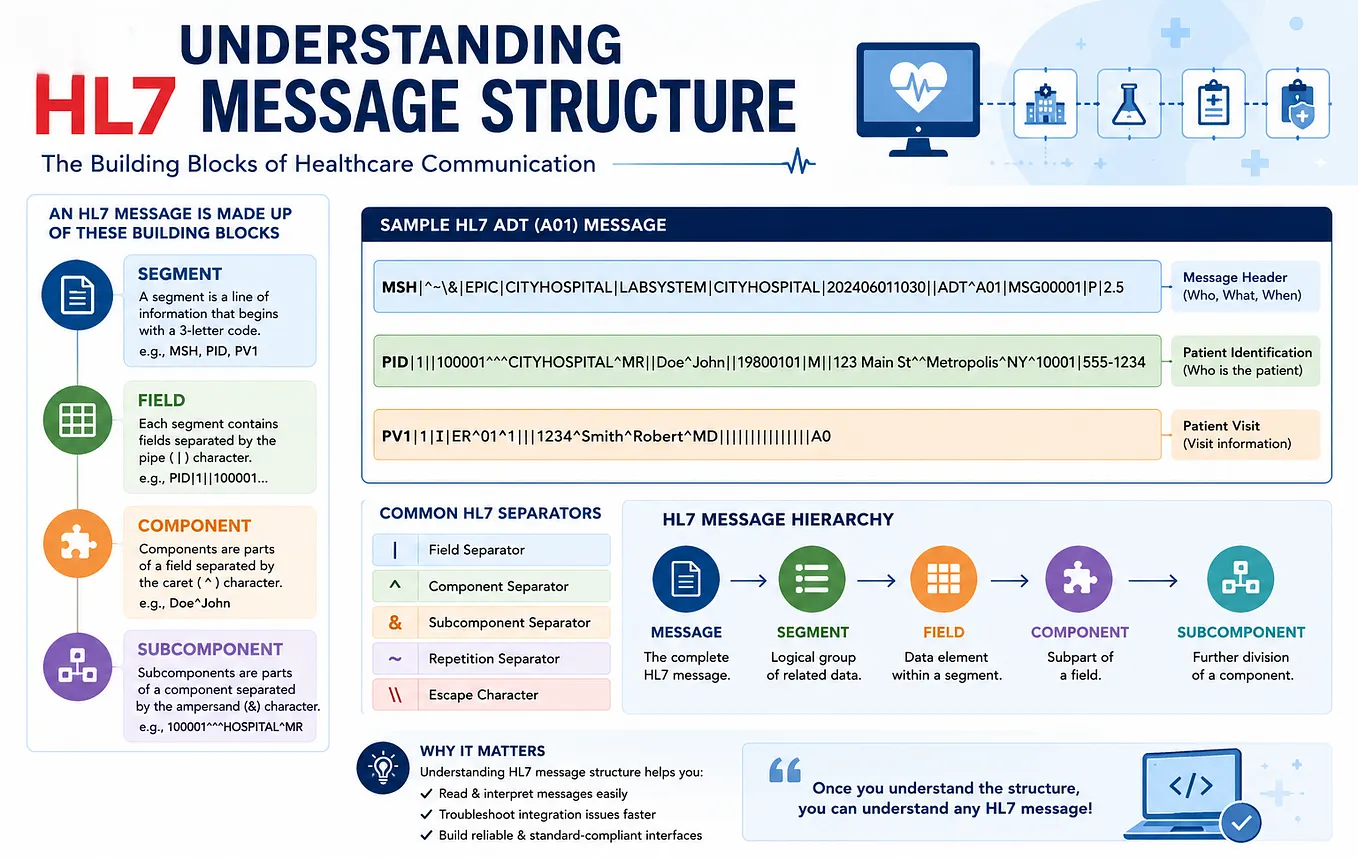
MSH|^~\&|EHR|HOSPITAL|LAB|HOSPITAL|202608141200||ADT^A01|MSG001|P|2.5
PID|1||12345^^^HOSPITAL^MR||DOE^JOHN||19800101|M
A receiving system expects the message to follow a specific HL7 structure.
Problems can occur when:
- A required segment is missing.
- Fields are in the wrong position.
- Delimiters are incorrect.
- The message type is invalid.
- The HL7 version is unsupported.
- Data does not match the expected format.
Troubleshooting Tip
Start by checking:
- Message type
- HL7 version
- Required segments
- Field positions
- Delimiters
Always compare the actual message with the interface specification or message profile.
2️⃣ Incorrect HL7 Delimiters
HL7 uses special characters to separate data.
The most common separators are:
CharacterPurpose``Field Separator^Component Separator~Repetition Separator&Subcomponent Separator\Escape Character
For example:
DOE^JOHNThe caret separates components.
If a system sends unexpected delimiters, the receiving application may fail to parse the message correctly.
Troubleshooting Tip
Check the encoding characters defined in:
MSH-1 and MSH-2Incorrect separators can cause the entire message to be interpreted incorrectly.
3️⃣ Missing Required Segments or Fields
Sometimes a message is structurally valid but still rejected because required information is missing.
For example:
PID|1||||DOE^JOHNIf the receiving system requires a patient identifier, the message may fail because the required value is missing.
Similarly, a laboratory order may require:
- Patient ID
- Order number
- Ordering provider
- Test code
Troubleshooting Tip
Check the interface specification and identify:
- Required segments
- Required fields
- Conditional fields
- Expected data types
Don’t assume that a message accepted by one application will automatically be accepted by another.
4️⃣ Connection Failures
Sometimes the HL7 message itself is correct, but the systems cannot communicate.
Common errors include:
- Connection refused
- Connection timeout
- Host unreachable
- Socket closed
- DNS resolution failure
For example:
Connection refusedThis may indicate that the receiving server is unavailable or the destination port is not accepting connections.
Troubleshooting Tip
Check:
- Is the destination server available?
- Is the correct IP address or hostname configured?
- Is the correct port being used?
- Is the receiving application running?
- Is a firewall blocking the connection?
- Can the interface server reach the destination?
This helps determine whether the problem is related to the HL7 message, interface engine, network, or receiving system.
5️⃣ Transformation Problems
Interface engines often transform messages before sending them to another system.
For example:
Source Message
      ↓
JavaScript / Mapping Logic
      ↓
Transformed Message
      ↓
Destination
A transformation error may occur because of:
- Incorrect field mapping
- Null values
- Invalid JavaScript
- Incorrect data type
- Missing lookup table value
- Unexpected message structure
For example, a script may expect:
PID-3But the source message may contain the patient identifier in a different location.
Troubleshooting Tip
Compare:
Original Message
with
Transformed Message
Then check the transformer logs for errors.
A simple field mapping issue can completely change the meaning of a message.
6️⃣ Messages Stuck in a Queue
Sometimes messages are successfully received by the interface engine but cannot be delivered to the destination.
These messages may remain in a queue.
Get Biswanath Sahoo’s stories in your inbox
Join Medium for free to get updates from this writer.
Common reasons include:
- Destination system unavailable
- Connection failure
- Timeout
- Negative acknowledgment
- Destination connector error
A growing queue is often an early warning sign of an interface problem.
Troubleshooting Tip
Check:
- Number of queued messages
- Oldest message in the queue
- Destination status
- Error logs
- Last successful connection
Once the issue is resolved, queued messages may need to be reviewed and reprocessed according to your organization’s procedures.
7️⃣ ACK Errors and Missing Acknowledgments
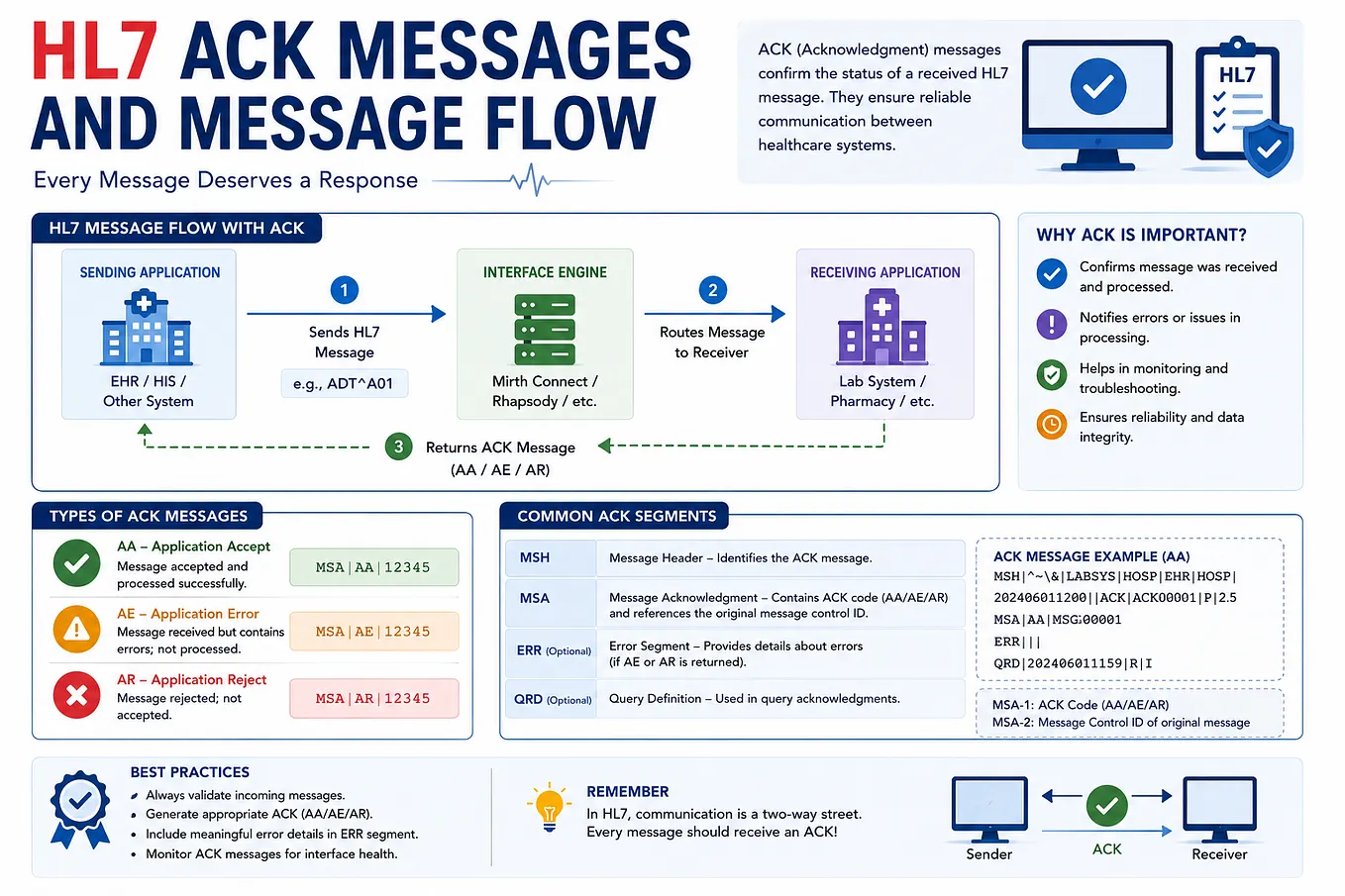
As discussed in the previous article, ACK messages confirm the status of an HL7 message.
Common responses include:
ACK CodeMeaningAAApplication AcceptAEApplication ErrorARApplication Reject
But sometimes there is another problem:
No ACK is received at all.
Possible reasons include:
- Connection timeout
- Receiving system unavailable
- ACK configuration mismatch
- Network issue
- Application processing delay
Troubleshooting Tip
Follow the Message Control ID.
Check:
MSH-10Then verify whether the same ID appears in:
MSA-2This helps correlate the original message with its acknowledgment.
8️⃣ Duplicate Messages
Duplicate messages can create serious problems.
For example, the same ADT message may be sent twice because the sender did not receive an ACK.
The receiving system may then process the patient update twice.
Common causes include:
- ACK timeout
- Automatic retry
- Network interruption
- Interface restart
- Incorrect duplicate detection
Troubleshooting Tip
Check:
- Message Control ID
- Timestamps
- Retry configuration
- Interface logs
- Duplicate detection rules
A duplicate message is not always a technical failure. Sometimes it is caused by communication uncertainty between systems.
🛠️ A Practical HL7 Troubleshooting Method
Instead of randomly checking logs, follow a structured approach.
Step 1: Confirm the Message Was Generated
Ask:
Did the source system actually create the message?
Check the source application logs.
Step 2: Confirm the Interface Received It
Check the interface engine.
Was the message received?
Did it enter the correct channel?
Step 3: Check Filters
Was the message intentionally filtered?
A message may be valid but blocked because it does not meet routing criteria.
Step 4: Check the Transformation
Did the transformer complete successfully?
Compare the:
Source Messageand:
Destination MessageLook for missing or incorrect data.
Step 5: Check Destination Connectivity
Did the interface connect to the destination?
Look for:
- Connection timeout
- Connection refused
- Socket errors
Step 6: Check the ACK
What did the receiving system return?
AA → Accepted
AE → Error
AR → Rejected
If there is no ACK, investigate the network and acknowledgment configuration.
Step 7: Review Logs
Check:
- Interface engine logs
- Application logs
- Network logs
- System logs
Always try to identify the first error in the message journey.
The first failure is often the most important one.
🧠 A Simple Troubleshooting Checklist
When an HL7 interface fails, ask these questions:
- Was the message generated?
- Did the interface receive it?
- Did the filter allow it?
- Did the transformation succeed?
- Was the destination reachable?
- Did the receiving system process it?
- What ACK was returned?
- Are messages stuck in a queue?
- Are duplicate messages being generated?
- What do the logs show?
Following this sequence helps avoid unnecessary troubleshooting.
🎯 Final Thoughts
HL7 integration problems can appear complicated because multiple systems, networks, applications, and message formats are involved.
However, most issues can be simplified by following the message journey.
Think of every problem as a path:
Generate → Receive → Validate → Transform → Send → Process → ACK
At each step, ask one question:
Did the message successfully move to the next stage?
Once you identify where the message stopped, you are much closer to finding the root cause.
Successful HL7 troubleshooting is not about guessing.
It’s about following the message, checking the logs, understanding the workflow, and validating each step.