Activities Are Not Screens — Android’s Mental Model

The first assumption Flutter developers make about Activities is that they map one-to-one with screens. One screen = one Activity.
That’s not quite right — and the distinction changes how you think about everything else.
What an Activity Actually Is
An Activity is a window — a container that the OS has allocated for your app to present UI and receive user interaction. It’s not a route. It’s not a page. It’s a window.

The key difference is who manages it.
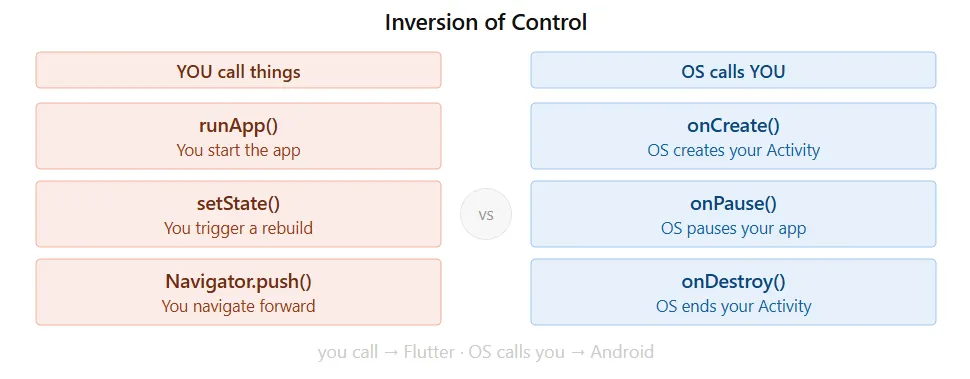
In Flutter, you manage your own navigation stack. You push routes, you pop them, you decide what’s visible and when. You’re in control of the stack.
In Android, the OS manages windows. It creates Activities, pauses them, resumes them, destroys them, and recreates them — on its own schedule, based on system needs.
One Application, Many Activities
Every Android app has one Application object — one per app process. It's the long-lived container. Activities are what come and go underneath it:
Application
     │
     ├── Activity A
     ├── Activity B
     └── Activity C
At any point, the OS can:
- Pause one Activity when another comes into the foreground
- Resume an Activity when the user returns to it
- Destroy an Activity to reclaim memory
- Keep the Application alive even when no Activity is visible
- Recreate an Activity after a configuration change like screen rotation
Your app has no direct control over when any of this happens. You respond to it.
Lifecycle Methods Are the OS Talking
onCreate(), onPause(), onResume(), onDestroy() — these are notifications from the OS telling your Activity what's happening.
Get Hafiz Umar Ahmad Siddiqui’s stories in your inbox
Join Medium for free to get updates from this writer.
You don’t invoke them. They arrive.
When the OS pauses your Activity because another app came to the foreground, onPause() gets called. You respond by saving any state that needs to survive. When the user comes back, onResume() gets called. You restore from where you left off.
The OS decides the timing. Your job is to write the right response to each notification.
Back Doesn’t Kill the App
This surprised me.
Pressing Back finishes the current Activity — it does not kill the entire app process.
The Application object stays alive. Background services keep running. Any state stored outside the Activity remains in place. Only the visible Activity gets finished.
The Activity and the app process are separate things. One can end without ending the other.
Activity Is Just One Component
Activity is one of four major component types in Android:
- Activity — the visible, interactive window
- Service — runs background operations without any UI
- BroadcastReceiver — listens to system-wide events
- ContentProvider — manages and shares data across apps
Everything in Android is a component. Activity is just the one that shows up on screen.
The Mental Model
Coming from Flutter, the Navigator feels like the natural way to think about screens — you own the stack, you control the flow.
Android’s model is different: the OS owns the windows. You write Activities, declare them in the Manifest, and handle the lifecycle notifications that arrive. The OS decides the rest.
Once that mental model is in place, questions like “why does my Activity get recreated on rotation?” or “why is Back not killing my app?” stop being confusing — they’re just the OS doing its job.