Implementing OKRs in Jira: Jira Align VS Jira VS OKR Board for Jira


If you want to configure native Jira functionality for OKRs, see my Ultimate Guide to Free OKR Management in Jira.
OKRs are the most popular goal-setting framework — and for a good reason. They provide a clear roadmap for reaching your goals, establishing the milestones you need to achieve, and keeping your team aligned throughout the journey. They also greatly simplify reporting for middle management and executives and provide the entire company with a clear direction. According to Mooncamp, 83% of companies that use OKRs consider them beneficial. In comparison, employees at such companies have a better understanding of the company’s strategy (~75% vs ~50% in the control group).
In short, OKRs are awesome… if only they didn’t require much maintenance. The more complex your company structure is, and the more OKRs you have, the more difficult it becomes to use them. When each bi-weekly check-in requires hours of progress tracking and data input, the benefits of OKRs are simply lost. And when OKRs become such a major drain on the management team, it inevitably leads to misalignment.
Luckily, there is a solution — Jira, the world’s favorite project management platform. Since Jira keeps track of the execution of every task in your company, we can use those task statuses to calculate our OKRs automatically. This will let us connect execution with our strategy and allow us to align teams in real time without spending valuable resources.
Except there are no OKRs in Jira by default — the platform simply doesn’t support them. I’ve shared 4 methods of how to configure Jira for OKRs in my recent post. And in this article, I am going to compare the out-of-the-box methods with Jira Align and OKR Board app:
- Hacking OKRs directly into the native Jira workflow;
- Using Jira Align as a compatibility layer between Jira and OKRs;
- Linking OKRs with Jira Issues using OKR Board for Jira app.
Jira Align VS Jira VS OKR Board for Jira: Detailed Comparison
These solutions differ in scale and scope, but at the end of the day, they are all meant to track OKRs in Jira. So, for this comparison, I will focus on how well they do it and provide a short overview of their other features at the end of the article.

OKR Integration for Jira

Both OKR Board for Jira and Jira Align integrate natively into the Jira workflow, simply adding new options, fields, and tools. They have intuitive UI and do not require specific skills to use. The same can’t be said about hacking the OKR support into Jira, which would require knowledge of JQL and Custom Fields to operate effectively.
OKR Confidence Level

Confidence level is an automatic OKR tracking feature that lets you see how likely your team is to reach the OKR before the deadline. Both OKR Board for Jira and Jira Align give you access to it, but Jira Align only offers it as a part of the OKR report — while OKR Board for Jira always has it on display.
OKR Grading

Both Jira Align and the “hacky” native solution offer you a way to calculate the OKR progress using the linked Jira issues — however, this is the only way they can calculate it. In comparison, OKR Board for Jira also lets you manually set the OKR grade using three approaches to measurement (by number, by percent, or as a simple binary option) and allows you to have multiple Key Results in addition to the linked Epics.
OKR Progress Tracking: Progress Chart

Both OKR Board for Jira and Jira Align feature many ways to display the Objective Progress Chart — by individuals, by teams, by OKR levels, etc. However, these features can’t be achieved with the Custom Fields or JQL, so the native solution lacks them.
OKR Weights

Not all Jira issues and Epics are made equal — some of them contribute to the Key Result more than others. The OKR weights are used to represent this.
For example, imagine a Key Result “Increase sales in Brazil by 26%” with linked Issues “Design a new marketing campaign” and “Find a new distributor”. By default, both of those tasks would be worth 50% of the Key Result. With OKR weights, you can define one of those issues as more impactful, and have it matter more. For example, if one task has a weight of 2 and the other one has a weight of 1, they will be worth 66% and 33% respectively.
Currently, custom weights for OKRs are only available in the OKR Board for Jira.
Notifications

All three solutions provide a way to notify people that their OKRs have been updated. However, while Jira and Jira Align use the embedded Jira tools to do so and send a standard message, OKR Board for Jira sends a custom in-app notification that is more likely to be noticed.
In addition, all three tools provide backup notifications via e-mail. However, OKR Board for Jira has more granular e-mail notification settings that let you customize exactly which updates you want to receive. For example, you may only want updates on OKRs that you own, or only on the ones where people have tagged your account in the comment. With OKR Board for Jira, you can specify that and prevent overwhelming notifications.
Filtering OKRs

You can filter OKRs and Epics linked to them using all three tools. However, if you go with the self-made native solution, you’ll have to set up every filter manually using Custom Fields for reference.
OKR Reporting

OKR Board and Jira Aline have pre-defined and customizable reports for Company, Team, and Personal OKR levels. These reporting capabilities make these solutions integral and comprehensive.
- Chart with OKR progress
- Sum up overall grade for Team, Department, Company
Both Jira Align and OKR Board for Jira provide in-app automated one-click reports, with OKR Board for Jira letting you export them as PDFs while Jira Align prefers CSVs.
Jira native solutions have limited capabilities in reporting. You can technically use JQL and Custom Fields to generate reports, but that would require advanced skills and technical know-how.
OKR Implementation

Both OKR Board for Jira and Jira Align require some training to use effectively, but the scope and scale of that training differ drastically. You can master OKR Board for Jira in a day, while getting used to all the features of Jira Align might take much longer. Still, it doesn’t compare to hacking the OKRs into Jira natively, which requires advanced JQL skills to be anywhere near usable.
Onboarding

OKR Board for Jira and Jira Align both provide in-app onboarding, as well as extensive knowledge bases full of manuals and instructions on how to be efficient with their tools. In addition, Oboard includes training on OKR Board for Jira in their OKR Consulting and Coaching packages, and Jira Align has pre-recorded courses at the Atlassian university.
Get Margo Sakova’s stories in your inbox
Join Medium for free to get updates from this writer.
Since hacking OKRs into Jira is not an officially supported solution, your developers must write their own documentation.
OKR Roadmap

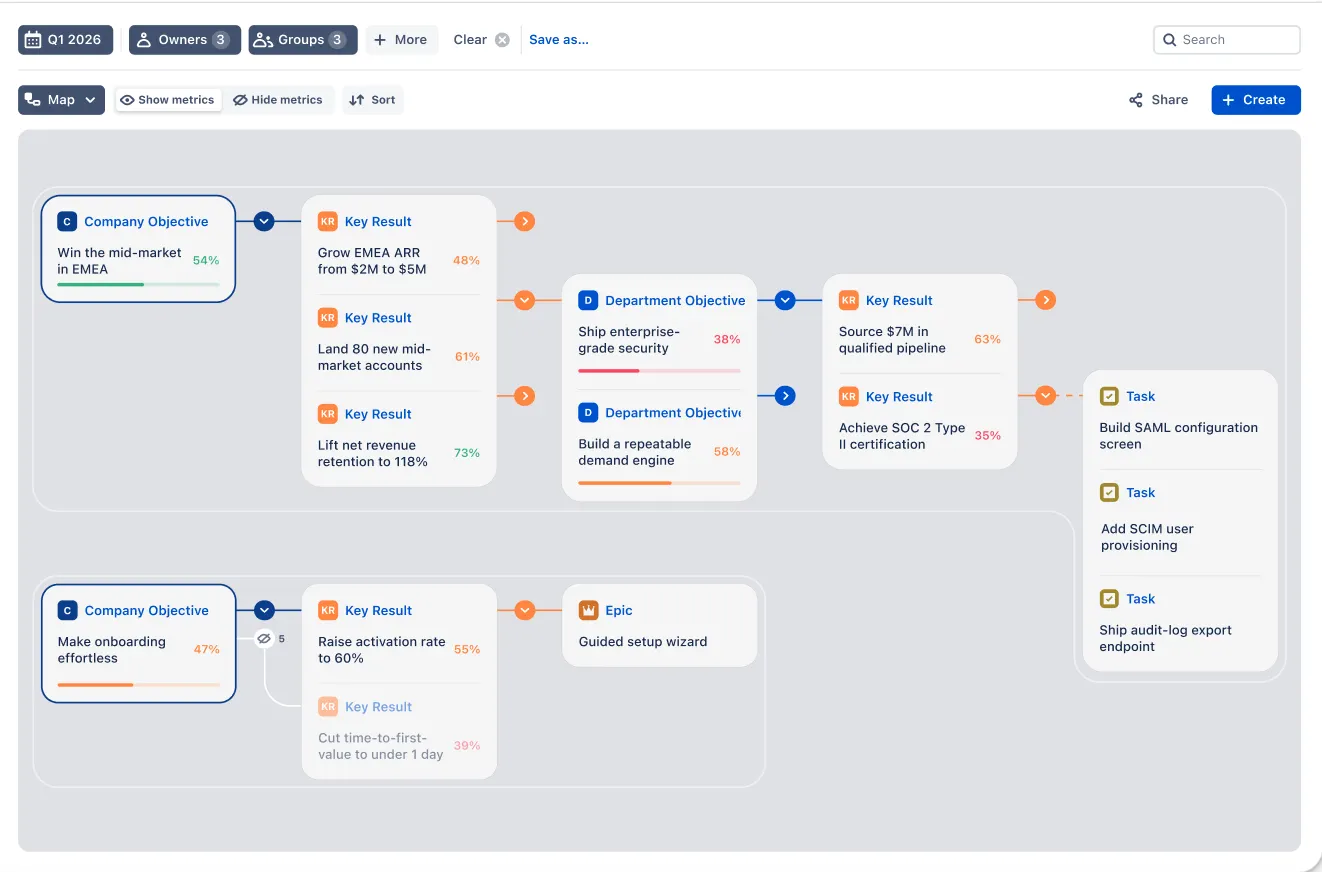
OKR Board for Jira lets you put OKRs onto Roadmaps, showcasing milestones, their dependencies, and blockers in a simple visual structure. Unfortunately, while Jira Align supports Roadmaps and OKRs, it cannot bring the two together.
*You can use Advanced Jira Roadmaps with both native Jira, but it requires Jira Premium and still has a rather limited feature set.
Pricing

Jira Align comes in two packages — Standard and Enterprise — but even the cheapest one will run you 90,000 USD annually and only give access to Align to 100 users. This is due to Jira Align acting as your one-stop product management suite rather than a dedicated OKR tool. Meanwhile, OKR Board for Jira comes at a much more reasonable cost of 1.80 USD/user per month.
Here is how one of the Atlassian verified experts and Sr R&D Tools Admin at Arctic Wolf, James Seddon compares the Jira Align and Oboard prices:
“OKR Board for Jira is definitely looking like something you would want to invest in if you’re outgrowing Advanced Roadmaps, and you feel like you need that next level of information to show to your leadership team. But — you just aren’t at the point at which you have projects configured in a way that would enable Jira Align or you don’t have the ability to take on the price tag that would be associated with Jira Align.”
He refers to Oboard as a solid app at a reasonable price, for those, looking for a Jira-Align-like experience, without a price tag, associated with it.
Here is the full review on Jimmy Talks Jira Channel:
*Writing your own system using JQL and Custom Fields is, of course, free — aside from the time and resources you’ll put into developing the system in the first place. But if you want to use some advanced features like Roadmaps, you’ll have to pay for Jira Premium.
Support

Both OKR Board for Jira and Jira Align provide fast support. However, the support for Jira Align is tool-specific and doesn’t include help with the OKR framework itself. Meanwhile, OKR Board for Jira has actual OKR experts on call, who can provide basic support on the framework itself in addition to the tool-specific woes.
*Pricing for advisory services like Technical Account Management and practice development workshops are negotiated separately and not included in the cost of the application.
Jira VS Jira Align VS OKR Board for Jira: OKR Solutions Breakdown
With this comparison in mind, let’s break down each solution and see what we might have missed.
Using Jira to Measure OKRs
Jira, primarily known for its robust task and issue-tracking capabilities, offers customizable workflows, a Confluence knowledge base, and many other great project management tools like its dashboards and automated reports. However, Jira lacks specific features for OKR management and tracking.
And that’s a problem — because for the goal-setting to be effective, you need it to permeate through your entire organization. And if your execution process is left out — as in the case of using Jira natively — you will inevitably find your teams struggling with alignment.
Technically, you can set up a separate Jira workspace, where you will treat Jira Epics as Objectives — which would count as “OKR Tracking in Jira”, but only in the loosest and most technical understanding of the term.
You can also attempt to build a custom OKR tool using JQL, Custom Fields, and Advanced Jira Roadmaps. It is technically possible but requires a lot of technical expertise and development time for a tiny gain.
So at the end of the day, OKR tracking in native Jira is doable — just not very efficient.
Jira Align
The official Atlassian solution for OKRs is included with Jira Align — a powerful and extensive portfolio management tool. It is your one-stop shop for OKRs, Agile, and other team productivity frameworks. It is quite a sophisticated tool, but it is not for everyone.
First of all, Jira Align is massive. It comes with the territory — the platform’s goal is to be your single point of contact with the company strategy, bringing together everything from Vision and Mission to your Agile Sprint Goals. But to make all that overwhelming flow of information digestible, Atlassian had to redesign the Jira UI completely. As a result, using Align efficiently will require a lot of training.
Second, Align is a multitool — it is not just an OKR platform or just an Agile platform, it is a way to bring all of those frameworks together in a single solution. As a result, its advanced features can instead hinder teams that are not Agile by design — for example, government agencies or financial institutions. Essentially, if all you want is OKRs, Align is overkill — and not in a good way.
Third, Align has some unusual takes on OKRs. Instead of following the classic framework, Atlassian attempted to reinvent the wheel. Some of their takes are quite useful — for example, the Objective Tree and the OKR Heatmap would be a great addition to any OKR management tool. But their other ideas are… less innovative. For example, Jira Align supports OKRs and Roadmaps, but there’s no way to bring the two together.
Fourth, Align is not particularly friendly to newcomers to the OKR framework. Some of it is due to the issues listed above, but even the system itself assumes that its users are experienced and does not provide sufficient onboarding when it comes to OKRs.
Finally, there’s a matter of price. Align is a high-powered strategic solution, and Atlassian prices it as such. If you have 100 users, it will run you at least 90,000 USD/year, which gets limited access to the Align tool set. The premium solution will run 154,800 USD/year.
At the end of the day, Jira Align is an expensive but powerful tool. If you need everything it can do and agree with how it does things, it can be a great boon to your project management team. But if all you need are OKRs, there is a less intrusive but equally powerful OKR solution — OKR Board for Jira by Oboard.
OKR Board for Jira by Oboard
Bridging the gap in native Jira for effective OKR management, OKR Board for Jira integrates deeply with Jira and Confluence, making it ideal for organizations already utilizing the Jira ecosystem. It directly links Jira issues to your Key Results, providing a direct connection between Strategy and Execution.
These links are essential because they keep your teams aligned and motivated even as they are digging through their backlog or just completing routine daily tasks. There is a world of difference between “We’ve improved the website loading speed” and “We’ve improved the website loading speed because we want to reduce the bounce rate by 25% this quarter”.
And that’s not all! Other standout features of OKR Board for Jira include:
- Customizable OKR Levels and Workspaces. Tailor OKR structures to fit company, departmental, or team needs.
- Real-Time Roadmaps. Facilitate long-term planning and visibility across all teams and projects.
- Automated Grading. Automatically update the progress of key results based on Jira issue resolution or subtask progression.
- Reporting. Generate extensive reports in a single click, then export them as PDFs or turn them into interactive Dashboards for real-time tracking.
- Interactive Dashboards. Visualize OKR progress within Jira, enhancing transparency and alignment across teams.
- Confluence Integration. Embed OKR reports in Confluence pages for broader visibility.
The result is an all-in-one efficient OKR software solution. It is well-integrated into the typical Jira workflow but not intrusive to the point where you’d have to retrain your team members or adjust how you work with Jira.
It just works — and it works great for both emerging startups and Fortune 500 companies alike. Oboard is even used by several government agencies in the US and EU, which is an excellent testament to the platform’s flexibility.
The last standout feature of OKR Board for Jira is the price — it is tied to the number of users in your Jira instance and has multiple brackets, keeping it affordable for everyone. For example, if you have 100 users, your annual subscription would run you just 1.80 USD/user per month. There’s even a 30-day free trial, and the app is completely free for teams with less than 10 members in one Jira instance.
Conclusion
In conclusion, choosing the right tool for implementing OKRs in your organization is crucial. While Jira offers robust task and issue-tracking capabilities, it lacks specific features for effective OKR management. Jira Align, Atlassian’s official solution, provides a comprehensive suite of tools for OKR and Agile management. Still, its complexity, extensive training requirements, and high cost make it less accessible for many organizations.
OKR Board for Jira, on the other hand, presents an efficient, user-friendly, and cost-effective alternative. It integrates seamlessly with Jira and Confluence, offering features like customizable OKR levels, real-time roadmaps, automated grading, and interactive dashboards. Its pricing model, based on the number of users, makes it a viable option for a wide range of companies, from startups to large corporations.
Both are equally viable, but if you are just dipping your toes into OKRs and want to see whether they suit you in the first place — OKR Board for Jira requires less commitment and provides even more features than the official Atlassian tool. If you’re interested in exploring further possibilities of OKR Board for Jira, you can register for a 45-minute demo to get a walkthrough of its functionality. Otherwise — embark on your assessment during a free 30-day trial (for less than 10 Jira users forever free).