Cypress keeps the log. Beacon keeps the run.

The terminal says one test failed. It does not say this is the seventh failure in eight runs, or that another test only went red because the first attempt failed. The screenshot and the video are files in a folder. The command log is gone when the job ends.
beacon-cypress writes that record into beacon-report. Open the folder and you get the run: outcomes, commands, screenshots, video, and history. Same pages locally and in CI. No account, and nothing loaded from a CDN.
Turn it on
The plugin records the run in Node. The collector records commands and named screenshots in the browser.
In cypress.config.js, set setupNodeEvents to beaconCypress({ title: 'Cypress demo' }).
In cypress/support/e2e.js, call installBeaconCollector().
Then run npx cypress run, and open the report with npx beacon-cypress open beacon-report.
The folder is created next to the Cypress project. title is the name in the header.
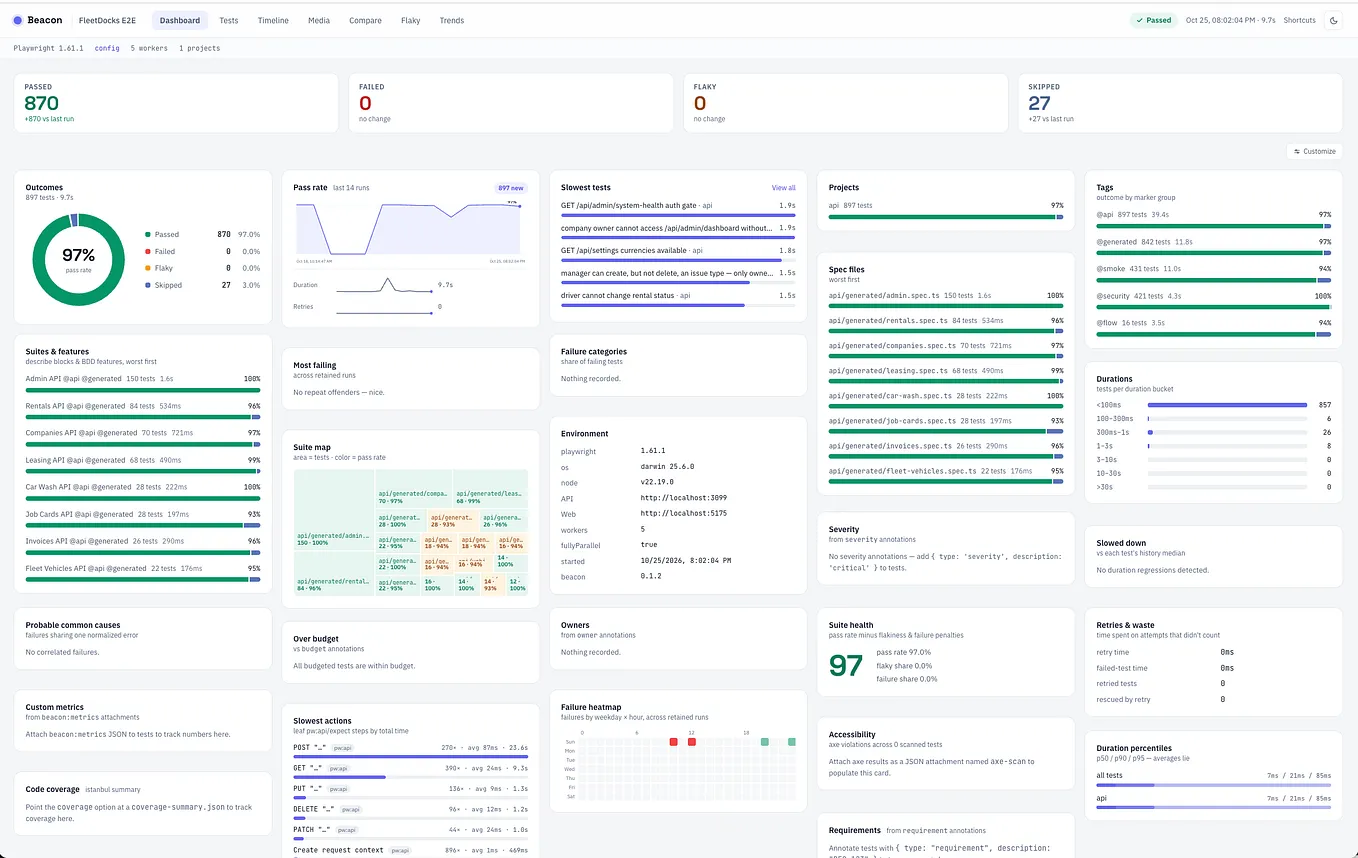
The dashboard is the run
Passed, failed, flaky, and skipped stay separate. A test that failed and then passed is flaky. It is not a failure.
Pass rate, duration, and retries are drawn across the runs you kept. Slow tests, tags, and spec files are on the same page.
Most failing counts tests that stayed red. A retry that recovered does not land there.
Open the failure
The test page is the attempt. You get the spec file, the commands, the assertion, the error, the screenshot, and the video. The history strip shows whether this failure is new.
Get Pradap Pandiyan’s stories in your inbox
Join Medium for free to get updates from this writer.
The spec is the file name. Beacon does not invent a line number Cypress did not report.
The list is the same four outcomes, grouped by spec, with retries marked on the test that needed one.
Flaky is not failed
A test that passes on the second try will keep doing that. Beacon scores it from the runs you kept and leaves it off the failure list.
retries then passes is flaky in 5 runs and failed in 0. fails the assertion is the opposite. That split is the reason to keep the report.
The same list from the CLI: npx beacon-cypress quarantine beacon-report
The timeline puts the attempts on one clock, so a four-second failure is obvious next to a test that finished in milliseconds.
Why this report
The folder is the product. Open it on your machine, or download the CI artifact and open the same pages.
History is what makes 7 of 8 runs possible, and what keeps a flake from looking like a new regression.
The same folder is a CI tool. gate fails the job past a threshold. summarize prints the failures. convert writes JUnit or CTRF. notify posts a short Slack line.
Files you already had in that folder stay there. An existing index.html is not replaced, and images Beacon did not write are not deleted.
npx beacon-cypress open beacon-report
https://www.npmjs.com/package/beacon-cypress
https://github.com/pradapjackie/beacon-cypress