Why I Switched from Cluely to Solvro After One Proctored Coding Assessment

I was paying $149.99/month for stealth mode. Then it failed on the one test that mattered.
TL;DR: I used Cluely’s $149.99/month Pro+Stealth plan for two months of interviewing. It worked fine for Zoom calls. Then I had a proctored HackerRank assessment in a lockdown browser, and Cluely couldn’t even launch. I switched to Solvro for $29 and it handled the proctored environment without breaking a sweat. Here’s the full story.
I’m going to be honest about something that feels a little embarrassing to admit: I spent $300 on Cluely over two months before I realized I was paying for a tool that couldn’t handle the exact situation I needed it most.
This isn’t a hit piece. Cluely is a solid product for what it does. But what it does and what I needed turned out to be two different things. And I’m writing this because I wish someone had written it before I found out the hard way.
How I Ended Up on Cluely
I started my job search in August. I’d been at the same company for three years, and the market was finally looking better for mid-level backend engineers. I had six applications out, two had responded, and my first technical screen was in four days.
A friend mentioned Cluely. I looked at the pricing. The Pro plan was $19.99/month — cheap enough to try. But then I read the fine print: the screen-share hiding feature only comes with Pro+Stealth at $149.99/month.
$150 a month is a lot. But I was interviewing at companies where the signing bonus alone would cover a year of it. I figured: this is an investment. I signed up.
Cluely Was Fine — For Regular Interviews
I’ll give credit where it’s due. For standard video interviews on Zoom and Google Meet, Cluely worked well. The floating window sat next to my call, it picked up the interviewer’s questions, and the answers were mostly helpful. The interface was clean, and it supports something like 12 languages (I only needed English, but good to know).
For two behavioral rounds and one system design discussion, it did its job. I felt more prepared, less likely to freeze on a curveball question. Worth $150/month? Debatable. But it was working.
Then came the coding assessment.
The Proctored Test That Changed Everything
The company — a mid-size fintech — sent me a HackerRank link with a note: “This assessment uses a proctored environment. Please ensure you have a stable internet connection and close all other applications.”
I’d done HackerRank before. Usually it’s just a browser tab. But this one launched a desktop proctoring client. Full-screen lockdown. No Alt+Tab. No task manager. No other windows visible.
Cluely didn’t even open. The proctoring software blocked it on launch. I sat there for about 30 seconds, trying to Alt+Tab to it, before I accepted the reality: I was on my own.
I passed the assessment, barely. Two out of three problems. The third was a graph problem I definitely could have solved with a nudge on the approach. It bothered me for days.
Finding Solvro
I started Googling “AI interview tool lockdown browser” and “coding copilot proctored exam” — the kind of increasingly specific searches you make at 1 AM when you’re frustrated. Most results were Reddit threads full of people saying it wasn’t possible.
Then I found Solvro.
Their pitch was different from everything else I’d seen. They explicitly listed compatibility with Respondus LockDown Browser, Safe Exam Browser, ExamSoft, HackerRank Desktop, ProctorU, Honorlock, Proctorio, and Proctortrack. Not as an asterisk. As the main feature — something they call “Ultimate Solvro.”
I was skeptical. Every tool claims to be invisible. Most of them mean “invisible in a Zoom screen share,” which is a very different thing from “invisible inside a locked-down proctoring client that monitors your running processes.”
But Solvro had a free trial — 10 AI answers and 10 minutes of Interview mode, no credit card. So I tried it.
How Solvro Actually Works Differently
Here’s the technical difference, as best I understand it.
Most AI interview tools are either browser extensions or standard desktop applications. Browser extensions get caught immediately by any proctoring software — they show up in the browser’s extension list. Standard desktop apps get caught by process monitoring — the proctoring client scans what’s running and flags anything suspicious.
Solvro runs as a system-level overlay that sits outside the browser sandbox. It uses the operating system’s content-protection flag, which means it doesn’t appear in screen captures or screen-share feeds. And because it’s not a browser extension or a standard windowed application, desktop proctoring tools don’t see it in their process scans.
Is this foolproof? Probably not — nothing is. But it’s a fundamentally different approach from what Cluely and most competitors do. They try to hide a window. Solvro operates at a layer that proctoring software doesn’t monitor.
Testing It on a Real Assessment
I had another online assessment coming up — this one through a company using Safe Exam Browser. I bought the $29 Sprint Pass (7 days, all features, one-time payment) and decided to test it properly.
First, I ran a practice test on my own. Opened Safe Exam Browser, launched it in full lockdown mode, and tried to use Solvro alongside it. It worked. The Solvro overlay appeared on top of the locked-down browser. I could screenshot the coding problem (Ctrl+Shift+S to capture, Ctrl+Enter to send), and get back an approach, complexity analysis, and working code.
Then I tried the auto-typing feature. Solvro can type the answer into whatever text field is active, but it does it keystroke by keystroke with human timing — not a paste. It even pauses and makes small timing variations, the way a person actually types. You can stop it with F8 and resume from the exact character with Ctrl+Shift+Y. I tested this in the Safe Exam Browser’s code editor and it worked perfectly.
For the actual assessment, I had three problems in 90 minutes. I used Solvro on all three. Screenshotted each problem, got the solution, reviewed it (one solution had a subtle off-by-one error that I caught before submitting), and used the auto-typing to input the code.
Get Alex Chen’s stories in your inbox
Join Medium for free to get updates from this writer.
I solved all three. One was a dynamic programming problem I definitely would have struggled with under time pressure.
The Price Difference Hit Hard
Here’s what made me slightly angry at myself:
- Cluely Pro+Stealth: $149.99/month. Two months. Total: $300.
- Solvro Sprint Pass: $29 one-time for 7 days.
That’s not a small difference. That’s an order of magnitude.
And the $29 Sprint Pass included everything. Five AI models (Claude Opus 5, Claude Fable 5, Claude Sonnet 5, Gemini 3.1 Pro, Gemini 3.7 Flash), all four modes (Interview, Coding Test, MCQ, Query), auto-typing, the multi-screenshot queue, and Ultimate Solvro. No upsells. No “pay $130 more for the feature you actually want.”
Cluely hides the stealth feature behind a $150/month paywall. Solvro includes everything in the $29 pass. That pricing structure alone tells you something about how each company thinks about its customers.
What Each Tool Does Better
I’m not going to pretend Solvro is perfect at everything. Here’s an honest comparison.
Where Cluely wins
- Meetings and sales calls. Cluely is a general-purpose meeting assistant. It works for sales calls, team meetings, one-on-ones — not just interviews. Solvro is built specifically for interviews and assessments.
- Language support. Cluely supports 12+ languages for transcription. Solvro is English only for spoken interviews.
- Free plan. Cluely has a free tier (no stealth, no live sessions). Solvro’s free trial gives 10 answers and 10 minutes — more useful for testing, but it’s a trial, not a permanent free plan.
Where Solvro wins
- Proctored environments. This is the big one. Cluely doesn’t work in lockdown browsers. Solvro does. If your job search includes any proctored assessments, this is the entire conversation.
- Coding mode. Solvro has a dedicated coding test mode with multi-screenshot support (up to 20 captures for long problems). You screenshot the problem, get the approach, the time and space complexity, and the code. Cluely doesn’t have this.
- MCQ mode. Dedicated multiple-choice handling. Screenshot a page of MCQs, get all the answers. Cluely doesn’t do this either.
- Auto-typing. Human-cadence typing with pause and resume. This matters more than you’d think during a proctored test where pasting code would be suspicious.
- Price. $29 for a week vs. $149.99/month for stealth mode. Not close.
- Resume-aware answers. Solvro uses your resume and the job description to shape answers, so they sound like things you’d actually say.
The Uncomfortable Question
Every time I tell this story, someone asks: “But is it okay to use these tools?”
I’ll say what Solvro’s own FAQ says: read the rules for each interview and decide for yourself. Most assessment platforms forbid outside help. Breaking that rule can mean a withdrawn offer.
I’m not going to pretend that’s a simple calculation. But I will say this: when companies use AI to screen resumes, write rejection emails, and score assessments automatically, the line between “preparation” and “outside help” gets blurry fast. Every candidate draws that line for themselves.
The Numbers That Made Me Switch
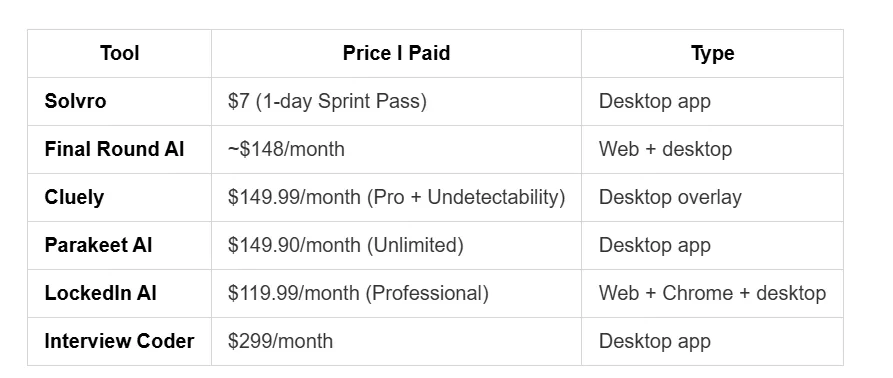
Let me put the total cost of my job search tools in perspective:

If I’d found Solvro first, I could have covered my entire interview sprint for $29 instead of $300. That’s $271 I’ll never get back.
For a full comparison of AI interview assistant pricing across 18 tools, Solvro actually maintains a detailed breakdown on their site. It’s worth checking before you commit to any tool.
What I’d Tell a Friend
If you’re interviewing right now, here’s my advice:
- Figure out if any of your assessments are proctored. If yes, most tools won’t help you there. Solvro’s Ultimate mode is the only one I’ve found that handles lockdown browsers.
- Don’t pay monthly if you only need a week. Solvro’s Sprint Pass is $29 for 7 days or $7 for one day. If your interviews are clustered, this makes way more sense than a monthly subscription.
- Try before you pay. Solvro’s free trial gives you 10 AI answers and 10 minutes of Interview mode, no credit card required. Use it on a practice problem before your real assessment.
- Don’t assume expensive means better. I paid $150/month for Cluely and it couldn’t handle a proctored test. I paid $29 for Solvro and it handled everything I threw at it.
Bottom Line
Cluely is a good meeting assistant. But for interviews — especially proctored coding assessments — it wasn’t enough. Solvro did what I actually needed, cost a fraction of the price, and worked in the environments where it mattered most. If I were starting my job search today, I’d skip straight to Solvro and save myself $271 and a lot of frustration.