React Native Developer Roadmap 2026: Skills, Projects and Career Guide

A few months back, a friend messaged me at midnight asking whether learning React Native in 2026 still makes sense, or whether she was late to a party that had already ended. I get some version of this question constantly, and my answer has stayed the same for years now. Mobile development is not slowing down, and React Native has quietly become one of the most practical ways into it. But the real problem I see over and over is not whether the technology is worth learning. It is that most people learn it in the wrong order, skip the parts that actually matter to employers, and end up frustrated when their portfolio does not translate into interviews.
So let us walk through this properly, the way I would explain it over chai rather than as a dry list of technologies to memorize.
Understanding Why React Native Still Matters
Every year there is some new framework promising to replace React Native, and every year it keeps showing up on job boards anyway. The reason is fairly simple once you think about it from a business perspective. Companies do not want to build and maintain two completely separate apps for Android and iOS if they can avoid it. React Native lets a single team, writing mostly JavaScript, ship features to both platforms at nearly the same time. That saves money, saves development hours, and keeps teams smaller and more agile. As long as that business incentive exists, React Native is not going anywhereanytime soon.
Start With JavaScript, Not With React Native
This is the part beginners hate hearing but it is the truth. If your JavaScript fundamentals are shaky, everything you build in React Native will feel like guesswork. Take the time to properly understand functions, closures, how arrays and objects behave, and especially asynchronous JavaScript with promises and async await. Mobile apps constantly fetch data, wait for responses, and handle things happening out of order, so this understanding is not optional. Once JavaScript feels natural rather than intimidating, TypeScript should be your very next stop. Most professional React Native teams write in TypeScript now, and getting comfortable typing your components, your API responses, and your navigation parameters early will save you from painful habits later.
Learning the Actual Building Blocks
Once your fundamentals feel steady, this is where the real fun begins. Start with functional components and understand how props flow data downward while state controls what changes on screen. Hooks like useState and useEffect will become your daily tools, so practice them until writing them feels automatic rather than something you have to look up every time. From there, move into how React Native handles styling, which works differently from web CSS but follows a similar mental model once flexbox clicks for you.
Do not stop at building isolated screens either. Learn how to fetch data from real APIs, handle loading states gracefully instead of showing a blank screen, and manage errors in a way that does not crash the entire app the moment the internet drops for a second. These small details are exactly what separate a tutorial project from something that feels like a real product.
Navigation Is Where Apps Start Feeling Real
An app without smooth navigation feels broken no matter how polished the individual screens are. Spend real time learning stack navigators, tab navigators, and drawer navigators, and understand how to combine them for different app structures. Practice passing data between screens correctly, and get comfortable with authentication flows where a logged out user sees one set of screens and a logged in user sees another. This single pattern shows up in almost every real app you will ever build professionally, so it is worth practicing until it feels second nature.
Get Rohan sharma’s stories in your inbox
Join Medium for free to get updates from this writer.
I actually broke down this entire progression in much more detail, including the exact order I would personally follow if I were starting over today, along with which small projects to build at each stage so the concepts genuinely stick instead of fading after a week. If you want that fuller walkthrough, this piece covering the complete roadmap with a project by project breakdown goes much deeper into sequencing your learning so nothing feels overwhelming at once.
Testing Is the Skill Beginners Skip and Regret
If there is one thing that quietly separates junior developers from people who get hired at a mid level, it is testing. Learn to write basic unit tests for your components and logic, and get familiar with tools that let you test the way a real user interacts with your app rather than testing internal code details that break the moment you refactor something. Once that feels comfortable, explore end to end testing that simulates entire user journeys across multiple screens. It might feel tedious at first, but showing an interviewer that you actually test your own code, rather than just hoping it works, changes how seriously they take your application.
Performance, Debugging and Staying Current
An app that technically works is not the same as an app that feels good to use. Learn to read error stacks calmly instead of panicking the moment a red screen appears, since debugging confidently under pressure is something interviewers specifically look for during live coding rounds. Spend time understanding what causes unnecessary re renders, why large lists can feel laggy if built carelessly, and how to optimize images so your app does not feel heavy on older devices.
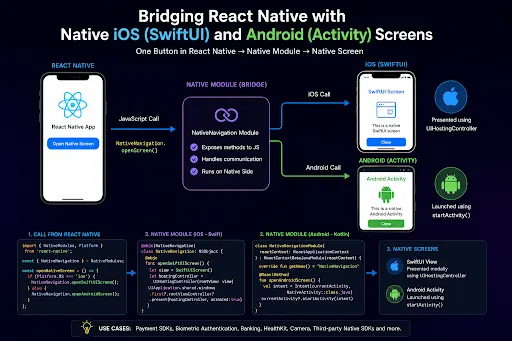
It also helps to stay aware of how React Native itself is evolving. The framework’s newer architecture has genuinely improved how JavaScript communicates with native code, and being able to explain in simple terms why this matters shows an employer you are someone who keeps learning rather than someone who studied React Native once and stopped.
Shipping Your App Into the Real World
Building something is only half the job. Understanding how to prepare a signed build, manage app icons and splash screens properly, and follow the review guidelines for both app stores removes an enormous amount of stress the first time you actually try to publish something. Even if it is just a personal project, going through this process once before you need to do it professionally will make you far less intimidated when a real client or employer asks you to handle a release.
What the Career Path Actually Looks Like
This is usually the part everyone really wants to know. React Native roles continue to show up steadily across startups, agencies, and larger companies, and plenty of listings specifically welcome freshers, often through internships that lead into full time offers. Your growth typically moves from building individual screens, to owning entire features, and eventually into making architecture decisions for bigger applications. There is also a genuinely active freelance market if traditional full time roles are not your immediate goal, and remote opportunities have made location far less of a limiting factor than it used to be.
Bringing It All Together
None of this needs to happen overnight, and honestly it should not. Rushing through concepts just to say you finished them tends to backfire the moment someone asks you to explain your own decisions in an interview. Build real projects, break them, fix them, test them properly, and let your understanding grow at a pace that actually sticks. That is what genuinely makes someone job ready, far more than any certificate ever could.
If you would rather not figure all of this out alone through scattered tutorials, it might be worth looking into how a guided react native training program is structured for people who want mentorship and real project practice instead of piecing everything together on their own.
Either way, the best time to start was probably a few months ago. The next best time is today .