Java ExecutorService & Thread Pools: Stop Managing Threads Manually

In the previous articles, we learned how Java threads work, how they interact with shared memory, and how synchronization makes concurrent code thread-safe.
But there is still a practical problem.
Suppose our payment service receives thousands of requests:
Payment Request
      ↓
Process Payment
      ↓
Database
      ↓
Payment Gateway
      ↓
Response
A naive implementation might create a new thread for every request:
new Thread(() -> processPayment()).start();That might work for a small application.
But what happens with:
10 requests
100 requests
10,000 requests
100,000 requests
Do we create 100,000 threads?
Obviously not.
This is where Executors and Thread Pools come in.
Don’t create and manage a thread for every task. Submit tasks to an executor and let it manage the worker threads.
1. From Threads to Executors
Creating threads manually has several problems.
Thread creation has a cost
A thread requires memory and operating-system resources.
Too many threads increase overhead
When many threads compete for CPU, the operating system has to perform more context switching.
Thread lifecycle becomes our responsibility
We need to manage:
- Creation
- Starting
- Failures
- Number of threads
- Shutdown
Instead of coupling a task to a specific thread:
Thread thread = new Thread(() -> processPayment());
thread.start();
we separate the task from how it executes:
Task
               │
               ▼
            Executor
               │
               ▼
          Worker Thread
The application says:
“Here is some work.”
The executor decides how that work should be executed.
Java provides the Executor interface for this abstraction:
Executor executor = ...;
executor.execute(() -> processPayment());
The important distinction is:
A
Threadrepresents an execution path. AnExecutorrepresents a mechanism for executing submitted tasks.
The executor may create a new thread, reuse an existing one, queue the task, execute it immediately, or reject it.
The caller doesn’t need to manage those details.
2. ExecutorService: Managing Tasks and Lifecycle
Executor is intentionally simple.
Real applications usually need more:
- Submit tasks
- Receive task results
- Shut down the executor
- Manage its lifecycle
That’s where ExecutorService comes in.
ExecutorService executor =
        Executors.newFixedThreadPool(10);
executor.submit(() -> processPayment());
executor.shutdown();
The relationship is:
Executor
   ↑
ExecutorService
ExecutorService extends Executor and adds task-management and lifecycle capabilities.
execute() vs submit()
This is a common interview question.
executor.execute(() -> processPayment());execute() accepts a Runnable and doesn't return a Future.
With submit():
Future<?> future =
        executor.submit(() -> processPayment());
the executor can accept a Runnable or Callable and returns a Future.
Think of it as:
execute()
   ↓
Run this task

submit()
   ↓
Submit this task
and give me a Future
We’ll explore Callable, Future, and CompletableFuture separately.
3. Thread Pools and Common Pool Types
The main idea behind a thread pool is simple:
Create a set of reusable worker threads instead of creating a new thread for every task.
For example:
Thread Pool
             ┌──────┼──────┐
             ▼      ▼      ▼
          Thread  Thread  Thread
             │      │      │
             └──────┼──────┘
                    │
                  Tasks
Suppose the pool has three workers:
Thread 1 → Task A
Thread 2 → Task B
Thread 3 → Task C
If Task D arrives while all workers are busy, it waits.
When Thread 1 finishes:
Thread 1 → Task DThe thread is reused.
This provides:
- Thread reuse
- Controlled concurrency
- Task queuing
- Resource management
- Lifecycle management
A useful mental model is:
ExecutorService
                    │
                    ▼
                Thread Pool
               /           \
              ▼             ▼
       Worker Threads    Work Queue
              │             │
              ▼             ▼
        Execute tasks    Waiting tasks
This gives us two important questions:
How many tasks can execute concurrently?
and
How many tasks can wait?
Java’s Executors class provides several common configurations.
Fixed Thread Pool
ExecutorService executor =
        Executors.newFixedThreadPool(10);
A fixed number of worker threads execute tasks.
If all workers are busy, additional tasks wait in the queue.
Fixed pool = predictable number of workers.
One important detail: the traditional newFixedThreadPool() configuration uses an unbounded queue. If tasks arrive faster than they are processed, the queue can continue growing.
Single Thread Executor
ExecutorService executor =
        Executors.newSingleThreadExecutor();
Only one task executes at a time.
Task A ─┐
Task B ─┤
Task C ─┤ → One worker
Task D ─┘
Useful when tasks must be processed sequentially.
A single-thread executor provides serialization, not parallelism.
Cached Thread Pool
ExecutorService executor =
        Executors.newCachedThreadPool();
It can create additional threads when needed and reuse idle threads.
Conceptually:
Low load   → fewer threads
High load  → more threads
Idle       → threads can be reclaimed
The important warning is that the traditional cached configuration does not impose a fixed upper bound on thread creation.
So aggressive task submission can lead to aggressive thread creation.
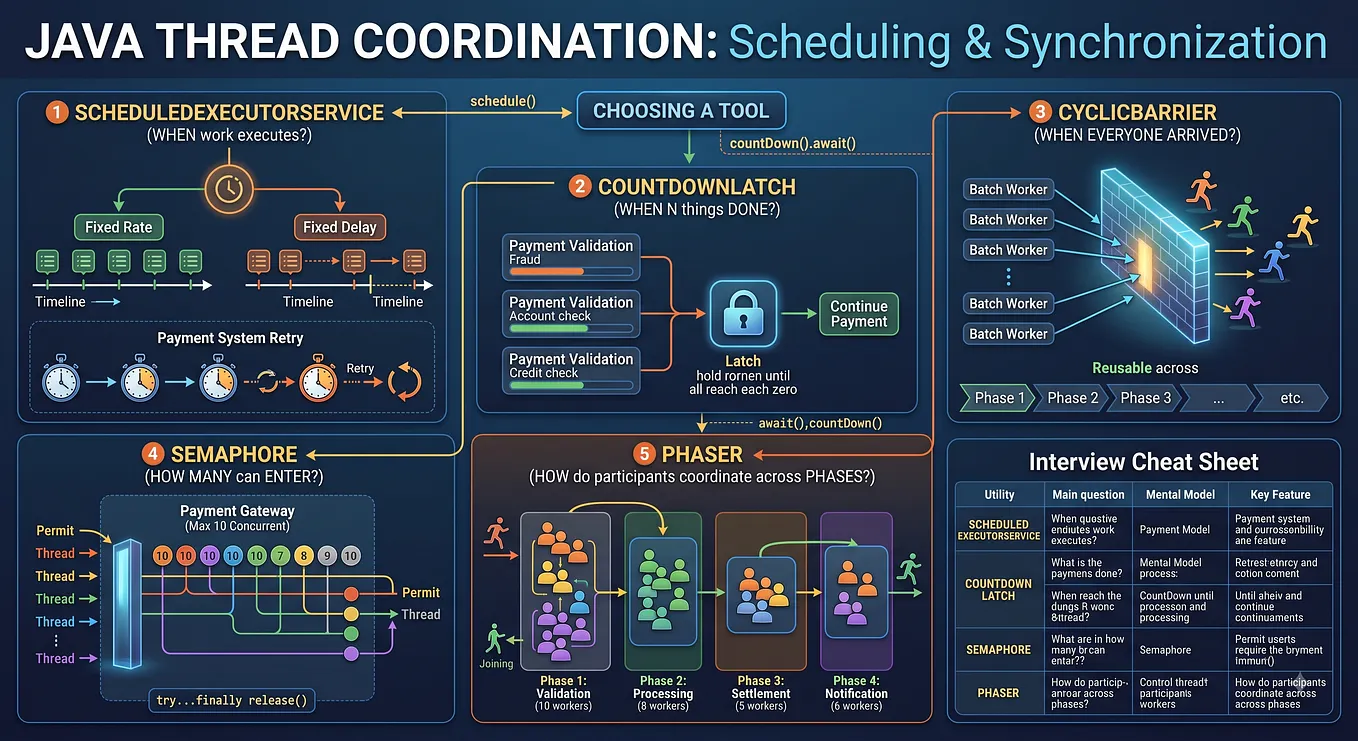
Scheduled Thread Pool
ScheduledExecutorService scheduler =
        Executors.newScheduledThreadPool(2);
Used for delayed and periodic execution:
Run cleanup after 5 minutes
Run health check every 30 seconds
Retry after 10 seconds
For now, remember:
Scheduled executors are designed for delayed and periodic task execution.
We’ll cover scheduling separately.
4. ThreadPoolExecutor: The Important Concepts
The convenience methods from Executors are useful, but production applications often need more control.
For example:
Core workers       = 10
Maximum workers    = 20
Queue capacity     = 1000
Idle timeout       = 30 seconds
Thread name        = payment-worker
Rejection policy   = CallerRunsPolicy
This is where ThreadPoolExecutor becomes important.
A simplified configuration looks like:
ThreadPoolExecutor executor =
        new ThreadPoolExecutor(
                corePoolSize,
                maximumPoolSize,
                keepAliveTime,
                unit,
                workQueue,
                threadFactory,
                handler
        );
Don’t memorize the constructor.
Understand the responsibilities:
ThreadPoolExecutor
             /       |        \
            ▼        ▼         ▼
        Workers    Queue    Rejection
            │        │         │
            ▼        ▼         ▼
        core/max  waiting    policy
corePoolSize
The normal number of worker threads the pool maintains.
Think:
How many workers should normally handle the workload?
maximumPoolSize
The maximum number of workers the pool can create under its configured conditions.
For example:
core = 10
max  = 20
The pool can temporarily grow beyond its core size.
workQueue
Stores tasks waiting for workers.
Common queue types include:
LinkedBlockingQueueArrayBlockingQueueSynchronousQueuePriorityBlockingQueue
The important concept is:
The queue determines how much work can wait before the pool needs to grow or reject tasks.
keepAliveTime
Controls how long certain idle non-core workers can remain before being removed.
For example:
Traffic spike
    ↓
20 workers
    ↓
Traffic drops
    ↓
Extra workers become idle
    ↓
Keep-alive expires
    ↓
Extra workers removed
ThreadFactory
Controls how worker threads are created.
For example:
payment-worker-1
payment-worker-2
payment-worker-3
Good thread names are extremely useful when debugging:
- Logs
- Stack traces
- Thread dumps
- Monitoring tools
RejectedExecutionHandler
Defines what happens when the executor cannot accept another task.
This becomes important when the pool is saturated.
5. The ThreadPoolExecutor Decision Flow
This is probably the most important concept to understand in this article.
Suppose:
corePoolSize    = 2
maximumPoolSize = 4
queue capacity  = 2
Tasks arrive one by one.
Task 1 → Create Worker 1
Task 2 → Create Worker 2
The core workers are now busy.
Task 3 arrives.
Instead of immediately creating Worker 3:
Task 3 → QueueTask 4 also goes into the queue.
Now:
Workers = 2
Queue   = full
Task 5 arrives.
The queue is full, but we haven’t reached maximumPoolSize.
So:
Create Worker 3Task 6:
Create Worker 4Now:
Workers = maximum
Queue   = full
Task 7 arrives.
Get Saurav Upadhyay’s stories in your inbox
Join Medium for free to get updates from this writer.
There is nowhere to put it.
So the task is rejected.
The mental model is:
Task submitted
      │
      ▼
Core worker capacity available?
      │
   ┌──┴──┐
  Yes    No
   │      │
   ▼      ▼
Execute  Queue task
           │
           ▼
       Queue full?
         │     │
        No    Yes
         │     │
         ▼     ▼
       Wait   Can create
              worker up to max?
                 │
              ┌──┴──┐
             Yes    No
              │      │
              ▼      ▼
          New worker Reject
This is much more useful than memorizing the constructor.
Understand the execution flow, not just the parameter names.
6. Queue Capacity, Backpressure & Rejection Policies
The queue is one of the most important parts of a thread-pool design.
Imagine:
10 workers
queue capacity = 10,000
This may appear generous.
But suppose:
Incoming rate > Processing rateThen:
Queue:
100
500
1,000
5,000
9,000
10,000
The system is accumulating work faster than it can process it.
A huge queue doesn’t solve the throughput problem.
It can simply delay the failure, increase memory usage, and increase latency.
Thread-pool and queue sizing are capacity-planning decisions, not arbitrary configuration values.
When the pool and queue are both saturated, the RejectedExecutionHandler determines what happens.
Java provides four standard policies.
AbortPolicy
The default.
Reject task
    ↓
RejectedExecutionException
Useful when rejection should be explicitly visible to the caller.
CallerRunsPolicy
The calling thread executes the task:
Pool full
   ↓
CallerRunsPolicy
   ↓
Calling thread executes task
This can naturally slow down producers because the caller is now busy doing the work instead of continuously submitting more tasks.
This provides a form of backpressure.
This is particularly useful as an interview discussion point.
DiscardPolicy
The new task is silently discarded.
Pool full
   ↓
Drop task
This is only appropriate when losing work is acceptable.
For a payment request, silently dropping work would generally be unacceptable.
DiscardOldestPolicy
The oldest task in the queue is discarded, and the executor attempts to submit the new task.
Queue:
A
B
C

New task D

Discard A
B
C
D
This can make sense when newer work is more valuable than older queued work.
Again, it would generally be inappropriate for critical payment processing.
Rejection Policies at a Glance
A simple way to remember them:
Abort
→ "Throw."

CallerRuns
→ "You execute it."

Discard
→ "Drop it."

DiscardOldest
→ "Drop the oldest."
The important engineering question isn’t:
“Which policy is best?”
It’s:
“What should happen to work when the system is overloaded?”
7. Thread Pool Sizing: CPU, I/O and Hidden Bottlenecks
One of the biggest mistakes is assuming:
More threads = more performance.
It doesn’t.
The right pool size depends on the workload.
CPU-bound tasks
Examples:
Image processing
Encryption
Compression
Complex calculations
Threads spend most of their time using the CPU.
Too many threads can increase context switching and contention.
So useful concurrency is often closer to available CPU parallelism.
I/O-bound tasks
Our payment service is a good example:
Database
HTTP request
Payment gateway
File I/O
A thread may spend significant time waiting:
Send request
    ↓
   WAIT
    ↓
Response arrives
    ↓
Continue
Because threads spend time waiting, having more concurrent workers than available CPUs can sometimes be useful.
But that does not mean:
“For I/O, create unlimited threads.”
Other resources still have limits.
Consider:
Thread Pool
    ↓
100 workers
    ↓
Database
    ↓
10 connections
Now:
100 threads
     ↓
10 DB connections
     ↓
90 threads waiting
Increasing the thread pool won’t necessarily improve throughput.
The database connection pool may be the real bottleneck.
Other bottlenecks include:
- CPU
- Memory
- Database connections
- HTTP connection pools
- Downstream APIs
- Locks
- Queues
This leads to an important production principle:
The thread pool is only one part of the system’s capacity.
Also don’t confuse:
Thread Pool
→ Controls concurrent execution of tasks

Connection Pool
→ Controls reusable connections to a resource
For example:
50 worker threads
10 database connections
Only 10 database operations can use those connections concurrently.
8. Lifecycle, Shutdown & Common Mistakes
Creating an executor is only half the job.
Eventually, it must be shut down.
executor.shutdown();This means:
Stop accepting new tasks, but allow already submitted tasks to complete.
There is also:
executor.shutdownNow();which attempts to interrupt running tasks and returns tasks that were waiting in the queue.
But remember:
shutdownNow()is a request to interrupt tasks, not a magical thread-kill operation.
Whether a task actually stops depends on how it responds to interruption.
A typical lifecycle is:
Create Executor
      ↓
Submit Tasks
      ↓
Execute Tasks
      ↓
Stop accepting new work
      ↓
Finish existing work
      ↓
Terminate
You can also wait for termination:
executor.awaitTermination(...);Common mistakes
1. Creating a pool per request
Request
 ↓
Create Executor
 ↓
Submit task
 ↓
Destroy Executor
This defeats thread reuse.
2. Creating unlimited threads
More threads don’t automatically mean more throughput.
3. Using an unbounded queue without understanding the consequences
The queue can grow faster than work is processed.
4. Ignoring rejection
Saturation is a normal possibility in a real system. Have a deliberate policy.
5. Blocking inside the wrong pool
For example, a small CPU-oriented pool can become exhausted if all workers are blocked on database calls.
6. Forgetting shutdown
Long-lived executors need clear ownership and lifecycle management.
9. The Big Picture & Interview Cheat Sheet
We’ve moved from manually managing threads:
new Thread(...)to:
Executorthen:
ExecutorServiceand finally:
ThreadPoolExecutorThink of the hierarchy as:
Executor
   ↓
ExecutorService
   ↓
ThreadPoolExecutor
Where:
Executor
→ Basic task execution
ExecutorService
→ Task execution + lifecycle managementThreadPoolExecutor
→ Configurable thread-pool implementation
Thread Pool Mental Model
Task
                     ↓
              ExecutorService
                     ↓
             ThreadPoolExecutor
                /           \
               ▼             ▼
        Worker Threads    Work Queue
               │             │
               ▼             ▼
          Execute tasks   Waiting tasks
                \           /
                 \         /
                  ▼       ▼
                   Saturated?
                      │
                      ▼
              Rejection Policy
ThreadPoolExecutor Cheat Sheet
corePoolSize
→ Normal worker capacity

maximumPoolSize
→ Maximum worker capacity

workQueue
→ Waiting tasks

keepAliveTime
→ Lifetime of idle extra workers

ThreadFactory
→ Controls worker-thread creation

RejectedExecutionHandler
→ Handles saturation
Common Interview Questions
Why use a thread pool?
To reuse worker threads, control concurrency, reduce thread-creation overhead, and manage submitted tasks more efficiently.
execute() vs submit()?
execute()accepts aRunnableand doesn't return aFuture.submit()acceptsRunnableorCallableand returns aFuture.
What happens when the queue is full?
If the pool hasn’t reached
maximumPoolSize, additional workers can be created. If maximum capacity is reached, the configured rejection policy handles the task.
What are the four rejection policies?
AbortPolicy,CallerRunsPolicy,DiscardPolicy, andDiscardOldestPolicy.
Why can CallerRunsPolicy provide backpressure?
Because the submitting thread executes the task when the pool is saturated, slowing down further task submission.
Why can an unbounded queue be dangerous?
If tasks arrive faster than they are processed, the queue can continue growing, increasing memory usage and latency.
Does increasing the thread-pool size always improve performance?
No. Excessive threads can increase context switching and resource contention, while the actual bottleneck may be CPU, memory, database connections, downstream services, or another resource.
Final Mental Model
If you remember only one thing from this article, remember:
A thread pool is a resource-management mechanism, not just a performance trick.
You’re controlling four things:
How much work?
      ↓
How many workers?
      ↓
How much work can wait?
      ↓
What happens under overload?
A production system isn’t designed only for the happy path.
You also need to ask:
What happens when traffic doubles?
What happens when the database slows down?
What happens when every worker is busy?
What happens when the queue is full?
What happens to the next request?
Can the system apply backpressure?
Can the system shut down gracefully?
These questions turn a simple thread-pool example into real concurrency design.
And we’ve now solved one major problem:
Before:

Task
 ↓
Create Thread
 ↓
Start Thread
 ↓
Manage Thread
Now:
Task
 ↓
ExecutorService
 ↓
ThreadPoolExecutor
 ↓
Worker Threads
 +
Work Queue
 +
Rejection Policy
But there is still another question.
What if the task needs to return a result?
For example:
Get account balance
        ↓
Validate payment
        ↓
Process payment
        ↓
Send notification
How do we represent the result of asynchronous work?
That’s where the next abstraction comes in:
Callable → Future → CompletableFuture
And that moves us from thread management toward asynchronous programming and composition.