

An indexed array in PHP stores multiple values using numeric keys, starting at 0 by default.
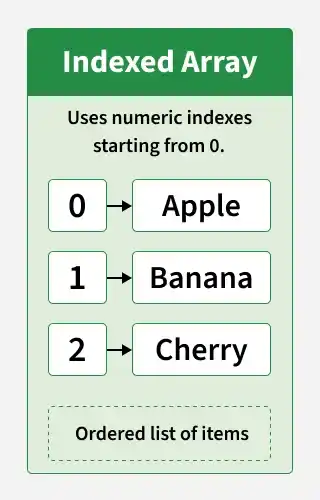
- Sequential Indexing: Uses numeric keys to access elements.
- Dynamic Size: Allows elements to be added or removed as needed.
- Flexible Data Types: Stores values of different data types.
Creating an Indexed Array
PHP supports two ways to create an indexed array.
1. Using the array() Function
<?php
$colors = array("Red", "Green", "Blue", "Yellow");

echo $colors[0];
?>
2. Using Short Array Syntax
The short array syntax ([]) is the commonly preferred way to create arrays in modern PHP.
<?php
$fruits = ["Apple", "Mango", "Litchi"];

echo $fruits[1];
?>
Accessing Array Elements
Access an element by specifying its numeric index inside square brackets. The first element has index 0.
<?php
$pen = ["Parker", "Flair", "Cello"];

echo $pen[0];
?>
Accessing an undefined index can produce a warning in modern PHP. Make sure the index exists before accessing it.
Modifying Array Elements
To modify an element, assign a new value to its existing index.
<?php
$numbers = [10, 20, 30, 40];

$numbers[2] = 35;

print_r($numbers);
?>
The value at index 2 changes from 30 to 35, while the other elements remain unchanged.
Looping Through Indexed Arrays
PHP provides foreach and for loops to iterate through indexed arrays.
1. Using the foreach Loop
The foreach loop visits each element without requiring manual index management.
<?php
$cars = ["Volvo", "BMW", "Toyota"];

foreach ($cars as $car) {
    echo $car . "\n";
}
?>
2. Using the for Loop
A for loop is useful when you need to work directly with numeric indexes.
<?php
$countries = ["USA", "Canada", "Mexico", "Brazil"];

for ($i = 0; $i < count($countries); $i++) {
    echo $countries[$i] . "\n";
}
?>
For arrays with sequential numeric indexes, both loops work well. The foreach loop is generally simpler when you only need to process each element.
Adding New Items to an Indexed Array
You can append elements using the [] syntax or the array_push() function. PHP assigns the next available numeric key when appending an element.
1. Using []
<?php
$colors = ["Red", "Green", "Blue"];

$colors[] = "Black";

print_r($colors);
?>
2. Using array_push()
The array_push() function adds one or more elements to the end of an array.
<?php
$colors = ["Red", "Green", "Blue"];

array_push($colors, "Black", "White");

print_r($colors);
?>
For a single element, $colors[] = "Black"; is simpler than using array_push().
Removing Items from Indexed Arrays
PHP provides array_pop() and array_shift() to remove elements from indexed arrays.
1. Using array_pop()
The array_pop() function removes the last element from an array.
<?php
$vegetables = ["Carrot", "Tomato", "Cucumber", "Lettuce"];

array_pop($vegetables);

print_r($vegetables);
?>
2. Using array_shift()
The array_shift() function removes the first element and reindexes the remaining numeric keys.
<?php
$vegetables = ["Carrot", "Tomato", "Cucumber", "Lettuce"];

array_shift($vegetables);

print_r($vegetables);
?>
To remove an element at a specific index, use unset(). Unlike array_shift(), unset() does not automatically reindex the remaining elements.
Traversing an Indexed Array in Reverse Order
You can traverse an indexed array in reverse order using a while loop, starting from the last index.
<?php
$numbers = [1, 2, 3, 4, 5];

$i = count($numbers) - 1;

while ($i >= 0) {
    echo $numbers[$i] . "\n";
    $i--;
}
?>
This approach works for a non-empty array with sequential numeric indexes.
Common PHP Functions for Indexed Arrays
PHP provides built-in functions to add, remove, and manage indexed array elements.
- array_push(): Adds one or more elements to the end of an array.
- array_pop(): Removes and returns the last element.
- array_shift(): Removes and returns the first element and reindexes the remaining numeric keys.
- array_unshift(): Adds one or more elements to the beginning and reindexes existing numeric keys.
- count(): Returns the number of elements in an array.
- sort(): Sorts elements in ascending order and resets numeric keys.
- rsort(): Sorts elements in descending order and resets numeric keys.
- array_reverse(): Returns an array with elements in reverse order.