Recent changes to wikihttps://sourceforge.net/p/facetracknoir/wiki/2022-02-09T10:19:41.346000ZRecent changes to wikiDiscussion for Compatible Games page2022-02-09T10:19:41.346000Z2022-02-09T10:19:41.346000ZFredSteelhttps://sourceforge.net/u/fredsteel/https://sourceforge.net11f41c038ef08bc6030dfd6aaefe9e61a4483580<div class="markdown_content"><p>Much appreciated for data fella! Im sorry for knocking old string! play insane time game by this connection and win more!</p></div>Discussion for HeadTrackers page2021-09-18T00:50:58.388000Z2021-09-18T00:50:58.388000ZEyeware Beamhttps://sourceforge.net/u/eyeware-beam/https://sourceforge.netbbf8e620d173290e9e0cd85ef8fb86a5b0a9d50e<div class="markdown_content"><p><strong>I am propose that you add "Eyeware Beam" to this list as the only combined eye and head tracker app that is compatible with Facetracknoir.</strong></p>
<p>Our free in beta app turns your iPhone or iPad, that supports Face ID with its built-in TrueDepth camera, into a reliable and precise, multi-purpose head and eye-tracking tool. It can be downloaded at from the app store now: <a href="https://apps.apple.com/us/app/eyeware-beam/id1538790472." rel="nofollow">https://apps.apple.com/us/app/eyeware-beam/id1538790472.</a></p>
<p>Our app works as the input source, enabling a full range of 6DOF in-game head motion. Eyeware Beam adds depth to your gaming and streaming experience with responsive, intuitive head movement controls. </p>
<p>The TrueDepth technology produces a depth map of your face by projecting 30,000 infrared points that are recorded and processed by the smartphone chip’s neural engine. Eyeware Beam takes advantage of this technology to provide you with an app that generates an accurate head pose and eye tracking signal comparable to expensive proprietary devices from Tobii or TrackIR. </p>
<p>All you need to start is your gaming PC, an iPhone or iPad that supports Face ID with iOS 13 or later... and, of course, your favorite PC game that supports FreeTrack or TrackIR protocol! To name a few: </p>
<p>Early API access for developers and independent software vendors is also available to build head and eye tracking-enabled PC solutions. Transform an iOS device into an eye and head tracking peripheral for a Windows PC to connect to your own app. Access head and eye tracking data in real-time for the app you're building. Potential use cases for eye and head tracking enabled software benefit gaming devices and simulators.</p>
<p>▶ Email - beam@eyeware.tech<br/>
▶ Website - <a href="http://beam.eyeware.tech" rel="nofollow">http://beam.eyeware.tech</a><br/>
▶ Early API Access - <a href="https://beam.eyeware.tech/developers" rel="nofollow">https://beam.eyeware.tech/developers</a></p></div>Discussion for Home page2021-03-10T22:52:55.185000Z2021-03-10T22:52:55.185000ZBrianhttps://sourceforge.net/u/likebubba/https://sourceforge.netc12b527ee2d029589ecdb9bc032cbdd62d28734f<div class="markdown_content"><p>Awesome help<br/>
sometimes it doesn't get it right. It becomes twitchy, like sooo twitchy idk ... any help or anything I am not doing right?</p></div>Discussion for Home page2020-06-30T23:30:45.457000Z2020-06-30T23:30:45.457000ZWes Johnston https://sourceforge.net/u/wesmaximus/https://sourceforge.net1c0767689ca28ceb83fd37a47067ea863eacb52a<div class="markdown_content"><p>Is there a way to have facetracknoir less sensitive to Facial expressions. I smile too much and when I do inin game camera moves wherever it randomly wants. Any setting that could lessen thiseffect? Thank you for the great software</p></div>faceAPI modified by Wim Vriend2016-03-20T11:16:55.139000Z2016-03-20T11:16:55.139000ZWim Vriendhttps://sourceforge.net/u/v4friend/https://sourceforge.net87d6bcf818c4d3c5a387898c67255790ff111891<div class="markdown_content"><pre>--- v16
+++ v17
@@ -3,7 +3,7 @@

-# faceAPI from [SeeingMachines](http://www.seeingmachines.com/product/faceapi/) #
+# faceAPI from SeeingMachines#
The non-commercial API from SeeingMachines was the big stimulator for us to create FaceTrackNoIR in the first place. It offers very good face-tracking, with relatively low CPU-usage.
If you have questions, remarks or compliments you want to share with us, please post them here: [discussion:faceapi]
@@ -12,8 +12,7 @@
Tracking facial features instead of IR-leds offers a great advantage: no hardware but a simple web-cam is required! So anyone can use faceAPI, almost instantly.
## Drawbacks ##
-Lighting and web-cam need to be good. If you wonder if your webcam will work with faceAPI, then it is wise to try the [faceAPI demo](http://www.seeingmachines.com/product/faceapi/downloads/) first. Registration (free of charge) is required.
-SeeingMachines recommends a Dual core processor or higher.
+Lighting and web-cam need to be good. If you wonder if your webcam will work with faceAPI, then it is wise to try the [faceAPI demo](http://sourceforge.net/projects/facetracknoir/files/redist/) first. SeeingMachines recommends a Dual core processor or higher.
### Limitations of non-commercial version ###
The most important limitation is the fact that the video-source cannot be selected. This means that faceAPI will always (try to) use the first video-source it finds (even if that's not your webcam).
</pre>
</div>Discussion for faceAPI page2016-01-29T18:26:21.855000Z2016-01-29T18:26:21.855000ZNguyen Truong Gianghttps://sourceforge.net/u/giangnm91/https://sourceforge.net424b9c83e91d95a47d81aadc26a8f2ae9a05c4a1<div class="markdown_content"><p>Hi, I can't seem to find & download faceApi on seeingMachine anymore, please help</p></div>Discussion for faceAPI page2015-01-11T16:08:13.348000Z2015-01-11T16:08:13.348000ZWim Vriendhttps://sourceforge.net/u/v4friend/https://sourceforge.netf06c495d736c77b0259d4295cb3474df20a5f03e<div class="markdown_content"><p>In the Files/redist section of this Project.</p></div>Discussion for faceAPI page2015-01-10T20:01:58.599000Z2015-01-10T20:01:58.599000ZLiquidhttps://sourceforge.net/u/mksolidus/https://sourceforge.net75137e6b61ef98f404cfc0bc8c70fd6baa399323<div class="markdown_content"><p>wtf where can i download only faceapi</p></div>Accela modified by Stanisław Halik2014-01-16T06:51:47.576000Z2014-01-16T06:51:47.576000ZStanisław Halikhttps://sourceforge.net/u/sthalik/https://sourceforge.net132c2e96b8f476d131a7c6345f02068cf6c97783<div class="markdown_content"><pre>--- v5
+++ v6
@@ -12,7 +12,7 @@
The accela-filter uses acceleration and speed to determine 'the next' position. It's a big improvement.
## Drawbacks ##
-None known yet.
+Involved configuration required to make it work in the first place.
## Settings ##
The curve of the Accela rotations and translations is very optimised and should only be changed, when absolutely necessary. To use Accela, it is important that <b>smoothing (main window of FaceTrackNoIR)</b> is set to "1".
</pre>
</div>WikiPage Accela modified by Wim Vriend2013-02-21T10:38:33.748000Z2013-02-21T10:38:33.748000ZWim Vriendhttps://sourceforge.net/u/v4friend/https://sourceforge.netaed70800fb585ec65165b3ea102ff8a130ed9bcb<div class="markdown_content"><pre>--- v4
+++ v5
@@ -15,7 +15,8 @@
None known yet.
## Settings ##
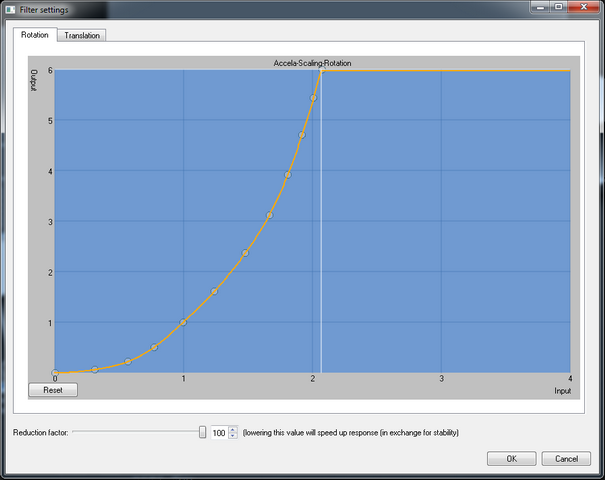
-The curve of the Accela rotations and translations is very optimised and should only be changed, when absolutely necessary.
+The curve of the Accela rotations and translations is very optimised and should only be changed, when absolutely necessary. To use Accela, it is important that <b>smoothing (main window of FaceTrackNoIR)</b> is set to "1".
+
The Settings-screen of Accela looks like this:
</pre>
</div>