Recent changes to wikihttps://sourceforge.net/p/scada-plugin/wiki/2025-09-02T17:44:09.235000ZRecent changes to wikiHome modified by ENGITEX2025-09-02T17:44:09.235000Z2025-09-02T17:44:09.235000ZENGITEXhttps://sourceforge.net/u/engitex/https://sourceforge.net5dd03ef996a4f082eb1348d6650626bd5fa9979e<div class="markdown_content"><pre>--- v9
+++ v10
@@ -20,6 +20,7 @@
### Demo limitations
The demo version has the following limitations:
+
* No data encryption and no user authorization in SCADA web app.
* No data collection over Modbus– demo only allows to test the system with three emulated variables (Emulator).
* Only one (main) window in **/view** with no possibility to make regions on SCADA canvas “clickable”.
</pre>
</div>Home modified by ENGITEX2025-09-02T17:43:37.546000Z2025-09-02T17:43:37.546000ZENGITEXhttps://sourceforge.net/u/engitex/https://sourceforge.netcb55ff04af843081fdbba0c5b62d178cf0ba5e78<div class="markdown_content"><pre>--- v8
+++ v9
@@ -17,3 +17,10 @@
### Quick start
The plugin can be tested even in demo version with 3 emulated signals coming from 2 emulated PLCs. [Example] page describes how to set-up the system for the test. See [SCADA output] for an explanation how to set-up a graphical output.
+
+### Demo limitations
+The demo version has the following limitations:
+* No data encryption and no user authorization in SCADA web app.
+* No data collection over Modbus– demo only allows to test the system with three emulated variables (Emulator).
+* Only one (main) window in **/view** with no possibility to make regions on SCADA canvas “clickable”.
+* No polling settings module.
</pre>
</div>JMP plugins modified by ENGITEX2025-08-25T06:45:04.561000Z2025-08-25T06:45:04.561000ZENGITEXhttps://sourceforge.net/u/engitex/https://sourceforge.net4d224c691e6dee658454bd816612f2a470e99a08<div class="markdown_content"><pre>--- v5
+++ v6
@@ -7,4 +7,4 @@
- *JMP baseline functionality includes task dispatching between available nodes according to a chosen load distribution policy, monitoring task status, sending output results from a task to the caller.*
+ *JMP baseline functionality includes task dispatching between available nodes according to a chosen load distribution policy, monitoring task status, sending output results from a task to the caller.*
</pre>
</div>JMP plugins modified by ENGITEX2025-08-25T06:44:25.777000Z2025-08-25T06:44:25.777000ZENGITEXhttps://sourceforge.net/u/engitex/https://sourceforge.net68feac9d668999611efa41f9a1f55960e274c1d1<div class="markdown_content"><pre>--- v4
+++ v5
@@ -7,4 +7,4 @@
-* *JMP baseline functionality includes task dispatching between available nodes according to a chosen load distribution policy, monitoring task status, sending output results from a task to the caller.*
+ *JMP baseline functionality includes task dispatching between available nodes according to a chosen load distribution policy, monitoring task status, sending output results from a task to the caller.*
</pre>
</div>JMP plugins modified by ENGITEX2025-08-25T06:44:14.602000Z2025-08-25T06:44:14.602000ZENGITEXhttps://sourceforge.net/u/engitex/https://sourceforge.net0fd0cd1a2e212be74268c710d7514bc4bb5362b8<div class="markdown_content"><pre>--- v3
+++ v4
@@ -7,4 +7,4 @@
-*JMP baseline functionality includes task dispatching between available nodes according to a chosen load distribution policy, monitoring task status, sending output results from a task to the caller.*
+* *JMP baseline functionality includes task dispatching between available nodes according to a chosen load distribution policy, monitoring task status, sending output results from a task to the caller.*
</pre>
</div>JMP plugins modified by ENGITEX2025-08-25T06:43:44.510000Z2025-08-25T06:43:44.510000ZENGITEXhttps://sourceforge.net/u/engitex/https://sourceforge.nete425aee5dcc6a21e32933ee086584683bb36af17<div class="markdown_content"><pre>--- v2
+++ v3
@@ -6,5 +6,5 @@
* Different plugins can run on the same machine simultaneously, e.g. SCADA plugin and Remote shell (rCMD) plugin.
-* *JMP baseline functionality includes task dispatching between available nodes according to a chosen load distribution policy, monitoring task status, sending output results from a task to the caller.
-*
+
+*JMP baseline functionality includes task dispatching between available nodes according to a chosen load distribution policy, monitoring task status, sending output results from a task to the caller.*
</pre>
</div>JMP plugins modified by ENGITEX2025-08-25T06:43:16.802000Z2025-08-25T06:43:16.802000ZENGITEXhttps://sourceforge.net/u/engitex/https://sourceforge.netfe8bdfd78a070ac76ab88ebee54de05c417cc98b<div class="markdown_content"><pre>--- v1
+++ v2
@@ -5,3 +5,6 @@
* There is no need to know the port number taken by a plugin on remote machine.
* Different plugins can run on the same machine simultaneously, e.g. SCADA plugin and Remote shell (rCMD) plugin.
+
+* *JMP baseline functionality includes task dispatching between available nodes according to a chosen load distribution policy, monitoring task status, sending output results from a task to the caller.
+*
</pre>
</div>SCADA output modified by ENGITEX2025-08-19T21:54:56.467000Z2025-08-19T21:54:56.467000ZENGITEXhttps://sourceforge.net/u/engitex/https://sourceforge.netde407fc6ad4df6b4bac3c93bacb27dfd7797b230<div class="markdown_content"><pre>--- v4
+++ v5
@@ -5,4 +5,4 @@
-
+
</pre>
</div>SCADA output modified by ENGITEX2025-08-19T21:54:22.122000Z2025-08-19T21:54:22.122000ZENGITEXhttps://sourceforge.net/u/engitex/https://sourceforge.net0312e36ef648e228ad04ffe7386d600ea9044d3c<div class="markdown_content"><pre>--- v3
+++ v4
@@ -1,4 +1,8 @@
### Set-up the output
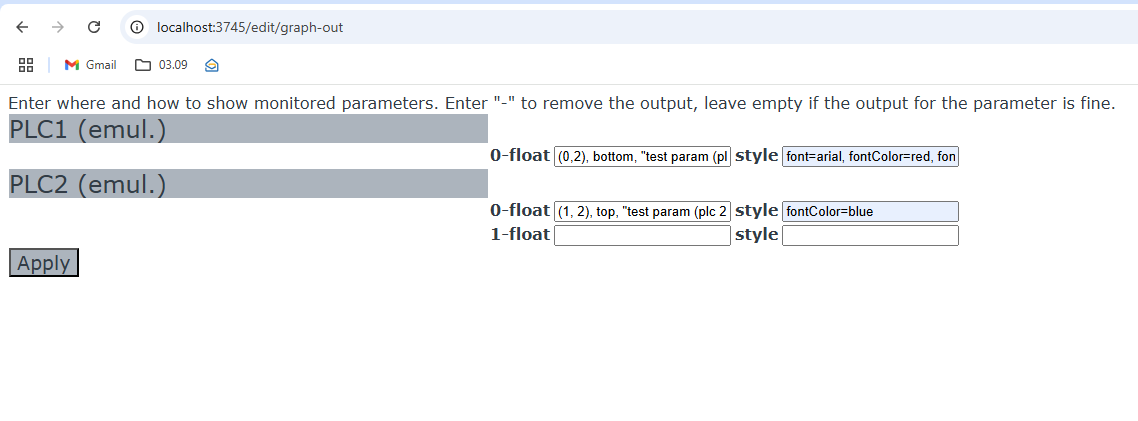
First, in** Graphical output** indices **(i, j)** along with other additional settings are provided for those parameters that should be shown on SCADA canvas.
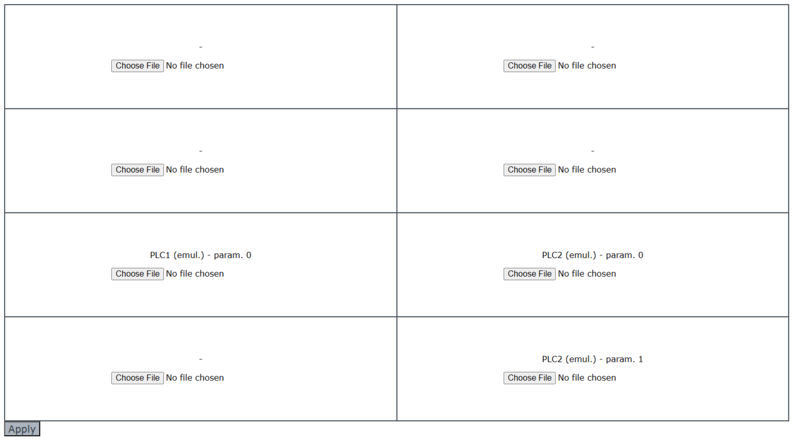
+Then clicking **Apply** must send you to the page where images for the canvas regions can be chosen. These images will be uploaded to the SCADA host.
+The dimensions of the canvas are always assumed to be **i_max** x **j_max** as entered on the previous page.
+

+
</pre>
</div>SCADA output modified by ENGITEX2025-08-19T21:50:40.854000Z2025-08-19T21:50:40.854000ZENGITEXhttps://sourceforge.net/u/engitex/https://sourceforge.net1a35eaced80a3c44bcdaa3de55c0d88b865680d8<div class="markdown_content"><pre>--- v2
+++ v3
@@ -1,3 +1,4 @@
### Set-up the output
First, in** Graphical output** indices **(i, j)** along with other additional settings are provided for those parameters that should be shown on SCADA canvas.
+

</pre>
</div>