No admin rights when adding features - Advanced Installer Community
rmoc
Posts: 72
Joined: Tue Mar 14, 2017 8:27 pm

No admin rights when adding features

I have a feature that requires the “SQL Server OLE DB Driver 18 x64.” In order to install this silently, I need administrator permissions, so I have configured the setup accordingly. When reinstalling the feature, this works without any problems. However, when I try to add the feature later (Add or remove software\modify), I get an error message.
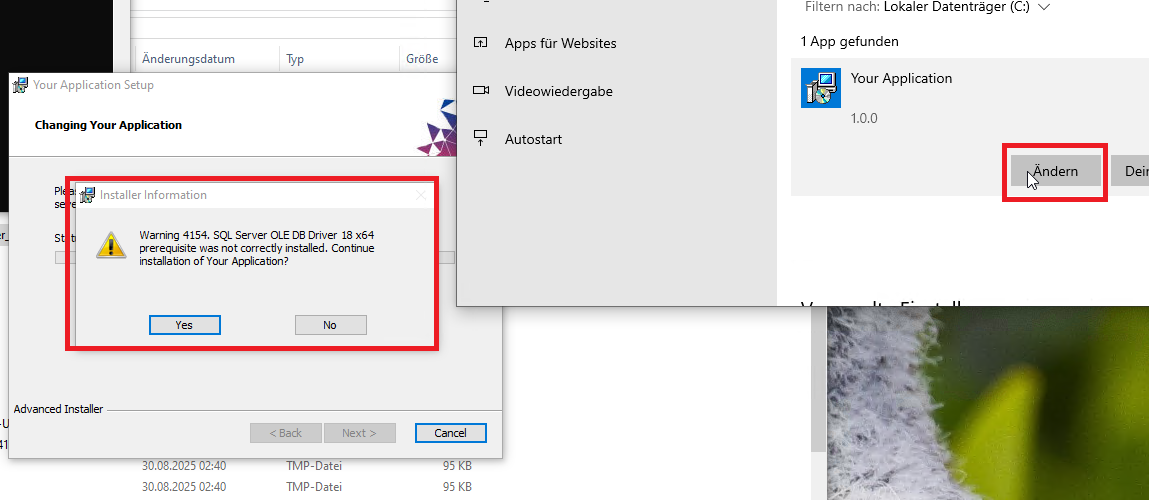
Error.png
Error.png (130.49 KiB) Viewed 2029 times
When I start the setup explicitly via an Admin Console, the installation works. It therefore appears that the setup via (Add or remove software\modify) is not started as an administrator.
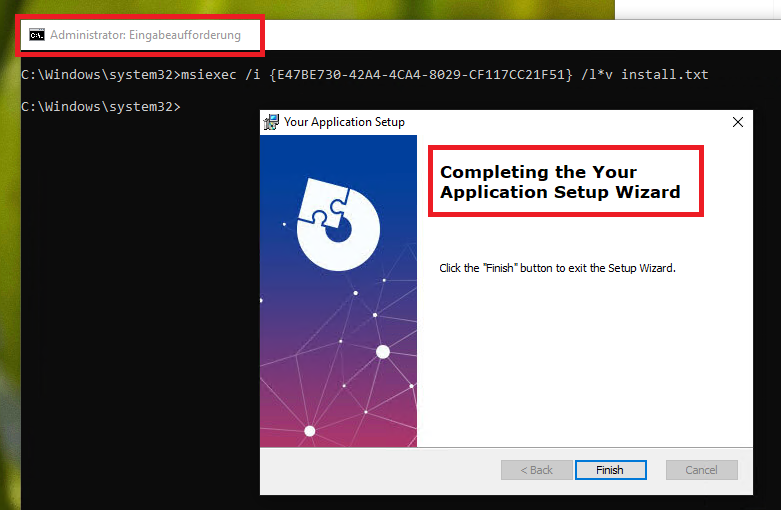
Ok.png
Ok.png (126.62 KiB) Viewed 2029 times
Sample project
AdminInstall.aip
(30.09 KiB) Downloaded 133 times
Catalin
Posts: 7847
Joined: Wed Jun 13, 2018 7:49 am

Re: No admin rights when adding features

Hello Rene,

This seems to be a limitation, to be quite honest with you.

I've found this thread from almost 12 years ago on SO that explains exactly the same issue (but with another Windows Installer authoring tool):

Windows Does not Prompt for Elevation when Changing Configuration of Product Using Add\Remove Programs

I will bring this up to the dev team and hopefully something can be done about this. :)

Best regards,
Catalin
Catalin Gheorghe - Advanced Installer Team
Follow us: Twitter - Facebook - YouTube
rmoc
Posts: 72
Joined: Tue Mar 14, 2017 8:27 pm

Re: No admin rights when adding features

Hello Cataline,

Thanks for your support.

Regards
René
Catalin
Posts: 7847
Joined: Wed Jun 13, 2018 7:49 am

Re: No admin rights when adding features

You are always welcome, René!

Best regards,
Catalin
Catalin Gheorghe - Advanced Installer Team
Follow us: Twitter - Facebook - YouTube

Return to “Common Problems”