Clipped Status text - Advanced Installer Community

We’re moving our forums to a new platform.

You can still browse and search existing topics, but you can no longer create new topics or post replies.

For questions, technical issues, or feature requests, please don’t hesitate to contact our support team at support@advancedinstaller.com.

Thank you for your understanding!

SteveA
Posts: 22
Joined: Fri Jan 30, 2009 2:36 am

Clipped Status text

I'm running Advanced Installer Professional 6.8 and I notice that during the install the Status text describing what's being done at the moment is clipped at the bottom. Notice the missing tails below on the g and p.
AI Status.jpg
AI Status.jpg (5.8 KiB) Viewed 3211 times

It's not that important, but perhaps the next time someone is in the source code they could nudge the text field up a bit or the status bar down a bit.

Thanks,
Steve Adams
Cosmin
Posts: 5797
Joined: Tue Jul 10, 2007 6:39 pm
Contact: Website

Re: Clipped Status text

Hi Steve,

Unfortunately we cannot reproduce this behavior on our test machines. Can you reproduce it on other computers? Also, are you using special display settings?

Regards,
Cosmin
Cosmin Pirvu - Advanced Installer Team
Follow us: Twitter - Facebook - YouTube
SteveA
Posts: 22
Joined: Fri Jan 30, 2009 2:36 am

Re: Clipped Status text

I tried it on another machine and it doesn't clip. I can see that on the machine that doesn't clip, that the font for the text is smaller, so it doesn't overflow it's field:
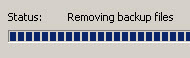
removing.jpg
removing.jpg (4.62 KiB) Viewed 3194 times
I'm not using any special display settings, though. The machine where it clips has a screen resolution of 1440 x 900 and is running XP. The machine where it does not clip has a screen resolution of 1280 x 1024 and is running Windows Server 2003.

Steve
Cosmin
Posts: 5797
Joined: Tue Jul 10, 2007 6:39 pm
Contact: Website

Re: Clipped Status text

Hi Steve,

I'm afraid we are still unable to reproduce this behavior on our test machines. This behavior may be encountered if:
- the fonts used by the dialogs are changed (by a theme for example)
- the font size is changed (we tested multiple font sizes on multiple Windows versions, but we couldn't reproduce the behavior)

Regards,
Cosmin
Cosmin Pirvu - Advanced Installer Team
Follow us: Twitter - Facebook - YouTube

Return to “Common Problems”