Android Project Structure — Mapped to Flutter

The first thing I did when opening an Android project was look for things I already knew as a Flutter Developer. Here’s the direct translation.
The Folder Structure
app/
├── manifests/
│   └── AndroidManifest.xml
├── java/
│   └── com.example.app/
│       └── MainActivity.kt
└── res/build.gradle.ktsEach piece has a Flutter equivalent — or a clear explanation for why it doesn’t.
build.gradle.kts → pubspec.yaml
Same job. Different file.
build.gradle.kts is where you manage:
- Dependencies (libraries and packages)
- SDK version requirements
- App version and build configuration
- Plugin setup
The only real difference is syntax — Flutter uses YAML, Android uses Kotlin script (.kts). Same purpose, different format.
res/ → assets/
res/ is Flutter's assets/ folder, with more structure.
It holds everything static the app needs:
- Drawables and images (
res/drawable/) - Fonts (
res/font/) - Strings, colours, dimensions (
res/values/)
Flutter’s assets/ folder is flat. res/ is organized into subfolders by type. Same idea — different level of organization.
AndroidManifest.xml — No Flutter Equivalent
This one has no direct Flutter equivalent, which is exactly why it matters.
Get Hafiz Umar Ahmad Siddiqui’s stories in your inbox
Join Medium for free to get updates from this writer.
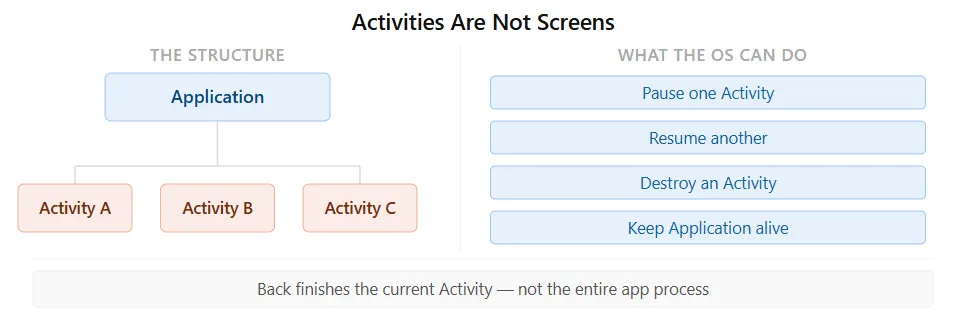
The AndroidManifest.xml is the identity card of the app. Android reads it before doing anything else. It declares:
- Every Activity in the app
- Every Service
- Every BroadcastReceiver
- What Permissions the app needs
- The app theme
- Which Activity launches when the icon is tapped (the Launcher Activity)
Since the OS controls everything, it needs this map first. Without the manifest, Android doesn’t know the app exists, what it can do, or where to start.
MainActivity → main() Entry Point
MainActivity is the first thing Android creates when the app icon is tapped. It's the entry point — the Android equivalent of main() in Flutter.
It extends ComponentActivity, the base class for modern Android activities. It provides:
- Lifecycle management
- Permission handling
- Compose support
- Core activity behaviour
You don’t build this from scratch. You extend it and add your UI inside it.
setContent {} → runApp()
setContent is the Compose equivalent of runApp(). Everything inside that block becomes the UI.
// Flutter
void main() {
  runApp(MyApp());
}
// Android + Compose
override fun onCreate(...) {
setContent {
MyApp()
}
}Same concept — the entry point to the UI tree.
The path maps cleanly too:
Flutter:  main() → runApp() → Widget tree → Screen
Android:  MainActivity → setContent{} → Composable tree → Screen
Widget → @Composable Function
In Flutter, everything is a widget — a class with a build() method.
In Compose, everything is a function marked with @Composable.
// Flutter
class MyText extends StatelessWidget {
  Widget build(BuildContext context) {
    return Text("Hello");
  }
}
// Compose
@Composable
fun MyText() {
Text("Hello")
}Same purpose — describe a piece of UI. Different shape.
Flutter uses class inheritance. Compose uses function annotations. And instead of build() returning a widget tree, Compose re-executes the function when state changes — this is called recomposition.
The key mental model: Widget is a class. @Composable is a function.
The Full Translation
Flutter Android pubspec.yaml build.gradle.kts assets/ res/ main() MainActivity runApp() setContent {} Widget @Composable build() Recomposition