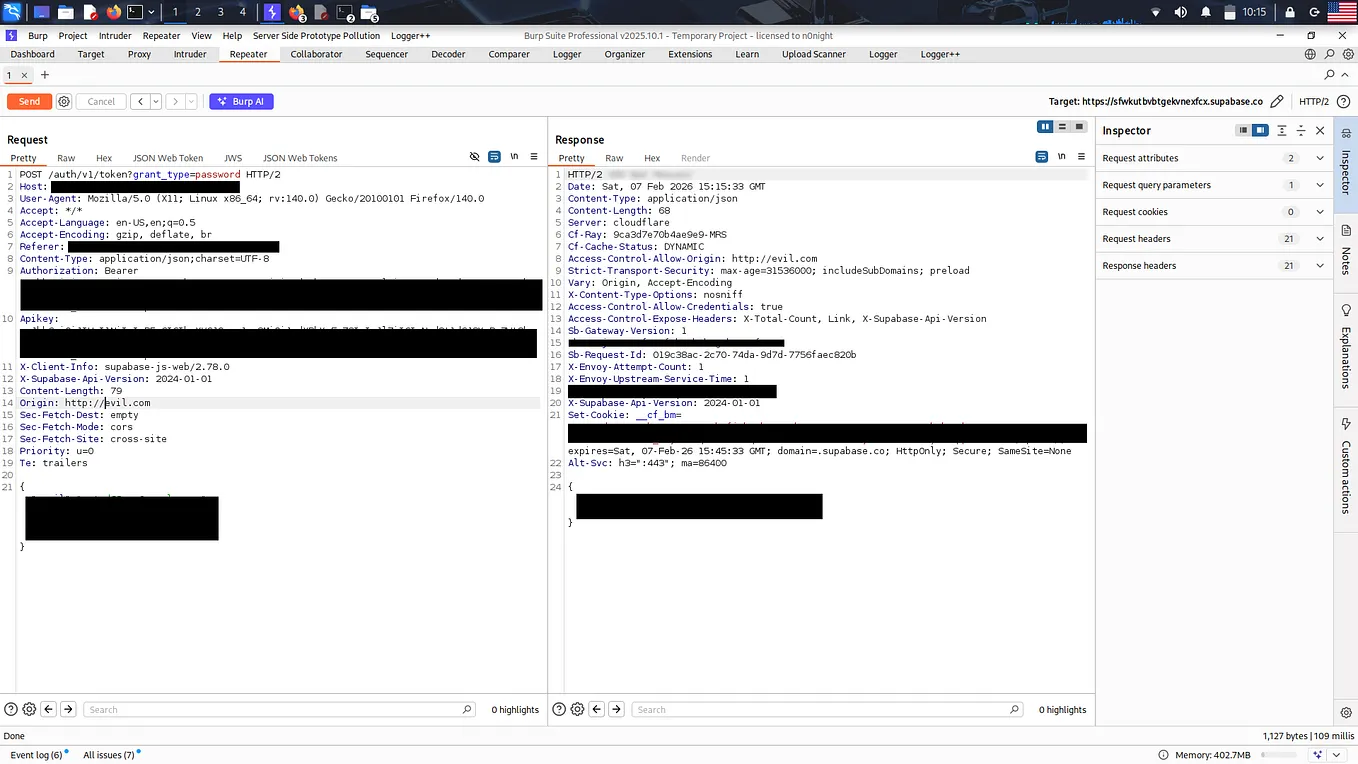
Is Every CORS Misconfiguration a Vulnerability?

Understanding the Difference Between CORS Configuration, Security Misconfiguration, and Exploitable Vulnerabilities
In web security, few topics generate as much confusion as Cross-Origin Resource Sharing (CORS).
During security assessments, it is common to encounter configurations such as:
Access-Control-Allow-Origin: *or:
Access-Control-Allow-Credentials: trueThese headers often attract immediate attention. However, finding a suspicious CORS configuration does not automatically mean that a security vulnerability exists.
The real question is not whether CORS is misconfigured, but whether that misconfiguration creates a security impact.
In this article, we will explore how CORS works, distinguish between potentially dangerous configurations and harmless ones, and understand how to assess CORS issues from an application security perspective.
1. What Is CORS?
Cross-Origin Resource Sharing (CORS) is a browser security mechanism that allows web applications to access resources from different origins under specific conditions.
An origin consists of three components:
- Scheme:
https - Host:
example.com - Port:
443
For example:
https://app.example.com
https://api.example.com
These are different origins because their hostnames differ.
Browsers implement the Same-Origin Policy (SOP), which restricts how documents and scripts from one origin can interact with resources from another origin.
CORS provides a controlled mechanism for relaxing certain restrictions.
Consider the following scenario:
A user visits:
https://attacker.comThe attacker-controlled website attempts to retrieve data from:
https://api.example.com/accountThe browser evaluates the CORS response headers to determine whether JavaScript running on attacker.com can access the response.
If the API does not permit the attacker’s origin, the browser prevents JavaScript from reading the response.
However, this does not necessarily mean the request itself was blocked.
This distinction is extremely important.
CORS primarily controls whether browser JavaScript can read cross-origin responses. It is not a general mechanism for preventing requests from reaching the server.
2. CORS Is Not Authentication or Authorization
One of the most common misunderstandings is treating CORS as an access control mechanism.
Imagine an API endpoint:
GET /api/profile HTTP/1.1
Host: api.example.com
The endpoint requires authentication and returns the current user’s profile.
CORS determines which browser origins can read the response.
Authentication determines who the user is.
Authorization determines what that user is allowed to access.
These are separate security controls.
For example, an attacker can use tools such as curl, Burp Suite, or a custom HTTP client to send requests directly to an API.
These tools do not enforce browser CORS restrictions.
Therefore, if an API relies exclusively on CORS to protect sensitive endpoints, the application has a much more fundamental security problem.
CORS should never replace proper authentication or authorization.
3. Is Access-Control-Allow-Origin: * Dangerous?
Consider this response:
HTTP/1.1 200 OK
Access-Control-Allow-Origin: *
Content-Type: application/json
{
"message": "Hello, world!"
}This configuration allows browser JavaScript from any origin to read the response.
Is this a vulnerability?
Not necessarily.
If the endpoint returns public information, allowing cross-origin access may be completely intentional.
For example:
GET /api/public/articlesIf the endpoint only returns publicly available articles, unrestricted cross-origin access may be appropriate.
Now consider a different endpoint:
GET /api/accountIf this endpoint returns sensitive information and the application incorrectly exposes it to unauthenticated users, the issue is not simply CORS.
The underlying problem is missing or ineffective authorization.
Important distinction
A wildcard CORS policy can be perfectly acceptable for public resources.
It becomes a security concern when the application exposes information or functionality that should not be accessible to the requesting party.
4. When Does CORS Become Dangerous?
A CORS misconfiguration becomes interesting when it allows an attacker-controlled origin to read sensitive information that would otherwise be protected by the application’s security controls.
Let’s explore several scenarios.
Scenario 1: Reflecting Arbitrary Origins
Consider this response:
HTTP/1.1 200 OK
Access-Control-Allow-Origin: https://attacker.com
Access-Control-Allow-Credentials: true
The application dynamically reflects the incoming Origin header.
For example, the server receives:
Origin: https://attacker.comAnd responds with:
Access-Control-Allow-Origin: https://attacker.com
Access-Control-Allow-Credentials: true
If the server trusts arbitrary origins, this can become dangerous.
Suppose the endpoint returns sensitive information:
GET /api/account HTTP/1.1
Host: api.example.com
Origin: https://attacker.com
Cookie: session=VALID_SESSION
The response contains:
{
  "email": "victim@example.com",
  "account_id": 12345,
  "balance": 5000
}
If the browser sends the victim’s authentication cookies and the response permits credentialed cross-origin access, JavaScript on the attacker’s website may be able to read the victim’s account information.
This is where the actual security impact appears.
The important conditions include:
- The endpoint returns sensitive information.
- The victim is authenticated.
- The browser sends the relevant credentials.
- The server permits the attacker’s origin.
- The browser accepts the credentialed CORS response.
A reflected Origin header alone does not establish exploitability.
5. Understanding Access-Control-Allow-Credentials
This header is frequently misunderstood.
Consider:
Access-Control-Allow-Credentials: trueThis tells the browser that the response permits credentialed cross-origin access.
Credentials may include cookies, HTTP authentication, or client certificates.
However, the header alone does not make an application vulnerable.
The attacker still needs a relevant cross-origin access path, and the endpoint must expose something worth accessing.
Additionally, browsers enforce restrictions around credentialed CORS requests.
For example, this combination is invalid for credentialed access:
Access-Control-Allow-Origin: *
Access-Control-Allow-Credentials: true
Browsers reject credentialed CORS responses that use the wildcard origin.
The server must return an explicit allowed origin.
For example:
Access-Control-Allow-Origin: https://app.example.com
Access-Control-Allow-Credentials: true
This is not inherently dangerous if app.example.com is a trusted origin and the application correctly validates it.
The real security question is how the server determines which origins are trusted.
6. The Origin Validation Problem
A common implementation mistake is validating origins using weak string matching.
For example:
if (origin.includes("example.com")) {
    return origin;
}
This might appear reasonable at first glance.
However, consider:
https://example.com.attacker.comThe string contains example.com, but the actual hostname is controlled by the attacker.
A similar issue can occur with poorly designed regular expressions or suffix checks.
For example, blindly trusting origins that end with:
example.commay accidentally allow:
https://attackerexample.comA safer approach is to parse the origin and compare its hostname against an explicit allowlist.
Example:
const allowedOrigins = new Set([
    "https://app.example.com",
    "https://admin.example.com"
]);
if (allowedOrigins.has(origin)) {
// Allow this origin.
}This approach is easier to reason about and less likely to introduce unexpected trust relationships.
Security principle: Validate the actual origin, not a substring that happens to appear inside it.
7. What About the null Origin?
Another configuration that sometimes appears during testing is:
Access-Control-Allow-Origin: nullThe null origin can occur in several situations, including sandboxed documents and certain nonstandard browsing contexts.
An attacker may be able to create a page that produces a null origin.
If an application explicitly trusts null and allows credentialed access to sensitive resources, this can potentially create a security issue.
However, the presence of:
Access-Control-Allow-Origin: nullis not sufficient to prove a vulnerability.
Get Youssefelbakrey’s stories in your inbox
Join Medium for free to get updates from this writer.
You still need to establish:
- Whether the endpoint returns sensitive information.
- Whether the browser can send the necessary credentials.
- Whether the attacker can create the relevant browsing context.
- Whether the browser accepts the response.
As always, configuration must be evaluated in context.
8. CORS and CSRF: Related but Different
CORS and Cross-Site Request Forgery (CSRF) are often confused.
Consider a state-changing request:
POST /api/change-emailAn attacker may attempt to trigger this request from another website.
Even if the browser prevents the attacker from reading the response, the request may still reach the server.
This is particularly relevant for certain simple cross-origin requests that do not require preflight.
Therefore:
A CORS policy that prevents reading a response does not necessarily prevent a CSRF attack.
CSRF protection should be implemented independently where required.
Depending on the application, defenses may include:
- CSRF tokens.
- Appropriate
SameSitecookie settings. - Origin or Referer validation for sensitive state-changing requests.
- Proper authentication and authorization.
- Requiring appropriate request content types where applicable.
It is important to remember that SameSite cookie restrictions, browser behavior, and request types can affect exploitability.
Do not assume that every cross-origin request automatically includes the victim’s cookies.
9. How to Test CORS During a Security Assessment
When testing CORS, I prefer to focus on the security impact rather than collecting suspicious headers.
Here is a practical workflow.
Step 1: Identify Relevant Endpoints
Look for endpoints that return:
- User profile information.
- Account details.
- Sensitive API responses.
- Administrative data.
- Private documents.
- Authentication-related information.
Public endpoints are usually less interesting from a confidentiality perspective.
Step 2: Inspect the Origin Handling
Send a request with an arbitrary origin:
GET /api/account HTTP/1.1
Host: api.example.com
Origin: https://attacker.com
Inspect the response:
Access-Control-Allow-Origin: https://attacker.com
Access-Control-Allow-Credentials: true
This suggests that the application may be trusting an arbitrary origin.
But at this stage, you have identified a potential security issue, not necessarily a confirmed vulnerability.
Step 3: Check Authentication Requirements
Determine whether the endpoint requires authentication.
Test the endpoint without credentials and with your own authorized test account.
Avoid accessing other users’ sensitive information without authorization.
Step 4: Verify Browser Behavior
This is an important step.
Tools such as curl and Burp Suite can help inspect HTTP responses, but they do not enforce browser CORS policies.
A successful HTTP request in Burp does not automatically mean JavaScript can read the response from another origin.
For browser-based verification, use a controlled test environment with two origins:
https://attacker.test
https://target.test
Then attempt to read the target response from JavaScript.
This helps confirm whether the browser actually permits the cross-origin read.
Step 5: Demonstrate the Impact
A strong security report should demonstrate:
- The affected endpoint.
- The origin validation behavior.
- The authentication requirements.
- The sensitive information exposed.
- The browser conditions necessary for exploitation.
- The impact on confidentiality or integrity.
This is what separates a meaningful security finding from a header observation.
10. Common CORS Findings That May Be False Positives
During security reviews, several situations can lead to incorrect vulnerability reports.
Public APIs
An endpoint intentionally exposes public information through unrestricted CORS.
Missing Credentials
A CORS policy allows arbitrary origins, but the endpoint does not return sensitive information and does not provide access to authenticated data.
Invalid Credentialed Configuration
The server returns a wildcard origin alongside credential permission, but the browser rejects the response for credentialed access.
Authentication Still Required
The endpoint has a permissive CORS policy, but proper authentication and authorization prevent unauthorized access.
No Browser-Based Exploitability
A request works in Burp Suite, but the browser does not permit the attacker’s JavaScript to read the response.
These situations demonstrate why automated scanners may report potential CORS issues that require manual verification.
A security assessment should not treat every scanner finding as a confirmed vulnerability.
11. How Should You Report a CORS Vulnerability?
When writing a security report, avoid titles such as:
“Missing CORS Security Header”
or:
“Access-Control-Allow-Origin Wildcard Detected”
These titles describe configurations rather than security impact.
Instead, focus on the actual vulnerability.
For example:
Title: Arbitrary Origin Trust Allows Cross-Origin Access to Authenticated User Data
A strong report should contain:
- Affected endpoint.
- Vulnerable CORS behavior.
- Preconditions.
- Reproduction steps.
- Proof of unauthorized data exposure.
- Impact.
- Recommended remediation.
The severity should be based on the actual impact and exploitability, not simply the presence of a CORS header.
A CORS issue exposing sensitive authenticated information may have significant confidentiality impact.
A CORS configuration affecting only public resources may have little or no security impact.
12. Remediation
The correct remediation depends on the application’s requirements.
Generally, developers should:
- Use an explicit allowlist of trusted origins.
- Avoid reflecting arbitrary Origin headers.
- Avoid trusting
nullunless there is a specific justified requirement. - Enable credentialed CORS only when necessary.
- Ensure authentication and authorization are enforced independently.
- Avoid exposing sensitive information through public endpoints.
- Use appropriate CSRF protections for state-changing requests.
- Include
Vary: Originwhen dynamically selecting the allowed origin to avoid incorrect caching across origins.
For example:
Access-Control-Allow-Origin: https://app.example.com
Access-Control-Allow-Credentials: true
Vary: Origin
This configuration can be appropriate when the origin is validated against a trusted allowlist.
Remember that there is no universally correct CORS configuration.
The correct policy depends on the application’s architecture, business requirements, and security model.
Conclusion
CORS is an important browser security mechanism, but it is frequently misunderstood during security assessments.
The presence of:
Access-Control-Allow-Origin: *does not automatically mean that an application is vulnerable.
Similarly, the presence of:
Access-Control-Allow-Credentials: truedoes not automatically establish a security issue.
The real question is whether the configuration allows an attacker-controlled origin to access information or functionality that should remain protected.
A good security researcher should understand the difference between:
- A suspicious configuration.
- A security weakness.
- An exploitable vulnerability.
- A vulnerability with demonstrated impact.
Security testing is not about finding the largest number of issues. It is about identifying and demonstrating meaningful security risks.
And CORS is a perfect example of why understanding the underlying security model matters more than simply recognizing a suspicious HTTP header.
Final Thought
The next time you encounter a CORS misconfiguration during a penetration test, do not immediately ask:
“Is this CORS vulnerable?”
Instead, ask:
“What security boundary does this configuration allow me to bypass, and can I demonstrate a real impact?”
That question leads to better findings, more accurate severity assessments, and stronger security reports.