

Mapped types in TypeScript allow you to create new types by transforming the properties of an existing type.
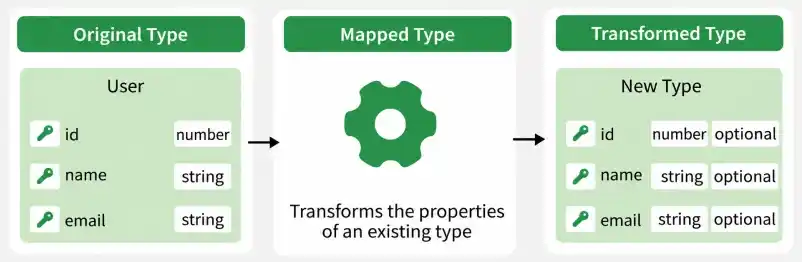
- Property Transformation: Modify properties by making them optional, readonly, nullable, or changing their types.
- Code Reusability: Create variations of existing types without redefining every property.
- Type Safety: Apply consistent transformations while preserving the relationship between properties and their types.
Creating Optional Properties
Mapped types can make all properties of an existing type optional using the ? modifier.
type User = {
    id: number;
    name: string;
    email: string;
};

type PartialUser = {
    [P in keyof User]?: User[P];
};
- keyof User: Retrieves the keys of the User type.
- [P in keyof User]: Iterates over each property of User.
- ?: Makes each property optional.
- User[P]: Preserves the original type of each property.
Example:
const user1: PartialUser = { id: 1 };
const user2: PartialUser = {};
const user3: PartialUser = { id: 2, name: "Alen" };
All three objects are valid because every property in PartialUser is optional.
Creating Readonly Properties
Mapped types can make all properties of an existing type readonly.
type User = {
    id: number;
    name: string;
    email: string;
};

type ReadonlyUser = {
    readonly [P in keyof User]: User[P];
};

const user: ReadonlyUser = {
    id: 1,
    name: "Alen",
    email: "alen@example.com"
};

user.id = 2;
The assignment to user.id produces a compile-time error because the property is readonly.
Output:
Error: Cannot assign to 'id' because it is a read-only property.Creating Nullable Properties
Mapped types can add null to the type of each property.
type Product = {
    name: string;
    price: number;
    inStock: boolean;
};

type NullableProduct = {
    [P in keyof Product]: Product[P] | null;
};

const product: NullableProduct = {
    name: "Laptop",
    price: null,
    inStock: true
};
- Product[P]: Preserves the original type of each property.
- | null: Allows each property to contain either its original type or null.
Example:
const product: NullableProduct = {
    name: "Laptop",
    price: null,
    inStock: true
};
Here, price can contain either a number or null.
Remapping Property Keys with Template Literals
Mapped types can remap property keys using the as clause. Template literal types and utility types such as Capitalize can be used to transform the property names.
type Person = {
    firstName: string;
    lastName: string;
};

type PrefixedPerson = {
    [P in keyof Person as `person${Capitalize<string & P>}`]: Person[P];
};

const person: PrefixedPerson = {
    personFirstName: "Jane",
    personLastName: "Doe"
};
- as: Remaps the property key.
- Template literal type: Adds the person prefix to each property name.
- Capitalize: Converts the first character of the property name to uppercase.
- Person[P]: Preserves the original property type.
The resulting type is equivalent to:
type PrefixedPerson = {
    personFirstName: string;
    personLastName: string;
};
Best Practices for Using TypeScript Mapped Types
- Keep Transformations Simple: Avoid overly complex nested transformations to maintain readability and maintainability.
- Preserve Type Safety: Use mapped types to apply consistent transformations while retaining the original property types where appropriate.
- Use Built-in Utility Types: Prefer utility types such as Partial, Readonly, Pick, and Omit when they already provide the required transformation.
- Use Key Remapping Carefully: Use the as clause with template literal types when property names need to be transformed or filtered.