Incorrectly ordered permissions on directory - Advanced Installer Community
mhopper
Posts: 10
Joined: Wed Aug 08, 2018 9:16 am

Incorrectly ordered permissions on directory

Hello there, we are currently working through getting a functional build of our latest branch of our software, which as part of this we updated Advanced Installer to version 15.1. We have managed to get an installer together, which when installed functions as expected. But when it comes to one of our custom actions whereby we need to allocate additional folder permissions, we are receiving an error message which implies that the folder permissions are not in canonical order. When viewing one of these folders within windows and moving to the security tab, the following message appears:
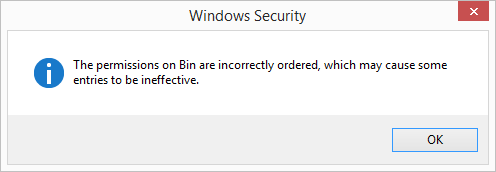
Permissions Warning.png
Permissions Warning.png (6.23 KiB) Viewed 9163 times
As an example of what permissions are being set against one of the folders which is incorrectly ordered, please see below:
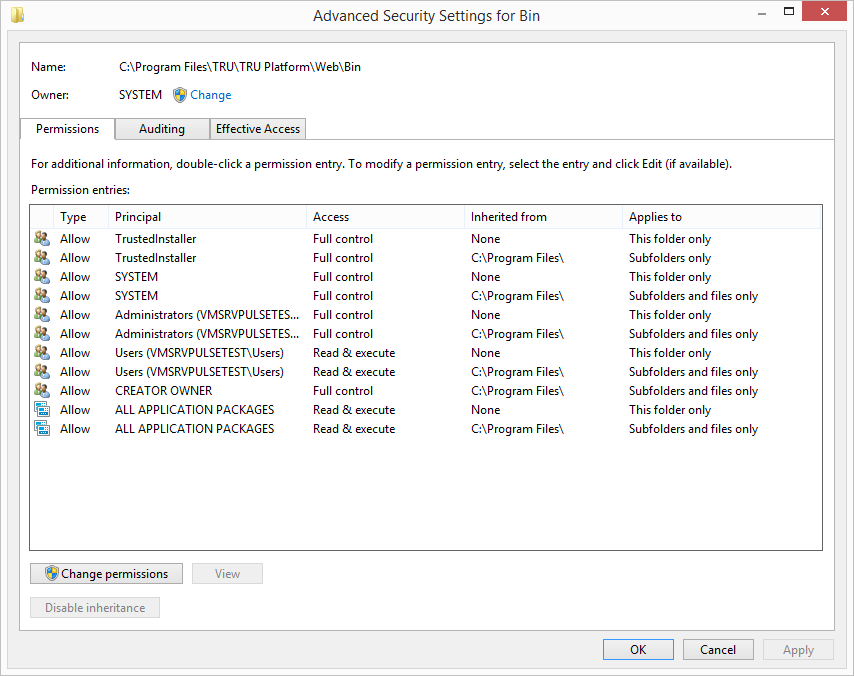
Sample Permissions.png
Sample Permissions.png (53.53 KiB) Viewed 9160 times
We previously never suffered this with our previous version of our software which was built with a prior version of Advanced Installer, and so ask whether this has been reported to you before, and whether this is indeed a bug with the software?
mhopper
Posts: 10
Joined: Wed Aug 08, 2018 9:16 am

Re: Incorrectly ordered permissions on directory

This is an important issue, as currently this stops us dead in terms of deploying our software to customers, because of this permissions issue.

We are a licensed customer, I'm just not currently listed as a contact. I work for a company called 121 Systems Ltd.
Daniel
Posts: 8283
Joined: Mon Apr 02, 2012 1:11 pm
Contact: Website

Re: Incorrectly ordered permissions on directory

Hello and welcome to our forums,

Unfortunately we never faced this issue before nor we are aware of its root cause.

Can you please try to manually run your custom action (outside of the setup package) to set additional permissions and see if the issue still occurs? If so, then you should try to investigate the permission list you are trying to apply and make sure is a valid one.

All the best,
Daniel
Daniel Radu - Advanced Installer Team
Follow us: Twitter - Facebook - YouTube
mhopper
Posts: 10
Joined: Wed Aug 08, 2018 9:16 am

Re: Incorrectly ordered permissions on directory

Daniel,

Please bear in mind, that at the point this custom action is ran, the permissions that are being applied to the folder(s) in question are purely those created and added by your installer mechanism. Running our custom action outside of the installer will not help in this regard, as until the permissions ordering is corrected, windows or Microsoft .NET will not allow further changes to the permissions until this is corrected.

Yes, we can manually correct this by going into each affected folders permissions and getting windows to re-order the permissions accordingly, but this is an unacceptable fix. It is clearly a bug within the installer engine or MSI engine and needs fixing.
Daniel
Posts: 8283
Joined: Mon Apr 02, 2012 1:11 pm
Contact: Website

Re: Incorrectly ordered permissions on directory

Hello,

I have asked you to manually run your custom action just to check if the same error is triggered when the custom action runs outside of the setup package. Just to isolate the root cause of the error. If this is the case then it means there is an issue generated by your custom action functionality and you should try to investigate this.

If the error also appears when just trying to apply a set of permissions on a folder by using our "Permissions" support from "Files and Folders" page, then please send us the .AIP (project file) and a verbose log of the installation to support at advancedinstaller dot com so we can investigate them?

If you cannot share with us your project file, then you can try to isolate the behavior in a buildable sample (.aip + its referenced files) which we can build and test on our side.

All the best,
Daniel
Daniel Radu - Advanced Installer Team
Follow us: Twitter - Facebook - YouTube
mhopper
Posts: 10
Joined: Wed Aug 08, 2018 9:16 am

Re: Incorrectly ordered permissions on directory

Daniel,

If I run the custom action outside of the setup package, it will not function correctly as it expects certain folders to exist. If I create these manually within windows, and then run our custom action, it functions as expected with no errors. This, as previously explained, indicates to me an issue with the MSI/Advanced Installer engine whereby it is setting invalid permissions against the folder(s) it creates.

There are no permissions being set against the affected folders within the Advanced Installer project file.

If you wish for the AIP + verbose logs to be sent, these will need to be sent via email, and I will clarify with my manager if we are happy to do so.
mhopper
Posts: 10
Joined: Wed Aug 08, 2018 9:16 am

Re: Incorrectly ordered permissions on directory

Can someone please respond in regards to this? As explained previously our custom action is ran after the point at which the folder permissions are set incorrectly and thus is not at fault.

I suspect you require further information such as the AIP, but would like clarification on what you require in this instance? Once i've had this I will then provide you with this ASAP. As explained previously, this is a blocking issue preventing us from releasing our software installer package from testing and ultimately release to customers.
mhopper
Posts: 10
Joined: Wed Aug 08, 2018 9:16 am

Re: Incorrectly ordered permissions on directory

Just providing an update to say, that since upgrading to the latest available version of Advanced Installer, and running our "Build Script" to create our end Installer, having cleared down the folders previously created, and running the latest installer, it appears as if the permissions are being applied correctly now.

Thank you to you and your team for your assistance on this issue.
Daniel
Posts: 8283
Joined: Mon Apr 02, 2012 1:11 pm
Contact: Website

Re: Incorrectly ordered permissions on directory

We apologize for the delayed reply.

Thank you for your follow up on this. I am glad that you got everything working by using our latest version, even though I am not aware of any functionality change added to our folder creation feature.

If this issue ever appear in the future, yes please send us the .aip (project file) to support at advancedinstaller dot com so we can investigate its settings? Or even better, if you could isolate the behavior into a small sample and send it us so we can fully build and test on our side this will be very useful for us.

All the best,
Daniel
Daniel Radu - Advanced Installer Team
Follow us: Twitter - Facebook - YouTube
mhopper
Posts: 10
Joined: Wed Aug 08, 2018 9:16 am

Re: Incorrectly ordered permissions on directory

Daniel,

Unfortunately this issue has once again come up (during a clean install - not previously installed) on an Azure VM we're using for testing. We believe, although are not 100% that the folder permissions are in non-canonical order prior to any custom action(s) being ran, which modify files or folder permissions or otherwise altering the ACL's in any way for the affected areas.

I will do some further investigation to confirm this, and then I will be emailing you with a copy of the affected AIP, and any additional information I feel may be useful for you during your investigation(s).
Daniel
Posts: 8283
Joined: Mon Apr 02, 2012 1:11 pm
Contact: Website

Re: Incorrectly ordered permissions on directory

Hello,

Thank you for your sent project file. I have built it with dummy files (after removing all of your configured custom actions) and tested the sample installation on several clean VMs. But I cannot replicate such issue at all.

Everytime the folder permissions are set correctly and no error is spawned after installation when checking the "Security" tab.
screenshot.jpg
screenshot.jpg (155.99 KiB) Viewed 9029 times
For testing purposes only, can you please remove any custom action you have added into your setup project ("Custom Actions" page), rebuild your setup project and test it again against multiple clean VMs? Letus know if you still replicate the issue.

For testing purposes we always recommend to be used virtual machines with clean states so that when something goes wrong you can easily revert to a clean state of the virtual machine.

All the best,
Daniel
Daniel Radu - Advanced Installer Team
Follow us: Twitter - Facebook - YouTube
Daniel
Posts: 8283
Joined: Mon Apr 02, 2012 1:11 pm
Contact: Website

Re: Incorrectly ordered permissions on directory

Thank you for your follow up on this.

All the best,
Daniel
Daniel Radu - Advanced Installer Team
Follow us: Twitter - Facebook - YouTube
mhopper
Posts: 10
Joined: Wed Aug 08, 2018 9:16 am

Re: Incorrectly ordered permissions on directory

Daniel,

Many thanks for your response and findings in regards to this. When last tested, this was on a clean VM in the Azure Cloud. Unfortunately due to a lack of understanding (on our part), or response (we are tight on timescales for this issue fix) we have started down the journey of replicating the setup project from scratch, in case any duplicate definitions have been produced in the setup file.

As a result, this is taking us some time, using our existing project file as a template for producing our new one. Once we have done this, and tested it I shall let you know of our findings. If after this it doesn't work as expected, then we will go down the path of following your resolution and testing steps to see if we can narrow down the root cause.
mhopper
Posts: 10
Joined: Wed Aug 08, 2018 9:16 am

Re: Incorrectly ordered permissions on directory

Daniel,

Unfortunately despite our best efforts to use our newly created installer project, we are still encountering issues relating to folder permissions (with none of our custom actions running - minimal features installed).

We are going to attempt (if we can - to rebuild the VM we are using to test internally). If after this we are still encountering issues, I suspect we will most likely be getting in contact via phone.

Return to “Common Problems”