Advanced Installer search and replace and UTF8 - Advanced Installer Community
sonda
Posts: 103
Joined: Mon Apr 30, 2018 12:01 pm

Advanced Installer search and replace and UTF8

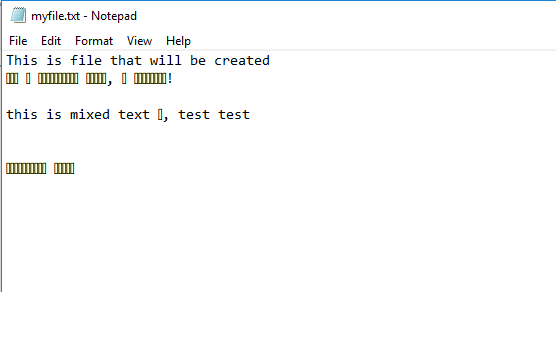
I have some file in installer that i want to edit. The file can contain different characters mixed languages, in our example Cyrillic. I have said the file to be craeated with utf-8, but when i open file i have only squares in place where i should see Cyrillic text. I have included images and test aip. How can i avoid this when editing file. Something i'm doing wrong but i don't know wath.
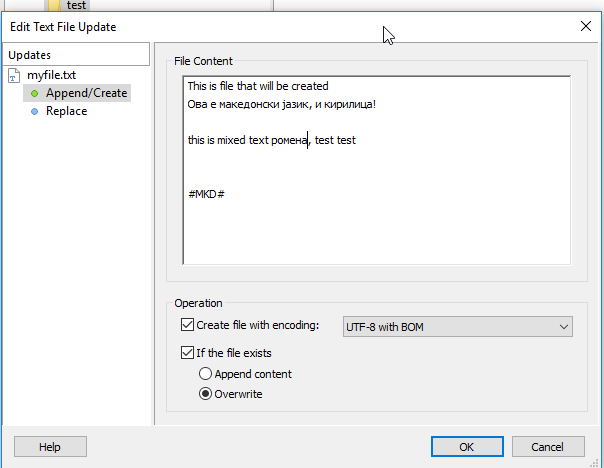
utf-1.png
utf-1.png (18.07 KiB) Viewed 3833 times
how it looks after installing
utf-2.png
utf-2.png (5.08 KiB) Viewed 3833 times
test-utf.aip
(14.75 KiB) Downloaded 296 times
here is demo aip file


Regards
Catalin
Posts: 7852
Joined: Wed Jun 13, 2018 7:49 am

Re: Advanced Installer search and replace and UTF8

Hello Sonda,

First of all, thanks for the sent sample project.

Could you please try the following and let me know the results:

- Go to "Builds" page

- under "Database Encoding", please select the "UTF-8 encoding (support Unicode characters to be displayed)" radio button.

Hope this helps.

All the best,
Catalin
Catalin Gheorghe - Advanced Installer Team
Follow us: Twitter - Facebook - YouTube
sonda
Posts: 103
Joined: Mon Apr 30, 2018 12:01 pm

Re: Advanced Installer search and replace and UTF8

Hi Catalin,

Thanks, it's works. I have seen this setting but i was mislead that this have something with db server ... and i have not tried...

Thanks you very much.

Regards
Catalin
Posts: 7852
Joined: Wed Jun 13, 2018 7:49 am

Re: Advanced Installer search and replace and UTF8

You are always welcome, Sonda.

Glad I could help.

All the best,
Catalin
Catalin Gheorghe - Advanced Installer Team
Follow us: Twitter - Facebook - YouTube

Return to “Common Problems”