


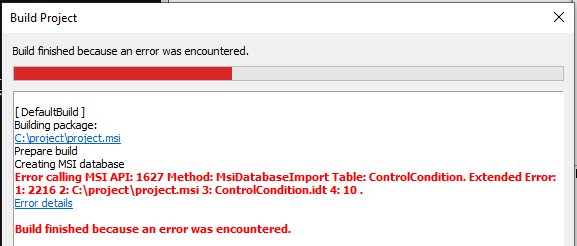
how do I fix it? and what caused it? thanks
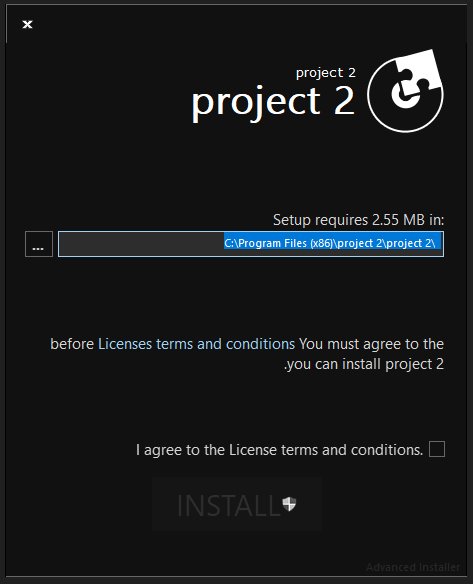
You can try any other language from the predefined list and you will see that the dialogs will look just fine.I can't just use another language rather than English?
as in the Backup Project.zip, there are two files, how can I put both of them in copy and move dialog?Source File>Name>The name of the file to be copied/moved. Use wildcard patterns to copy/move multiple files.
Sure thing.I got one last question if it's okay;
Indeed, this is the intended behavior.and simply it's because the original files have identical names as the new ones, and when changing the name of one of the two files it works.
In software, a wildcard character is a kind of placeholder represented by a single character, such as an asterisk (*), which can be interpreted as a number of literal characters or an empty string. It is often used in file searches so the full name need not be typed.also in this guide, I didn't quite understand the meaning of this sentence:
In order to create a registry search, you can proceed as it follows:*btw I tried to follow this tutorial, but didn't know how to properly create a new registry in the search page, so I just skipped it/i]
I see, but for example, if I haveThe logic behind this is that it will copy/move "anyString.txt".
sorry, I forgot to put the question properly, how do I workaround this? or it just won't work using this method?Indeed, this is the intended behavior.
yes, this is where I ended up when I tried but... Eusebiu didn't quite explain what to put in the "key", "root", "type" fields which are visible your screenshot, and this is why I skipped the whole tutorial.behavior
As far as I have tried, I am afraid this is not possible with our predefined support. However, this can still be achieved through a custom action. For instance, you can create a script / .DLL file which can use regular expressions to match your needed files and then copy them in the desired location.and I want to copy/move only 1.txt and 2.txt, I can't do that in one file operation, am I right?
I am afraid I am not aware of any workaround for this.sorry, I forgot to put the question properly, how do I workaround this? or it just won't work using this method?
No worries, I can explain it to you. Basically, every setup created with Advanced Installer creates a "Path" value. This can be found at the following location:yes, this is where I ended up when I tried but... Eusebiu didn't quite explain what to put in the "key", "root", "type" fields which are visible your screenshot, and this is why I skipped the whole tutorial.


FOLLOW US
Get the latest news in Application Packaging