Empty Directory automatically deleted from AI project - Advanced Installer Community
pkimike
Posts: 8
Joined: Mon Feb 21, 2022 9:33 pm

Empty Directory automatically deleted from AI project

I need AI to lay down an empty "Logs" folder in the application directory of my software.

I went to Resources -> Files and Folder and created the "Logs" folder as a Regular folder. Everything looks fine:
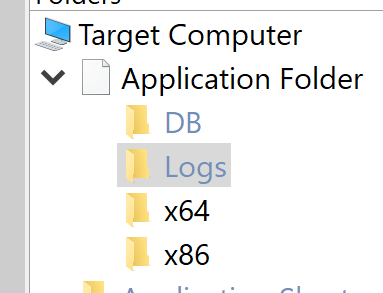
Image

However, if I close AI and re-open the project, the folder gets deleted:
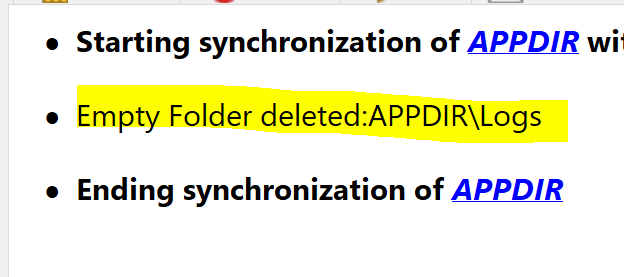
Image
The logs folder doesn't exist in the source directory since it's not a build artifact.

As you can see, there's another empty directory ("DB") which was created by another developer. If I open my AI project file in an editor, I see this within the "caphyon.advinst.msicomp.MsiDirsComponent" node:

Code: Select all

<ROW Directory="DB_Dir" Directory_Parent="APPDIR" DefaultDir="DB"/>
<ROW Directory="Logs_Dir" Directory_Parent="APPDIR" DefaultDir="Logs" DirectoryOptions="3"/>
The "Logs" folder that I created contains an extra property DirectoryOptions="3". I'm not sure what that means. The thing is that even if I remove this property, AI still deletes my "Logs" directory but retains the "DB" directory.
Catalin
Posts: 7852
Joined: Wed Jun 13, 2018 7:49 am

Re: Empty Directory automatically deleted from AI project

Hello Mike and welcome to our forums,

From what I can see, your "Application Folder" is synchronized with a folder from your disk.

If possible, could you please let me know if the "Logs" folder exists on the disk as well? Because if it's not, then this might be the reason why the folder is deleted from your project. Basically, when you open the project, the syncrhonization is refreshed and when we detect that the "Logs" folder does not exist on the disk, we remove it.

Best regards,
Catalin
Catalin Gheorghe - Advanced Installer Team
Follow us: Twitter - Facebook - YouTube

Return to “Common Problems”