Why is "Visual C++" prerequisite not installed if ".msi" file is executed in silent mode? - Advanced Installer Community
WPA
Posts: 15
Joined: Wed Feb 16, 2022 11:04 pm
Contact: Website

Why is "Visual C++" prerequisite not installed if ".msi" file is executed in silent mode?

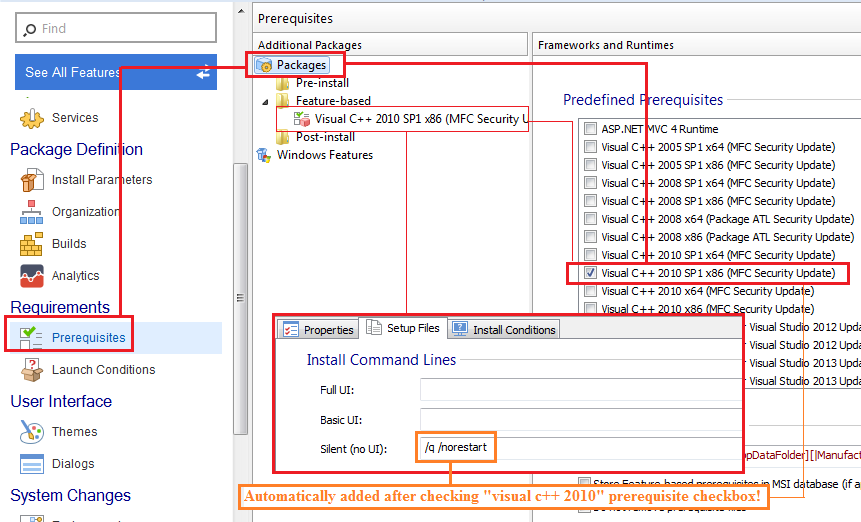
From the image below, "Visual C++" prerequisite is not installed if ".msi" file is executed in silent mode! Why?


Click image to zoom!
https://i.imgur.com/pm0T5fF.png
Image
Catalin
Posts: 7852
Joined: Wed Jun 13, 2018 7:49 am

Re: Why is "Visual C++" prerequisite not installed if ".msi" file is executed in silent mode?

Hello,

As per the following article:

Prerequisite Setup Files Tab
For feature-based and post-install prerequisites, on below Enterprise project types only the "Full UI" install command line can be used and the prerequisite will be installed only if the main package is run with full UI. All other command line fields will be ignored and the prerequisite will not be installed if the main package is installed with silent or basic UI.
However, what you want to achieve can be done, in the "Professional" project type in two ways:

1. add the prerequisite as "Pre-install". Please note that, this way, your setup will be converted from MSI to an EXE - this is a requirement in order to use pre-install prerequisites.

2. through a custom action that will launch the MSI.

I would advise adding the prerequisite as pre-install as it is the easier approach and also less error prone.

Best regards,
Catalin
Catalin Gheorghe - Advanced Installer Team
Follow us: Twitter - Facebook - YouTube
WPA
Posts: 15
Joined: Wed Feb 16, 2022 11:04 pm
Contact: Website

Re: Why is "Visual C++" prerequisite not installed if ".msi" file is executed in silent mode?

Catalin wrote: ↑Tue Mar 01, 2022 3:17 pm
Hi,

Although Advanced Installer is proving to be a useful software, such information should\must be included\alerted in app usage!

Why not just disable "Basic UI" and "Silent (no UI)" command line fields for "feature-based" and "post-install" prerequisites in editions below "Enterprise"?

But anyway, thanks again for the clarifications!
Catalin
Posts: 7852
Joined: Wed Jun 13, 2018 7:49 am

Re: Why is "Visual C++" prerequisite not installed if ".msi" file is executed in silent mode?

You are always welcome!

Regarding this limation, to be honest with you, I am not qutie sure how you added those parameters in the "Silent (No UI)" field.

I have tried manually adding them and it gives a notice that they are available starting with the Enterprise suite.

Best regards,
Catalin
Catalin Gheorghe - Advanced Installer Team
Follow us: Twitter - Facebook - YouTube
WPA
Posts: 15
Joined: Wed Feb 16, 2022 11:04 pm
Contact: Website

Re: Why is "Visual C++" prerequisite not installed if ".msi" file is executed in silent mode?

Catalin wrote: ↑Wed Mar 02, 2022 11:23 am Regarding this limation, to be honest with you, I am not qutie sure how you added those parameters in the "Silent (No UI)" field.

I have tried manually adding them and it gives a notice that they are available starting with the Enterprise suite.

The parameters weren't added manually in the "Silent (No UI)" field, they are automatically added after checking "visual c++ 2010" prerequisite checkbox in "Packages" section from "Prerequisites" option.

Image
Catalin
Posts: 7852
Joined: Wed Jun 13, 2018 7:49 am

Re: Why is "Visual C++" prerequisite not installed if ".msi" file is executed in silent mode?

Hello,

You are indeed right!

I tested this by manually adding the prerequisite in the "Prerequisites" page, which does not add those parameters automatically.

Best regards,
Catalin
Catalin Gheorghe - Advanced Installer Team
Follow us: Twitter - Facebook - YouTube

Return to “Common Problems”