Hello - I am having a problem when re-opening a .msi file for editing that has been previously saved. When the file is first added the Physical Source column has the path to the correct file (in my case C:\Diff\Cap\Apps\etc....). However once it is saved and closed, when I re-open it those Physical Source paths are now listed as C:\Users\503033~2\AppData\Local\Temp\MSIA5AD.tmp\etc.... If I delete the .cab files that were previously built to rebuild the entire project the by saving it again, it errors out. I am not using a .aip project file as the size of this installation (over 14GB) was taking more than a day to add the files.
My question is how can I set those Physical Source paths back to the original file location?
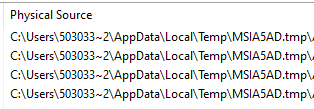
- Annotation 2023-06-29 131722.png (4.07 KiB) Viewed 8122 times


FOLLOW US
Get the latest news in Application Packaging