Specialized Template for VS2008 and dll dependencies - Advanced Installer Community

We’re moving our forums to a new platform.

You can still browse and search existing topics, but you can no longer create new topics or post replies.

For questions, technical issues, or feature requests, please don’t hesitate to contact our support team at support@advancedinstaller.com.

Thank you for your understanding!

p_infortech
Posts: 4
Joined: Sat Aug 21, 2010 12:39 am

Specialized Template for VS2008 and dll dependencies

I have the Professional Edition of Advanced Installer. I have a .Net winform application that I would like to create an installation package for. My first inclination was to use the Specialized Template for VS2008 in the belief that the template would help me find the DLL dependencies that my application relies upon. My application uses a significant number of components from DevExpress, so it requires that a client's machine get those dll's.

Here's the problem I ran into with the Specialized Template. An error message appears stating that I must elevate my Advanced Installer to a higher edition and yet when you hover over the icon for the VS2008 specialized template it shows that a Professional license gives you the ability to use that template. What's going on? See attached screenshots for further details.
The attachment TechQuestion1.jpg is no longer available
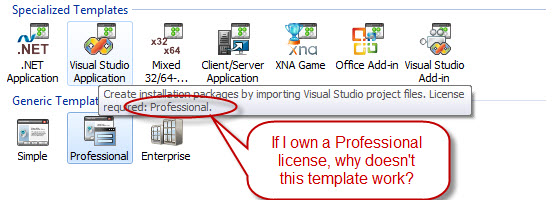
TechQuestion1.jpg
TechQuestion1.jpg (58.73 KiB) Viewed 3431 times
In the end I had use the non-template route and manually add the dll's to my installation package. Isn't there a better way? And furthermore, when my installation package ran on the client's machine, it threw all the dll's in the C:\Program Files\MyApplication directory. Shouldn't the dll's go in the System32 directory?

Any help appreciated, thank you.
Peter
Attachments
TechQuestion2.jpg
TechQuestion2.jpg (67.33 KiB) Viewed 3431 times
GabrielBarbu
Posts: 2146
Joined: Thu Jul 09, 2009 11:24 am
Contact: Website

Re: Specialized Template for VS2008 and dll dependencies

Hi Peter,

Please try running Advanced Installer with elevated privileges then try the importing process again.
Let us know how it worked.

Best regards,
Gabriel
Gabriel Barbu
Advanced Installer Team
http://www.advancedinstaller.com/
p_infortech
Posts: 4
Joined: Sat Aug 21, 2010 12:39 am

Re: Specialized Template for VS2008 and dll dependencies

I don't understand your reply. How does one run "Advanced Installer with elevated privileges "?

Please clarify.

P. Costantino
GabrielBarbu
Posts: 2146
Joined: Thu Jul 09, 2009 11:24 am
Contact: Website

Re: Specialized Template for VS2008 and dll dependencies

Hello,

Right click the Advanced Installer icon then click "Run as administrator" from the context menu.

Best regards,
Gabriel
Gabriel Barbu
Advanced Installer Team
http://www.advancedinstaller.com/

Return to “Common Problems”