


Suggested Articles
-
raistlinthewiz
- Posts: 6
- Joined: Mon Jun 27, 2011 8:54 am
Stuck at "Extracting the main application files"
I'm using 8.2 to produce setups for one of my projects and one of my clients have a problem with the installer, whatever he does the setup gets stuck at "Extracting the main application files". He's using a Korean based windows 7 installation and i suspect of it. Any suggestions?
-
mihai.petcu
- Posts: 3860
- Joined: Thu Aug 05, 2010 8:01 am
Re: Stuck at "Extracting the main application files"
Hello and welcome to the Advanced Installer Forums,
Can you please ask your client to download the package again and see if the problem persists? If the package is not the issue then it must be something related to that particular machine that causes the behavior.
Also, your client should verify the extract location set from the project.
All the best,
Mihai
Can you please ask your client to download the package again and see if the problem persists? If the package is not the issue then it must be something related to that particular machine that causes the behavior.
Also, your client should verify the extract location set from the project.
All the best,
Mihai
-
raistlinthewiz
- Posts: 6
- Joined: Mon Jun 27, 2011 8:54 am
Re: Stuck at "Extracting the main application files"
I've already made him download the package again and again, no solution.
>>Also, your client should verify the extract location set from the project.
Can you clarify this please?
>>Also, your client should verify the extract location set from the project.
Can you clarify this please?
-
mihai.petcu
- Posts: 3860
- Joined: Thu Aug 05, 2010 8:01 am
Re: Stuck at "Extracting the main application files"
Hello,
Also, the client should ensure there aren't any special permissions set for any of the folders in that location which could prevent the extraction.
All the best,
Mihai
In this case, there is most probably something wrong with that particular machine that is causing the issue.I've already made him download the package again and again, no solution.
I meant that the client should verify if there are any resources in the extract location of the .EXE. This location is specified from the Media page -> Bootstrapper tab -> Install Options group.>>Also, your client should verify the extract location set from the project.
Can you clarify this please?
Also, the client should ensure there aren't any special permissions set for any of the folders in that location which could prevent the extraction.
All the best,
Mihai
-
raistlinthewiz
- Posts: 6
- Joined: Mon Jun 27, 2011 8:54 am
Re: Stuck at "Extracting the main application files"
Oh sorry, i mis-spelled the 'client'. Actually i'm the one that's building the software & setup project. He's just a Korean user of the software  The software i'm building is used by people from many different regions; US-to-south korea. All the users from America and Europe have successfully been installed the software, but only the one from south-korea have this issues. So i suspected a problem with hits OS installations language & charset.
He's running windows 7 with Korean language active.
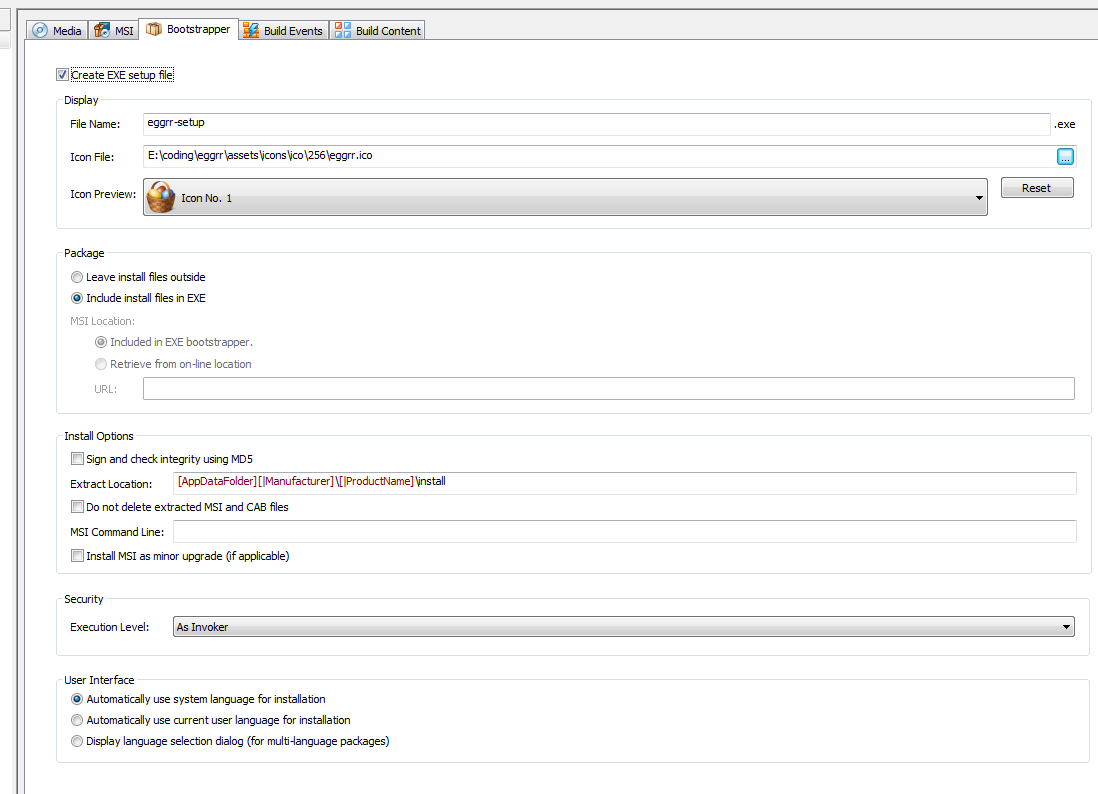
I've double checked your suggestion but can't find a problem there, anyway here's my boot-strapper settings.
The software i'm building is used by people from many different regions; US-to-south korea. All the users from America and Europe have successfully been installed the software, but only the one from south-korea have this issues. So i suspected a problem with hits OS installations language & charset.He's running windows 7 with Korean language active.
I've double checked your suggestion but can't find a problem there, anyway here's my boot-strapper settings.
-
raistlinthewiz
- Posts: 6
- Joined: Mon Jun 27, 2011 8:54 am
Re: Stuck at "Extracting the main application files"
any further info on this?
-
mihai.petcu
- Posts: 3860
- Joined: Thu Aug 05, 2010 8:01 am
Re: Stuck at "Extracting the main application files"
Hello,
Have you asked your client to verify the permissions for every folder in the extract location path and also if any files get extracted although the error is shown?
If so, then you can suggest your client to reinstall Windows Installer on that machine. If this fails but the package works fine on other machines with same architecture and OS there must be something on that particular machine causing the issue.
All the best,
Mihai
Have you asked your client to verify the permissions for every folder in the extract location path and also if any files get extracted although the error is shown?
If so, then you can suggest your client to reinstall Windows Installer on that machine. If this fails but the package works fine on other machines with same architecture and OS there must be something on that particular machine causing the issue.
All the best,
Mihai


FOLLOW US
Get the latest news in Application Packaging