Foriegn language file corruption - Advanced Installer Community

We’re moving our forums to a new platform.

You can still browse and search existing topics, but you can no longer create new topics or post replies.

For questions, technical issues, or feature requests, please don’t hesitate to contact our support team at support@advancedinstaller.com.

Thank you for your understanding!

wyzerd
Posts: 75
Joined: Tue Mar 27, 2007 3:54 am
Location: St. Louis, MO
Contact: Website

Foriegn language file corruption

While the English installation (Authored language) is fine. Every foreign language is scrambling the files and names. It is as if the file names are assigned after the files are moved and the sequencing is off.

I've attached a picture of the end result on a Japanese machine. the results are the same for German as well as Spanish so far.
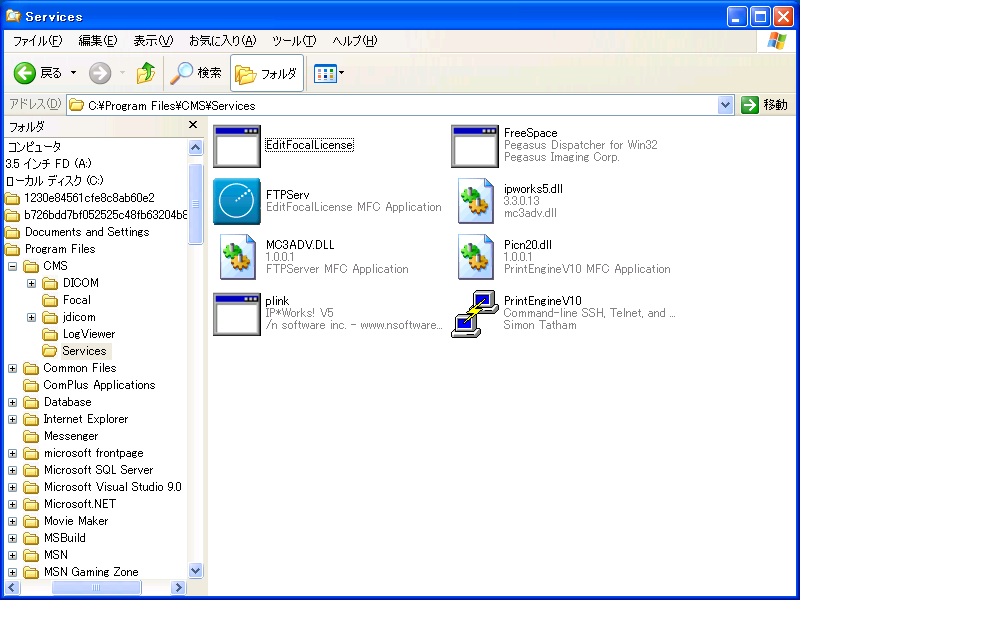
Scrambled files after install
Scrambled.jpg (128.11 KiB) Viewed 6963 times
I've included my .aip file. Please help we are in the middle of a big release and I have to have this ready very soon.
FocalSetup.aip
Aip File
(266.88 KiB) Downloaded 406 times
Also, if you can tell me if this is a new bug in 8.5 and what version I should revert to, that would be helpful.

Thanks,
George
mihai.petcu
Posts: 3860
Joined: Thu Aug 05, 2010 8:01 am

Re: Foriegn language file corruption

Hi George,

Can you please send us the custom dictionary as well to support at advancedinstaller dot com so we can investigate it?

All the best,
Mihai
Mihai Petcu - Advanced Installer Team
Follow us: Twitter - Facebook - YouTube
wyzerd
Posts: 75
Joined: Tue Mar 27, 2007 3:54 am
Location: St. Louis, MO
Contact: Website

Re: Foriegn language file corruption

Here is the dictionary
trans.zip
(2.7 KiB) Downloaded 531 times
Your website will not accept .ail files. You should probably fix that also.
wyzerd
Posts: 75
Joined: Tue Mar 27, 2007 3:54 am
Location: St. Louis, MO
Contact: Website

Re: Foriegn language file corruption

Further research has found that this problem occurs during creation. I have changed the install to make seperate packages and used orca to compare the MSIs. The File table is corrupt.
Here is a sample:

English:
PrintEngineV10.exe PrintEngineV10.exe PrintE~1.exe|PrintEngineV10.exe 79872 1.0.0.1 1033 0 171

Japanese:
PrintEngineV10.exe PrintEngineV10.exe PrintE~1.exe|Picn20.dll 79872 1.0.0.1 1033 0 171

The bad news is the table does correctly represent the package as it was created. All the files compressed have had the names scrambled in the way represented by this table. Since I do not deliver any different files based upon language, I have found that copying the files from english to Japanese and replacing all the row in the Files table with the English Files table, did fix the problem. While this is not a suitable work-around, I am hopeful it may help you take down what the cause of the problem is.

The translation table is a ruse and is of no use. I have removed it to eliminate it from the problem. You can drop it from the dictionaries since it is only used for UI anyway.

The machine being used to package this is Win7 Professional x64, I am not sure if that may be related to the problem or not.
mihai.petcu
Posts: 3860
Joined: Thu Aug 05, 2010 8:01 am

Re: Foriegn language file corruption

Hi,

This is happening because you have specified random custom localization identifiers for each file in that directory.

For example :
- go to Files and Folders page -> Program Files\CMS\Services folder
- right click PrintEngineV10.exe and select Properties from the context menu
- right click on the Name text field and select Localization
- notice the localization identifier is set to pdftk.exe which is another file's name from the same folder

There are several files in the same folder with similar localization settings( custom localization identifier is set to a different file's name in the same folder ).

When an element has a localization identifier for which there is no translation specified in the custom dictionary, the localization identifier is used as a translation instead.

The English package does not require a translation( ignore ="en" in the custom dictionary ) so everything is fine.

The solution is to set every file's localization settings to the default "Inherit global settings" option.

All the best,
Mihai
Mihai Petcu - Advanced Installer Team
Follow us: Twitter - Facebook - YouTube
wyzerd
Posts: 75
Joined: Tue Mar 27, 2007 3:54 am
Location: St. Louis, MO
Contact: Website

Re: Foriegn language file corruption

Wow, thanks. I didn't even know that setting existed.

That is a problem since these files were not added anyway different than they were done in the past. So it appears there is a bug in the "add file" routine of Advanced Installer that has been added since 8.1.3 because I did not experience this problem with our previous release. Also if you check the Translation settings, you will see the only option selected is "User Interface", so it should not have made thos settings on files and folders.

I am glad to be able to fix this and get it out and look forward to the patch to avoid this.

Thanks!!
Cosmin
Posts: 5797
Joined: Tue Jul 10, 2007 6:39 pm
Contact: Website

Re: Foriegn language file corruption

Hi,

Unfortunately we are unable to reproduce this behavior on our test machines. Can you reproduce it with a new project? If you can, will you please let us know your exact steps?

Regards,
Cosmin
Cosmin Pirvu - Advanced Installer Team
Follow us: Twitter - Facebook - YouTube
wyzerd
Posts: 75
Joined: Tue Mar 27, 2007 3:54 am
Location: St. Louis, MO
Contact: Website

Re: Foriegn language file corruption

Update:

I found that this problem exists from copying from one project to another not when putting directly in from file explorer. So now I am unsure when the corruption occurred. In any case, the correct solution is if "User Interface" is the only selection in Translation project segments, these entries should not have existed.

Thanks!

Return to “Common Problems”