I tried that but it seems to error out with Error 1721. Created four Properties NOVAPDF_CMD_1, NOVAPDF_CMD_2, NOVAPDF_CMD_3 and NOVAPDF_CMD_4. This is how I have my parameters now look in the AI project
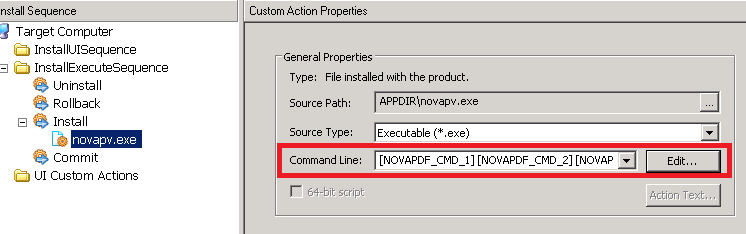
- CmdLineSpaces.png (13.66 KiB) Viewed 5751 times
During the install it gives me error 1721:
Action ended 10:13:17: StartServices. Return value 1.
MSI (s) (28:58) [10:13:17:362]: Doing action: novapv.exe
Action 10:13:17: novapv.exe.
Action start 10:13:17: novapv.exe.
MSI (s) (28:58) [10:13:17:362]: Note: 1: 1721 2: novapv.exe 3: C:\Program Files (x86)\ACS\SignOnlyBuild\novapv.exe 4: /VERYSILENT /SUPPRESSMSGBOXES /NOCANCEL /NORESTART /PrinterName="DocumentVision Printer" /OEMApplication="DocumentVision" /OEMCompany="Applied Computer Systems, Inc." /OEMSaveFolder="#temp#" /OEMActionApp="#systemdrive#\DVPrinter\DVPrinterSave.exe" /RegisterName="Applied Computer Systems" /RegisterKey="KEY-HERE"
Error 1721. There is a problem with this Windows Installer package. A program required for this install to complete could not be run. Contact your support personnel or package vendor. Action: novapv.exe, location: C:\Program Files (x86)\ACS\SignOnlyBuild\novapv.exe, command: /VERYSILENT /SUPPRESSMSGBOXES /NOCANCEL /NORESTART /PrinterName="DocumentVision Printer" /OEMApplication="DocumentVision" /OEMCompany="Applied Computer Systems, Inc." /OEMSaveFolder="#temp#" /OEMActionApp="#systemdrive#\DVPrinter\DVPrinterSave.exe" /RegisterName="Applied Computer Systems" /RegisterKey="KEY-HERE"
MSI (s) (28:58) [10:13:22:621]: Product: SignOnlyBuild -- Error 1721. There is a problem with this Windows Installer package. A program required for this install to complete could not be run. Contact your support personnel or package vendor. Action: novapv.exe, location: C:\Program Files (x86)\ACS\SignOnlyBuild\novapv.exe, command: /VERYSILENT /SUPPRESSMSGBOXES /NOCANCEL /NORESTART /PrinterName="DocumentVision Printer" /OEMApplication="DocumentVision" /OEMCompany="Applied Computer Systems, Inc." /OEMSaveFolder="#temp#" /OEMActionApp="#systemdrive#\DVPrinter\DVPrinterSave.exe" /RegisterName="Applied Computer Systems" /RegisterKey="KEY-HERE"
Action ended 10:13:22: novapv.exe. Return value 3.
Can you please check the trace.log and let me know what I am doing incorrectly? We have tried running that same exe outside of AI and it runs fine from a Windows Command Prompt.


FOLLOW US
Get the latest news in Application Packaging