License Dialog - Advanced Installer Community

We’re moving our forums to a new platform.

You can still browse and search existing topics, but you can no longer create new topics or post replies.

For questions, technical issues, or feature requests, please don’t hesitate to contact our support team at support@advancedinstaller.com.

Thank you for your understanding!

BGood
Posts: 32
Joined: Thu Apr 19, 2012 4:22 pm

License Dialog

I am considering purchasing an Advanced Installer Professional license, but am concerned that the standard Licensing Dialog in the Professional version is wholly inadequate for potential users to review, print, and potentially save the software license agreement that they are forced to accept. Relative to other standard Software License Dialogs, like those provided for free in Visual Studio's Setup and Deploy project, users can review, print, search, and save either via a default PDF application or system editor:
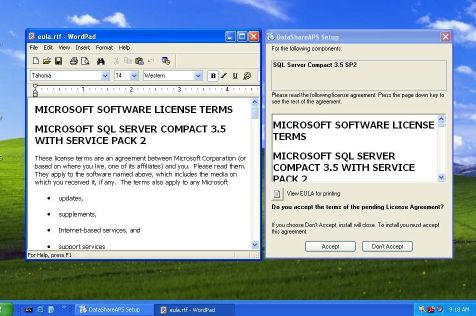
Sample Dialog
Sample Dialog
AI Licensing Dialog Small.jpg (38.17 KiB) Viewed 11219 times
I recognize that there are many other Advanced Installer features that extend beyond the free Visual Studio installer, but I don't think I should have to spend $900 for the Enterprise version of AI where I would still need to develop my own license dialog. I think that Advanced Installer should provide a legally-compliant tool for user acceptance of software licenses in its Professional version.

I would appreciate any suggestions or ideas regarding ways to work-around this deficiency, but otherwise I am very impressed with the AI software and appreciate the excellent support and guidance which have been provided during my evaluation of Advanced Installer.
BGood
Posts: 32
Joined: Thu Apr 19, 2012 4:22 pm

Re: License Dialog

If I render the software license as HTML, is there any way to link to it gracefully with only a Professional AI license?
mihai.petcu
Posts: 3860
Joined: Thu Aug 05, 2010 8:01 am

Re: License Dialog

Hello,

Thank you for taking the time to evaluate Advanced Installer.
If I render the software license as HTML, is there any way to link to it gracefully with only a Professional AI license?
Indeed, this would be the recommended approach while disposing of the "LicenseAgreementDlg" altogether. However, I'm afraid that customizing any dialog can only be done within the Dialog Editor, which is available starting with the Enterprise edition.

The "LicenseAgreementDlg" layout and functionality is different from theme to theme. You can try other themes using the Professional edition and see if they fit your requirements.

All the best,
Mihai
Mihai Petcu - Advanced Installer Team
Follow us: Twitter - Facebook - YouTube
BGood
Posts: 32
Joined: Thu Apr 19, 2012 4:22 pm

Re: License Dialog

Mihai, thank you for this guidance.

For obvious reasons, I want to provide end users with a complete opportunity to review and understand the legal agreement which they must accept in order to download and install my software. I do not want users or their lawyers to claim that an insufficient opportunity was provided for them to review the contract.

Document review and acceptance can be accomplished in many ways, the most flexible of which would be from a specific url on our website. With the Professional edition of AI, is there any way that a URL can be presented to a customer for review?

Thanks again for your assistance.
BGood
Posts: 32
Joined: Thu Apr 19, 2012 4:22 pm

Re: License Dialog

Mihai, thank you for the suggestion:
The "LicenseAgreementDlg" layout and functionality is different from theme to theme. You can try other themes using the Professional edition and see if they fit your requirements.
I had been using the "Classic" theme and with a little further research based on your suggestion, I discovered that the LicenseDialog in the "Air", "Azure", "Modern" and "Spring" themes DO provide a print Icon for printing the license agreement. This is very helpful.

Thank you for this guidance. I will try changing the theme of my installer and see how it works.
BGood
Posts: 32
Joined: Thu Apr 19, 2012 4:22 pm

Re: License Dialog

Following up on my previous post, I tested the LicenseDialog Print Icon in the "Air", "Azure", "Modern" and "Spring" themes, and in each case, the Print Icon which is visible on the Dialog preview DOES NOT appear when the installer is executed.

Could someone please give me a definitive answer as to why this happens?

I am wondering if the Print Icon is simply disabled in the evaluation software, or is this basic feature intentionally crippled in the Professional version as an incentive to upgrade to the Enterprise version?

Thank you.
mihai.petcu
Posts: 3860
Joined: Thu Aug 05, 2010 8:01 am

Re: License Dialog

Hello,

You're welcome, glad to assist.
With the Professional edition of AI, is there any way that a URL can be presented to a customer for review?
This could be done by customizing one of your dialogs with a Hyperlink Control. As I mentioned in my initial post, adding a control or customizing a dialog in any way can be achieved only within the dialog editor.
Could someone please give me a definitive answer as to why this happens?
I am not sure why this happens, I could not replicate the behavior in a Professional project by using the default settings. If by creating a new project the behavior persists, can you please send us the .AIP manifesting this and specify the target OS so we can help sort this out? Also, please make sure you are launching the .EXE installer.

All the best,
Mihai
Mihai Petcu - Advanced Installer Team
Follow us: Twitter - Facebook - YouTube
BGood
Posts: 32
Joined: Thu Apr 19, 2012 4:22 pm

Re: License Dialog

To better illustrate my question, consider the following two screenshots:
LicenseDialog Preview (with Print Icon)
DialogPreview.jpg (24.1 KiB) Viewed 11166 times
LicenseDialog Execution (no Print Icon)
DialogExecution.jpg (62.39 KiB) Viewed 11166 times
I am currently running AI Evaluation software. Does the Print Icon not render with the Evaluation software? Does the Print Icon render with the paid Professional version or is Enterprise required?

Thank you.
BGood
Posts: 32
Joined: Thu Apr 19, 2012 4:22 pm

Re: License Dialog

Reporting back with an update on this issue...

I don't know why, but after many successive re-builds under the 4 preset themes mentioned above, the print dialog finally shows up in my evaluation installers.

Again, no idea why. Thanks to AI support for the assistance.
mihai.petcu
Posts: 3860
Joined: Thu Aug 05, 2010 8:01 am

Re: License Dialog

Your screen shots show two different license dialogs(bootstrapper's and main .MSI's). One cannot show the print button but the other can.

Your second screen shot represents the bootstrapper LicenseAgreementDlg(shown when having pre-install prerequisites).
The other one you can preview in the dialog editor and indeed shows the print button. This dialog is available after the bootstrapper as part of the main .MSI installation.

If you navigate through the chain until VerifyReadyDlg you'll see two license dialogs. You can hide the bootstrapper license dialog from Dialogs page -> Bootstrapper UI -> "Display License Agreement dialog".

All the best,
Mihai
Mihai Petcu - Advanced Installer Team
Follow us: Twitter - Facebook - YouTube
BGood
Posts: 32
Joined: Thu Apr 19, 2012 4:22 pm

Re: License Dialog

Mihai,

Thank you for the explanation of differences between Bootstrapper and MSI dialogs. I was not aware of the distinction between the two, I just want to make sure the licensee has an adequate opportunity to review the legal document.

Return to “Common Problems”