


I am creating an installer for a Java application. After creating the Product in 'Java Products', I can see the corresponding .exe in 'Files and Folders'. When I open the properties for the .exe, there is no option (checkbox) to be able to digitally sign it.
I have tried going in to 'Digital Signature' and adding the .exe in 'Files Configured for Signing' but it seems that after I save and close Advanced Installer project and then re-open the project, the .exe is no longer included in the files to be signed.
How do I get Advanced Installer to sign the Java Native Launcher .exe?
Thanks,
Victor
Suggested Articles
Re: No option to Digitally sign Java Native Launcher exe
Hi Victor,
I've tested your scenario, but I cannot reproduce the behavior. Can you please tell us the version of Advanced Installer you are using?
Best regards,
Eusebiu
I've tested your scenario, but I cannot reproduce the behavior. Can you please tell us the version of Advanced Installer you are using?
Best regards,
Eusebiu
Re: No option to Digitally sign Java Native Launcher exe
I am using the latest version: 10.3, but originally created the project with 10.2. I have included a screenshot.
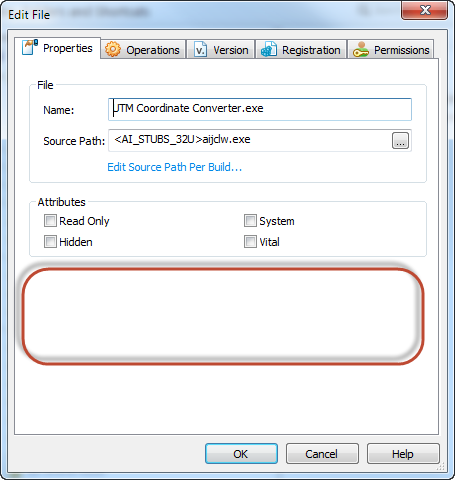
When I first started playing around with Advanced Installer, I vaguely remember the checkbox being there but I'm not sure.
When I first started playing around with Advanced Installer, I vaguely remember the checkbox being there but I'm not sure.
Re: No option to Digitally sign Java Native Launcher exe
Hi Victor,
Indeed, the "Digitally sign the file" option is not available for the Java Native Launcher if you have "Embedded JAR" file included in the your Java Product. The same problem was also discussed in the Digital Signature Problem thread.
Best regards,
Eusebiu
Indeed, the "Digitally sign the file" option is not available for the Java Native Launcher if you have "Embedded JAR" file included in the your Java Product. The same problem was also discussed in the Digital Signature Problem thread.
Best regards,
Eusebiu
Re: No option to Digitally sign Java Native Launcher exe
Thank-you for your response. I can see now, from the other discussion, that I can't sign the exe if I have an embedded jar, but now I'm wonder why Advanced Installer has been designed that way, I think a lot of people would want to be able to both embed the jar and sign the exe.
-Victor
-Victor
Re: No option to Digitally sign Java Native Launcher exe
Hi Victor,
Unfortunately, this is not supported by Java Virtual Machine and that's the reason we designed Advanced Installer that way.
Best regards,
Eusebiu
Unfortunately, this is not supported by Java Virtual Machine and that's the reason we designed Advanced Installer that way.
Best regards,
Eusebiu
Re: No option to Digitally sign Java Native Launcher exe
Hello Eusebiu,
I'm using Advanced Installer 13.3 and have been run in the exact same situation.
I wanted to digitally sign an embedded jar with advanced installer.
As described above, the advanced installer does not support to sign the EXEs with an embedded JAR.
But as we really need that feature, I've done some more investigation and done the following steps:
- I extracted the signed Setup-EXE with the Option "/EXTRACT"
- in the installer package I have bundled 2 EXE-Files with embedded JARs created by Advanced Installer
- I signed both of them with the Signtool from the Windows SDK
- I started the installation with the bundled Setup-MSI
- for me that all worked fine
My question is now:
Why it is / was not possible to sign EXEs with embedded JARs in Advanced Installer?
Secondary:
Is it possible to enable that feature experimental in some way?
Yours sincerely,
Philipp
I'm using Advanced Installer 13.3 and have been run in the exact same situation.
I wanted to digitally sign an embedded jar with advanced installer.
As described above, the advanced installer does not support to sign the EXEs with an embedded JAR.
But as we really need that feature, I've done some more investigation and done the following steps:
- I extracted the signed Setup-EXE with the Option "/EXTRACT"
- in the installer package I have bundled 2 EXE-Files with embedded JARs created by Advanced Installer
- I signed both of them with the Signtool from the Windows SDK
- I started the installation with the bundled Setup-MSI
- for me that all worked fine
My question is now:
Why it is / was not possible to sign EXEs with embedded JARs in Advanced Installer?
Secondary:
Is it possible to enable that feature experimental in some way?
Yours sincerely,
Philipp
Re: No option to Digitally sign Java Native Launcher exe
Hello Philipp,
All the best,
Daniel
This is because the method of embedding the JAR file into the EXE launcher is not fully compatible with the file digitally signing operation. There might be situations when the digitally signed EXE launchers (with embedded JAR) won't work. This is a limitation of Advanced Installer. Thank you for your understanding.Why it is / was not possible to sign EXEs with embedded JARs in Advanced Installer?
The only way will be to manually add, each time after reopening the project in Advanced Installer, the EXE java launcher file in "Files Configured for Siging" section from "Digital Signature" page.Is it possible to enable that feature experimental in some way?
All the best,
Daniel
Re: No option to Digitally sign Java Native Launcher exe
Hello Daniel,The only way will be to manually add, each time after reopening the project in Advanced Installer, the EXE java launcher file in "Files Configured for Siging" section from "Digital Signature" page.
thanks for your response.
Is there a possibility to add the embedded EXEs during a rebuild via command line? As our current build process uses an ant script, it would be more convinient to build it through command line.
That would give us some time to examine the alternatives to the current build process with the embedded JARs.
Best regards
Philipp
Re: No option to Digitally sign Java Native Launcher exe
Hello Philipp,
All the best,
Daniel
I'm afraid not. This is not possible. Thank you for your understanding.Is there a possibility to add the embedded EXEs during a rebuild via command line? As our current build process uses an ant script, it would be more convinient to build it through command line.
That would give us some time to examine the alternatives to the current build process with the embedded JARs.
All the best,
Daniel


FOLLOW US
Get the latest news in Application Packaging