Installed Service gets removed on upgrade - Advanced Installer Community
Schleuse
Posts: 2
Joined: Wed Feb 05, 2014 1:11 pm

Installed Service gets removed on upgrade

Hello,

i've got a Problem with upgrading windows services. When I do a fresh install, the service gets installed just fine. Now I upgrade; the service gets removed and isn't getting installed again. When i do upgrade again the service get's installed again. I'm basically toggling the service installation.

I've noticed this since I enabled custom Upgrade Rules. I need to be able to upgrade without incrementing the version but by controlling the product code. To do that i've modified the default custom rule on property "OLDPRODUCTS" slightly by including the maximum version on range (wich is the current Product Version).

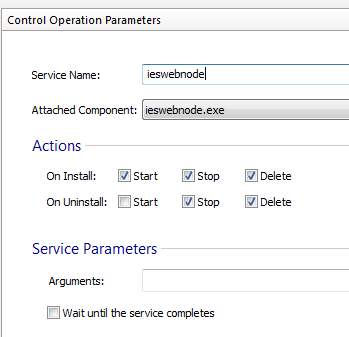
Here's my service config:
Image


Thanks & Greetings from Germany :D
Attachments
upgrade_service_reinstall.log
Log of an upgrade wich reinstalled the service
(628.38 KiB) Downloaded 147 times
upgrade_service_remove.log
Log of an upgrade wich removes the service
(619.07 KiB) Downloaded 145 times
install_initially.log
Log of an initial Installation
(336.68 KiB) Downloaded 147 times
Daniel
Posts: 8283
Joined: Mon Apr 02, 2012 1:11 pm
Contact: Website

Re: Installed Service gets removed on upgrade

Hello and welcome to Advanced Installer forums,

Thank you for your interest in Advanced Installer.
i've got a Problem with upgrading windows services. When I do a fresh install, the service gets installed just fine. Now I upgrade; the service gets removed and isn't getting installed again. When i do upgrade again the service get's installed again. I'm basically toggling the service installation.
This may happen due to a known Windows Installer bug. Please take a look on our "DLL file disappears during an upgrade" thread which debates this issue. However, can you please enable the "Always overwrite existing file" option for your service files, added in "Files and Folders" page, and see if the behavior still persist?
I've noticed this since I enabled custom Upgrade Rules. I need to be able to upgrade without incrementing the version but by controlling the product code. To do that i've modified the default custom rule on property "OLDPRODUCTS" slightly by including the maximum version on range (wich is the current Product Version).
In order to achieve this you can simply enable our "Uninstall a package with the same version (if found)" option from "Media page -> Configuration tab".

Let us know if this helped.

All the best,
Daniel
Daniel Radu - Advanced Installer Team
Follow us: Twitter - Facebook - YouTube
Schleuse
Posts: 2
Joined: Wed Feb 05, 2014 1:11 pm

Re: Installed Service gets removed on upgrade

Hey Daniel

Your advice:
This may happen due to a known Windows Installer bug. Please take a look on our "DLL file disappears during an upgrade" thread which debates this issue. However, can you please enable the "Always overwrite existing file" option for your service files, added in "Files and Folders" page, and see if the behavior still persist?
has done the trick! Thanks for the quick feedback and solution :D
Daniel
Posts: 8283
Joined: Mon Apr 02, 2012 1:11 pm
Contact: Website

Re: Installed Service gets removed on upgrade

You're always welcome. I'm glad you got this working.

All the best,
Daniel
Daniel Radu - Advanced Installer Team
Follow us: Twitter - Facebook - YouTube

Return to “Common Problems”