"ConfigureDlg": tabs are empty - Advanced Installer Community
Fulgan
Posts: 101
Joined: Mon Feb 27, 2012 10:42 am

"ConfigureDlg": tabs are empty

Hello,

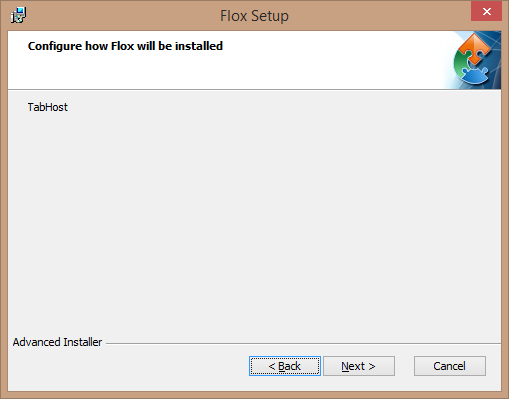
For some reason, the "ConfigureDlg" dialog of my installers are all completely empty: instead of the expected tab list, I have a grey area with the text "tabHost" at the top:
2014-07-25_1525.png
2014-07-25_1525.png (102.85 KiB) Viewed 4000 times
Any idea what could cause this ? The whole UI is default from the "Enterprise" and I have the same problem (with different looks) no matter the theme I pick.

Thansk
Eusebiu
Posts: 4971
Joined: Wed Nov 14, 2012 2:04 pm

Re: "ConfigureDlg": tabs are empty

Hi,

This happens because any other than "Classic" theme requires Enhanced User Interface to be enabled which is handled by our EXE Bootstrapper, but not by the MSI package. The Enhanced User Interface option can be found in the Themes page, "Settings" tab.

So, when you choose a theme, from the Themes page, that requires Enhanced UI, the package type is automatically turned to EXE in the Media page. Then, when the project is built it creates an EXE setup file and the MSI file next to it (the MSI file can also be included in the EXE file).

When you run your package, you should run the EXE file for the bootstrapper to handle correctly all the dialogs and controls.

Best regards,
Eusebiu
Eusebiu Aria - Advanced Installer Team
Follow us: Twitter - Facebook - YouTube
Fulgan
Posts: 101
Joined: Mon Feb 27, 2012 10:42 am

Re: "ConfigureDlg": tabs are empty

hello and thank you for your answer.

Unfortunately, it doesn't seem that your answer is correct. I have switched the GUI back to "Classic" and I have the sale result:
2014-07-28_1055.png
2014-07-28_1055.png (16.83 KiB) Viewed 3978 times
(This is, BTW, from the "test installation UI" functionality which, I believe, will do whatever is necessary to get the UI working properly).

In fact, the reason why I switched away fro the "Classic" theme is that this theme does NOT offer me any "customize" dialog at all, only the "configure" one which is, in my case, bugged.

Would it help if I opened a help ticket and provided you with the installer source ?
Eusebiu
Posts: 4971
Joined: Wed Nov 14, 2012 2:04 pm

Re: "ConfigureDlg": tabs are empty

Hi,

Please keep in mind that some controls requires "Enhanced User Interface" to be enabled and the "ConfigureDlg" dialogs uses some of these controls (i.e. Quick Selection Tree).

Can you please go in the "Themes" page, "Settings" tab and select one of the the "Only on install" or "Always" options for the "Enhanced User Interface" feature and see if the problem persists? Please make sure that, as I mentioned in my previous post, you run the EXE package after you build the project, not the MSI file.

Best regards,
Eusebiu
Eusebiu Aria - Advanced Installer Team
Follow us: Twitter - Facebook - YouTube

Return to “Common Problems”