Error while Repacking - Advanced Installer Community
aXeSwY
Posts: 3
Joined: Tue May 19, 2015 6:50 pm

Error while Repacking

So this keep happening why , how...I don't really know but even doing the following :
• Create a new windows in the VMware
• Reinstall advanced installer
• Upgrade advanced installer from 12.0 to 12.1 ( was released like yesterday )
• Clean all %appdata% folders....( after uninstalling)


But nothing , hope you guys could help and Thank You in Advance
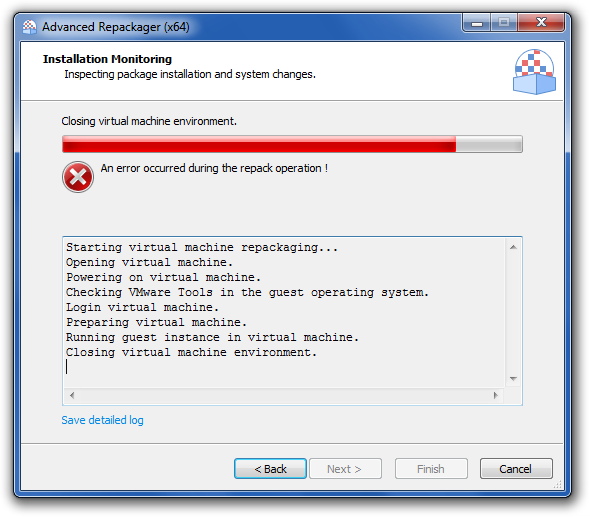
Image

Text version of the log

Code: Select all

Starting virtual machine repackaging...
Opening virtual machine.
Powering on virtual machine.
Checking VMware Tools in the guest operating system.
Login virtual machine.
Preparing virtual machine.
Running guest instance in virtual machine.
Closing virtual machine environment.
Daniel
Posts: 8283
Joined: Mon Apr 02, 2012 1:11 pm
Contact: Website

Re: Error while Repacking

Hello,

I've tested the scenario with our latest version of AI, but the repackaging in VMWare VM succeeded. Please note that the Repackager tool will require elevation inside the VM, so be sure to check the VM for any prompts. Also, please make sure all our Repackager requirements are fulfilled by your working environment.

If this is still of no help to you, please tell us what is the software configuration (Windows version, architecture: 32 or 64-bit) of your host (the machine hosting the VMWare application) and VM machines and what version of VMWare Workstation/Player are you using. Also, please try to iterate a detailed step by step test case which we can follow on our side.

All the best,
Daniel
Daniel Radu - Advanced Installer Team
Follow us: Twitter - Facebook - YouTube
aXeSwY
Posts: 3
Joined: Tue May 19, 2015 6:50 pm

Re: Error while Repacking

My configuration :
OS : Windows 7 Ultimate 64bit SP1
HW : i7 CPU / 8GB RAM
VMware used : VMware Workstation 11.1.0 Build-2496824
Virtual machine Created : Windows 7 Ultimate 32bit SP1 (Vmware tools installed)
HW assigned to VM : 2GB RAM / 1 CPU / 2 Cores / 40 GB HDD / NAT

How the problem accrued :
Well it was all working fine ( did couple of repacks before and worked just great ) , till i mistakenly deleted the virtualized windows , so i did install a new one and delete the old profile from Advanced Repackager add the new one ( vmx path with the correct login and password ) but than the problem start to appear even with switching the virtualized windows from 32 to 64...reinstall Vmware itself and AI but :( nothing whatsoever

Other thing please : even when i remove and install AI somehow it keep remembering the VMware profile how can i manually remove that


And Again thanks for trying to help
Daniel
Posts: 8283
Joined: Mon Apr 02, 2012 1:11 pm
Contact: Website

Re: Error while Repacking

Hello,

We have tested the scenario on several similar environments using VMware Workstation 11.1.0, but all went fine.

Can you please make sure that your VMWare Tool are up to date? Just open your VM in VMWare, go to "VM" menu and choose the "Update VMWare Tools" option. After updating the VMWare Tools to the latest just try again the scenario.

Also, please make sure that you are using in the Repackager settings the correct user account credentials and make sure the "Autologin" feature is disabled in VMWare. Just open your VM and go to "VM menu -> Settings -> Options -> Autologin" and set it to disable. Then, test again the repackaging and let us know if this was of any help. If not, we can send you a debug version of our Repackager to try log more info about the failure.
Other thing please : even when i remove and install AI somehow it keep remembering the VMware profile how can i manually remove that
You can remove it from our "Select VM Profile" dialog. Just use the "Delete" context menu option.

All the best,
Daniel
Daniel Radu - Advanced Installer Team
Follow us: Twitter - Facebook - YouTube

Return to “Common Problems”