


Hello,
We have a supplementary package installer that installs additional tools to our core product (which is installed via a separate installer). The tools are installed to the same app directory as the core product.
At any point, the user can delete that folder where the supplementary tools are added with no issues, however the Control Panel listing for the supplementary app is still there. If you choose to uninstall this listing the uninstaller runs normally without any sign of issues, and the listing is removed correctly.
Is there a way for me to configure the installer project so that it detects that the folder is deleted and then removes the Control Panel listing automatically as appropriate?
Suggested Articles
Re: Control Panel program listing still shows after program is deleted
Hello,
Windows Installer allows the self-healing mechanism for you installation package but not a self-uninstall.
If you have other questions, please let me know.
Best regards,
Dan
Indeed, the entry from the Control Panel is stored in the registry, it doesn't matter if you delete the resources files or not.At any point, the user can delete that folder where the supplementary tools are added with no issues, however the Control Panel listing for the supplementary app is still there.
You can do this from your core product. Check if the related folder is on disk, if it is not, remove the supplementary package from the machine (e.g. use a command line like this msiexec /x {B40D5AC5-6120-4AD6-BBD4-AF5EF7E04351}, where {B40D5AC5-6120-4AD6-BBD4-AF5EF7E04351} is the ProductCode GUID of the supplementary package).Is there a way for me to configure the installer project so that it detects that the folder is deleted and then removes the Control Panel listing automatically as appropriate?
Windows Installer allows the self-healing mechanism for you installation package but not a self-uninstall.
If you have other questions, please let me know.
Best regards,
Dan
Re: Control Panel program listing still shows after program is deleted
Dan,
How do I go about accomplishing what you have suggested? I created a custom search to look for the folder.
I am stuck at the part where I configure a call to msiexec. I would assume this is done via custom actions but I can't find the correct action to use.
How do I go about accomplishing what you have suggested? I created a custom search to look for the folder.
I am stuck at the part where I configure a call to msiexec. I would assume this is done via custom actions but I can't find the correct action to use.
Re: Control Panel program listing still shows after program is deleted
Hello,
Use the following image for your reference:
Please note that you need to condition the custom action execution, so that only if the related folder was found on the target machine, the custom action should execute.
If you need any help, please let me know.
Best regards,
Dan
To launch the msiexec.exe, you can use the predefined Launch file custom action.I am stuck at the part where I configure a call to msiexec. I would assume this is done via custom actions but I can't find the correct action to use.
Use the following image for your reference:
- LaunchFile custom action.png (42.45 KiB) Viewed 5158 times
If you need any help, please let me know.
Best regards,
Dan
Re: Control Panel program listing still shows after program is deleted
Hi Dan,
Thank you for the pointers.
I set up the installer project like you showed but I cannot get it to work. Here are screenshots showing my configuration:
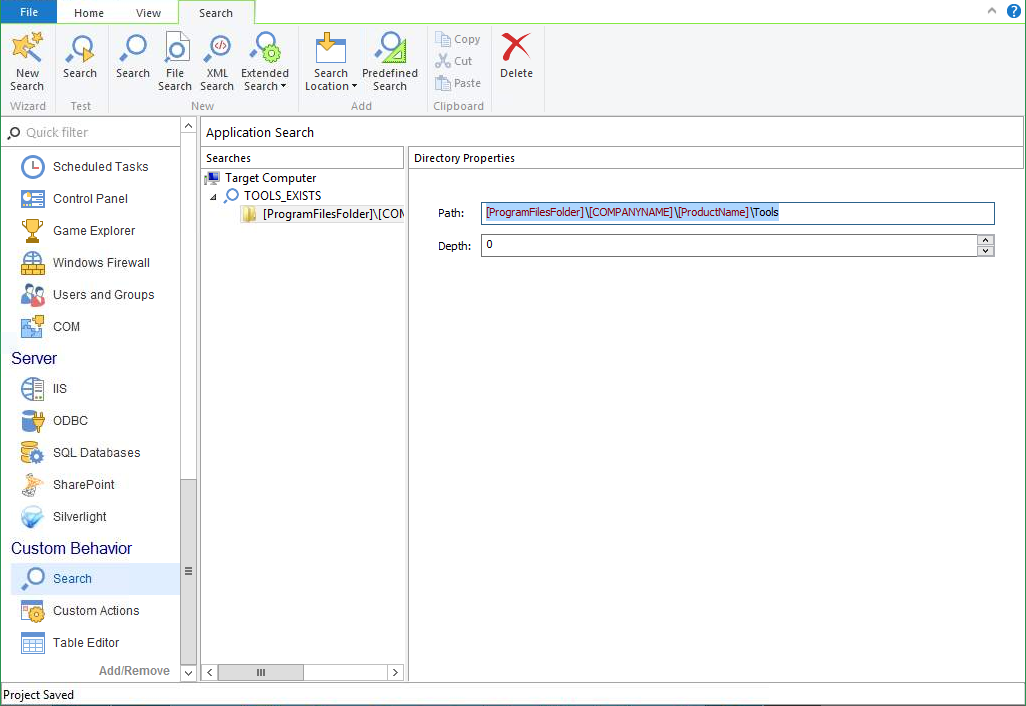
Here you can see my custom search item. It is looking for the Tools folder within the install path of the core product.
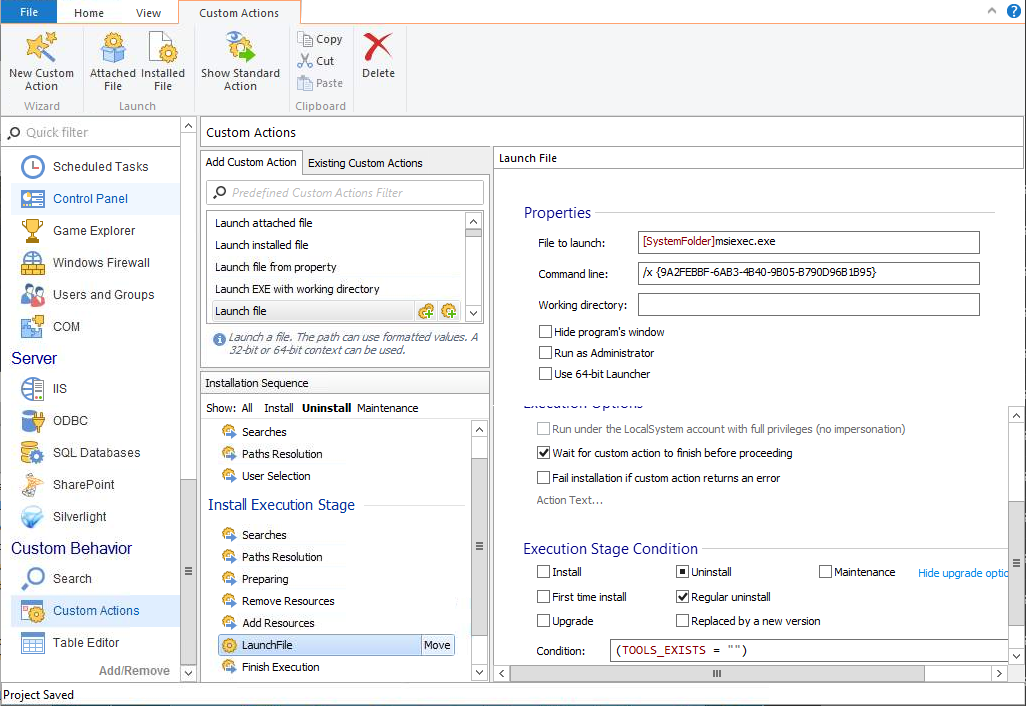
Here you can see my custom action setup. It is only for the uninstall sequence, right before the finish execution stage. You can't see it but the Execution Time is "Immediately." The Execute Stage is only for a regular uninstall. In my testing of the custom search, if the search is successful it returns the folder path. That is why the condition is (TOOLS_EXISTS = ""). Is there anything incorrect in this setup?
Thank you for the pointers.
I set up the installer project like you showed but I cannot get it to work. Here are screenshots showing my configuration:
Here you can see my custom search item. It is looking for the Tools folder within the install path of the core product.
Here you can see my custom action setup. It is only for the uninstall sequence, right before the finish execution stage. You can't see it but the Execution Time is "Immediately." The Execute Stage is only for a regular uninstall. In my testing of the custom search, if the search is successful it returns the folder path. That is why the condition is (TOOLS_EXISTS = ""). Is there anything incorrect in this setup?
Last edited by fali on Fri Oct 30, 2015 4:24 pm, edited 1 time in total.
Re: Control Panel program listing still shows after program is deleted
You're welcome,
In order to have a better view about this, can you please send us the .AIP (project file) to support at advancedinstaller dot com so we can investigate it? If it contains confidential information you can send us a small test project which reproduce this behavior.
Best regards,
Dan
I don't see any attachment. Did you missed to attach the related screenshots?I set up the installer project like you showed but I cannot get it to work. Here are screenshots showing my configuration:
In order to have a better view about this, can you please send us the .AIP (project file) to support at advancedinstaller dot com so we can investigate it? If it contains confidential information you can send us a small test project which reproduce this behavior.
Best regards,
Dan
Re: Control Panel program listing still shows after program is deleted
Dan,
I don't know why the images did not attach the first time. I even previewed the post first to make sure they did work. In any case they have been re-attached.
I don't know why the images did not attach the first time. I even previewed the post first to make sure they did work. In any case they have been re-attached.
Re: Control Panel program listing still shows after program is deleted
Hi,
First of all you should add the custom action that performs the uninstall process after the Finish Executionstage from the Install Execution Stage. Also, you should uncheck the Wait for custom action to finish before proceeding option and Fail installation if custom action returns an error option.
In the condition field you should use the following condition:
Please let us know if now it is working as expected.
Best regards,
Dan
First of all you should add the custom action that performs the uninstall process after the Finish Executionstage from the Install Execution Stage. Also, you should uncheck the Wait for custom action to finish before proceeding option and Fail installation if custom action returns an error option.
In the condition field you should use the following condition:
Code: Select all
NOT TOOLS_EXISTSBest regards,
Dan
Re: Control Panel program listing still shows after program is deleted
Dan,
It still did not work, however we can move on and close this ticket as we have determined this is abnormal behavior and we will not be supporting such a use case. Thank you.
It still did not work, however we can move on and close this ticket as we have determined this is abnormal behavior and we will not be supporting such a use case. Thank you.


FOLLOW US
Get the latest news in Application Packaging