I think I've stumbled upon a bug regarding the creation of shared folders. The process of sharing a folder does not seem to respect feature conditions (and possibly component conditions).
Consider the following folder structure:
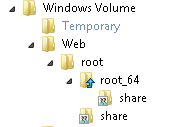
- FolderStructure.PNG (2.89 KiB) Viewed 2841 times
I have a folder named "share" that the installer creates as a shared folder. You can see there are two of these folders. They are included in separate features:
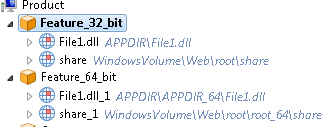
- Features.PNG (7.01 KiB) Viewed 2841 times
The features are conditionally installed. So, I would expect the shares to only be created if the feature they are under is enabled for install. However, this does not seem to be the case:
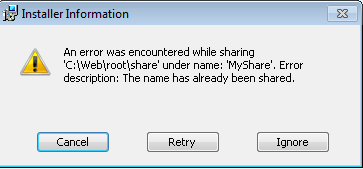
- error.PNG (7.01 KiB) Viewed 2841 times
It seems the installer tries to share the folder twice. I am able to workaround the issue by making the share itself conditional (right click folder > properties > Sharing tab > condition).
It's kind of hard to explain, so I've uploaded an example project that reproduces the issue (
http://www.filedropper.com/foldersharetest). Basically, the process of sharing a folder does not seem to respect feature conditions, even thought the creation of the folder does. Not sure if component conditions are respected - did not test that.
edit: On a related note, is there a way to access the folder share path (ex: \\MyServer\Share) during installation? Using the folder property gives the non-share path (C:\Web\Share).
Thanks.


FOLLOW US
Get the latest news in Application Packaging