


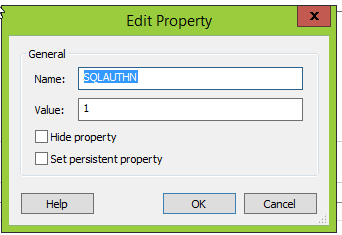
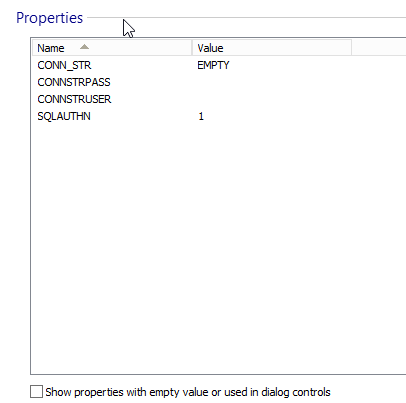
We don't have an UI control (yet) that changes this value, neither is it touched by a custom action or set in any other way in our installer.
On our test server, the SQLAUTHN property is always set to "1" correctly. On a customer server, this wasn't always the case: the first 3 tries of running the setup, the value wasn't 1, and the setup failed. In the fourth, the value was set to 1 correctly, and the setup ran through.
Excerpts from the verbose log of the third try; containing every position where the string "SQLAUTHN" occurs:
So, this property has not been modified in the installer, but still it isn't set to the default value I configured, and I would like to know why.MSI (s) (EC!9C) [07:33:25:651]: PROPERTY CHANGE: Adding AI_SqlRollback property. Its value is 'WindowsAuthConnectionSQLAUTHN <> "1"0SQL ServerSQL-Timeflex\timeflex1433timeflexadmin30160UpdateVersion_1WindowsAuthConnection1GO-- Inline SQL script
MSI (s) (EC!9C) [07:33:25:698]: PROPERTY CHANGE: Adding AI_SqlConfig property. Its value is 'WindowsAuthConnectionSQLAUTHN <> "1"0SQL ServerSQL-Timeflex\timeflex1433timeflexadmin30160UpdateVersion_1WindowsAuthConnection1GO-- Inline SQL script
MSI (s) (EC!9C) [07:33:25:714]: PROPERTY CHANGE: Deleting AI_SqlConfig property. Its current value is 'WindowsAuthConnectionSQLAUTHN <> "1"0SQL ServerSQL-Timeflex\timeflex1433timeflexadmin30160UpdateVersion_1WindowsAuthConnection1GO-- Inline SQL script
1: Konfiguriere Windows-Features.
MSI (s) (EC:98) [07:35:34:419]: Executing op: ActionStart(Name=AI_WinOptFeaturesConfig,Description=Konfiguriere Windows-Features.,Template=Konfiguriere Windows-Features.)
1: Führe Rollback auf konfigurierte Windows-Features durch.
MSI (s) (EC:98) [07:35:34:419]: Executing op: ActionStart(Name=AI_WinOptFeaturesRollback,Description=Führe Rollback auf konfigurierte Windows-Features durch.,Template=Führe Rollback auf konfigurierte Windows-Features durch.)
MSI (s) (EC:98) [07:35:34:419]: Executing op: CustomActionRollback(Action=AI_WinOptFeaturesRollback,ActionType=11521,Source=BinaryData,Target=**********,CustomActionData=**********)
MSI (s) (EC:38) [07:35:34:419]: Invoking remote custom action. DLL: C:\Windows\Installer\MSI2F3E.tmp, Entrypoint: OnWinOptFeaturesRollback
MSI (s) (EC:98) [07:35:39:591]: Executing op: End(Checksum=0,ProgressTotalHDWord=0,ProgressTotalLDWord=0)
MSI (s) (EC:98) [07:35:39:591]: Error in rollback skipped. Return: 5
MSI (s) (EC:98) [07:35:39:591]: Note: 1: 2318 2:
MSI (s) (EC:98) [07:35:39:591]: No System Restore sequence number for this installation.
MSI (s) (EC:98) [07:35:39:591]: Unlocking Server
MSI (s) (EC:98) [07:35:39:591]: PROPERTY CHANGE: Deleting UpdateStarted property. Its current value is '1'.
Aktion beendet um 7:35:39: INSTALL. Rückgabewert 3.
Property(S): AppsShutdownOption = All
Property(S): APPDIR =
...
Property(S): SQLAUTHN = Property.SQLAUTHN
So, I suspect that our Table is missing some action. I made a test installer with a similar property and let it run, and the verbose log would show this:
while our app's verbose log does not contain a single line with Property(C), only with Property(S).Property(S): PrimaryVolumeSpaceRemaining = 0
Property(S): SOURCEDIR = C:\Users\urban\AppData\Roaming\Your Company\Default Property Test 1.0.0\install\679C3EC\
Property(S): SourcedirProduct = {40024358-4DB1-4278-B683-3FD98679C3EC}
Property(S): ProductToBeRegistered = 1
MSI (s) (30:DC) [11:57:48:973]: MainEngineThread is returning 0
MSI (s) (30:70) [11:57:48:976]: RESTART MANAGER: Session closed.
MSI (s) (30:70) [11:57:48:980]: User policy value 'DisableRollback' is 0
MSI (s) (30:70) [11:57:48:980]: Machine policy value 'DisableRollback' is 0
MSI (s) (30:70) [11:57:48:980]: Incrementing counter to disable shutdown. Counter after increment: 0
MSI (s) (30:70) [11:57:48:980]: Note: 1: 1402 2: HKEY_LOCAL_MACHINE\Software\Microsoft\Windows\CurrentVersion\Installer\Rollback\Scripts 3: 2
MSI (s) (30:70) [11:57:48:982]: Note: 1: 2265 2: 3: -2147287035
MSI (s) (30:70) [11:57:48:982]: Note: 1: 1402 2: HKEY_LOCAL_MACHINE\Software\Microsoft\Windows\CurrentVersion\Installer\Rollback\Scripts 3: 2
MSI (s) (30:70) [11:57:48:983]: Decrementing counter to disable shutdown. If counter >= 0, shutdown will be denied. Counter after decrement: -1
MSI (s) (30:70) [11:57:48:983]: Destroying RemoteAPI object.
MSI (s) (30:B4) [11:57:48:983]: Custom Action Manager thread ending.
MSI (c) (D0:50) [11:57:48:986]: Back from server. Return value: 0
MSI (c) (D0:50) [11:57:48:987]: Decrementing counter to disable shutdown. If counter >= 0, shutdown will be denied. Counter after decrement: -1
MSI (c) (D0:50) [11:57:48:988]: PROPERTY CHANGE: Deleting SECONDSEQUENCE property. Its current value is '1'.
Action ended 11:57:48: ExecuteAction. Return value 1.
MSI (c) (D0:50) [11:57:48:991]: Doing action: ExitDialog
Action 11:57:48: ExitDialog.
Action start 11:57:48: ExitDialog.
Info 2826. Control BottomLine on dialog ExitDialog extends beyond the boundaries of the dialog to the right by 3 pixels.
Action 11:57:49: ExitDialog. Dialog created
Action ended 11:57:49: ExitDialog. Return value 1.
Action ended 11:57:49: INSTALL. Return value 1.
MSI (c) (D0:50) [11:57:49:720]: Destroying RemoteAPI object.
MSI (c) (D0:3C) [11:57:49:722]: Custom Action Manager thread ending.
Property(C): AppsShutdownOption = All
Property(C): APPDIR = C:\Program Files (x86)\Your Company\Default Property Test\
...
Property(C): TestProperty = 2
- What does the (C) and the (S) mean?Property(S): AppsShutdownOption = All
Property(S): APPDIR = C:\inetpub\wwwroot\timeflex\
Property(S): DiskPrompt = [1]
...
Property(S): SQLAUTHN = Property.SQLAUTHN
- Why is the AppsShutdownOption a Property(S) in our old installer, and a Property(C) in a new installer
- Am I possibly missing a certain Table Editor entry, where the property is set?
I should mention that our installer aip has been upgraded from 11.5 over 12.3(?) and 12.6 to 13.4, while the test installer is created brand-new with 13.4. Not sure whether this is an issue here...


FOLLOW US
Get the latest news in Application Packaging