How to silently get over confirmation messages - Advanced Installer Community
sagetuza
Posts: 8
Joined: Mon Dec 12, 2016 2:06 pm

How to silently get over confirmation messages

We have to deploy our MSI silently using msiexec /qn but it fails because some components are not automatically overwritten during installation.
This are the steps which should be passed silently:
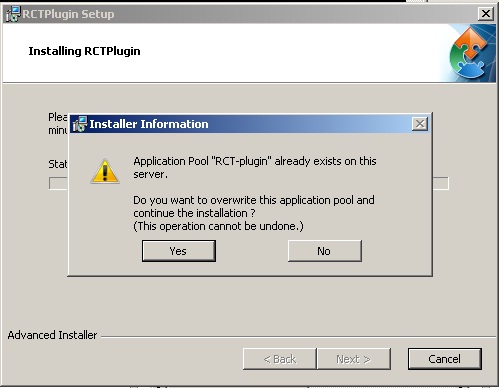
Step 1
Step 1
1.jpg (41.62 KiB) Viewed 2763 times
and
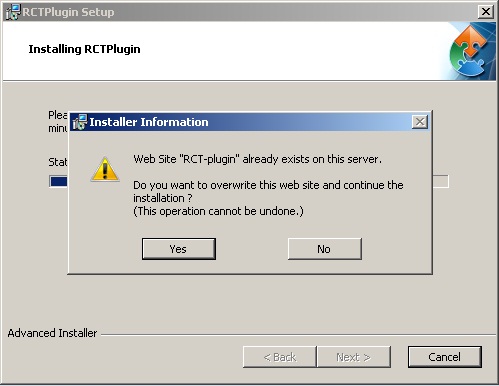
Step 2
Step 2
2.jpg (42.19 KiB) Viewed 2763 times
Please check the aip attached.
Attachments
msi.aip
(675.93 KiB) Downloaded 257 times
Eusebiu
Posts: 4971
Joined: Wed Nov 14, 2012 2:04 pm

Re: How to silently get over confirmation messages

Hi,

I order to be able to automatically overwrite IIS configuration when the application is installed silently, you need to choose the "Prompt user to overwrite item or rollback installation" option in the "Error Policy" section of your Websites and App Pools, then set the "IISINSTALLPOLICYOVERWRITE" property to "1" from the command line.

Just let me know if you need more details.

Best regards,
Eusebiu
Eusebiu Aria - Advanced Installer Team
Follow us: Twitter - Facebook - YouTube
sagetuza
Posts: 8
Joined: Mon Dec 12, 2016 2:06 pm

Re: How to silently get over confirmation messages

It works, thank you very much, we have included that parameter in MSI parameters table, so there is no need to set it from command line at execution
Eusebiu
Posts: 4971
Joined: Wed Nov 14, 2012 2:04 pm

Re: How to silently get over confirmation messages

You're welcome. Glad to help.

Adding the property in the MSI package is correct if you don't want to set if from command line anymore.

Best regards,
Eusebiu
Eusebiu Aria - Advanced Installer Team
Follow us: Twitter - Facebook - YouTube

Return to “Common Problems”