
Teams
-
Core
The coreCore Core is the set of software required to run WordPress. The Core Development Team builds WordPress. team makes WordPress. Whether you’re a seasoned PHPPHP PHP (recursive acronym for PHP: Hypertext Preprocessor) is a widely-used open source general-purpose scripting language that is especially suited for web development and can be embedded into HTML. https://www.php.net/manual/en/index.php, HTMLHTML HTML is an acronym for Hyper Text Markup Language. It is a markup language that is used in the development of web pages and websites., JavaScriptJavaScript JavaScript or JS is an object-oriented computer programming language commonly used to create interactive effects within web browsers. WordPress makes extensive use of JS for a better user experience. While PHP is executed on the server, JS executes within a user’s browser. https://www.javascript.com or CSSCSS CSS is an acronym for cascading style sheets. This is what controls the design or look and feel of a site. developer or are just learning to code, we’d love to have you on board. You can write code, fix bugs, debate decisions, and help with development.
-
Design
The design group is focused on the designing and developing the user interface. It’s a home for designers and UXers alike. There are regular discussions about mockups, design, and user testing.
-
Mobile
The mobile team builds the iOSiOS The operating system used on iPhones and iPads. and Android apps. Lend them your Kotlin, Swift, or ReactReact React is a JavaScript library that makes it easy to reason about, construct, and maintain stateless and stateful user interfaces. https://reactjs.org Native skills. The team also needs designers, UXUX UX is an acronym for User Experience – the way the user uses the UI. Think ‘what they are doing’ and less about how they do it. experts, and testers to give users a smooth experience on every device.
-
Accessibility
The a11yAccessibility Accessibility (commonly shortened to a11y) refers to the design of products, devices, services, or environments for people with disabilities. The concept of accessible design ensures both “direct access” (i.e. unassisted) and “indirect access” meaning compatibility with a person’s assistive technology (for example, computer screen readers). (https://en.wikipedia.org/wiki/Accessibility) group provides accessibilityAccessibility Accessibility (commonly shortened to a11y) refers to the design of products, devices, services, or environments for people with disabilities. The concept of accessible design ensures both “direct access” (i.e. unassisted) and “indirect access” meaning compatibility with a person’s assistive technology (for example, computer screen readers). (https://en.wikipedia.org/wiki/Accessibility) expertise across the project. They make sure that WordPress coreCore Core is the set of software required to run WordPress. The Core Development Team builds WordPress. and all of WordPress’ resources are accessible.
-
Polyglots
WordPress is used all over the world in many different languages. If you’re a polyglot, you can help by translating WordPress into your own language or contributing to the GlotPress project, making translations easier and more effective for everyone.
-
Support
Answering questions in the support forums, IRC, or SlackSlack Slack is a Collaborative Group Chat Platform https://slack.com/. The WordPress community has its own Slack Channel at https://make.wordpress.org/chat/ is one of the easiest ways to start contributing. Everyone knows the answer to something! Since the forums run on bbPress, you can also contribute by helping make the software behind them even better.
View all teams and their meetings
Latest activity
See the latest happenings across the entire project.
 Max Schmeling
Core ·
What's new in Gutenberg 24.4? (12 November)
“What’s new in GutenbergGutenberg The Gutenberg project is the new Editor Interface for WordPress. The editor improves the process and experience of creating new content, making writing rich content much simpler. It uses ‘blocks’ to add richness rather than shortcodes, custom HTML etc. https://wordpress.org/gutenberg/…” posts (labeled with the #gutenberg-new tag) are posted following every Gutenberg release on a biweekly basis, showcasing new features included in each release. As a reminder, here’s an overview of different ways to keep up with Gutenberg and the Editor.

What’s new in
Gutenberg 24.4?
Gutenberg 24.4 is released and available for download!
This release adds emoji reactions and search to Notes, improves content-only editing across more blocks, and brings more controls in line with the WordPress Design System. The experimental Media Editor gains PDF previews and clearer file details. Draft content gets extra protection when restoring browser backups, while Rich Text and blockBlock Block is the abstract term used to describe units of markup that, composed together, form the content or layout of a webpage using the WordPress editor. The idea combines concepts of what in the past may have achieved with shortcodes, custom HTML, and embed discovery into a single consistent API and user experience. parsing get performance improvements. Developers also get an experimental PHPPHP The web scripting language in which WordPress is primarily architected. WordPress requires PHP 7.4 or higher runtime for wp-env. All of this thanks to a fantastic team of contributors, including five first-timers.
Find the right note faster
Notes gain search across comments, replies, and author names, plus filtering by open/resolved status.
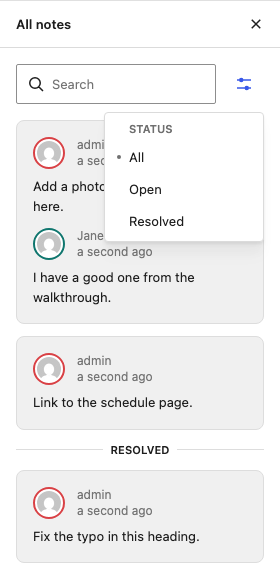
Compact note emoji reaction picker
Reacting to notes now takes less space, with a compact horizontal emoji picker that keeps the conversation in view (#85819). New thumbs-up and plus reactions give you more ways to show agreement or support without adding another reply (#85565).
Understand what’s overriding your Global Styles
Global Styles now shows an “Overridden by” list for elements such as headings, links, and buttons, making it clearer when coreCore Core is the set of software required to run WordPress. The Core Development Team builds WordPress. blocks have styles that take precedence (#84671). Each item links directly to the block’s style settings, so you can find and adjust the override without hunting through the block list.

Changelog
Features
- wp-env: Add an experimental runtime using locally installed PHP and SQLite. (85512)
Enhancements
Components
- RadioControl: Place group help text below the fieldset label and remove its legacy
components-base-control__helpclass. (85126) - UIUI User interface: Add Menu width presets and make Select and SelectControl popup presets size to content up to a maximum width. Use CSSCSS Cascading Style Sheets. when a fixed width is required. (84086)
- DataViews: Standardize action-label punctuation. Consumers should supply labels without ellipses; modal menu actions add translated ellipses. (85396)
- Align focus indicators across AlignmentMatrixControl, DataViews grids, FormToggle, Modal scrollable content, RangeControl, RotationRuler, and disabled items. (85528, 85364, 85285, 85251, 85536, 85535, 86125)
- Badge: Add optional infotips using a consumer-supplied Popover. (85309)
- Align Modal colors and corners, and Tooltip backgrounds, with the design system. (85855, 85858)
- Migrate CustomGradientPicker and BackgroundClipControl select controls to
@wordpress/ui. (85750, 86046) - DataViews: Migrate Sort by and relative-date Unit controls to
@wordpress/ui. (86167) - DataViews: Use
@wordpress/uibuttons in the bulk actions bar. (85939) - Align the standalone Spinner appearance with the design system and scale its stroke width with its size. (85859, 85378)
- Theme: Report insufficient contrast of focus-ring and strong brand-fill colors against theme surfaces. (85449)
- Use solid brand highlights for popup items. (84583)
Block Library
- Improve content-only editing for Button content, Comments Pagination link labels, and Query LoopLoop The Loop is PHP code used by WordPress to display posts. Using The Loop, WordPress processes each post to be displayed on the current page, and formats it according to how it matches specified criteria within The Loop tags. Any HTML or PHP code in the Loop will be processed on each post. https://codex.wordpress.org/The_Loop pagination link labels. (84854, 86175, 70165)
- Add border support to Comments Pagination Numbers, and border and padding support to Query Pagination Numbers. (85164, 85245)
- Migrate select controls in the Archives, Audio, File, Latest Comments, List, Playlist, Post Author AvatarAvatar An avatar is an image or illustration that specifically refers to a character that represents an online user. It’s usually a square box that appears next to the user’s name., Social Icons, and Tag Cloud blocks to
@wordpress/ui. (86137, 86194, 86199, 86138, 86141, 86161, 86160, 86196, 86198) - Remove the Auto/Manual grid toggle and add an experimental Canvas variation of the Group block. (85985)
- Social Icon: Support editing the link from the inspector. (84860)
Block and Site Editors
- Rich Text: Give formats in the More dropdown a consistent order and reserve dedicated name-based toolbar slots for known core formats. (85843)
- Add an alignment-menu action to select the block constraining a child block’s width. (82607)
- Guard entity preload filters and share entity actions and fields logic. (85390)
- Experimental Site Editor v2: Unregister the View revisionsRevisions The WordPress revisions system stores a record of each saved draft or published update. The revision system allows you to see what changes were made in each revision by dragging a slider (or using the Next/Previous buttons). The display indicates what has changed in each revision. action on the server. (85279)
Design Tools and Global Styles
- Show an icon for each aspect ratio option in the Dimensions tool. (85812)
- Global Styles: List core block types that override an element’s styles. (84671)
- Place background and text colors first in the color palette. (62548)
Media
- Experimental media editor: Show file type and size in the headerHeader The header of your site is typically the first thing people will experience. The masthead or header art located across the top of your page is part of the look and feel of your website. It can influence a visitor’s opinion about your content and you/ your organization’s brand. It may also look different on different screen sizes. and reposition the settings dropdown. (86154, 86020)
- Add PDF previews to the experimental media editor. (86002)
- Animate the media editor sidebarSidebar A sidebar in WordPress is referred to a widget-ready area used by WordPress themes to display information that is not a part of the main content. It is not always a vertical column on the side. It can be a horizontal rectangle below or above the content area, footer, header, or any where in the theme. when opening and closing it. (85889)
- Group Reset and Restore original under a History menu. (85891)
- Prevent MediaEdit item-removal animations. (85372)
Collaboration
- Hide collaborator avatars while typing. (83490)
- Notes: Add search and a status filterFilter Filters are one of the two types of Hooks https://codex.wordpress.org/Plugin_API/Hooks. They provide a way for functions to modify data of other functions. They are the counterpart to Actions. Unlike Actions, filters are meant to work in an isolated manner, and should never have side effects such as affecting global variables and output. to the All Notes sidebar. (84060)
- Notes: Add thumbs-up and plus reactions, and show the reaction picker as a row of emoji. (85565, 85819)
Dashboard and Widgets
- WidgetWidget A WordPress Widget is a small block that performs a specific function. You can add these widgets in sidebars also known as widget-ready areas on your web page. WordPress widgets were originally created to provide a simple and easy-to-use way of giving design and structure control of the WordPress theme to the user. Dashboard: Forward grid settings to the surface. Stop applying the automatic 600px and 960px breakpoints to numeric column counts; hosts that relied on them must supply a column-step map. Render positive row heights without snapping to presets. (85228)
- Add
useWidgetIdentityfor translated widget titles. (85729) - Support an
exampledeclaration inwidget.json. (85240) - Grid: Support column-count steps based on container width. (85216)
Icons
- Add the database icon and expose error, info, and postComments in the
core-admincollection. (85273, 85452) - Promote Dashicon replacements to the
core-admincollection and map their Dashicons. (85541)
Developer Tools
- Design System MCP: Add pattern tools using Storybook MDX manifest output. (84864)
- Storybook: Show icon details in the Icon Library. (86057)
- Limit wp-build esbuild concurrency. (79889)
Bug Fixes
Components
- CheckboxControl: Use design system color tokens; legacy
--wp-components-color-accentand--wp-components-color-accent-invertedoverrides no longer apply. Use ThemeProvider for customization. (85856) - Widget Dashboard: Give the footer strip a consistent height. (85237)
- BoxControl: Add fallback units for the input slider. (70288)
- DataViews: Correct filter-chip focus styling and prevent the remove button from overlapping chip text. (85374)
- ColorPicker: Preserve hex and RGB edits when the picker closes. (85734)
- ControlWithError: Skip unchanged validity-state updates. (85479)
- Core fields: Preserve status-icon sizing when labels wrap and remove extra spacing in slug inputs. (85828, 85935)
- DataViews: Use a page-number input for pagination above 100 pages. (85303)
- DropdownMenu: Account for Button borders in menu-item padding. (85503)
- Keep MenuItem and ToggleGroupControl widths stable when selection changes. (85831, 85454)
- Modal: Restore each modal’s
aria-hiddenstate when modals close out of order. (85720) - PaletteEdit: Preserve existing slugs when deduplicating presets. (85817)
- ToolsPanel: Keep Reset labels visible on highlighted menu items. (86045)
- Calendar: Show only the day number in day cells. (86010)
Block Library
- Table: Keep the selected cell on the first click into an unselected table. (86757)
This was introduced in 24.4.1. - Comment Author Avatar: Pass the configured size to
get_avatar(). (86113) - Comments Pagination Next: Remove the link filter from the correct hook. (85244)
- Cover: Prevent Navigation overlays from being clipped in Safari. (86041)
- Playlist: Preserve track metadata after failed replacement uploads, handle URLs containing query-string ampersands, and render tracks without attachment IDs. (86018, 85931, 83880)
- Table of Contents: Show previewed headings in published-post previews and keep list styles editable in templates. (86155, 86251)
- Heading: Preserve combining marks in generated anchors. (85096)
- Navigation Link: Preserve text formatting when editing in the sidebar. (85223)
- Page List: Keep pages visible in the Navigation sidebar. (85357)
- Paragraph: Support removing theme-disabled drop caps and avoid empty toolbar groups when alignment controls are unavailable. (84839, 85796)
- Social Icon: Prevent closing a popover from stealing focus. (86215)
- Social Links: Restore the larger icon size for the Logos Only style. (85506)
- Tabs: Correct the classic-theme selector for tab-button styles. (85504)
Editors and Saving
- Rich Text: Handle full-content deletion through
beforeinput, including Safari deletion commands. (85886) - Copy the text of bound fields. (85403)
- Preserve HTMLHTML HyperText Markup Language. The semantic scripting language primarily used for outputting content in web browsers. anchors when editing as HTML and converting Classic blocks. (82836)
- Inserter: Keep focused results below the sticky search field. (85706)
- Link Control: Preserve preview focus while the selected post’s record loads. (85945)
- Match the block-visibility viewport once per canvas. (85808)
- Preserve child layout attributes when transforming a block. (85045)
- Rich Text: Remove stale format boundaries when a field loses selection. (86168)
- Correct non-breaking-space replacement behavior and its tooltip. (85873, 85777)
- Writing flow: Correct triple-click list selection, parent-block select-all behavior, and arrow-key navigation at viewport edges. (85569, 85987, 85408)
- Raw handling: Keep shortcodes within text inline. (85795)
- Vertically center the Categories loading spinner. (85563)
- Save current content before restoring a browser backup. (85406)
- Revisions: Include only revisioned metadata in revision REST responses. (85509)
- Command Palette: Correct the classic-theme guard for template commands. (86142)
Design Tools and Global Styles
- Apply globally: Show the block type’s current value. (84823)
- Contrast checker: Check the visible color of text clipped to its background. (86148)
- Global Styles: Preserve individual sides when editing padding and margin shorthand. (85437)
- Typography: Clear the synced link color when resetting all settings. (85376)
- Pass
blockNameto style-state inspector slots. (86084) - Allow separate row and column block gaps in the block-style theme.jsonJSON JSON, or JavaScript Object Notation, is a minimal, readable format for structuring data. It is used primarily to transmit data between a server and web application, as an alternative to XML. schema. (86044)
- Allow CSS custom properties when sanitizing block gaps. (82817)
- KSES: Allow CSS color functions in inline styles. (84213)
- Correct the deprecated duotone render wrapper’s arguments and document known limitations in deprecated duotone functions. (68397)
- Duotone: Avoid undefined-array-key warnings when parsing hue units. (68399)
Media
- Experimental media editor: Correct canvas border radii and footer controls. (86143)
- RotationRuler: Keep the center marker visible in forced-colors mode. (85546)
- Prevent endless image-sideloading loops when the browser cannot decode a large image. (83530)
Collaboration
- Notes: Handle inline notes in merged text. (85744)
- Notes: Handle notes shared by duplicated or split blocks. (85906)
- Notes: Share thread-focus recovery across actions. (85455)
- Notes: Correct reaction-deletion permissions, including author checks and preventing changes on resolved threads. (85415, 85883)
Interactivity APIAPI An API or Application Programming Interface is a software intermediary that allows programs to interact with each other and share data in limited, clearly defined ways.
- Ignore router regions and
attachTotargets insidedata-wp-htmlcontent. (84919) - Load Interactivity Router script modules without
eval()or WebAssembly to support Content Security Policy restrictions. (84056)
Developer Tools
- Storybook: Match icon labels when searching the icon library. (85399)
- Storybook: Remove BaseControl from the component manifest. (85847)
- Update the sprintf dependency to resolve TypeScript module-resolution issues. (85562)
- wp-env: Preserve Debian security updates in Bullseye-based images. (85469)
- wp-env: Report the PHP runtime’s actual automatically selected port and preserve it when resetting the site. (85574)
AccessibilityAccessibility Accessibility (commonly shortened to a11y) refers to the design of products, devices, services, or environments for people with disabilities. The concept of accessible design ensures both “direct access” (i.e. unassisted) and “indirect access” meaning compatibility with a person’s assistive technology (for example, computer screen readers). (https://en.wikipedia.org/wiki/Accessibility)
- Prevent invalidinvalid A resolution on the bug tracker (and generally common in software development, sometimes also notabug) that indicates the ticket is not a bug, is a support request, or is generally invalid. LaTeX from trapping keyboard focus in the Math block and inline math controls. (86027)
- Migrate Separator and Table of Contents select controls to
@wordpress/ui. (86047) - Modal: Preserve dialog boundaries in forced-colors mode. (85888)
- UI: Add
Notice.Listwith live announcements. (85209) - Notes: Show reaction pills’ pressed state in forced-colors mode. (85904)
- Give URLURL A specific web address of a website or web page on the Internet, such as a website’s URL www.wordpress.org submit buttons consistent identification. (85725)
- Improve the accessibility and usability of the error copy button. (85477)
- Grid: Preserve tile content semantics when dragging is disabled. (84869)
Performance
- Reduce Rich Text initialization and editing overhead by batching DOM updates, parsing unfocused fields on mount, and simplifying field registration, event listeners, selection tracking, and undo handling. (85177, 85874, 86007, 86021, 85887, 85994, 85983)
- Reduce block action and store-subscription overhead. (85991, 85804)
- Preserve unchanged blocks when resetting content so undo does not re-render the entire post. (85427)
- Skip measuring the collaborators overlay when there is nothing to draw. (85179)
- ThemeProvider: Use prebuilt color ramps for the default seeds. (85182)
- withFilters: Track mounted instances in a Set. (86012)
- Log block migrations only when
SCRIPT_DEBUGis enabled. (85736) - Expose script exports on globals as data properties. (85180)
- Reduce parser memory use and processing time for documents with deeply nested, unclosed blocks. (74427)
Documentation
- Add agent guidance for escaping PHP output and preventing cross-site scripting. (84596)
- Add migrationMigration Moving the code, database and media files for a website site from one server to another. Most typically done when changing hosting companies. guides for CustomSelectControl and SelectControl. (85377, 85220)
- Document
createInterpolateElementin the internationalization guide. (86015) - Clarify the design system introduction and document the legacy-component replacement process. (85764, 85480)
- Focus package changelogs on consumer-facing changes. (85079)
- Document SelectControl callbacks when reselecting the current value. (86200)
- Add DropdownMenu selection stories. (85551)
- Document the 7.1.4 security patchpatch A special text file that describes changes to code, by identifying the files and lines which are added, removed, and altered. It may also be referred to as a diff. A patch can be applied to a codebase for testing. releases. (85930)
- Add a Design System MCP page to Storybook. (85464)
- Add guidance for agents reading Storybook without JavaScriptJavaScript JavaScript or JS is an object-oriented computer programming language commonly used to create interactive effects within web browsers. WordPress makes extensive use of JS for a better user experience. While PHP is executed on the server, JS executes within a user’s browser. https://www.javascript.com. (85757)
- Complete Storybook guidance for copy-to-clipboard feedback. (85745)
- Correct minified component names in Storybook code snippets. (85966)
- Make the Save & Submit Canvas example fully copyable and add a Notice disclosure composition example. (85766, 84627)
- Keep documentation before attached, named MDX pages in Storybook. (85308)
- Remove ThemeProvider’s private badge in Storybook. (85529)
- Update Figma border-import documentation. (85304)
- Document
npm run other:cherry-pick -- --dry-runin the release guides. (85465)
Code Quality
Components
- Remove the public
checkbox-controlandradio-controlSass mixins from@wordpress/base-styles; their styles now live in CheckboxControl and RadioControl. (85248) - Require distinct aliases for legacy IconButton, Menu, Notice, Popover, Tabs, validated controls, Card, and VisuallyHidden imports. (85846, 85845, 85839, 85838, 85852, 85950, 85519, 85837)
- Replace legacy DataViews selection-indicator mixins. (85191)
- Deprecate the legacy FormToggle, Tooltip, ProgressBar, TabbableContainer, and CustomGradientPicker components. (85517, 85518, 85520, 85521, 85953)
- Restore change-case for component class-name generation. (85192)
Icons
- Update
lockto use the former outline artwork and remove thelockOutlineandlockSmallexports. (85740) - Remove the
insertBefore,insertAfter, andofflineicon exports. (85445)
Blocks and Editors
- Reduce effects in core blocks using render-time state, core-data,
useEvent, anduseRefEffect, and restrict new effects with a lint rule. (85814, 85864, 85810, 85862, 85867) - Remove unused Button outline styles and redundant Site Title fit-text CSS. (85471, 85166)
- Correct PHPDocPHPDoc (docblock, inline docs), private static access, redundant conditions, and return values in block rendering and style support. (86092, 86090, 86094, 86091)
- Use null-coalescing assignment for Navigation, Tab Panel, and background-size defaults. (86033, 85548)
- Navigation: Replace the button block appender with a dropdown appender. (70524)
- Remove ignored
parseFloatradix arguments and an unused SpacingSizesControl constant. (85163, 85877) - Centralize focus-capture prevention once per canvas. (85815)
- Remove non-iframeiframe iFrame is an acronym for an inline frame. An iFrame is used inside a webpage to load another HTML document and render it. This HTML document may also contain JavaScript and/or CSS which is loaded at the time when iframe tag is parsed by the user’s browser. metaMeta Meta is a term that refers to the inside workings of a group. For us, this is the team that works on internal WordPress sites like WordCamp Central and Make WordPress.-box code from Edit Post. (86009)
- Set welcome-guide preferences to false when closing the guides. (85742)
Media
- Simplify cropper state and instruction handling and remove unnecessary media-editor effects. (85881, 86147, 85882, 85880)
- Tidy cropper code before exposing it. (85429)
Styles and Server APIs
- Correct theme JSON types, cached-property PHPDoc, and private static calls, and simplify CSS-variable matching. (68407, 86111, 86096, 68386, 68401)
- Make PHP types explicit and simplify duotone, layout, shadow, style-variation, typography, and compatibility code. (68405, 68389, 68404, 68398, 68396, 68392, 86099)
- Remove the Global Styles inheritance-indicators experiment. (85884)
- Use
gutenberg_prepare_json_value_for_client()for view configurations and entity fields. (85206) - Move the Site patterns view-configuration change into the WordPress 7.2 compatibility directory. (85905)
- Remove obsolete
--wp-components-color-*overrides. (85938)
TypeScript
- Expand TypeScript coverage for block-editor components, core-data utilities and actions, Patterns stores, and Core Commands; add split TypeScript configuration and a typed test to Blocks. (84950, 85058, 85070, 85534, 85253, 84385)
- Convert package tests and test utilities to TypeScript across Components, DOM, LaTeX to MathML, Redux Routine, Element, API Fetch, Viewport, Plugins, E2E Test Utils, HooksHooks In WordPress theme and development, hooks are functions that can be applied to an action or a Filter in WordPress. Actions are functions performed when a certain event occurs in WordPress. Filters allow you to modify certain functions. Arguments used to hook both filters and actions look the same., and Preferences Persistence. (85150, 85161, 85084, 85121, 85159, 85145, 85115, 85088, 84917, 85141, 85162)
Tools
Testing
- Add split TypeScript configuration for most packages to support typed tests, and disable Vitest CommonJS globals injection. (85470, 85878)
- Add
npm run browsefor driving the local WordPress site from the command line. (85525) - Stabilize drag tests by handling insertion-indicator remounts and setting the initial caret position. (85270, 85988)
- Improve synchronization in autocomplete, rich-text selection, link-field, cut-and-paste, template, and editor-canvas tests. (85572, 85975, 85996, 85976, 85978, 85974)
- Stabilize the Interactivity Router URL-fragment navigation test. (85473)
- Replace the Page List unit testunit test Code written to test a small piece of code or functionality within a larger application. Everything from themes to WordPress core have a series of unit tests. Also see regression. with end-to-end coverage, update entity-fields assertions for Core trunktrunk A directory in Subversion containing the latest development code in preparation for the next major release cycle. If you are running “trunk”, then you are on the latest revision., and use real components in interface tests. (85564, 85201, 86171)
- Remove redundant Site Editor and comments-count checks and simplify entity-action loader test labels. (85259, 85979, 85798)
- Shrink and speed up the block Notes end-to-end tests. (86209)
- Measure page-load performance without tracing and record end-to-end traces only on failed-test retries. (86025, 85428)
- Run end-to-end tests in parallel with a separate wp-env site per two CPU cores. (85420)
- Stabilize web-editor selection tests in iOSiOS The operating system used on iPhones and iPads. Safari. (85461, 85481)
Build Tooling
- Docgen: Remove Babel core, project Babel-configuration support, and support for syntax requiring custom parsers, including Flow. (85183)
- Move theme build and Stylelint plugins to
@wordpress/theme-build-toolsand remove their old@wordpress/themeexports; consumers must update their imports. (83568) - wp-build: Pass
falseinstead of an empty string as the source inwp_register_script(). (86106) - Introduce PHPStan level-5 analysis, a dedicated tooling workspace, updated WordPress stubs, and corrected baseline configuration. (66693, 86222, 86109, 86093)
- Load Storybook previews from a Blueprint bundle. (85946)
- Update Storybook to 10.6.5 and
@storybook/iconsto 2.2.0, including Vitest addon fixes. (86172, 85741) - Update Vite to 8.3.5 and Vitest to 5.0.5. (85739, 86173)
- Streamline CI with lighter runners, scoped changelog checks, updated baseline tooling, and fresher reads of unfinished-job status. (85907, 85459, 85076, 85077)
- Warn when a bugbug A bug is an error or unexpected result. Performance improvements, code optimization, and are considered enhancements, not defects. After feature freeze, only bugs are dealt with, with regressions (adverse changes from the previous version) being the highest priority. fix’s new end-to-end test also passes on trunk. (85717)
- Migrate the build pipeline from esbuild to Rolldown. (85476)
- Remove the legacy Storybook manifest shim and type-check manifest post-processing scripts. (85778, 85769)
- Declare
@wordpress/themeas a peer dependency of@wordpress/theme-build-tools. (85388) - Update Terrazzo token-generation tools to 2.10.0. (85737)
- Remove redundant
tsconfig.test.jsonfiles from split packages. (85516) - Derive wp-build CSS-module class names from each stylesheet’s CSS. (85900)
- Improve ESLint component recommendations with migration-guide links,
getWpCompatOverlaySlotguidance, and per-import exceptions. (85752, 85835, 85188)
Repository and Release Management
- Update PHPStan tooling ownership rules. (86204, 86112)
- Move backportbackport A port is when code from one branch (or trunk) is merged into another branch or trunk. Some changes in WordPress point releases are the result of backporting code from trunk to the release branch. changelog entries into the appropriate WordPress 7.2 and 7.3 directories. (85064, 85418)
- Configure the props bot’s introduction through the action input. (83917)
- Require a hash-prefixed issue number or full issue URL when assigning fixed issues. (86130)
- Correct the
.gitignorecomment about re-included.cachepaths. (85375)
First-time contributors
The following PRs were merged by first-time contributors:
- @justlevine: Add PHPStan static analysis at rule level 5. (66693)
- @lucatume: iOS tests: De-flake the selection handle test. (85461)
- @mattmiklic: Theme: Update Figma border import documentation. (85304)
- @RajkiranBagal: DataViews: Use a page number input in the footer pagination above 100 pages. (85303)
- @theritiktiwari: Fix typo in .gitignore comment about re-included .cache paths. (85375)
Contributors
The following contributors merged PRs in this release:
@00kaku @aaronrobertshaw @adamsilverstein @adamwoodnz @aduth @amitraj2203 @andrewserong @ciampo @CookieDarb @DAreRodz @desrosj @DevinWalker @dmsnell @draganescu @drewmt @ekamran @ellatrix @fushar @hbhalodia @himanshupathak95 @huubl @huzaifaalmesbah @im3dabasia @jasmussen @jeryj @jorgefilipecosta @jsnajdr @justlevine @karthikeya-io @kushagra-goyal-14 @lazerg @louwie17 @lucatume @luisherranz @Mamaduka @manzoorwanijk @mattmiklic @mcsf @mikachan @mirka @noruzzamans @ntsekouras @oandregal @peterwilsoncc @R1shabh-Gupta @RajkiranBagal @ramonjd @retrofox @SainathPoojary @salvatorecorsi @sarthaknagoshe2002 @shail-mehta @simison @singhakanshu00 @sirreal @Soean @stokesman @t-hamano @tellthemachines @theaminulai @theritiktiwari @USERSATOSHI @westonruter @yashjawale @youknowriad
Kudos to all the contributors that helped with the release! 👏
 Henrique Iamarino
Core ·
Introducing Mētis, Our New Flagship Theme
Mētis is a theme for creators in an unmapped moment: people who work in more than one form and keep finding their way as the work changes.
It began as our first direction for the next default theme. As we shared when we introduced Ipsum, Mētis continues on its own, and at @matt’s request it’s now our flagship theme. A default has to work for every site; a flagship can go further and show what the Editor can do today.
How We came to It
The theme is named after an ancient Greek word for cunning intelligence: reading a situation as it shifts and finding a way through with whatever is at hand. It is the adjective Homer uses to describe Odysseus in the “mother of all stories,” which inspired this project.
We started from that idea and from the people it describes: writers, designers, and makers whose work keeps changing shape, who hold many things at once and keep going without a complete map. We built the theme in the Site Editor, with real content from the start.
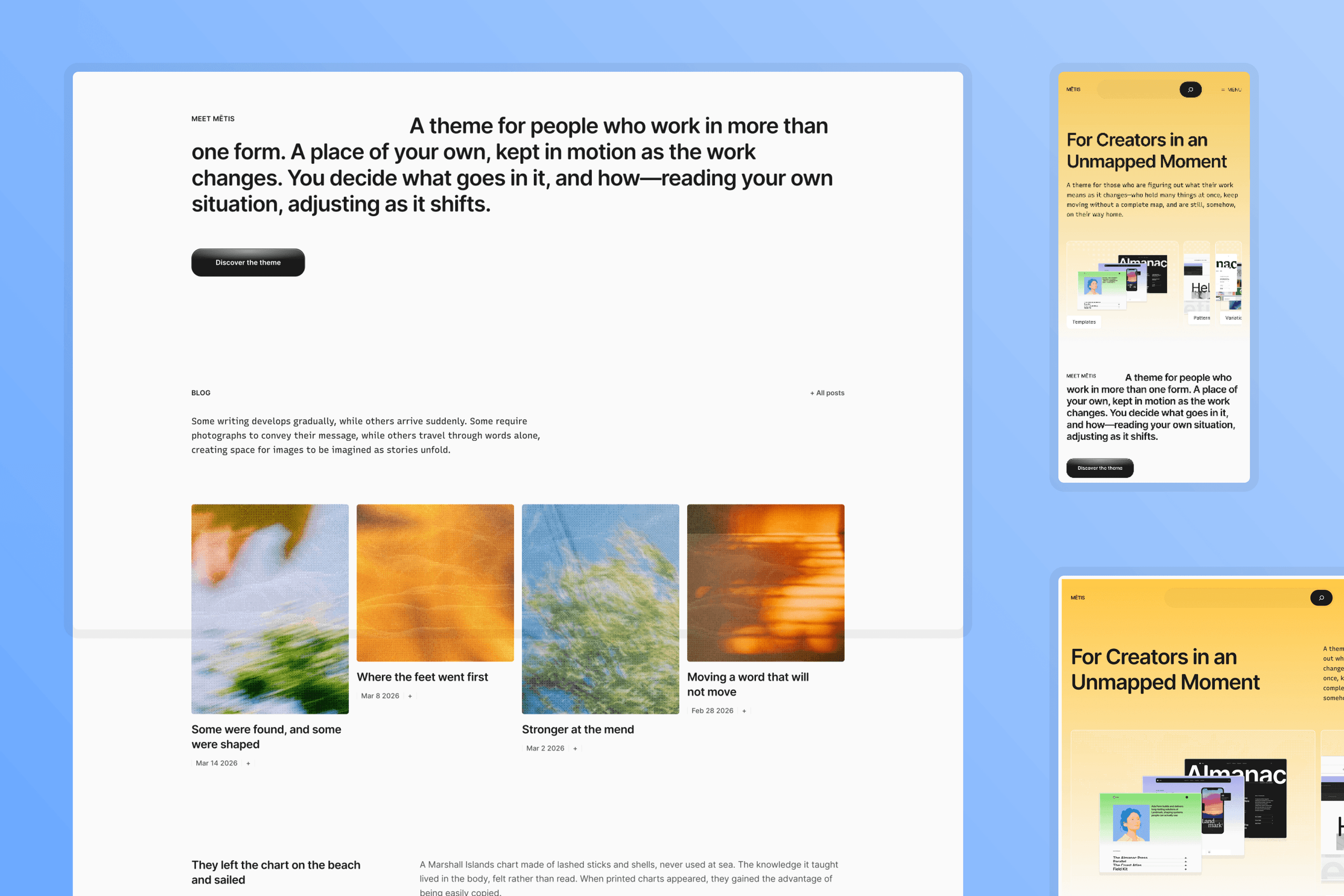
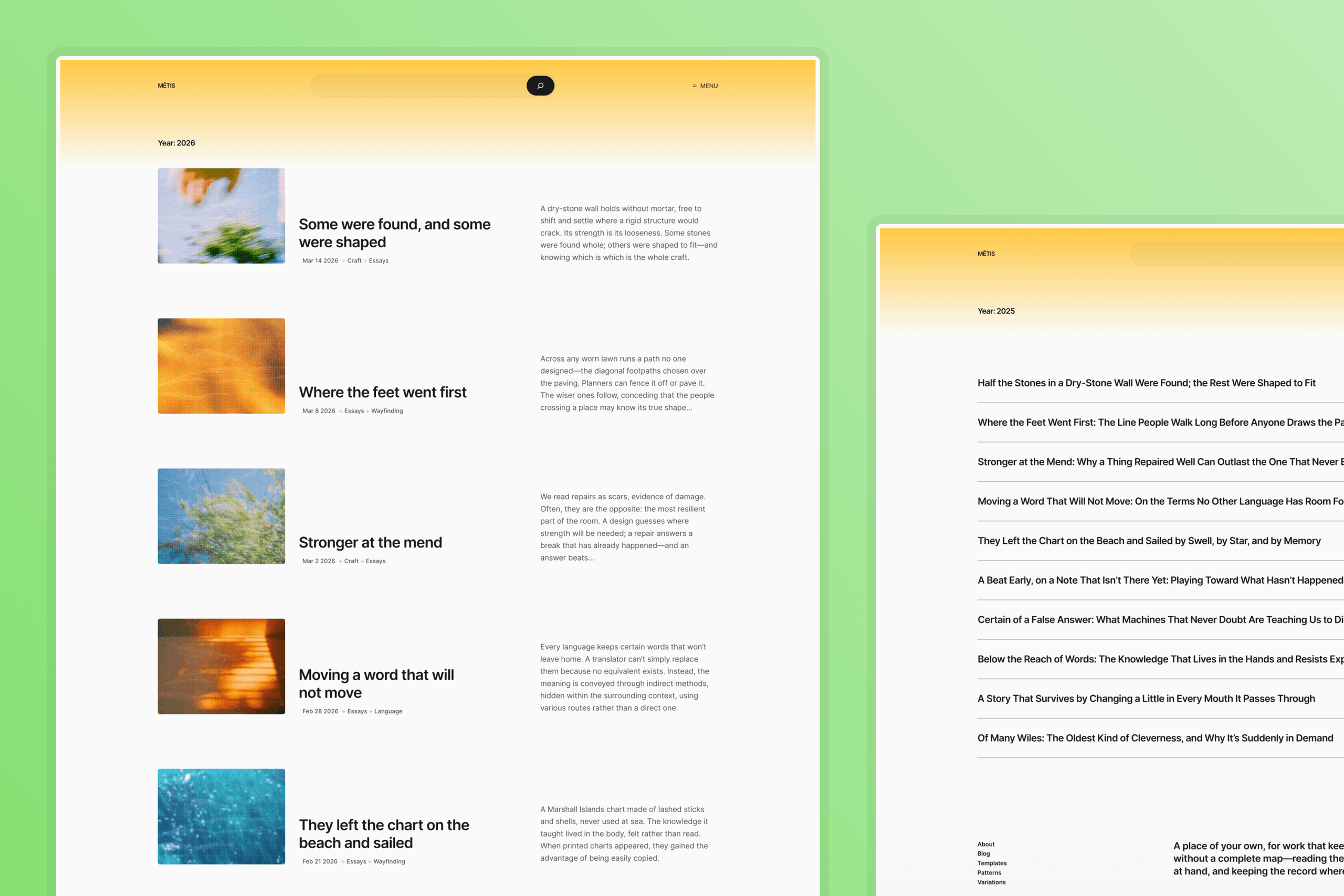
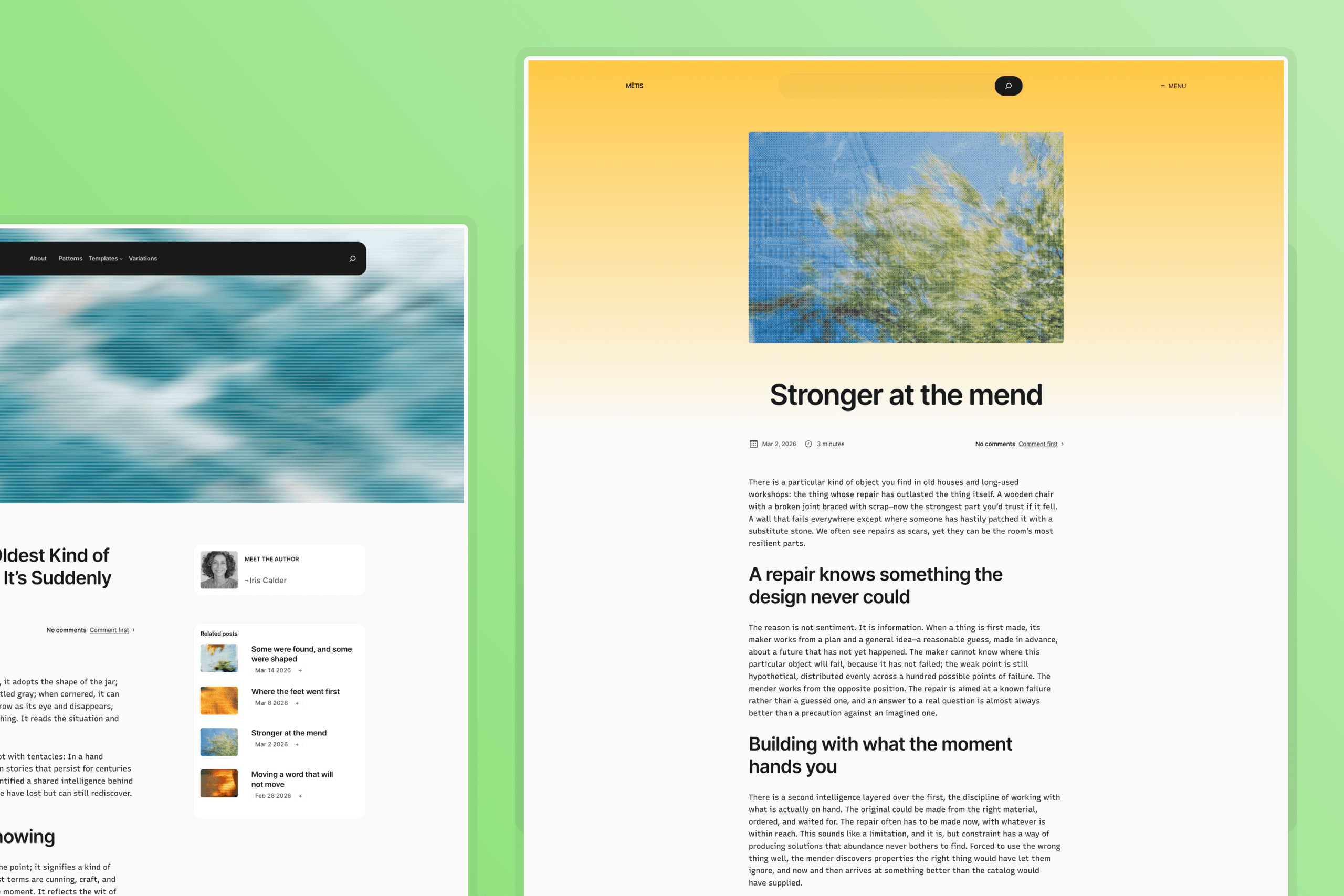
What’s Inside
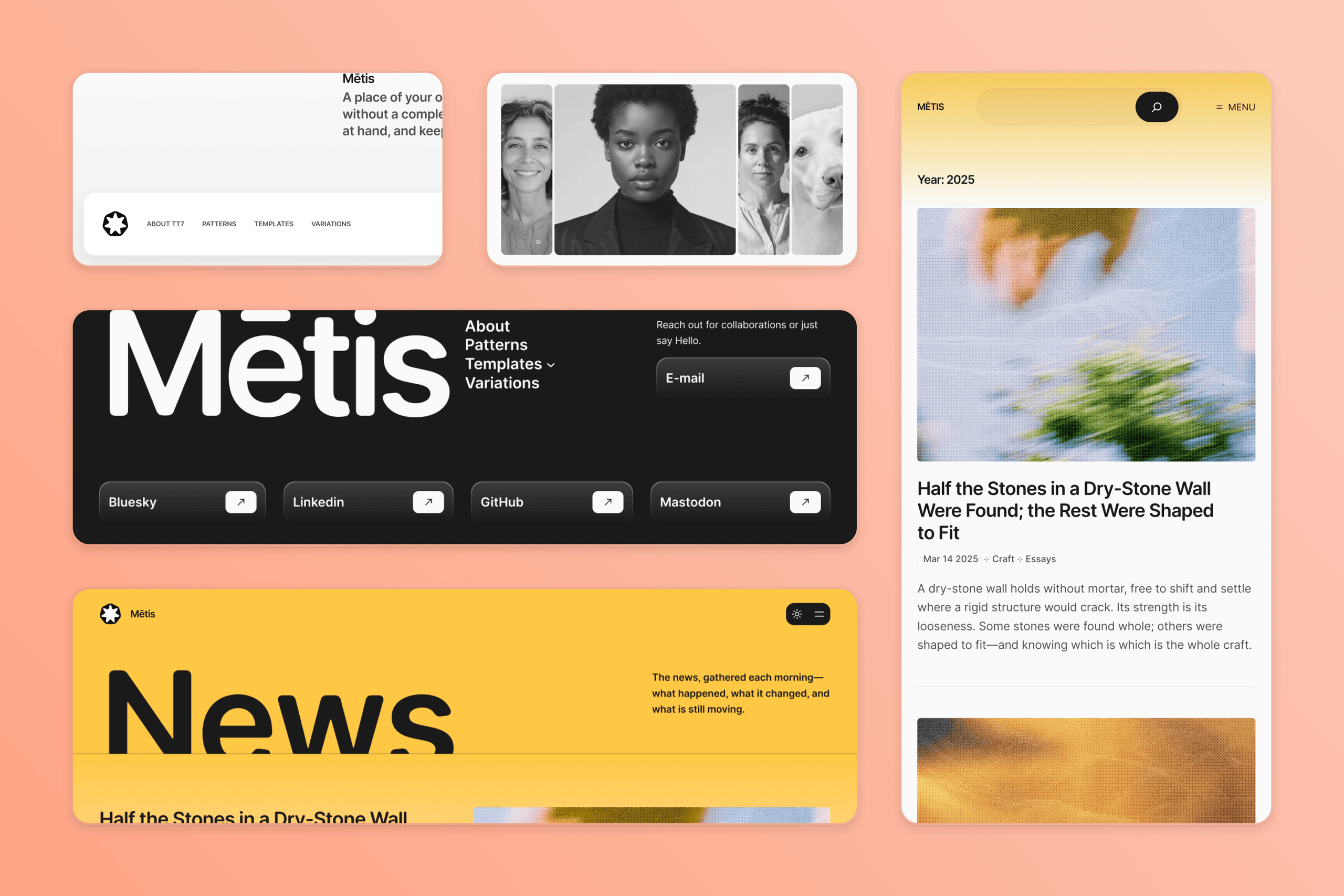
Templates
Six starter sites, each one a page template and a page pattern you can drop into a new page:
- Business: the studio page, with services, the team, a testimonial, and pricing.
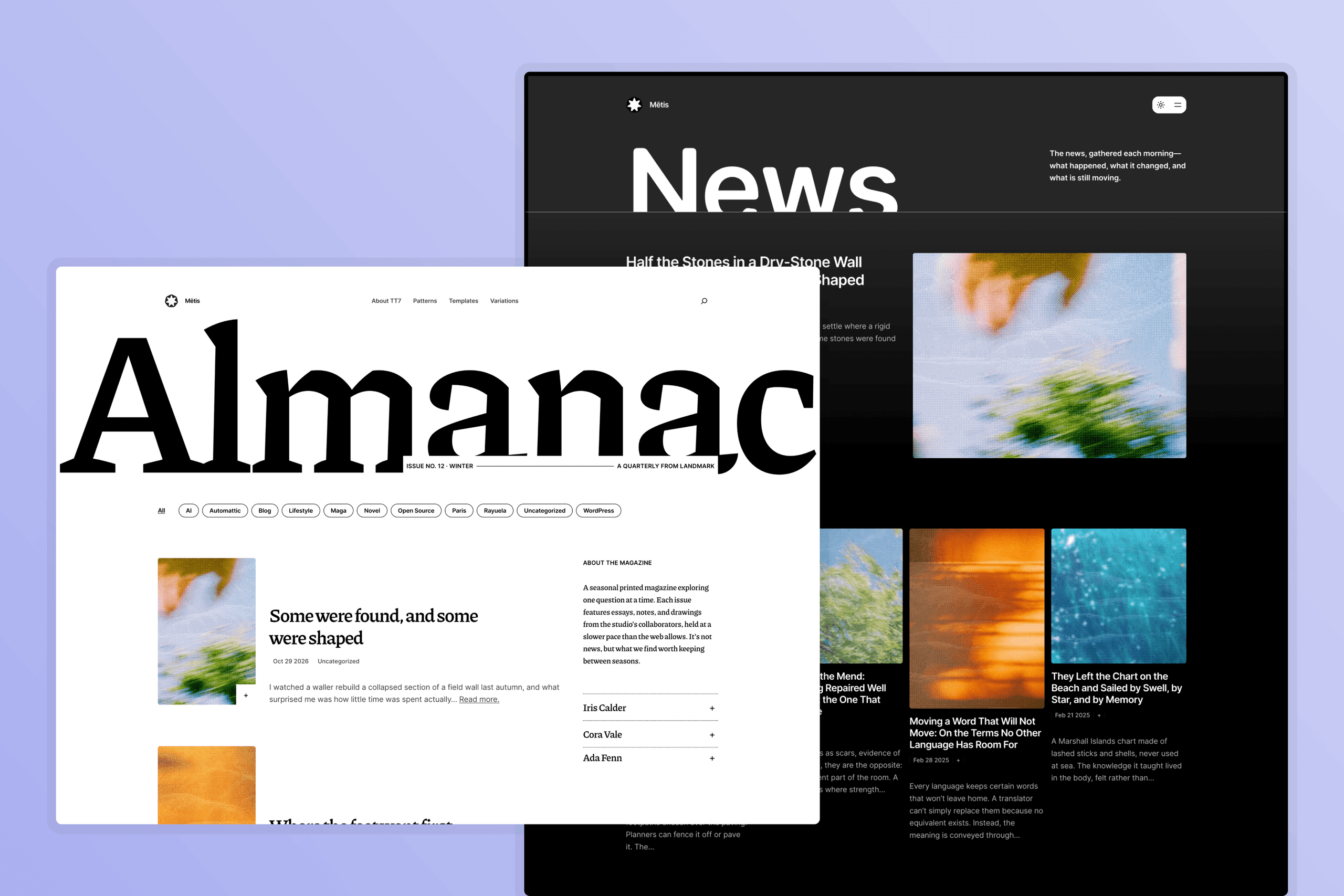
- News: the paper front page, with a featured story, the latest news, and the archive.
- Magazine: the magazine’s current issue, a filterFilter Filters are one of the two types of Hooks https://codex.wordpress.org/Plugin_API/Hooks. They provide a way for functions to modify data of other functions. They are the counterpart to Actions. Unlike Actions, filters are meant to work in an isolated manner, and should never have side effects such as affecting global variables and output. by categoryCategory The ‘category’ taxonomy lets you group posts / content together that share a common bond. Categories are pre-defined and broad ranging., and the people who make it.
- Portfolio: The designer’s profile, selected work, awards, experience, and a playlist.
- Writer: The writer’s home, with a portrait, her new book and its reviews, then writings, books, and talks.
- Personal: The developer’s portrait, selected builds and her latest posts.
Around them sit the everyday templates. Single posts come in three layouts. Pages can show their title or hide it. Three headers and five footers put diversity into practice as templates change with a single swap.
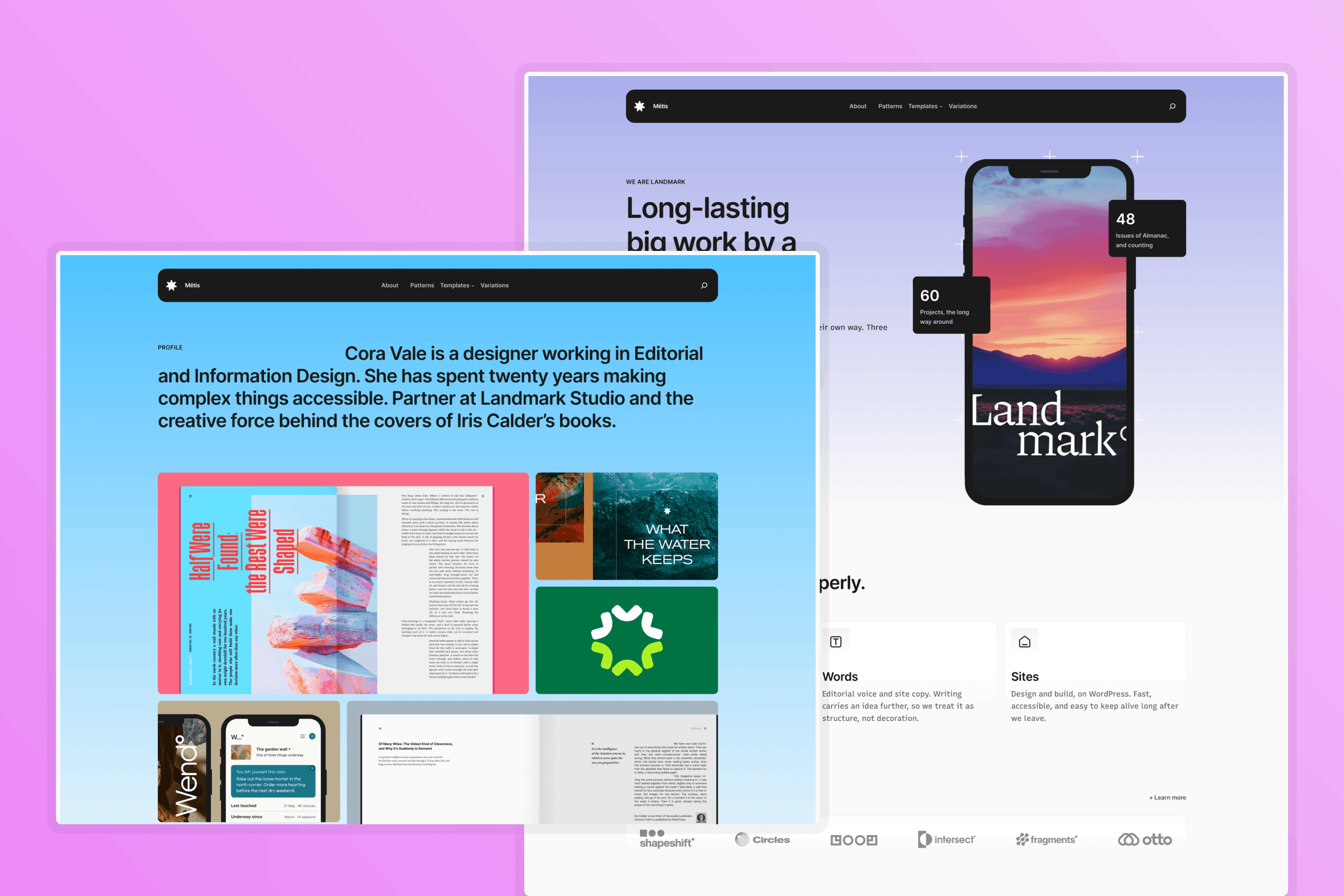
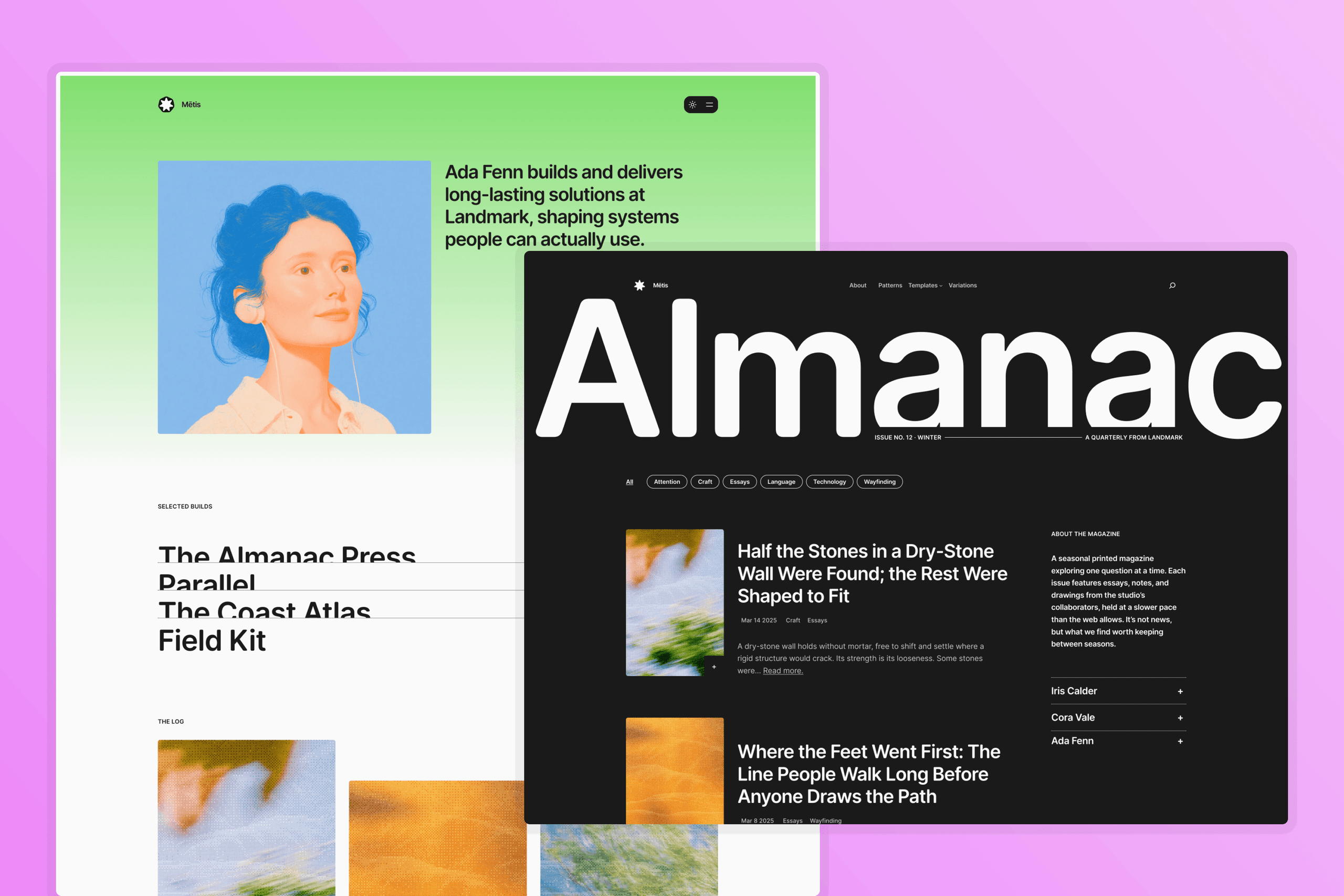
Patterns
Mētis ships with fifty section patterns, grouped by category and named after their description to welcome users and AI agents. And with a few blockBlock Block is the abstract term used to describe units of markup that, composed together, form the content or layout of a webpage using the WordPress editor. The idea combines concepts of what in the past may have achieved with shortcodes, custom HTML, and embed discovery into a single consistent API and user experience. styles to carry on the theme’s character.
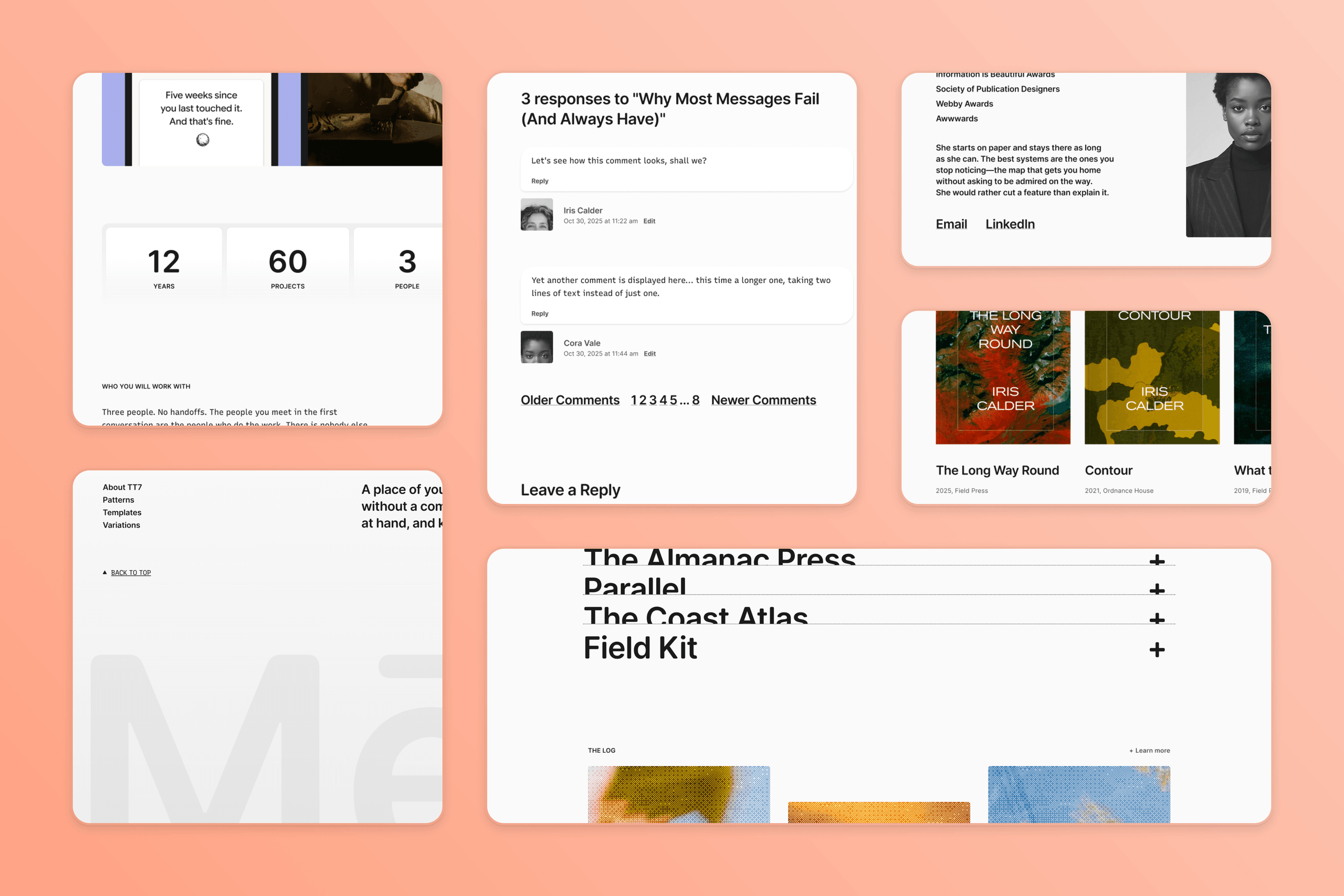
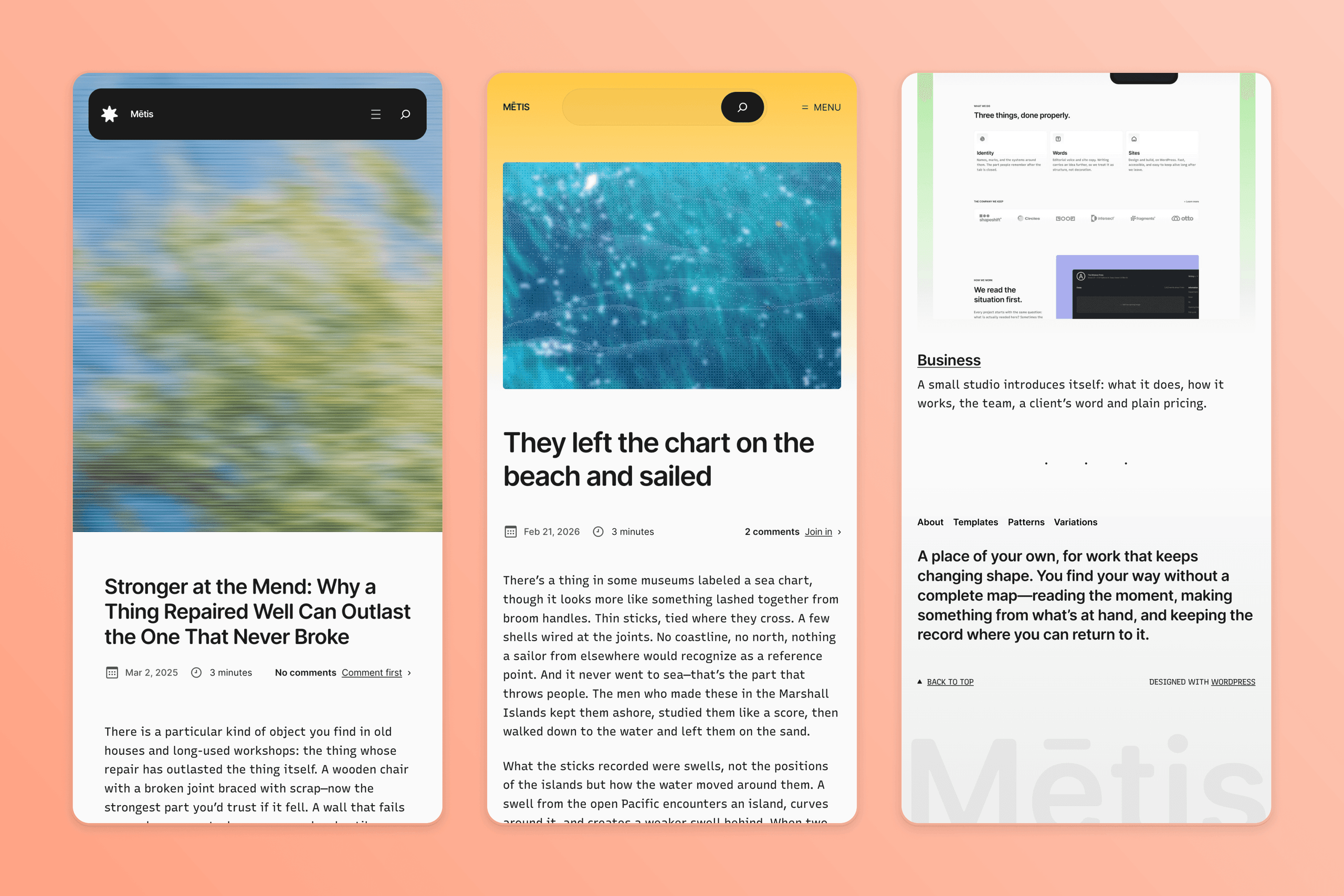
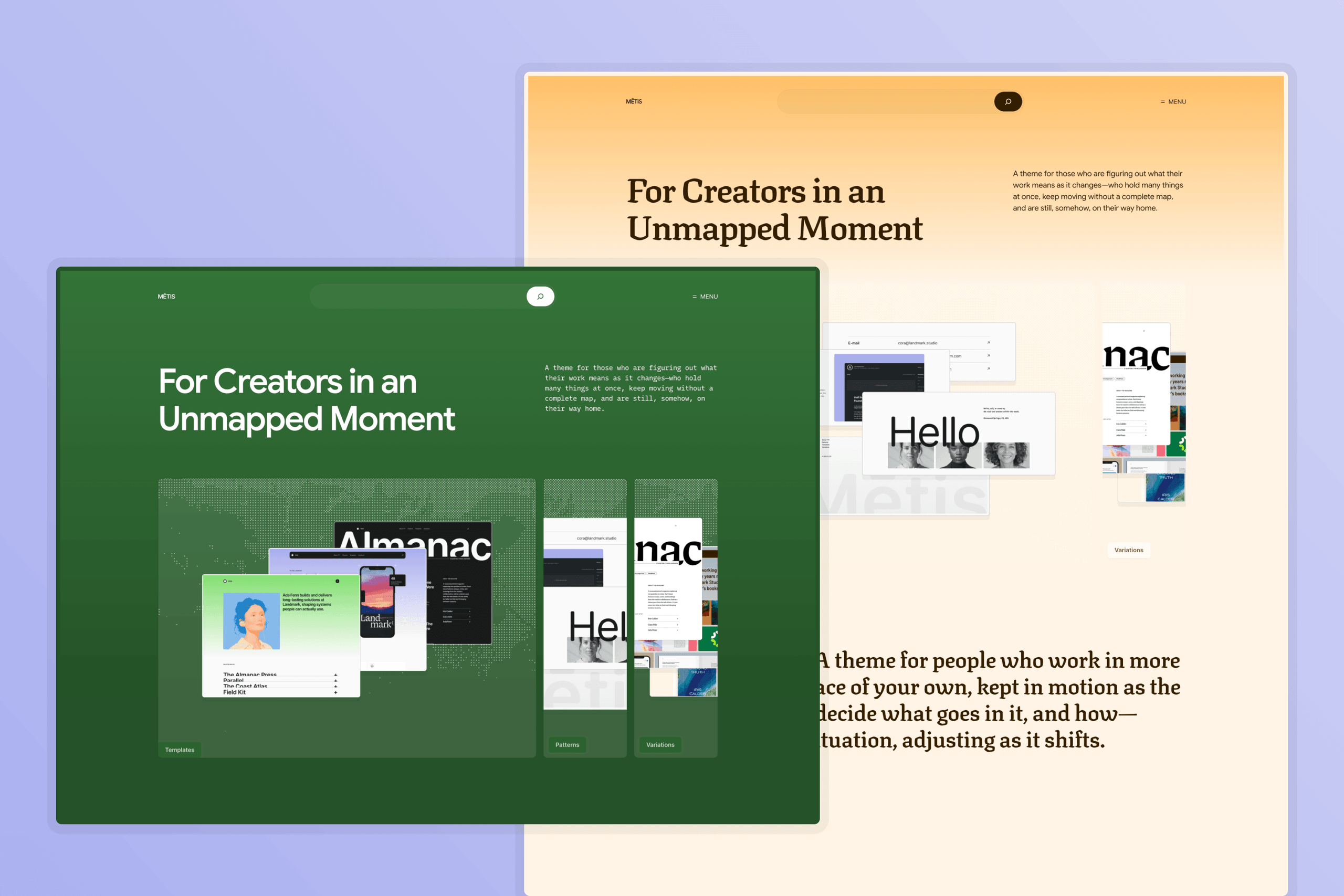
Style variations
Six style variations change the type and color of the whole site at once. One is a dark version of the default, and visitors can switch to its colors through some headers and the navigation overlay. Each palette also pairs a day and a night duo to rule the sections with gradients, changing automatically when the visitor’s device switches to dark mode.
Behind all of them, nine open-source type families are bundled with the theme: old-style and blackletter-inspired serifs, geometric and grotesque sans serifs, and a monospace.

Development
As part of the 7.2 release, Carolina Nymark (@poena), Maggie Cabrera (@onemaggie), and Juanfra Aldasoro (@juanfra) are leading development, while Henrique Iamarino (@iamarinoh) is leading design and theme building. The current build reflects the design work; the formal development review comes next, folding in what we hear from you along the way—we look forward to your involvement throughout the process.
Learn more
For information about previous default themes, read the following posts:
- Ipsum
- Twenty Twenty-Five
- Twenty Twenty-Four
- Twenty Twenty-Three
- Twenty Twenty-Two
- Twenty Twenty-One
- Twenty Twenty
Here are a few resources if you’re interested in learning more about Block Themes and the Site Editor:
- Block Theme documentation
- Global Styles & theme.json documentation
- A Developers Guide to Block Themes
- Develop Your First Low-Code Block Theme
+make.wordpress.org/themes/#7-2, #bundled-theme, #core-themes, #ipsum, #metis
 zhdan
Polyglots ·
[uk] Quality Assurance Audit of…
[uk] Quality Assurance Audit of WordPress CoreCore Core is the set of software required to run WordPress. The Core Development Team builds WordPress. Translation (6.8–7.0.x): Systemic Review Issues & Cleanup Request
Hello Polyglots TeamPolyglots Team Polyglots Team is a group of multilingual translators who work on translating plugins, themes, documentation, and front-facing marketing copy. https://make.wordpress.org/polyglots/teams/ and LocaleLocale Locale = language version, often a combination of a language code and a region code, for instance es_MX denotes Spanish as it’s used in Mexico. A list of all locales supported by WordPress in https://make.wordpress.org/polyglots/teams/ Mentors,
I am writing to raise a serious concern regarding the current quality assurance (QA) and approval workflow for the Ukrainian (#uk) localizationLocalization Localization (sometimes shortened to “l10n“) is the process of adapting a product or service to a particular language, culture, and desired local “look-and-feel.” of WordPress Core.
A recent spot-check of approved stringsString A string is a translatable part of the software. A translation consists of a multitude of localized strings. in the 7.0.x Core branch revealed systemic quality issues that directly affect user experience, technical accuracy, and interface consistency. Please note that the 20 examples documented below represent only a fraction of the issues found during a brief sample audit — they are the tip of the iceberg, indicating a broader lack of editorial review before strings are approved.
Furthermore, this is not an isolated issue specific to the 7.0.x development cycle. Because GlotPressGlotPress GlotPress is the translation management software that powers Translate.WordPress.org. More information is available at glotpress.org. propagates approved strings forward between major releases, these exact mistranslations, broken date formats, and glossary violations have been carried over across multiple stable release cycles (6.8, 6.9, and now 7.0.x) without ever being caught or corrected by the current review process.
Below is a categorized breakdown of confirmed, approved strings in wp/7.0.x/uk/default with direct links, exact explanations of the errors, and standard corrections.
1. Critical Technical Bugs & Broken Formatting
- Broken PHPPHP PHP (recursive acronym for PHP: Hypertext Preprocessor) is a widely-used open source general-purpose scripting language that is especially suited for web development and can be embedded into HTML. https://www.php.net/manual/en/index.php
date()format specifier (Dinstead ofd)- Link: Original #32876271
- Original (
Note date full date format):F j, Y g:i a - Approved:
D.m.Y H:i - Issue: In PHP
date()/wp_date(), uppercaseDoutputs an abbreviated weekday name (e.g., Чт), whereas lowercasedoutputs the day of the month. As approved, the UIUI UI is an acronym for User Interface – the layout of the page the user interacts with. Think ‘how are they doing that’ and less about what they are doing. outputs broken strings likeЧт.11.2026 14:35, completely omitting the day of the month and ignoring thefull date formatcontext. - Correction:
j F Y H:i(for full date format) ord.m.Y H:i(for numeric format).
2. Severe Mistranslations & Blind Machine Translation (Misleading UI)
- Core entity substitution:
file typetranslated as “Post Type”- Link: Original #32876386
- Original:
%s: Sorry, you are not allowed to upload this file type. - Approved:
%s: На жаль, вам не дозволено завантажувати цей тип записів. - Issue:
file typeis mistranslated as «тип записів» (Post Type), which is a completely different WordPress entity. Users attempting to upload a restricted file format receive a nonsensical error about “post types.” - Correction:
%s: На жаль, вам не дозволено завантажувати файли цього типу.
- Mistranslated error message:
set as thumbnailconfused with “size” + glossary violation- Link: Original #32876465
- Original:
Could not set that as the thumbnail image. Try a different attachment. - Approved:
Не вдається задати розмір мініатюри. Спробуйте інше долучення. - Issue:
set that as the thumbnail imagewas misread as “set thumbnail size” («задати розмір мініатюри»), misinforming the user about the cause of the error. Additionally,attachmentviolates the official#ukglossary, which defines it as вкладення rather than «долучення». - Correction:
Не вдалося встановити це зображення як мініатюру. Спробуйте інше вкладення.
- Double entity mistranslation in BlockBlock Block is the abstract term used to describe units of markup that, composed together, form the content or layout of a webpage using the WordPress editor. The idea combines concepts of what in the past may have achieved with shortcodes, custom HTML, and embed discovery into a single consistent API and user experience. Editor UI (
block“locking”,document“documentation”)- Link: Original #32876337
- Original:
Access all block and document tools in a single place. - Approved:
Доступ до всіх інструментів блокування та документації в одному місці. - Issue: Unedited machine translation turned
block(GutenbergGutenberg The Gutenberg project is the new Editor Interface for WordPress. The editor improves the process and experience of creating new content, making writing rich content much simpler. It uses ‘blocks’ to add richness rather than shortcodes, custom HTML etc. https://wordpress.org/gutenberg/ content block) into «блокування» (blocking/locking) anddocument(the current post/page being edited) into «документації» (technical documentation). - Correction:
Доступ до всіх інструментів блока і документа в одному місці.
- Nonsensical translation of
visual emphasisas “surveillance/supervision”- Link: Original #32876683
- Original (
block description):Give special visual emphasis to a quote from your text. - Approved:
Надайте особливий нагляд на цитату з тексту. - Issue:
visual emphasisis mistranslated as «нагляд» (supervision/surveillance), paired with an ungrammatical Ukrainian preposition structure («надайте … на»). - Correction:
Візуально виділіть цитату з вашого тексту.
- Technical term
tabs(tab characters) mistranslated as “browser tabs”- Link: Original #32876681
- Original (
block description):Add text that respects your spacing and tabs, and also allows styling. - Approved:
Додайте текст, який відповідає вашим інтервалам і вкладкам, а також дозволяє стилізувати. - Issue: In the context of the Preformatted block (
tabsrefers to tab characters/indentation, not UI «вкладкам» (browser tabs). Furthermore,respects spacingis mistranslated as «відповідає вашим інтервалам» instead of preserving whitespace. - Correction:
Додайте текст, який зберігає ваші пробіли та символи табуляції, а також дозволяє налаштувати оформлення.
- Broken syntax and unedited machine output in Verse block description
- Link: Original #32876766
- Original (
block description):Insert poetry. Use special spacing formats. Or quote song lyrics. - Approved:
Вставити вірші. Використовуйте спеціальні формати інтервалу. Або цитата лірика пісні. - Issue: Mixes infinitive («Вставити») with imperative mood («Використовуйте») and ends with a completely broken, non-Ukrainian fragment («Або цитата лірика пісні» — literally “Or quote lyricist of a song”).
- Correction:
Вставте поезію. Використовуйте спеціальні формати інтервалів. Або процитуйте тексти пісень.
- Color name hallucinations & mistranslations (
Pale cyan blue,Light green cyan)- Link 1: Original #32876806
- Original (
Color name):Pale cyan blue - Approved:
Блідий зеленувато-блакитний(hallucinated “greenish” where none exists incyan blue). - Correction:
Блідий блакитно-синійorБлідо-блакитний.
- Original (
- Link 2: Original #32876804
- Original (
Color name):Light green cyan - Approved:
Легкий зелено-блакитний(translatesLightas “lightweight/easy” — «Легкий» — instead of “light/pale” — «Світлий»). - Correction:
Світлий зелено-блакитний.
- Original (
- Link 1: Original #32876806
- Literal calques distorting UI concepts (
break“recess/intermission”,separator“separator device”)- Link: Original #32876719
- Original (
block description):Create a break between ideas or sections with a horizontal separator. - Approved:
Створіть перерву між ідеями або розділами з горизонтальним сепаратором. - Issue:
breakis translated as «перерву» (a coffee/work break) instead of a visual break/divider («розрив» or «проміжок»), andseparatoris calqued as «сепаратором» (an industrial centrifuge/device) instead of the standard UI term «розділювач». - Correction:
Створіть розрив між думками або розділами за допомогою горизонтального розділювача.
- Inappropriate semantic choice for
override(“neglect/disregard”)- Link: Original #32876267
- Original:
Changes will apply to new posts only. Individual posts may override these settings. - Approved:
Зміни будуть застосовуватися лише до нових записів. Окремі записи можуть нехтувати цими налаштуваннями. - Issue:
overrideis translated as «нехтувати» (to neglect/disregard), which carries a negative colloquial meaning and breaks lexical compatibility with an inanimate subject (“posts”). Also uses a non-standard passive form instead of the Ukrainian impersonal predicate («Зміни буде застосовано…»). - Correction:
Зміни буде застосовано лише до нових записів. Окремі записи можуть перевизначати ці налаштування.
3. Direct Violations of the Official Ukrainian Glossary
Even terms explicitly defined in the #uk Locale Glossary are consistently ignored in approved Core strings:
- Double glossary violation in a single stringString A string is a translatable part of the software. A translation consists of a multitude of localized strings. (
Displayandfeed)- Link: Original #32876712
- Original (
block description):Display entries from any RSS or Atom feed. - Approved:
Показати елементи з будь-якої RSS- або Atom-стрічки. - Issue: Glossary defines
Displayas відображати (contextually Відображає, not «Показати») andfeedas канал (not «стрічки»). - Correction:
Відображає записи з будь-якого каналу RSS або Atom.
- Glossary violation (
Display) + Ukrainian euphony rule violation (вinstead ofу)- Link: Original #32876697
- Original (
block description):Display the total number of results in a query. - Approved:
Показати загальну кількість результатів в запиті. - Issue: Uses «Показати» instead of the glossary term відображати (Відображає), and violates mandatory Ukrainian phonetic alternation rules («результатів в запиті» instead of «результатів у запиті» between consonants).
- Correction:
Відображає загальну кількість результатів у запиті.
- Glossary violation (
media libraryreplaced with «Медіафайлів»)- Link: Original #32876774
- Original (
block description):Embed a video from your media library or upload a new one. - Approved:
Вставте відео з Медіафайлів або завантажте нове. - Issue: Ignores the official
#ukglossary entry formedia library(бібліотека медіа — note that the compound noun медіабібліотека is more natural in modern Ukrainian, yet the approved string violates even the official glossary by using «Медіафайлів» with inconsistent capitalization). - Correction:
Вставте відео з бібліотеки медіа або завантажте нове.
- Glossary violation (
custom«спеціальні» instead of «власні»)- Link: Original #32876726
- Original (
block description):Insert additional custom elements with a WordPress shortcode. - Approved:
Вставте додаткові спеціальні елементи за допомогою короткого коду WordPress. - Issue: Official glossary defines
customas власний (note: in modern technical Ukrainian, довільні would actually be more accurate in this context, showing that the glossary itself is outdated — yet the approved string violates even the official glossary by using «спеціальні» / special). - Correction:
Вставте додаткові власні елементи за допомогою короткого коду WordPress.
- Glossary violation (
deprecated«застарів» instead of «застарілий» &Columns«стовпці»)- Link: Original #32876763
- Original (
block title):Text Columns (deprecated) - Approved:
Текстові стовпці (застарів) - Issue: Official glossary defines
deprecatedas застарілий (not the finite verb «застарів») andcolumnas колонка (not «стовпці»). - Correction:
Текстові колонки (застарілий)
- Glossary violation (
Columns«стовпців» instead of «колонка», plus missing quotes/capitalization)- Link: Original #32876764
- Original (
block description):This block is deprecated. Please use the Columns block instead. - Approved:
Цей блок застарілий. Замість цього скористайтеся блоком стовпців. - Issue: Official glossary defines
columnas колонка. Furthermore, in Ukrainian UI typography, any inline reference to block names, sections, or menu items (when not standing alone as a heading or button) must be enclosed in guillemets with the first word capitalized (блок «Колонки»). - Correction:
Цей блок застарілий. Натомість використовуйте блок «Колонки».
4. Severe Inconsistency, Broken Syntax & Structural Calques
- Unjustified punctuation alteration (
(4:3)instead of— 4:3) + grammatical gender mismatch- Link 1: Original #32876810
- Original (
Aspect ratio name):Standard - 4:3Approved:Стандартний (4:3) - Correction:
Стандартне — 4:3
- Original (
- Link 2: Original #32876809
- Original (
Aspect ratio name):Square - 1:1Approved:Квадрат (1:1) - Correction:
Квадратне — 1:1
- Original (
- Issue: First, the
#ukglossary lacks an entry foraspect ratio(співвідношення сторін). Grammatical gender here depends on the implied head noun: masculine if tied to «формат» (format), or neuter if tied to «співвідношення сторін» (aspect ratio). Since «формат» is already reserved in WordPress for another entity (Post Format— формат запису), adjectives must agree with neuter «співвідношення сторін» (Стандартне,Квадратне). Instead, the approved strings replace the separator with parentheses (a structural calque from third-party localesLocale Locale = language version, often a combination of a language code and a region code, for instance es_MX denotes Spanish as it’s used in Mexico. A list of all locales supported by WordPress in https://make.wordpress.org/polyglots/teams/) and mix a masculine adjective («Стандартний») with a noun («Квадрат»). Furthermore, per Ukrainian orthography and typography rules, a spaced em-dash (—) must be used here—and generally across the UI for semantic pauses, value clarifications, and ranges—rather than an ASCII hyphen (-), which is strictly an intra-word sign.
- Link 1: Original #32876810
- Contradictory translations of
namein two adjacent strings of the same UI form- Link 1: Original #32876413
- Original:
This category already exists. Please use a different name.Approved:Ця категорія вже існує. Будь ласка, скористайтеся іншим ім'ям. - Correction:
Ця категорія вже існує. Введіть іншу назву.
- Original:
- Link 2: Original #32876412
- Original:
Please enter a new name for this category.Approved:Будь ласка, введіть нову назву для цієї категорії. - Correction:
Введіть нову назву для цієї категорії.
- Original:
- Issue: In two consecutive strings for the exact same field (
category name),nameis translated as «ім’ям» (personal name, incorrect for categories) in the first string and «назву» (correct term) in the second.
- Link 1: Original #32876413
- Broken verb agreement & colloquial register in session expiration notice
- Link: Original #32876474
- Original:
Your session has expired. You can log in again from this page or go to the login page. - Approved:
Ваша сесія скінчилася. Ви можете повторно увійти в систему з цієї сторінки або перейдіть на сторінку входу. - Issue: Broken grammatical coordination: «Ви можете увійти… або перейдіть» mixes an infinitive with an imperative mood after
or(should be або перейти). Also uses colloquial «скінчилася» instead of standard technical phrasing. - Correction:
Термін дії вашої сесії закінчився. Ви можете увійти знову з цієї сторінки або перейти на сторінку входу.
- Altered punctuation (breaking screen reader pauses), unidiomatic calques & semantic distortion
- Link: Original #32876468
- Original:
Number of media items displayed: %d. Scroll the page for more results. - Approved:
Число відображуваних медіаелементів: %d, прокрутіть сторінку для інших результатів. - Issue: Replaces the period after
%dwith a comma (degrading screen reader accessibilityAccessibility Accessibility (commonly shortened to a11y) refers to the design of products, devices, services, or environments for people with disabilities. The concept of accessible design ensures both “direct access” (i.e. unassisted) and “indirect access” meaning compatibility with a person’s assistive technology (for example, computer screen readers). (https://en.wikipedia.org/wiki/Accessibility)), uses the unidiomatic calque «Число відображуваних…» instead of natural Ukrainian «Кількість відображених…», and mistranslatesmore results(додаткових/наступних результатів) as «інших результатів» (different/other results). - Correction:
Кількість відображених медіафайлів: %d. Прокрутіть сторінку, щоб переглянути більше результатів.
Summary & Request
The 20 examples above demonstrate that strings containing broken PHP date specifiers, unedited machine-translation hallucinations, broken Ukrainian grammar, and direct violations of the #uk glossary are regularly passing review into WordPress Core and propagating from version to version (6.8 6.9 7.0.x).
Because these strings were uncovered during a limited spot-check rather than an exhaustive audit, simply fixing these specific entries will not resolve the underlying issue. I ask the Polyglots Mentors and the #uk GTEGeneral Translation Editor A General Translation Editor (often referred to as GTE) is a person, who has global access to validate strings on all projects for a specific locale. team to:
- Review the current QA and approval standards for WordPress Core to prevent unedited machine translations and broken formatting from being approved.
- Enforce adherence to the official
#ukGlossary and standard Ukrainian technical orthography across active and propagated branches. - Initiate a systematic audit and cleanup of the
7.0.xCore branch to identify and correct the remaining unreviewed or broken translations before release.
Thank you for your time and attention to maintaining the quality of WordPress in Ukrainian.

Hi @zhdan
Thank you for this feedback.
All UI translations of WordPress are made by volunteers, with more or less time available.
Our Ukrainian team is very small, and they’re still working on reaching enough strings translated to have the current release of WordPress, 7.1, packaged in a translated version.
In general, we mostly concentrate on getting the current version of WordPress core in order. It’s still possible to fix errors in older versions, but that has much lower priority.
The best way to communicate effectively with the Ukrainian translation team is via chat on the global Slack instance for WordPress contributors.
So I’d suggest that you
1. Join Slack via https://make.wordpress.org/chat/
2. Then come to polyglots-uk where you can cooperate around bringing the Ukrainian translation to a release. And after that improving it further 🙂
FYI #uk

Hi @tobifjellner, thank you for the quick response.
I brought this audit directly to the Polyglots blog because I have already reached out to the local GTE regarding these quality issues, and my feedback was simply ignored without constructive engagement — even though raw, unedited machine translations (like the examples listed above) are routinely being approved in Core.
Because GlotPress propagates identical strings forward across branches, these exact broken translations (including the broken D.m.Y PHP date format and glossary violations) are already present in the current 7.1.x / dev branch that is being prepared for packaging.
I completely understand that the local team is small — that is precisely why I am offering practical help rather than just reporting issues. However, re-typing hundreds of systemic fixes one by one through the web form without clear review timelines is not a viable workflow when strings in #uk already sit unreviewed in the Waiting queue.
I am ready to help both finish the untranslated strings for 7.1 and clean up the broken approved strings. Using standard GlotPress .po batch imports (e.g., 100–200 vetted strings per batch) — or expanding the active #uk review team if current GTEs lack the bandwidth — would let us ensure the 7.1 Ukrainian release meets proper quality standards.

Hello! Thank you for taking the time to provide these specific examples. Some of them (particularly regarding terminology discrepancies, isolated cases of grammatical agreement, or date formatting) are indeed valid. This is natural for a massive body of text that has accumulated over the years in an open-source project and requires periodic review.
However, we emphasize that the solution to this issue does not lie in bulk-overwriting branches with raw machine translations generated via third-party prompts, but rather in targeted, systematic error correction that respects context.
Since you have both the time and the enthusiasm to improve the quality of WordPress in Ukrainian, we invite you to join the official localization team. Volunteers who are ready to dive deep into technical details, catch such bugs, and submit carefully verified fixes via the official `translate.wordpress.org` platform are always needed.
Please choose specific projects, submit your suggestions through the standard review interface, go through the moderation process, and work alongside the editors to bring the translation quality to perfection in practice.
If you have specific fixes to offer, welcome aboard through the official channels.
Hi @kovalets, thank you for acknowledging the validity of the examples in the audit.
First, let’s set the record straight: I never proposed overwriting branches with “raw machine translations.” On the contrary, my audit specifically highlights raw, unedited machine translations that are already approved in Core today (such as translating “lyricist quote” as “цитата лірика пісні” or breaking PHP date formatting with D.m.Y), which automatically propagate into 7.1.x / dev.
Second, importing vetted .po files containing only targeted, manually verified changes (in small batches of 100–200 strings) is a standard, built-in feature of translate.wordpress.org. It does not blindly overwrite an entire branch; it only updates the specific corrected strings, allowing editors to review and approve clean batches efficiently rather than spending months manually re-typing hundreds of fixes one by one in the web form.
I am ready to help both finish the untranslated strings for 7.1 and clean up these systemic errors in Core. Are you open to reviewing vetted .po patches in batches so we can ensure high translation quality for the 7.1 Ukrainian release?
Update for @tobifjellner and the Polyglots mentors:
While reviewing the status of my recent suggestions in GlotPress for 7.0.x, I found a clear pattern of attribution stripping. Instead of simply clicking Approve on valid fixes — which preserves the contributor’s credit in GlotPress — @kovalets is marking character-for-character identical suggestions as Rejected and re-entering the exact same string under his own account (Translated by: KOVALETS):
- Original ID 32876804 — exact same translation rejected and re-submitted by GTE
- Original ID 32876719 — exact same translation rejected and re-submitted by GTE
- Original ID 32876698 — exact same translation rejected and re-submitted by GTE
- Original ID 32876697 — exact same translation rejected and re-submitted by GTE
There is no technical reason in GlotPress to reject a 100% identical string just to re-type it under a GTE’s own name. Doing so strips contributor attribution and actively discourages people from helping improve the #uk locale. This is why #uk needs transparent review practices and additional active GTEs who support collaborative workflows.
@zhdan
Let’s clarify a few things. I can assure you that @sergeykovalets (Note: when you mention someone, you should use their profile slug) isn’t trying to steal any props. He simply doesn’t need that. The same thing would happen to me if I’d extract some good strings from 7.0 and upload them to 7.1. It’s just the quickest way to do it. The GlotPress interface is a bit clunky with regards to translation history (if you know that there was a good translation before, then you need to click through several page-loads to sustain a translation credit – when you’ve got hundreds of strings to fix, this becomes quite annoying).
I’m a bit surprised that you continue involving me and the global mentors’ team, where direct cooperation on Slack (please join if you can) would be more fruitful. And if you would had joined Slack, Sergey would probably have asked you to upload those strings (and get credited).
So: I’m grateful for your contribution, and so is Sergey. But let’s concentrate more on our shared goal of getting a good translation than fighting over a few credits. Soon enough, you’ll find cases where you’ll want to slightly improve on his translations, and you’ll get credited for the whole string, even if you just changed one word.
Thank you for the clarification, @tobifjellner, and for noting the correct profile slug for @sergeykovalets.
Fair point — my goal is indeed a clean, consistent Ukrainian translation rather than counting credits, and I appreciate the context on how bulk updates between branches work in GlotPress.
I’ll join the Ukrainian Slack channel to coordinate directly with Sergey on the remaining fixes and workflow. Thanks again for your time and guidance.
 Harmony Romo
Community ·
Request sponsor vetting right from your event dashboard
After some great work by @obenland, @clk87, @coreyhall93, and @velda, organizers can now request sponsor vetting from inside the sponsor record, without leaving the dashboard.
This is useful whether there’s a need to request sponsor vetting before creating invoices (most flagships), or if an event will be handling funds locally and not creating invoices in the event dashboard. Organizers should no longer send emails or spreadsheets to WordPress Community SupportWordPress Community Support WordPress Community Support PBC is a Public Benefit Corporation, created specifically to be the financial and legal support for WordCamps, WordPress Meetup groups, and any additional “official” events organized within the WordPress Community Events program. for sponsor vetting.
How it works (Here’s a short demo video, so you can see it in action)
- In your event dashboard, go to Sponsors and create a new sponsor (or open an existing one).
- Fill in the sponsor’s contact information: company name, website (this one is especially important), first and last name, email address, phone number, and address. A title also needs to be added in order to save a sponsor record. If
Save Draftis greyed out, that means you’ve missed a required input. - Click Save draft.
- In the right-hand sidebarSidebar A sidebar in WordPress is referred to a widget-ready area used by WordPress themes to display information that is not a part of the main content. It is not always a vertical column on the side. It can be a horizontal rectangle below or above the content area, footer, header, or any where in the theme., scroll down past Sponsor Agreement. You’ll find a new Sponsor Vetting panel.
- Once all the required fields are filled in and the record is saved, the Request vetting button appears. Click it, and the sponsor’s details go straight to the team that will be completing the vetting.
Tracking the status
Come back to the main sponsor dashboard (there’s now a new column with vetting statuses), or the individual sponsor record any time to check progress. The Sponsor Vetting panel shows where things stand, from Not Requested, to Waiting on Sponsor (indicating compliance has been requested), and finally Approved.
Once the panel says Approved, you can create the invoice and send it for approval or send it directly to the sponsor if running funds locally.
Approved Status Note: If a sponsor has been recently vetted, and the sponsor is compliant, Approved will appear in the Sponsor Vetting panel. This means, there’s no need to wait to create an invoice!
Questions? Drop them in the comments below!
 Courtney Robertson
Hosting ·
Call to test: WordPress 7.2's Secrets API, upgrades and /random/ on your hosting platform by November 17
HostingHosting A web hosting service is a type of Internet hosting service that allows individuals and organizations to make their website accessible via the World Wide Web. team: this is a call to test three WordPress 7.2 changes on your platform before RC1 on November 17, and to post what you find in the comments. RC1 is the string freeze; after it, a change needs coreCore Core is the set of software required to run WordPress. The Core Team builds WordPress. committers to sign off on it. WordPress 7.2 ships on December 8, 2026. Three changes behave differently on a hosting platform than on a single test site: the new Secrets APIAPI An Application Programming Interface (API) is a computing interface that defines interactions between multiple software intermediaries. It defines the kinds of calls or requests that can be made, how to make them, the data formats that should be used, the conventions to follow, etc. is disabled by default on any site without a WP_SECRETS_KEY, the new /random/ route needs a rewrite flush after an upgrade, and the two upgrade paths leave different files behind. Results below come from testing 7.2-beta4 and beta5 on one managed platform and local test fleets – run the tests on your own stack, on staging or test sites, and never on production. Catching problems now keeps them from reaching your customers as support tickets after release.
Update, November 13: comments on the Secrets API dev note include a request to remove the API from 7.2 and a reply from its author, who asks for a provider built against its contract for a real platform before RCRelease Candidate A beta version of software with the potential to be a final product, which is ready to release unless significant bugs emerge.. Test the API as BetaBeta Beta is the software development phase following alpha. A Beta phase generally begins when the software is feature complete but likely to contain a number of known or unknown bugs. Software in the beta phase will generally have many more bugs in it than completed software, speed or performance issues, and may still cause crashes or data loss. The focus of beta testing is reducing impacts to users, often incorporating usability testing. 5 ships it, and read the dev note’s comments again before RC1.
The short checklist
- Count sites reaching 7.2 without a
WP_SECRETS_KEY, and decide where their key comes from. - Update your one-click installers and provisioning scripts to write a
WP_SECRETS_KEYfor every new site. - Search your objectObject In computer science, an object can be a variable, a data structure, a function, or a method, and as such, is a value in memory referenced by an identifier. cacheCache A cache is a component that stores data so that future requests for that data can be served faster; the data stored in a cache might be the result of an earlier computation or a copy of data stored elsewhere. and databaseDatabase A database is an organized collection of data. Access to this data is usually provided by a “database management system” (DBMS) consisting of an integrated set of computer software that allows users to interact with one or more databases and provides access to all of the data contained in the database. Because of the close relationship between them, the term “database” is often used casually to refer to both a database and the DBMS used to manipulate it. for a test secret’s plaintext.
- Rebuild any
wp-content/secrets.phpdrop-in against Beta 5 now, and again at RC1. - Upgrade one test site through the Dashboard and one with WP-CLIWP-CLI WP CLI is the Command Line Interface for WordPress, used to do administrative and development tasks in a programmatic way., and compare checksums.
- After every upgrade, flush rewrite rules on every site, then purge your page cache.
- Check how
/random/behaves at your edge and on your largest databases.
Secrets API: the key is now your job
7.2 adds encrypted storage for credentials such as API tokens (Trac #66187, proposal). The Secrets API dev note covers the whole API. Beta 5 changed how its key is found:
- No salt fallback (changeset 65385). Without
WP_SECRETS_KEY, the API is off and returnssecret_key_unavailable. - Only the browser installer writes a key (changeset 65389). Upgraded sites get none, and neither does any new site whose
wp-config.phpyour own tooling writes:wp config create, one-click installers and provisioning scripts. If your tool copieswp-config-sample.phpand fills in only the eight salts, the key placeholder that file now ships stays in place, and the API rejects it. - The extension points are abstract classes (changeset 65390). A drop-in written against Beta 4’s interfaces is a fatal error until it uses
extends.
Both sites upgraded on the managed platform had no key. Core doesn’t call the API yet, so this breaks sites only once plugins move credentials into it.
Test 1: count the sites without a key.
wp config has WP_SECRETS_KEY
wp eval 'var_dump( wp_is_secrets_api_available() );'
With a custom provider, store and read a test secret instead (Test 3).
Test 2: choose where the key lives. Make sure migrations, rebuilds and restores never regenerate it. A key shared across environments lets a live database cloned to staging read its secrets. With a different key, the Secrets API is off on the clone: old secrets can’t be read and new ones can’t be saved, and Site HealthSite Health This WordPress functionality will perform a number of checks on your installation to detect common configuration errors and known issues, and also allows plugins and themes to add their own checks. shows two Critical items. To change a key later, use the steps under Changing a key below. Generate a key with openssl rand -base64 32, and trim values from a file or store: a trailing newline makes a different key. The API also rejects a copied salt or the placeholder from the sample file.
Test 3: check that plaintext stays out of your cachesCache A cache is a component that stores data so that future requests for that data can be served faster; the data stored in a cache might be the result of an earlier computation or a copy of data stored elsewhere., with a control value:
S="secret-canary-$(openssl rand -hex 8)"
C="control-canary-$(openssl rand -hex 8)"
wp eval "var_dump( wp_set_secret( 'hosting-test/canary', '$S' ) );"
wp option update hosting_test_control "$C"
wp db export - | grep -c "$S"   # expect 0
wp db export - | grep -c "$C"   # expect 1 or more
Search your object cache for both too. On the platform tested, the secret was in none of 51 RedisRedis Redis (Remote Dictionary Server) is an in-memory data structure store, in-memory key–value database. It is open-source software.. keys; the control was in Redis and the database. Clean up with wp eval "wp_delete_secret( 'hosting-test/canary' );" and wp option delete hosting_test_control.
Test 4: try a read-only provider. If your platform keeps secrets outside WordPress, in environment variables or a secrets manager, write a secrets.php drop-in whose provider only reads, and post where it hit a wall. Core checks only that a custom provider has the right type, not how it stores secrets. A read-only provider makes pluginPlugin A plugin is a piece of software containing a group of functions that can be added to a WordPress website. They can extend functionality or add new features to your WordPress websites. WordPress plugins are written in the PHP programming language and integrate seamlessly with WordPress. These can be free in the WordPress.org Plugin Directory or can be cost-based plugin from a third-party. saves fail with secret_provider_read_only, so save a credential through each plugin your customers use for API keys and confirm the plugin reports the failure instead of appearing to save. Plugins can check wp_secrets_provider_is_writable() first. The safest drop-in only defines WP_SECRETS_KEY.
Test 5: multisiteMultisite Multisite is a WordPress feature which allows users to create a network of sites on a single WordPress installation. Available since WordPress version 3.0, Multisite is a continuation of WPMU or WordPress Multiuser project. WordPress MultiUser project was discontinued and its features were included into WordPress core. Advanced Administration Handbook -> Create A Network.. Archived, spam and deactivated subsites miss the new manage_secrets capability; run wp core update-db --url=<site> when you reactivate one.
Changing a key. Put the old key in WP_SECRETS_KEY_PREVIOUS and run the wp eval command in the Secrets API dev note. Test sites that stored secrets on Beta 1–4 without a key can recover them the same way, using LOGGED_IN_KEY . LOGGED_IN_SALT as the old key (tested on one site).
Support will see a Site Health notice with a paste-ready define() whose key changes on every page load, rated only Recommended; decide whether your docs point customers to it.
Upgrades: test both paths
Upgrading from 7.1.4 through the Dashboard or auto-update leaves 10 files under wp-includes/ that 7.2 doesn’t ship, because $_old_files hasn’t been updated for 7.2 yet (Trac #66456). Core adds removed files to $_old_files at RC1, so this is expected during the betas; repeat the comparison on RC1. WP-CLI’s wp core update removes them, so checksum-based integrity monitoringMonitoring Website monitoring is the process of testing and verifying that end-users can interact with a website or web application as expected. Website monitoring is often used by businesses to ensure website uptime, performance, and functionality is as expected. flags one path and not the other. Upgrade a test site each way and run wp core verify-checksums on both. It lists leftover files as warnings but still prints Success and exits 0, so make your monitoring read the warnings. WP-CLI also removes the files only when it can reach api.wordpress.orgWordPress.org The community site where WordPress code is created and shared by the users. This is where you can download the source code for WordPress core, plugins and themes as well as the central location for community conversations and organization. https://wordpress.org/; otherwise it skips them with a warning and still reports success.
/random/: flush after upgrades, and early performance notes
7.2 adds a /random/ route that redirects to a random published post (Trac #64498, dev note). After an upgrade it’s a 404 until rewrite rules are flushed, which core does on the first wp-admin request, per site on multisite (Trac #64498 comment 73).
Run wp rewrite flush on every site after each upgrade, then purge your page cache, in that order. Check by requesting the URLURL A specific web address of a website or web page on the Internet, such as a website’s URL www.wordpress.org: wp rewrite list can show the rule while the site still returns 404. On the platform tested, a cached 404 survived the upgrade until a purge. after_db_upgrade fires right after core’s flush, a good hook for a purge. Check that your cache code doesn’t replace core’s no-cache headers; on the platform tested, a plugin’s did.
Early performance notes, from reading the Beta 5 source, not measured:
- Every request runs
ORDER BY RAND() LIMIT 0, 1over the eligible published posts, so the cost grows with post count. - Neither the object cache nor the edge absorbs repeats, and
?randomon search and archive URLs runs the same query.
Check your slow-query log on your largest sites and whether your edge rate-limits these URLs. The wp_enable_random_content_redirect filterFilter Filters are one of the two types of Hooks https://codex.wordpress.org/Plugin_API/Hooks. They provide a way for functions to modify data of other functions. They are the counterpart to Actions. Unlike Actions, filters are meant to work in an isolated manner, and should never have side effects such as affecting global variables and output. turns the route off; add it before upgrading, or flush afterwards.
Other quick checks
wp-admin/load-scripts.phpandload-styles.phpanswer 410 (changeset 64585).- KSES uses the HTMLHTML Hypertext Markup Language (HTML) is the standard markup language for documents designed to be displayed in a web browser. HTML describes the structure of a web page semantically and originally included cues for the appearance of the document. API by default (Trac #66208, progress report).
- Client-side media processing needs the
Document-Isolation-PolicyheaderHeader The header of your site is typically the first thing people will experience. The masthead or header art located across the top of your page is part of the look and feel of your website. It can influence a visitor’s opinion about your content and you/ your organization’s brand. It may also look different on different screen sizes.; check it survives your edge. - Network upgrades can report “All done!” after a subsite’s upgrade fails (Trac #66477). Check
db_versionper site.
How this differs from the hosting test runners
The distributed hosting tests run core’s PHPUnit suite on your infrastructure every few hours and report pass and fail counts to the test results page. They answer one question: do core’s own tests pass in your environment? The runner has no step that provisions a site with your tooling, upgrades one, or puts it behind your cache and edge. This call asks for those checks, once, on a staging site, before RC1, and wants your observations in the comments, not counts. If you run the test runner, keep it running. These tests add to it.
Where to send feedback
Please test before RC1 on November 17. Post your results as a comment on this post: what you tested, what you saw, and your stack (PHPPHP PHP (PHP: Hypertext Preprocessor) is a general-purpose scripting language especially suited to web development. PHP code is usually processed on a web server by a PHP interpreter. On a web server, the result of the interpreted and executed PHP code would form the whole or part of an HTTP response., database, object cache, page cache or CDNCDN A Content Delivery Network (CDN) is a geographically distributed network of proxy servers and their data centers. The goal is to provide high availability and performance by distributing the service spatially relative to end users. CDNs have grown to serve a large portion of the Internet content today, including web objects (text, graphics and scripts), downloadable objects (media files, software, documents), applications (e-commerce, portals), live streaming media, on-demand streaming media, and social media sites.). Test the setup most of your customers run, not a fresh install, and describe your platform by type, such as shared or managed; you don’t need to name your company. File WordPress bugs on Core Trac, and ask questions in #hosting on Making WordPress Slack. Results from subdomain multisite, PHP 8.x, MemcachedMemcached Memcached is a general-purpose distributed memory-caching system. It is often used to speed up dynamic database-driven websites by caching data and objects in RAM to reduce the number of times an external data source must be read. Memcached is free and open-source software. and very large sites help the most. The full test list, with scripts, is in this unofficial hosting guide for WP 7.2.
Also configure the test runner. The hosting test runner runs core’s PHPUnit suite on your infrastructure, and WordPress.org emails you when tests pass there but fail on your platform. As of November 13, the test results page lists 10 active reporters and 58 other registered names with no reports in more than 25 revisionsRevisions The WordPress revisions system stores a record of each saved draft or published update. The revision system allows you to see what changes were made in each revision by dragging a slider (or using the Next/Previous buttons). The display indicates what has changed in each revision.. To join, create a WordPress.org bot account with an email a person reads, then open an issue in the phpunit-test-runner repository asking for the Test Reporter role. If you’re already registered, check that your runner is still reporting.
Thank you for testing. Props to @huzaifaalmesbah, @jns141191 and @r1k0 for reviewing and testing this post, and to @amykamala for bringing it to the 7.2 test leads.

+make.wordpress.org/test/
 Infixs
Polyglots ·
PTE Request for SquidCore and Pingo Notify
I am the pluginPlugin A plugin is a piece of software containing a group of functions that can be added to a WordPress website. They can extend functionality or add new features to your WordPress websites. WordPress plugins are written in the PHP programming language and integrate seamlessly with WordPress. These can be free in the WordPress.org Plugin Directory https://wordpress.org/plugins/ or can be cost-based plugin from a third-party. author for SquidCore – ERP & CRM Platform and Pingo Notify. I’m a native Brazilian Portuguese speaker and I’ve already imported complete pt_BR translations of both plugins for review.
- https://wordpress.org/plugins/infixs-squidcore-erp/
- https://wordpress.org/plugins/infixs-pingo-notify/
 Eric Mann
Core ·
The Secrets API in WordPress 7.2
Update 2026-11-13: Corrected the betaBeta A pre-release of software that is given out to a large group of users to trial under real conditions. Beta versions have gone through alpha testing in-house and are generally fairly close in look, feel and function to the final product; however, design changes often occur as part of the process. migrationMigration Moving the code, database and media files for a website site from one server to another. Most typically done when changing hosting companies. steps for installs with more than one networknetwork (versus site, blog): each network’s root key has to be re-encrypted, not only the current network’s.
WordPress 7.2 adds the Secrets APIAPI An API or Application Programming Interface is a software intermediary that allows programs to interact with each other and share data in limited, clearly defined ways., which stores credentials such as API keys and OAuth client secrets encrypted, with one previous version kept for rotation. The original design is in the proposal and the history is on TracTrac An open source project by Edgewall Software that serves as a bug tracker and project management tool for WordPress. #66187.
If you tested an earlier WordPress 7.2 beta or created a secrets.php drop-in, review the breaking changes since Beta 1 and beta migration instructions before upgrading.
Storing and reading a secret
$result = wp_set_secret( 'my-plugin/api-key', $api_key );

if ( is_wp_error( $result ) ) {
	// Nothing was stored. Keep the existing storage.
}

$secret = wp_get_secret( 'my-plugin/api-key' );

if ( $secret instanceof WP_Secret ) {
	$client->authenticate( $secret->reveal() );
} elseif ( null === $secret ) {
	// Never stored. Ask the user for it.
} else {
	// WP_Error: it exists but can't be read right now. Don't ask for a new one.
}
wp_get_secret() returns null only when the secret was never stored. When it exists but can’t be read, because the key or the database is unavailable, it returns a WP_Error. Keep the two apart: asking for a new credential on an error can replace one that still works.
Names take the form plugin-slug/secret-name, in lowercase letters, digits, hyphens and underscores. A name without a slash works but triggers _doing_it_wrong(). The prefix stops plugins from overwriting each other’s secrets. It isn’t access control, since any code running on the site can read any secret.
A name also cannot start or end with a hyphen or an underscore and only one slash is allowed.
WP_Secret shows [secret:my-plugin/api-key] when it is printed, logged, JSONJSON JSON, or JavaScript Object Notation, is a minimal, readable format for structuring data. It is used primarily to transmit data between a server and web application, as an alternative to XML.-encoded, or passed to var_dump() or var_export(). Serializing or cloning it throws an exception. Only reveal() returns the value, so call it where you use the value, and don’t cache the object.
Writing a new value moves the current one to WP_Secret_Version::PREVIOUS, so you can fall back to it while a rotated credential rolls out. Saving the same value again, as a settings form does, keeps the previous version. wp_retire_secret_version() deletes it when you’re done.
The other functions:
wp_delete_secret().wp_list_secrets()returns names and metadata, never values.wp_import_option_as_secret()copies an existing option into a secret. It leaves the option for you to delete and flags the secret for rotation, since the old value has already been through your backups.wp_set_network_secret()and the other*_network_secret()functions store secrets for a whole network on multisitemultisite Used to describe a WordPress installation with a network of multiple blogs, grouped by sites. This installation type has shared users tables, and creates separate database tables for each blog (wp_posts becomes wp_0_posts). See also network, blog, site. The site and network functions never fall back to each other.
The functions don’t check capabilitiescapability A capability is permission to perform one or more types of task. Checking if a user has a capability is performed by the current_user_can function. Each user of a WordPress site might have some permissions but not others, depending on their role. For example, users who have the Author role usually have permission to edit their own posts (the “edit_posts” capability), but not permission to edit other users’ posts (the “edit_others_posts” capability)., because they have to work from cron and REST. Check them wherever a user enters or manages a value. The wp_secret_changed action fires when a secret is created, updated, imported, deleted, or retired. It passes fingerprints, never values.
Checking that the API is available
The API needs WP_SECRETS_KEY, covered in the next section. Before moving an existing credential into it, check:
if ( wp_is_secrets_api_available() ) {
	// Move the credential.
} else {
	// Keep the existing storage.
}
This returns false in three cases:
- the
secrets.phpdrop-in failed to load; WP_SECRETS_KEYis missing or not usable;- the key can’t decrypt the root key that is already stored, which happens when someone changes the key after secrets are stored.
A keyring or provider from a working drop-in counts as available. If its backend fails on a request, that call returns a WP_Error.
Host-managed secrets
Some hosts provide secrets through a read-only provider, where values are managed in the host’s dashboard or CLICLI Command Line Interface. Terminal (Bash) in Mac, Command Prompt in Windows, or WP-CLI for WordPress. rather than in WordPress. On those sites wp_secrets_provider_is_writable() returns false and wp_set_secret() returns a WP_Error.
if ( ! wp_secrets_provider_is_writable() ) {
	// The host manages this secret. Show a notice instead of an input field.
	return;
}

$result = wp_set_secret( 'my-plugin/api-key', $api_key );

if ( is_wp_error( $result ) ) {
	// Show $result->get_error_message() to the admin.
	// Don't fall back to storing the value in an option.
}
Reads work the same on every provider, so wp_get_secret() needs no special handling.
Setting WP_SECRETS_KEY
Secrets are encrypted with libsodium (XChaCha20-Poly1305) and stored in the options tables. Their keys are derived from a random root key, which is stored encrypted with WP_SECRETS_KEY from wp-config.php.
Without a usable WP_SECRETS_KEY, the API stores nothing, and every write, and every read of a stored secret, returns a secret_key_unavailable error. An empty key, the wp-config-sample.php placeholder, or a value copied from one of the authentication keys or salts doesn’t count.
New installs get a key: the installer fills it in along with the salts. Existing sites need one added. Site Health generates a line to copy into wp-config.php, below the salts:
define( 'WP_SECRETS_KEY', '…a base64-encoded random 32-byte key…' );You can also make one with php -r 'echo base64_encode( random_bytes( 32 ) ), "\n";'. Hosts and tools that write wp-config.php should add the key when they add the salts. WP-CLIWP-CLI WP-CLI is the Command Line Interface for WordPress, used to do administrative and development tasks in a programmatic way. The project page is http://wp-cli.org/ https://make.wordpress.org/cli/’s wp config create is being updated to do the same.
Don’t treat the key like the salts. Once secrets are stored, changing or removing it makes all of them unreadable until the old value comes back. To replace it, follow the steps in the last section.
Replacing the keyring, store or provider
A host can replace part of the API with a wp-content/secrets.php drop-in, which loads like db.php:
WP_Secrets_Keyring: keep the key that encrypts the root key in a KMS or HSM.WP_Secrets_Store: keep the encrypted records outside the options tables.WP_Secrets_Provider: hand the whole API to an external secret manager.
<?php
// wp-content/secrets.php

class My_Host_Keyring extends WP_Secrets_Keyring {
	public function wrap( #[\SensitiveParameter] string $key_material ) { /* … */ }
	public function unwrap( string $wrapped ) { /* … */ }
	public function get_key_source(): string { return 'My Host KMS'; }
}

$wp_secrets_keyring = new My_Host_Keyring();
The drop-in sets $wp_secrets_keyring, $wp_secrets_store or $wp_secrets_provider. If it fails to load, or sets one to the wrong type, every call returns an error and Site Health reports it. The API never falls back to the defaults, because a misconfigured backend shouldn’t look like an empty one.
PHPPHP The web scripting language in which WordPress is primarily architected. WordPress requires PHP 7.4 or higher doesn’t inherit attributes, so add #[\SensitiveParameter] yourself to any parameter that receives a key or a value. Conformance tests for keyrings and providers are in wordpress-develop under tests/phpunit/includes/secrets/.
Site Health
Three tests appear under Security:
- Secrets API key source is recommended when the key is missing or not usable, and critical when it can’t decrypt the stored root key.
- Secrets API: undecryptable secrets is critical when any stored secret can’t be decrypted.
- Secrets API: credentials pending rotation is recommended when secrets are flagged, as imported ones are.
The Info tab has a Secrets API section with the provider, keyring, key source and the number of secrets.
In code, the tests are methods of WP_Site_Health, and the Info section is WP_Debug_Data::get_wp_secrets_api(), under the key wp-secrets-api (r65394). The wp_secrets_site_health_*() functions and the secrets-api key from the betas are gone.
Breaking changes since Beta 1
The following changes affect developers who tested earlier WordPress 7.2 betas or implemented custom drop-ins.
WP_SECRETS_KEY is required (r65385, r65389). In earlier betas, a site without it used a key derived from LOGGED_IN_KEY and LOGGED_IN_SALT, so rotating the salts made every secret unreadable. That fallback is gone. Secrets stored under it can be kept; see the next section.
The keyring, store and provider are abstract classes (r65390). They were interfaces, and an interface can’t gain a method without breaking every class that implements it. The method signatures are unchanged. Change implements to extends in your drop-in, and deployDeploy Launching code from a local development environment to the production web server, so that it’s available to visitors. it together with 7.2. A drop-in that still says implements is a fatal error on every request, and the API can’t catch it.
Smaller changes during the beta:
- Drop-ins can set the overrides as plain variables, not only through
$GLOBALS(r65378). secrets.phpis listed with the other drop-ins on the Plugins screen and in Site Health (r65374).- Names with a trailing newline are rejected (r65375).
- A failed database read no longer replaces the root key (r65373).
If you stored secrets during the beta
Secrets stored on a beta without WP_SECRETS_KEY are encrypted under the old fallback. After updating, Site Health reports that they can’t be decrypted. They’re still there. Leave the salts alone until you’ve finished these steps, because the old key comes from them.
- Generate a key with
php -r 'echo base64_encode( random_bytes( 32 ) ), "\n";'. Add it and the old key towp-config.php, below the salts:define( 'WP_SECRETS_KEY', '...your new key...' );define( 'WP_SECRETS_KEY_PREVIOUS', LOGGED_IN_KEY . LOGGED_IN_SALT ); - Re-encrypt the root key with the new key:
wp eval '$r = ( new WP_Secrets_Key_Manager() )->rotate_site_key( new WP_Secrets_Config_Key_Provider( true ), new WP_Secrets_Config_Key_Provider() ); echo is_wp_error( $r ) ? $r->get_error_message() : "Done.";' - Remove the
WP_SECRETS_KEY_PREVIOUSline.
No stored secret is rewritten. On multisite, one run covers the current network. An install with more than one network has a root key for each, and each one needs re-encrypting before you remove WP_SECRETS_KEY_PREVIOUS. If you already added WP_SECRETS_KEY, keep it and add only the second line. The same steps replace any key: put the old value in WP_SECRETS_KEY_PREVIOUS.
Props to @whyisjake for technical review and @jeffpaul for copy review.

Will this be made available as a plugin for older WP versions? Otherwise, potential consumers are likely to delay starting to use it.

Absolutely. It’s been live at https://github.com/ericmann/secrets-api as a feature plugin (with docs at https://secretsapi.dev) since the original proposal.

I remain very worried about this API generally, for the reasons expressed in the proposal, and I don’t think enough has been done to allay those concerns.
Industry-wide best practice is that wherever possible, secrets should be stored separately to the rest of your data, in a way that exposes them as read-only to the running application. The management of those secrets should be out-of-band to prevent tampering, to ensure auditability of those secret changes, and to apply proper governance rules (as appropriate for the platform). This also permits secret rotation in line with compliance rules. In all of these, secrets are things that are provided to the application, not managed by it.
By putting write functionality both in-scope for the feature and making it so “easy” to achieve, I think this API is likely to ossify in a way that will mean secret providers must support writes to be ecosystem-compatible. The checks for whether secrets can be set require extra defensive coding and a thorough reading of the APIs, and it’s super easy to miss these checks.
This is already the case in early usage I can see: the AI plugin’s secrets bridge does not check if the provider supports writes, assuming it does, and discarding any errors silently.
The API also is unlike other industry-standard APIs, which are read-only. Looking through multiple other CMSes, frameworks, and platforms, secrets are effectively universally managed “out-of-band”; that could be in files, environment variables, management panels, etc.
While the proposal and implementation include details on switching the provider out to use one backed by HSMs, there’s no additional fundamental security offered by secrets compared to the database if your database is already encrypted at rest (which any provider offering a HSM-backed secrets API is likely already doing).
As it is, I think the API is mixing together two separate things in this dangerous way. Firstly, secrets provided by the platform, which should be managed externally and provided to the application (not managed by it). Secondly, secret data within the application, including passwords, API keys, 2FA keys, etc. Without making this distinction extremely clear through the API design, naming, best practices, and “golden path” for development, this API risks compromising security.
This could be rectified by breaking this into two separate APIs, such as a wp_get_secret() read-only API, and a wp_get_encrypted_value()/wp_set_encrypted_value() read-and-write API. This would provide a clear distinction between the two separate types of data, provide a unified host-agnostic way to get platform-provided secrets, and could improve security for sensitive application information.
I am a strong -1 on this feature, and I think this should be backed out of core for 7.2 until the above is resolved.
Thanks @rmccue. Calling hosts in for testing here: https://make.wordpress.org/hosting/2026/11/12/wordpress-7-2-hosting-tests/
@rmccue Thanks for the detailed note. Several of these concerns are ones I took seriously in August, and the API changed because of them.
The provider layer was built for your setup. After your comment and Pantheon’s on the proposal, I made WP_Secrets_Provider the outermost extension point. A host can hand the entire API to an external secret manager, which owns storage and encryption, so the external store is the encryption boundary rather than WordPress. Read-only providers are first-class: wp_secrets_provider_is_writable() returns false, and writes return a WP_Error instead of pretending to succeed. The feature plugin has shipped AWS Secrets Manager and HashiCorp Vault providers for months (see: https://secretsapi.dev). An Altis provider wrapping your get_secret( $key ): string with a refusing write path is roughly the AWS example with the client swapped. I asked for review of exactly this on the proposal and in dev chat, and it’s still the feedback I need most before RC.
> secrets are things that are provided to the application, not managed by it.
I agree, for platforms that have an out-of-band channel. Most WordPress sites don’t. Their credentials arrive through a plugin settings screen and sit in wp_options in plaintext, where they show up in every dump, backup, staging clone, and export. A read-only API gives those sites nothing, because the plugin still needs somewhere to put the value the admin just typed. WordPress’s provisioning model is the settings screen, and the API has to meet sites there to get adopted.
> there’s no additional fundamental security offered by secrets compared to the database if your database is already encrypted at rest
Encryption at rest protects against someone walking off with the disk. It does nothing about SQL injection, a leaked mysqldump, a misconfigured backup bucket, or a staging copy handed to a contractor. Those are the real exposure paths for most sites, and the default closes them: the rows are ciphertext, and the key lives in wp-config.php. On HSM-backed hosts, the provider path means WordPress isn’t doing the encryption at all. The default raises the floor; the provider raises the ceiling.
> This could be rectified by breaking this into two separate APIs
That pushes the complexity onto plugin authors. A payment gateway’s API key is host-managed on Altis and admin-entered on a shared host. Under a split, the plugin has to call wp_get_secret(), fall back to wp_get_encrypted_value(), and pick which setter to offer, on every host. A single API with a provider capability check does that once, in core. The distinction you’re drawing is real, but it belongs in the host’s configuration, not in which function each plugin calls.
> this API is likely to ossify in a way that will mean secret providers must support writes to be ecosystem-compatible
They don’t have to. A read-only provider passes the conformance suite. A plugin that ignores the WP_Error from a setter is buggy in the same way as any code that ignores a WP_Error. The fix is documentation and tooling, not removing writes for everyone.
> the AI plugin’s secrets bridge does not check if the provider supports writes
Fair catch. The bridge checks that the functions exist instead of calling wp_is_secrets_api_available() or wp_secrets_provider_is_writable(). When a write fails, it falls back to option storage without telling the admin. I’ll open a PR to fix that. I’ll also add a “host-managed secrets” section to the docs and this dev note, so plugin authors have a read-only pattern to copy.
> I think this should be backed out of core for 7.2
I don’t think that’s warranted. The August concerns are the ones the provider rework addressed, and the remaining issue is a bug in one consumer that’s getting fixed. What would help most is a provider built against the contract for Altis’s real setup before RC. If it hits a wall, we fix it before release, and I’m happy to pair on it.

It’s also not a great time to be making ourselves a target for very sensitive things like that. We already have a lot that we handle privately with wp_users, drafts, etc.
The credentials are already in `wp_options`, in plaintext, on every site running a payment, SMTP, or AI plugin, and they leave in every backup and dump. This encrypts sensitive things WordPress already holds, with a key in `wp-config.php` instead of next to the ciphertext. Backing it out leaves it undefended for another cycle.
On the design: the read-only, host-managed shape Ryan asked for in August is what we shipped. I reworked the provider layer and it’s been in both the feature plugin and core since. The one concrete example, the AI plugin’s write handling, has a fix proposed in WordPress/ai#1378. The multisite reports desrosj filed last night all have PRs this morning.
My ask is to keep it in 7.2. I’ll pair with Altis on a provider against their real setup before RC, and if that hits a wall it gets fixed before release. If there’s a specific failure you’re worried about that this doesn’t cover, I’d love to hear it before RC.
 Jeffrey Paul
Core AI ·
AI Contributor Weekly Summary – 11 November 2026
This week’s meeting focused on WordPress 7.2 release readiness, including testing the Secrets APIAPI An API or Application Programming Interface is a software intermediary that allows programs to interact with each other and share data in limited, clearly defined ways., reviewing Abilities APIAbilities API A core WordPress API (introduced in 6.9) that creates a central registry of capabilities, making WordPress functions discoverable and accessible to AI agents, automation tools, and developers. Transforms WordPress from isolated functions into a unified system. changes, and preparing developer documentation ahead of Release CandidateRelease Candidate A beta version of software with the potential to be a final product, which is ready to release unless significant bugs emerge. 1. Contributors also agreed to move shared WordPress abilities into a dedicated Composer package under the WordPress GitHubGitHub GitHub is a website that offers online implementation of git repositories that can easily be shared, copied and modified by other developers. Public repositories are free to host, private repositories require a paid subscription. GitHub introduced the concept of the ‘pull request’ where code changes done in branches by contributors can be reviewed and discussed before being merged by the repository owner. https://github.com/ organization, discussed plans for AI pluginPlugin A plugin is a piece of software containing a group of functions that can be added to a WordPress website. They can extend functionality or add new features to your WordPress websites. WordPress plugins are written in the PHP programming language and integrate seamlessly with WordPress. These can be free in the WordPress.org Plugin Directory https://wordpress.org/plugins/ or can be cost-based plugin from a third-party. 1.6.0 and its evolving AI workspace experience, and reviewed PHPPHP PHP (recursive acronym for PHP: Hypertext Preprocessor) is a widely-used open source general-purpose scripting language that is especially suited for web development and can be embedded into HTML. https://www.php.net/manual/en/index.php AI Client dependencies, documentation improvements, and plugin discovery on WordPress.orgWordPress.org The community site where WordPress code is created and shared by the users. This is where you can download the source code for WordPress core, plugins and themes as well as the central location for community conversations and organization. https://wordpress.org/.
WordPress 7.2 Release Readiness
@jeffpaul encouraged contributors to continue testing the Secrets API ahead of WordPress 7.2, particularly on multisiteMultisite Multisite is a WordPress feature which allows users to create a network of sites on a single WordPress installation. Available since WordPress version 3.0, Multisite is a continuation of WPMU or WordPress Multiuser project. WordPress MultiUser project was discontinued and its features were included into WordPress core. Advanced Administration Handbook -> Create A Network. installations where testing coverage can be limited. The API provides an important foundation for additional capabilities planned for WordPress 7.3.
With WordPress 7.2 Release Candidate 1 approaching, the team also discussed preparing developer notes for the Abilities API functionality included in the release. @jeffpaul will coordinate with @jorgefilipecosta or @gziolo to ensure documentation is drafted, ideally in time for the release candidate and accompanying field guide.
@justlevine requested additional feedback on a TracTrac Trac is the place where contributors create issues for bugs or feature requests much like GitHub.https://core.trac.wordpress.org/. ticket proposing changes to how abilityAbility A registered, self-documenting unit of WordPress functionality that can be discovered and invoked through multiple contexts (REST API, Command Palette, MCP). Includes authorization and input/output specifications. permissions are defined. The underlying concern is allowing permissions to be enumerated without executing permission callbacks. Without sufficient feedback before the release, @justlevine suggested reverting the proposed change to allow more time to consider the public API.
The team also noted that previous input coercion changes have been reverted in favor of a new input preparation function. Follow-up pull requests are being prepared in the AI plugin and MCP AdapterMCP Adapter Translates WordPress abilities into Model Context Protocol format, allowing AI assistants like Claude and ChatGPT to discover and invoke WordPress capabilities as tools, resources, and prompts. to align with the updated implementation once the coreCore Core is the set of software required to run WordPress. The Core Development Team builds WordPress. changes land.
Shared WordPress Abilities Package
@nikskyverge shared progress on the proposed shared WordPress Abilities package, including proof-of-concept integrations for both the AI plugin and MCP Adapter.
The package would centralize the development and maintenance of reusable abilities, allowing multiple projects to consume them as a Composer dependency rather than maintaining separate implementations. This approach would also enable projects such as WooCommerce to use shared abilities without requiring the entire AI plugin.
Following discussions in previous meetings and the absence of objections to the overall approach, contributors agreed to proceed with moving the package into the WordPress GitHub organization. The final repository name and several implementation details remain to be determined.
The team also discussed several considerations for the package’s longer-term development:
- Ability lifecycle: Establishing how abilities move from experimental implementations to stable functionality and potentially into WordPress core.
- Development workflows: Supporting experimentation without creating unnecessary dependencies or blocking progress in consuming plugins.
- Naming and compatibility: Avoiding the
core/prefix for abilities developed within the AI plugin to prevent conflicts with existing or future core abilities. - Maintenance: Establishing clear ownership for reviewing contributions, managing releases, and maintaining the shared package.
@nikskyverge volunteered to coordinate the initial migrationMigration Moving the code, database and media files for a website site from one server to another. Most typically done when changing hosting companies. and maintainership, with @justlevine offering additional support. Contributors emphasized the need to broaden maintainership over time to avoid creating a single point of failure.
@jeffpaul will coordinate with the WordPress systems and MetaMeta Meta is a term that refers to the inside workings of a group. For us, this is the team that works on internal WordPress sites like WordCamp Central and Make WordPress. teams to facilitate the repository transfer. Existing abilities pull requests can then be migrated or consolidated into the shared package as appropriate.
AI Plugin 1.6.0 and AI Workspace
@jeffpaul outlined priorities for AI plugin 1.6.0, currently targeted for the end of November and expected to be the last regularly scheduled major plugin release before WordPress 7.2. A primary focus is the evolving AI Workspace concept, which brings together ongoing site agent and Command Palette work into a more unified experience within WordPress.
The initial implementation would provide a chat-based agent experience directly inside WordPress, using models available through configured AI connectors. Unlike the broader WordPress 7.3 vision of connecting external agents and tools through MCP, this first version would focus on interactions that operate within WordPress itself.
The team also hopes to incorporate the shared abilities package as a Composer dependency in 1.6.0. @dkotter noted that approximately a dozen abilities pull requests are currently open and could be migrated to the new package rather than blocking the release. Additional abilities can continue to be developed and released independently as the package and its integration workflows mature.
PHP AI Client Dependencies and Security
@justlevine raised questions about whether the PHP AI Client requires dependency updates ahead of the WordPress 7.2 release, particularly where upstream libraries may have received security improvements.
During the discussion, contributors clarified that Guzzle is currently a development dependency rather than a production dependency. However, other dependencies used in production, including PSR-related packages, may still warrant review.
Because another PHP AI Client release was not already planned, the team agreed to first establish whether any updates would affect the code shipped with WordPress 7.2 before allocating additional resources.
@justlevine will investigate the production dependency footprint and coordinate with @jason_the_adams if a release or additional review is warranted.
Documentation and Contributor Experience
Contributors revisited the question of how documentation for the AI plugin and MCP Adapter should be published and maintained. Although both projects include Markdown documentation within their repositories, there is not yet an established approach for presenting that documentation through a more accessible, user-facing interface. The discussion also highlighted the importance of making documentation contributions easier for non-developers, particularly contributors participating in WordCampWordCamp WordCamps are casual, locally-organized conferences covering everything related to WordPress. They’re one of the places where the WordPress community comes together to teach one another what they’ve learned throughout the year and share the joy. Learn more. Contributor Days.
Potential approaches include GitHub Pages or similar publishing workflows, although no specific solution was selected.
@justlevine also encouraged contributors to help improve existing MCP Adapter documentation, including reviewing and refining content that originated from AI-generated drafts.
Discoverability of AI Capabilities on WordPress.org
@nikskyverge provided an update on work to make AI-related plugin capabilities more discoverable within the WordPress.org Plugin Directory. An ability scanner developed following WordCamp Contributor DayContributor Day Contributor Days are standalone days, frequently held before or after WordCamps but they can also happen at any time. They are events where people get together to work on various areas of https://make.wordpress.org/ There are many teams that people can participate in, each with a different focus. https://make.wordpress.org/support/handbook/getting-started/getting-started-at-a-contributor-day/ discussions can identify registered abilities and store that information as plugin metadata. The implementation has received an initial review from the Meta team and requires additional cleanup before progressing.
@nikskyverge also shared that a related Trac ticket has been opened to explore identifying plugins that consume the PHP AI Client. This could help users discover plugins that support AI connectors or provide AI-powered functionality, making it easier to understand which WordPress plugins can participate in broader AI workflows.
Next Steps
- WordPress 7.2 testing: Contributors are encouraged to test the Secrets API, particularly on multisite installations, and provide feedback on the outstanding Abilities API permissions proposal.
- Developer documentation: @jeffpaul will coordinate with @jorgefilipecosta or @gziolo to prepare Abilities API developer notes ahead of Release Candidate 1.
- Shared abilities package: @nikskyverge and @jeffpaul will coordinate moving the repository into the WordPress GitHub organization, then continue refining integration workflows and migrating relevant abilities.
- Package maintainership: @nikskyverge and @justlevine will provide initial maintenance support while identifying additional contributors.
- AI plugin 1.6.0: Continue development of the AI workspace experience and prepare the shared abilities package integration for the targeted end-of-month release.
- PHP AI Client: @justlevine will review production dependencies and consult @jason_the_adams if updates are needed before WordPress 7.2.
- Documentation: Contributors are encouraged to submit improvements to MCP Adapter documentation and explore more accessible publishing and contribution workflows.
- Plugin discoverability: Continue refining the abilities scanner and related WordPress.org Meta work to improve visibility into plugins supporting abilities and the PHP AI Client.
Upcoming Meetings
- Contributors are welcome to join the weekly AI contributor call. All team meeting schedules are published on the WordPress Meeting Calendar.
- AI Team Office Hours: Thursday, November 12, 2026 at 17:00 UTC.
Props to @gajendrasingh for pre-publish review.
 Erick Wambua
Test ·
Test Chat Summary: November 5th, 2026
🎧 Huddle Notes: 11/5/26 in #core-test.
AI took notes for this huddle from 1:01:34 AM – 1:49:43 AM GMT+10. Test Team discussed workflow failures, badge criteria proposals, documentation PRs, and new automation tooling; addressed stalled contributions requiring team takeover.
Attendees
@r1k0, @huzaifaalmesbah, @jns141191, @ozgursar and @noruzzaman.
Summary
Weekly Testing Digest Workflow Failure
@huzaifaalmesbah identified TracTrac Trac is the place where contributors create issues for bugs or feature requests much like GitHub.https://core.trac.wordpress.org/. scrape timeout issue blocking the digest workflow. [5:59]
@ozgursar noted contributor Rajoul is blocked; team discussed testing approach using feature repo with real SlackSlack Slack is a Collaborative Group Chat Platform https://slack.com/. The WordPress community has its own Slack Channel at https://make.wordpress.org/chat/ webhook. [7:41] [7:58]
@huzaifaalmesbah proposed MCP (Model Context Protocol) as best solution to bypass verification; already tested locally on separate branch. [10:46] [12:37]
@r1k0 assigned @huzaifaalmesbah to guide PR author on implementing MCP fix. [14:04]
Release Squad Test Leads Badge Criteria
@jns141191 agreed badges should be awarded after release completion per handbook rules. [15:48]
@ozgursar clarified process: volunteer call precedes release, CoreCore Core is the set of software required to run WordPress. The Core Development Team builds WordPress. Team selects leads, then Test Team awards badges post-release. [16:12]
@jns141191 confirmed badges require continuous contribution; inactivity over three months may trigger removal, but emeritus badges available for long-term members.
@r1k0 noted removal is discretionary and requires extended inactivity (year+), not just three months. [20:54]
Contributor Toolkit Documentation PR Review
@ozgursar tested desktop application; it auto-builds environment but lacks documentation of test steps; platform variations (Mac/Linux) untested. [26:58] [28:01]
@ozgursar suggested pinging Ryan (maintainer) for review; team can pre-review using existing handbook contributor toolkit documentation. [29:24] [30:38]
Team agreed to review PR and provide feedback before Ryan’s final approval. [31:31]
New Trac Need-Testing Announcer
Merged PR #8157 adds automatic Slack announcer for tickets marked “needs-testing,” mirroring GutenbergGutenberg The Gutenberg project is the new Editor Interface for WordPress. The editor improves the process and experience of creating new content, making writing rich content much simpler. It uses ‘blocks’ to add richness rather than shortcodes, custom HTML etc. https://wordpress.org/gutenberg/ announcer functionality.
Manuel pioneered and implemented the announcer; @huzaifaalmesbah credited Manuel’s behind-scenes contributions to Test Team. [35:37] [36:24]
@ozgursar clarified: announcer automatically surfaces tickets to Slack without manual action once keyword applied. [37:34]
Team to report any announcer issues to Manuel via Slack mention for fixes. [38:07]
Open Floor
Stalled Contributor PRs Requiring Takeover
Two PRs opened by inactive contributor: “Update Contributor DayContributor Day Contributor Days are standalone days, frequently held before or after WordCamps but they can also happen at any time. They are events where people get together to work on various areas of https://make.wordpress.org/ There are many teams that people can participate in, each with a different focus. https://make.wordpress.org/support/handbook/getting-started/getting-started-at-a-contributor-day/ getting started guide” and “Fix typos in Test Handbook documentation.”
@huzaifaalmesbah noted both are minor manual changes suitable for team takeover and merge. [41:12] [41:52]
@ozgursar volunteered to review and apply changes to both PRs. [42:20]
Personal announcement
@noruzzaman announced birth of child; apologized for unavailability on 7.2 personal channel due to hospital time. [33:19] [33:53]
@r1k0 offered to cover @noruzzaman‘s pending work; @noruzzaman can contribute when time permits. [34:10]
Action items
@huzaifaalmesbah guide PR author on implementing MCP fix for Trac scrape timeout. [14:04]
@ozgursar review and apply changes to both stalled contributor PRs for merge. [42:20]
Team to comment approval on Release Squad badge proposal issue by end of November. [22:28]
Team members review Contributor Toolkit PR and leave feedback before Ryan’s final review. [31:31]
Files and media
Jeffrey Paul
Core AI ·
AI Contributor Weekly Summary – 4 November 2026
This week’s meeting focused on the approach for developing and distributing WordPress abilities across coreCore Core is the set of software required to run WordPress. The Core Development Team builds WordPress., the AI pluginPlugin A plugin is a piece of software containing a group of functions that can be added to a WordPress website. They can extend functionality or add new features to your WordPress websites. WordPress plugins are written in the PHP programming language and integrate seamlessly with WordPress. These can be free in the WordPress.org Plugin Directory https://wordpress.org/plugins/ or can be cost-based plugin from a third-party., and MCP AdapterMCP Adapter Translates WordPress abilities into Model Context Protocol format, allowing AI assistants like Claude and ChatGPT to discover and invoke WordPress capabilities as tools, resources, and prompts., including compatibility considerations and the roadmap for WordPress 7.3. Contributors also discussed OAuth authentication, the role of retrieval-augmented generation (RAG) in WordPress, and coordinating work across the AI team. The team identified follow-up work to confirm the shared abilities approach, communicate proposed changes more broadly, and clarify the recurring meeting schedule.
WordPress Abilities and MCP Adapter Integration
The team continued discussing how abilities should be developed and shared between WordPress core, the AI plugin, and MCP Adapter. @jorgefilipecosta outlined an approach where WordPress core trunk would become the source of truth for abilities once development reopens, with updates synchronized back to MCP Adapter. This would allow contributors to deliver new capabilities through the adapter ahead of their inclusion in a WordPress release.
@justlevine questioned whether abilities needed to be prioritized for WordPress 7.3 if they could already be made available through MCP Adapter. The discussion highlighted the importance of supporting multiple transport mechanisms, including REST and MCP, while avoiding unnecessary duplication and maintenance overhead.
Contributors also revisited the proposed shared abilities package discussed during the previous meeting. Before proceeding with implementation, the team needs to confirm the package approach, determine where abilities should be maintained, and establish how updates should flow between WordPress.orgWordPress.org The community site where WordPress code is created and shared by the users. This is where you can download the source code for WordPress core, plugins and themes as well as the central location for community conversations and organization. https://wordpress.org/ repositories and the AI and MCP Adapter plugins.
Compatibility was another important consideration. Unlike abilities included in WordPress core, which must maintain backward compatibility, abilities exposed through MCP Adapter primarily serve AI models and agents that consume dynamically provided schemas. Contributors generally agreed that adapter-specific schemas could evolve more freely, although the implications for developers building programmatic integrations require consideration.
Rather than immediately proceeding with the proposed synchronization strategy, contributors agreed to document the approach in a GitHubGitHub GitHub is a website that offers online implementation of git repositories that can easily be shared, copied and modified by other developers. Public repositories are free to host, private repositories require a paid subscription. GitHub introduced the concept of the ‘pull request’ where code changes done in branches by contributors can be reviewed and discussed before being merged by the repository owner. https://github.com/ issue and allow additional time for feedback from stakeholders who could not attend the meeting.
OAuth Authentication and WordPress 7.3
The team discussed ongoing OAuth development and its potential inclusion in WordPress 7.3. @ovidiu-galatan shared that an initial prototype implementing a minimal subset of OAuth functionality had been developed, while noting that the full protocol includes significant complexity and requires a clearly defined scope.
Contributors discussed continuing experimentation in a separate MCP Adapter development branch before pursuing core integration. The broader goal is to provide reusable authentication capabilities that can support MCP connections, REST APIREST API The REST API is an acronym for the RESTful Application Program Interface (API) that uses HTTP requests to GET, PUT, POST and DELETE data. It is how the front end of an application (think “phone app” or “website”) can communicate with the data store (think “database” or “file system”) https://developer.wordpress.org/rest-api/ integrations, and other external applications.
The group supported pursuing OAuth in WordPress core independently of whether MCP Adapter itself is integrated into core. However, the proposed scope and implementation still require broader review and agreement.
@jason_the_adams will help coordinate a formal proposal on the AI team blog, cross-post it to the Core team, and bring the discussion to upcoming Core meetings. Contributors emphasized the importance of making this work visible early so interested developers can participate before architectural decisions are finalized.
Retrieval-Augmented Generation and Embeddings
An earlier discussion addressed community interest in retrieval-augmented generation (RAG) within WordPress. @gajendrasingh shared feedback from WordCampWordCamp WordCamps are casual, locally-organized conferences covering everything related to WordPress. They’re one of the places where the WordPress community comes together to teach one another what they’ve learned throughout the year and share the joy. Learn more. Rajasthan, where contributors asked about using RAG to search, filterFilter Filters are one of the two types of Hooks https://codex.wordpress.org/Plugin_API/Hooks. They provide a way for functions to modify data of other functions. They are the counterpart to Actions. Unlike Actions, filters are meant to work in an isolated manner, and should never have side effects such as affecting global variables and output., and retrieve WordPress content for AI applications.
@justlevine explained that vectorization and embeddings provide the foundational capabilities for these use cases. Embeddings are part of the WordPress 7.2 work, while the AI plugin is also exploring experimental support for adding embeddings to post types.
The discussion explored whether RAG itself belongs in WordPress core or is better supported through plugins and external services. While there was no formal decision, the distinction between providing foundational capabilities in core and leaving specialized implementations to plugins was an important consideration.
@gajendrasingh will continue researching potential RAG implementations and share the findings with other contributors. @justlevine will also share information about the existing embeddings experiment in the AI plugin. See PRs on semantic search experiment and adding an “embeddings” mode to Content Classification within the AI plugin.
AI Connectors and User Experience
Contributors briefly discussed the challenges of maintaining integrations with external AI providers, particularly as providerProvider An AI service offering models for generation, embeddings, or other capabilities (e.g., Anthropic, Google, OpenAI). APIs and policies continue to evolve.
@jason_the_adams emphasized the importance of working toward a consistent user experience rather than focusing exclusively on individual provider integrations. The broader vision remains enabling users to connect AI assistants and agents to WordPress sites and manage site functionality through those interactions.
This work connects directly to the ongoing abilities, MCP Adapter, and OAuth efforts, which together provide the underlying functionality, communication, and authentication needed to support those experiences.
Meeting Schedule and Coordination
The meeting also highlighted confusion caused by daylight saving time changes across contributor time zones. Some participants joined at the previously expected local time, resulting in separate discussions before the main meeting began.
@jeffpaul will confirm the recurring meeting time, update the calendar invitation to remain fixed at 17:00 UTC, and adjust the published meeting information as needed. This should provide a consistent reference for contributors regardless of local daylight saving time changes.
Next Steps
- Abilities integration: @jorgefilipecosta will document the proposed development and synchronization strategy in an MCP Adapter GitHub issue, allowing contributors to review and provide feedback before implementation.
- Shared abilities package: Confirm the package approach, then coordinate any necessary changes to WordPress.org repositories and update the AI and MCP Adapter plugins accordingly.
- Contributor review: @justlevine will help bring additional contributors into the abilities discussion, including @apeatling and @nikskyverge. Contributors will have time to review the proposed approach asynchronously.
- OAuth proposal: @jason_the_adams will coordinate a proposal for broader Core team review, while contributors working on OAuth continue refining its scope and implementation.
- RAG research: @gajendrasingh will document findings from the community discussion, and @justlevine will share the AI plugin embeddings experiment.
- Core release review: @jason_the_adams will review the TracTrac Trac is the place where contributors create issues for bugs or feature requests much like GitHub.https://core.trac.wordpress.org/. ticket raised by @justlevine ahead of WordPress 7.2 Release CandidateRelease Candidate A beta version of software with the potential to be a final product, which is ready to release unless significant bugs emerge. 1.
- Meeting schedule: @jeffpaul will confirm the recurring meeting time and update the calendar invitation and meetings page as needed.
Upcoming Meetings
- Contributors are welcome to join the weekly AI contributor call. All team meeting schedules are published on the WordPress Meeting Calendar.
- AI Team Office Hours: Thursday, November 12, 2026 at 17:00 UTC.
Props to @gajendrasingh for pre-publish review.
Rene Hermenau
A memorable name and a modern, impressive design. I really like the first impression!
One small UX issue in my opinion:
While clicking around and testing the theme, it took me a moment to understand why it suddenly switched to dark mode.
It’s not immediately obvious that the button appearing after opening the hamburger menu serves two different purposes: closing the menu and switching between light and dark mode.
At first glance, it looks like a regular close button with an additional icon. I didn’t realize that the icon was actually a theme toggle.
I’d suggest making these two actions visually more distinct.
Reply
Rene Hermenau
Looking at it again, I think the main UX issue is that the theme toggle and the close action are visually combined into what looks like a single button.
As users, we’re generally used to one button performing one action. Here, the sun icon and the CLOSE label share the same button background, with no visible separation suggesting that they are actually two independent clickable areas.
So when I clicked the sun icon, I didn’t realize I was activating a theme toggle. For a split second, I thought the page turning dark was just some kind of visual transition effect.
Then I clicked CLOSE, which also made the theme toggle disappear. I was suddenly in dark mode without immediately understanding what had happened or how to switch back.
I’d suggest either separating these into two visually distinct buttons or keeping the theme toggle permanently visible outside the menu.
Reply
annezazu
Thank you for all the hard work and creativity that went into this beautiful theme. My only complaint is that you’re now making me choose between Ipsum and this for which theme to use.
Reply