


Context Menu Properties
This page enables you to configure Windows Explorer context menu items for your packaged application. These items could be located in either the file, the folder or the background context menu.
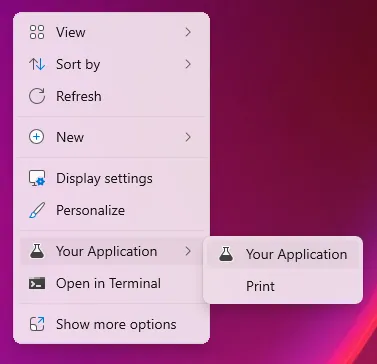

 A system reboot/restarting Explorer is required in order to display
the shell extension.
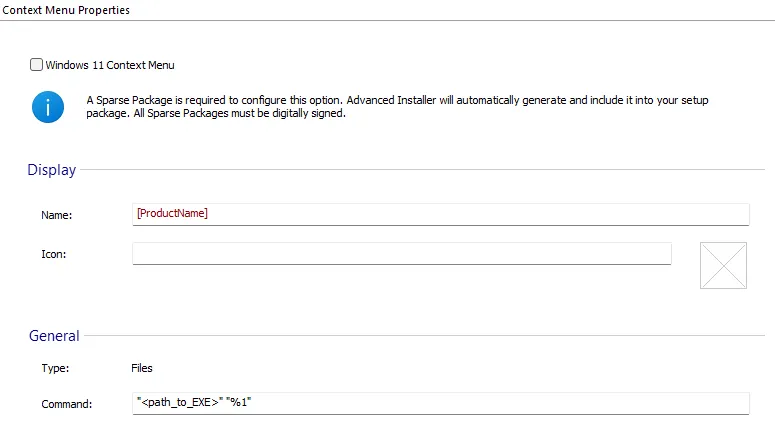

Windows 11 Context Menu
Check this option to enable Windows 11 Context Menu.
A Sparse Package is required to configure this option. It will be automatically generated and included into your setup package.
 Digital signature is mandatory for this option. All Sparse Packages have to be
digitally signed, thus the above Sparse Package will be signed with the digital signature
configured in your project.
 "Windows 11 Context Menu" option takes effect at install time only if the digital
certificate used to signed the setup package is a trusted certificate on target machine (i.e.
is installed in "Trusted Root Certification Authorities" certificates store). Otherwise its
installation will be skipped.
Display
Name
Specify the name of the context menu item. Formatted type.
Icon
Select or specify the icon (a *.ico file) of the context menu item. Formatted type.
General
Type
The type of the context menu is displayed in this field:
- File
- Folder
- Background
- Drive
Command
Specify the command to be executed by the context menu item. Formatted type.