


Custom Properties
This view allows you to set IIS properties, such as attributes and collection items, that you can normally see and modify using IIS Manager's Configuration Editor.
 Supported only for IIS 7 or newer. If the setup package is
installed on a machine with an older IIS version these settings will be
ignored.
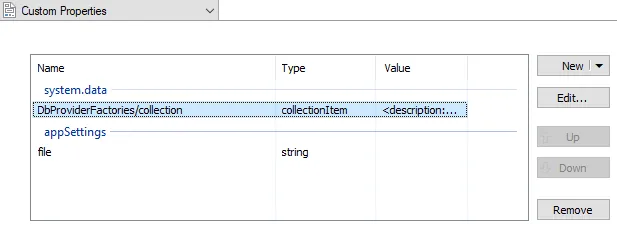

Adding a new property
Use the button or the “New” context menu item to add a new property, be that an attribute value or collection item.
Editing a property
Use the button, the “Edit...” context menu item or press the Space key while an element from the list control is selected.
Increase the execution priority
Use the button, the “Up” context menu item or press the Page Up key while an element from the list control is selected.
Decrease the execution priority
Use the button, the “Down” context menu item or press the Page Down key while an element from the list control is selected.
Removing a property
Use the button, the “Remove” context menu item or press the Delete key while an element from the list control is selected.
IIS Attribute Dialog
This dialog allows you to configure IIS properties.
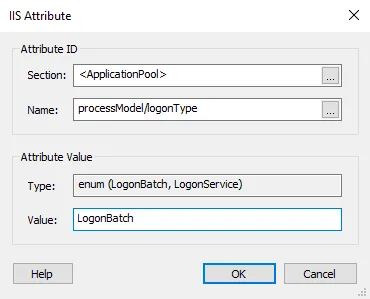

Attribute ID
Section
The attribute you want to set must be a member of this IIS configuration section.
<WebSite>, <VirtualDirectory> and <ApplicationPool> are section pseudonames used for grouping direct attributes of the website/virtual directory/application pool.
Name
Specify a name for the attribute.
Attribute Value
Type
Provides type information for the selected attribute.
 An Enum attribute consists of just one of the displayed
options. A Flags attribute may contain any number of the
displayed options, separated by a comma.
Value
This field is of Formatted Type and
can be edited using Smart Edit Control.
IIS Collection Item Dialog
This dialog allows you to configure IIS collection items.
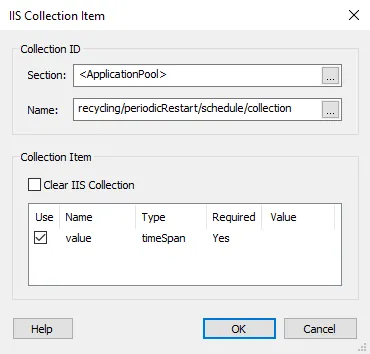

Property ID
Section
The collection you want to modify must be a member of this IIS configuration section.
<WebSite>, <VirtualDirectory> and <ApplicationPool> are section pseudonames used for grouping direct properties of the website/virtual directory/application pool.
Name
Specify a name for the collection in which the new item will be added.
Collection Item
Clear IIS Collection
Enabling this option will clear the entire collection.
The collection item's available fields are displayed in the list. Only those fields with the "Use" column checked will be set when creating the collection item, all others will be set to their default value.
The "Value" column is of Formatted
Type; however, you need to insert the property references
manually, due to development implementation constraints.