


Edit Table Dialog
In this dialog, you can specify information about a table: name, schema.
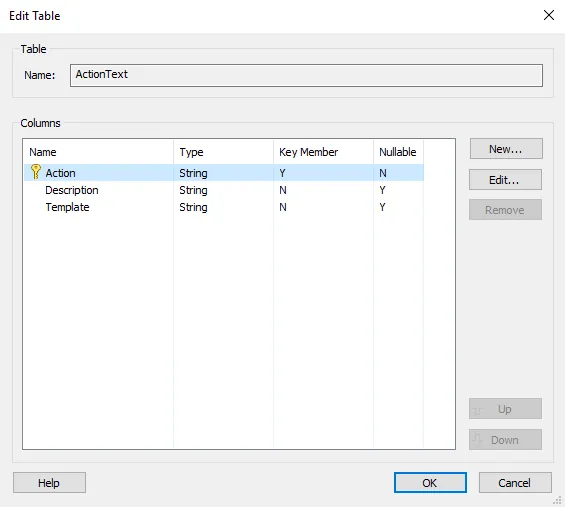

Table Name
Specify the table name.
Columns
In this section, you can edit the table schema.
Adding a new column
Use the button, the “New...” context menu item or press the Insert key. The New Column dialog will be displayed allowing you to create a new column.
Editing a column
Use the button, the “Edit...” context menu item or press the Space key. The Edit Column dialog will be displayed allowing you to edit a column.
Removing a column
Use the button, the “Remove” context menu item or press the Delete key.
Updating the column order
Use the / buttons, the “Move Up” / “Move Down” context menu items or press the Shift + Up / Shift + Down keys.
 The tables' key columns must be first on the list so their
position will be automatically updated when the key flag is
changed.
Edit Column Properties Tab
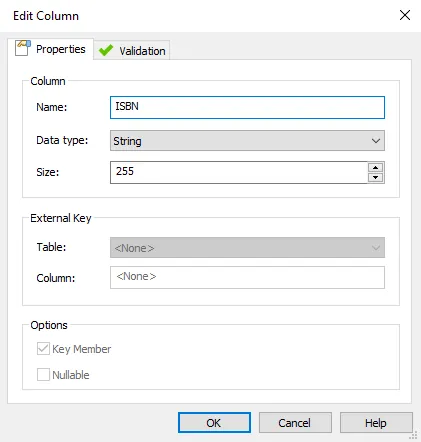
In this tab, you can specify the column properties.

Column
Name
Specify column name.
 You cannot edit a column name if the column is marked as key and the
table is referenced from another table.
Data Type
Choose what kind of data the column will hold:
- String - Any kind of text or formatted reference.
- Localizable string - Any kind of text or formatted reference. Also, the content is localizable.
- Short integer - A number between -32768 and +32768.
- Long integer - A number between -2147483647 and +2147483647.
- Binary - Any type of binary data such as an image, executable code etc.
- External key column - The key column of another table.
You cannot change the data type if the table contains rows unless a
correct transformation can be made. Example "String" to
"Localizable String"
Size
The column size. The specified size is relevant only for "String" or "Localizable String" data type. A size of 0 translates to an unlimited number of characters.
External Key
This section is relevant when the "External key column" data type is specified.
Table
Choose the table name that will be referenced.
Column
The column that will be referenced. It will always be the key column.
Tables that have the key composed of several columns cannot be
referenced.
If the current table has rows you cannot modify the external key
table and column.
Options
Key Member
Specify if the column is part of the table key.
You cannot change the key flag if the current table is referenced
from another table.
Nullable
Specify if the column can be left null upon populating with rows.
Column Validation Tab
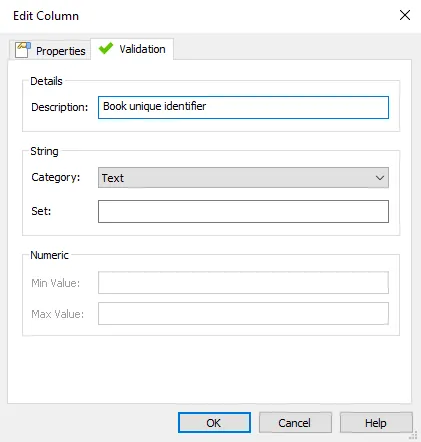
In this tab, you can specify the validation data for the column.

Description
Specify a description of the column.
String
Validation options specific to string type columns.
Category
Select the string category.
Set
Specify a set of predefined values that the column can contain.
Numeric
Validation options specific to numeric type columns.
Min Value
The minimum value of the number that the column can hold.
Max Value
The maximum value of the number that the column can hold.