


Web Deploy Package Parameters
This view allows you to edit the default parameter values contained by the Web Deploy Package from the disk.
Editing a web deploy parameter
Use the button, the “Edit...” context menu item or press the Space key while an element from the list control is selected.
Synchronize parameters list with Web Deploy Package from the disk
Use the button or the “Sync with ZIP” context menu item.
 The sync operation won't delete the parameters removed from the
Web Deploy source package. If you want the parameters removed from the
Web Deploy source package to be deleted from the parameters list, then
you should manually perform this operation using the
button.
Removing a setting
Use the button, the “Remove” context menu item or press the Delete key while an element from the list control is selected.
Web Deploy Parameter Dialog
This dialog allows you to configure Web Deploy parameter values.
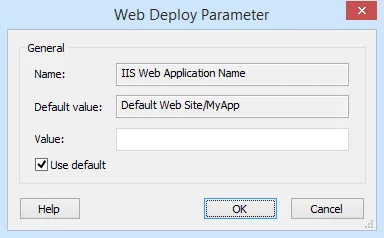

Name
The package parameter's name. This field is populated with parameters defined in the Web Deploy Package from the disk and is non-editable.
Default Value
The parameter default value. This field is populated with default parameter value set in the Web Deploy Package from the disk and is non-editable.
Value
The custom value which will be set to package parameter at install time. It can be set only when Use default option is left unchecked. This field is of Formatted Type and can be edited using the Smart Edit Control.
Use default
Check this option when you want to use the default parameter value set in the Web Deploy Package from the disk.