


Web Deploy Destination Settings
Destination Settings can be used to configure the Web Deploy provider (such as IIS Express or Password Decryption) used for the package publishing operation.
Adding a new setting
Use the button, the “New...” context menu item or press the Insert key while the list control is focused.
Editing a setting
Use the button, the “Edit...” context menu item or press the Space key while an element from the list control is selected.
Removing a setting
Use the button, the “Remove” context menu item or press the Delete key while an element from the list control is selected.
Web Deploy Destination Setting Dialog
This dialog allows you to configure Web Deploy destination settings.
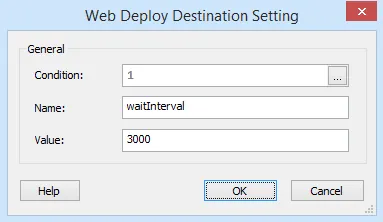

Condition
This condition is evaluated at install time and based on the result the specified setting will be used or not. This field is of Formatted Type and can be edited using Smart Condition Edit Control.
Name
Specify the setting's name.
Value
Specify the setting's value.
 The Name and Value fields are of
Formatted Type and can be edited using the
Smart Edit Control.